This lesson introduces the essentials of building a simple web server with Node.js, focusing on the built-in http module and the request–response model that underpins web communication. It clarifies what a web server does, how clients and servers exchange data via HTTP methods such as GET and POST, and why context matters in handling requests. The chapter also touches on HTTPS at a high level, noting the role of encryption and certificates for secure traffic when an application goes live.
You start by initializing a project with npm to create a package.json, then add a main.js file. The core server uses require to load the http module and the http-status-codes package, selects a development port (commonly 3000), and calls createServer with a callback that receives request and response objects. The server sets response headers with writeHead (for example, 200 OK and Content-Type: text/html), writes a simple HTML message, and finishes with end to close the response. The server instance is kept in a constant and begins listening for incoming connections with listen, illustrating Node.js’s callback-driven, nonblocking approach.
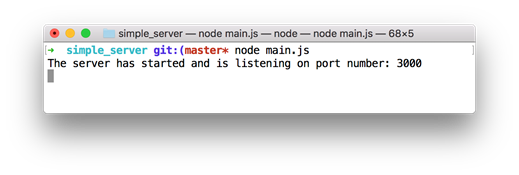
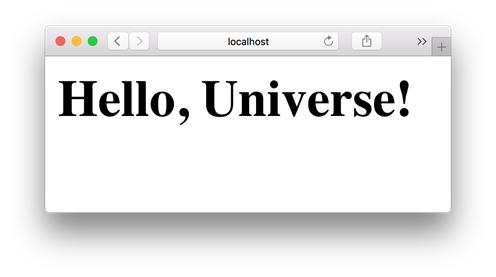
To run the application, you execute it from the terminal with Node and visit the chosen port on localhost to see the response rendered in the browser. Terminal logs confirm requests and responses as they occur, and you can stop the server with Ctrl-C. In a handful of lines, you stand up a working web server—an approachable foundation you can expand with routes, richer responses, and additional features as the application grows.
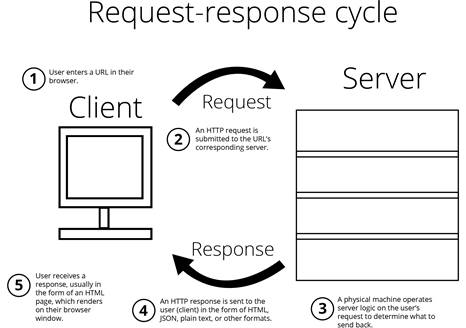
A web server sends your browser web pages, images, and other resources on request.
Running the a basic Node.js server
Display of your first web page
FAQ
What is the Node.js http module and why is it useful?The http module is a built-in Node.js library for creating web servers. It lets you receive HTTP requests and send HTTP responses, so your app can serve HTML, images, and other resources to browsers.What’s the difference between HTTP GET and POST?GET requests ask the server for data (like loading a page), while POST requests send data to the server (like submitting a form). The server then responds with content or a redirect.Why use HTTPS, and how do I get a certificate?HTTPS encrypts data in transit between client and server. To enable it on a live app, install a trusted TLS/SSL certificate on your server. Services like Let’s Encrypt provide free certificates that renew every 90 days.How does the request–response cycle work?Your browser (client) sends an HTTP request to a server. The server processes it and returns an HTTP response containing status, headers, and an optional body (like HTML). This exchange powers most web interactions.How do I initialize a new Node.js project for this server?Create a project folder, then run npm init to generate a package.json. Provide basics like name, description, and entry point (e.g., main.js). This file tracks metadata and dependencies.What is the http-status-codes package and why use it?http-status-codes provides named constants (like StatusCodes.OK) for HTTP status codes. Using constants improves readability and avoids magic numbers like 200 scattered through your code.How do I create a basic web server with http.createServer?Require the http module, call http.createServer with a callback that receives request and response objects, then call server.listen on a port. The callback runs for each incoming request so you can send a response.What do response.writeHead, response.write, and response.end do?response.writeHead sets the status and headers (e.g., Content-Type). response.write sends body content (like HTML). response.end finishes the response. You must call end so the client knows the response is complete.Which port should I use in development, and what about 80/443?Port 3000 is a common choice for development. Port 80 (HTTP) and 443 (HTTPS) are standard for production. If you don’t specify a port, the OS may assign one automatically.How do I run and stop the server?From the project directory, run node main (or node main.js), then visit http://localhost:3000 in your browser. Press Ctrl-C in the terminal to stop the server.
pro $24.99 per month
access to all Manning books, MEAPs, liveVideos, liveProjects, and audiobooks!

 Get Programming with Node.js ebook for free
