37 Capstone: Deploying Confetti Cuisine
This chapter chronicles moving the Confetti Cuisine application from development to production. After aligning expectations with the client and ensuring the Node.js, Express, and MongoDB stack is stable with cleaned-up code and tests, the focus shifts to deploying carefully to avoid production mishaps. Heroku is chosen as the hosting platform to showcase a fully functional app that now persists meaningful data.
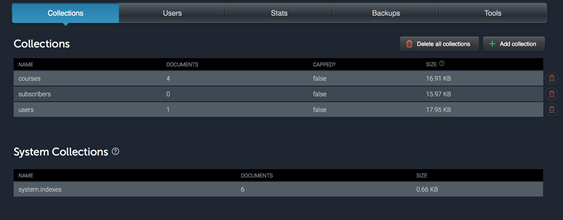
Preparation begins by tightening quality and observability: linting the codebase with ESLint and adding request/response logging with Morgan. The app is configured to read environment variables for the server port and MongoDB connection, and a Procfile instructs Heroku how to start the web process. With Git initialized, sensitive or bulky content (like node_modules) is excluded, changes are committed, and the app is created and pushed to Heroku. An initial failure highlights the missing database, leading to provisioning a hosted MongoDB add-on and verifying the MONGODB_URI configuration. To make the live site presentable, seed data is inserted via the Heroku Node REPL so courses appear immediately.
Once live, the developer’s role shifts to maintenance and rapid iteration. Production monitoring and debugging rely on streaming Heroku logs, reproducing issues locally with the production configuration, and using breakpoints to inspect runtime behavior. With this workflow, fixes and enhancements are deployed quickly through the familiar add/commit/push cycle, while logs and user activity guide ongoing improvements.
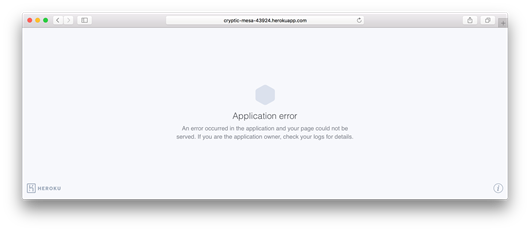
Application not loading on Heroku
Displaying contents of mLab database
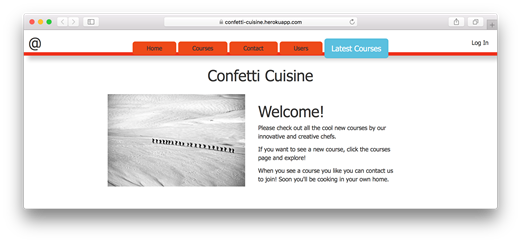
Loading the home page
Summary
In this final capstone exercise, I deployed my application to be accessible to the public. With the right configurations in place and a working Node.js application, I was able to upload my application to a production server. From this server, incoming requests will be handled and queries made to an external database. My application now depends on a variety of resources that may incur fees as my application collects more data and popularity. As traffic and demand increase on my application, more resources will be required, and I’ll need to consider the costs of hosting my Node.js application somewhere that can support its growing database and popularity. Scalability, high availability, and performance improvements are all topics of my next iteration with this application, and I hope that Confetti Cuisine will be happy to collaborate as I implement future improvements.
FAQ
Why should I lint and improve logging before deploying?
Linting catches bugs and style issues early, and better logging helps diagnose problems in production. Install ESLint globally withnpm install -g eslint, initialize it via eslint --init (choose ES6 and both browser/node), then run eslint to see issues. For request logging, install Morgan with npm i morgan -S, require it with const morgan = require('morgan'), and enable it via app.use(morgan('combined')).How do I set the port correctly for Heroku?
Use an environment variable so Heroku can assign the port:app.set('port', process.env.PORT || 3000). Heroku will provide process.env.PORT in production; otherwise it defaults to 3000 locally.How do I configure Mongoose for a production MongoDB connection?
Connect using an environment variable with a local fallback:mongoose.connect(process.env.MONGODB_URI || 'mongodb://localhost/confetti_cuisine_db'). Heroku will set MONGODB_URI when you provision a MongoDB add-on or when you supply an external database URL.What is a Procfile and what should it contain?
A Procfile tells Heroku how to run your app. Create a file namedProcfile in the project root with: web: node main.js. This starts your app as a web process that handles HTTP requests.What Git steps should I take before deploying?
Initialize and commit your code:git init, add node_modules to .gitignore, then git add . and git commit -m "first production deployment". Heroku will run npm install on deploy, so you don’t need to commit node_modules.How do I create a Heroku app and push my code?
From your project directory: 1)heroku create confetti-cuisine (pick another name if taken), 2) verify the remote with git remote -v, 3) deploy with git push heroku master, and 4) open with heroku open.Why does the app not load after the first deploy?
It likely lacks a database connection. Provision MongoDB withheroku addons:create mongolab:sandbox (free tier) and confirm the connection string with heroku config:get MONGODB_URI. Once set, your app should load.How can I seed initial data into the production database?
Use the production REPL: runheroku run node, require needed modules (e.g., mongoose and your models), connect using process.env.MONGODB_URI, and create documents (e.g., Course.create({...})). Close the connection when done.How do I view logs and debug issues in production?
Stream live logs withheroku logs --tail. To reproduce issues locally with production settings, run heroku local web (serves at http://localhost:5000/). You can add debugger; in your code to step through execution with Node’s debugger.Can I upgrade the database plan or use an external MongoDB?
Yes. Upgrade (costs may apply) withheroku addons:create mongolab:shared-cluster-1. Or point to any external MongoDB by setting MONGODB_URI to its connection string. Verify with heroku config:get MONGODB_URI.
 Get Programming with Node.js ebook for free
