Your app is live, so the priority shifts to keeping it reliable, presentable, and easy to diagnose when issues arise. This chapter focuses on three pillars of managing Node.js apps in production: seeding initial data so the site looks complete from day one, enforcing code quality with linting to prevent avoidable crashes, and setting up logging and debugging workflows that surface problems quickly and guide you to the fix.
To pre-populate production, the chapter recommends a dedicated seed script that connects with Mongoose, clears old records as needed, and creates the initial documents you want users to see. You can run this script safely via the Heroku CLI—either by opening a Node REPL and pasting the script, or by starting a bash session and executing the file directly—rather than connecting straight to the hosted database, which poses security risks. This approach gives your application a clean, useful starting state and shortens the path to a polished experience after deployment.
For resilience and maintainability, lint your code with ESLint: install it, initialize a configuration that matches your environment (Node, browser, ES6), and define rules for style and common pitfalls so errors surface early with precise locations. For observability, use local debug logs (for example, enabling Express debug output) and add a convenience script to run the app in that mode, but prefer structured request logging in production with a middleware like morgan. When deeper investigation is needed, use Node’s built-in debugger (node inspect) with debugger statements to pause execution, step through code, and inspect state via a REPL at the exact failure point. Together, these practices make production behavior transparent, speed up root-cause analysis, and help keep your app healthy.
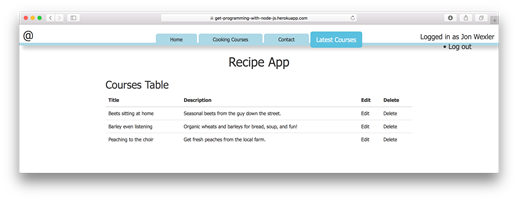
Display of the populated courses page
FAQ
What is “seed data,” and why should I load it into production?Seed data is a small set of initial database records you load when an app first goes live (for example, a few courses or products). It makes pages look complete immediately and helps you verify features with real-looking content.How do I load seed data into my Heroku app?Create a script (for example, courseSeed.js) that connects with Mongoose and creates the records you want. Then either run: 1) heroku run node and paste the script contents into the REPL, or 2) heroku run bash and then node courseSeed to execute the file on the dyno. Watch the console output to confirm inserts and close the DB connection in your script.Is it safe to write directly to my hosted DB (like mLab/Atlas) to seed data?It’s possible but not recommended because exposing your production database directly increases security risk. Prefer Heroku CLI approaches that run inside your app’s environment.What happens when I run “heroku run node”?Heroku starts a Node REPL in the context of your production app. From there, you can require your app modules and interact with the live database as if you were running locally.What’s a simple way to deploy code fixes to Heroku?Stage and commit your changes locally, then push to Heroku: git add .; git commit -m "Your message"; git push heroku master (or your deploy branch). Monitor logs to confirm the fix.What is linting, and how do I set up ESLint?Linting is automated code checking for errors and style issues. Install ESLint (globally or as a dev dependency), run eslint --init to generate a config, choose environments (Browser and Node, ES6), and then run eslint on your files (for example, eslint main.js).What does .eslintrc.js control, and can I customize it?It stores ESLint configuration: environments (browser, node, ES6), parser options, and rules (indentation, quotes, semicolons, linebreaks, etc.). You can adjust rules to match your team’s style and desired strictness.How can I see detailed request/response logs?Development: start with DEBUG=* node main (Windows: set DEBUG=* & node main), or add an npm script like "debug". Production: use the morgan middleware (for example, app.use(morgan('combined'))) to log HTTP method, URL, status, and response time.How do I pause and inspect code with Node’s built-in debugger?Run node inspect main.js. Use n to step to the next line or c to continue. Add debugger; in your code to set breakpoints. While paused, enter repl to inspect variables (for example, console.log(user.email)).What protocol should I follow when a bug appears in production?Reproduce locally, add targeted logs (morgan and console output), use DEBUG mode or the Node debugger to find the issue, lint to catch mistakes, fix and retest, then git add/commit and push to Heroku. Monitor production logs to confirm resolution.
pro $24.99 per month
access to all Manning books, MEAPs, liveVideos, liveProjects, and audiobooks!

 Get Programming with Node.js ebook for free
