32 Adding a chat notification indicator
This lesson extends your event-driven chat feature so users can sense activity from anywhere in the app. By using socket.io beyond the dedicated chat page, you create a lightweight notification system in the navigation bar that alerts users to new messages. The result is a more responsive experience: even while browsing profiles, recipes, or the home page, users get a subtle cue when the conversation is active.
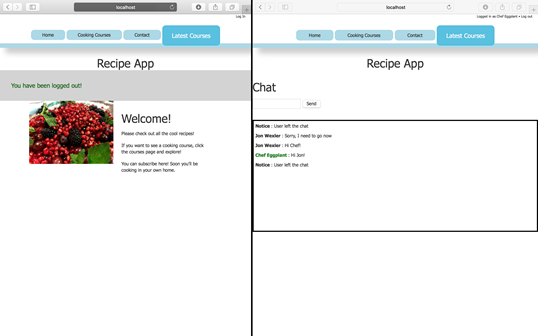
On the server, you add a custom event that broadcasts when a client disconnects, notifying all other connected sockets without echoing back to the one that left. The client listens for this “user disconnected” event and posts a brief notice in the chat, reinforcing presence awareness across participants. This pattern illustrates when to use broadcasting (to everyone else) versus emitting to all sockets, including the originator.
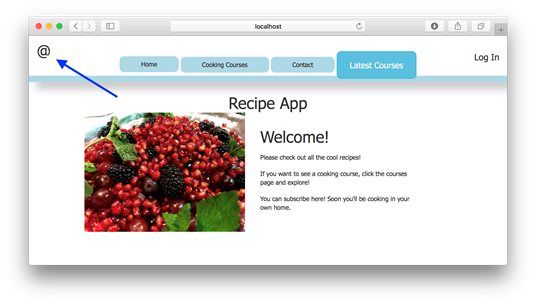
To surface chat activity across pages, you place a chat icon in the navigation bar and animate it whenever a message arrives. The client continues to display incoming messages in the chat view, and also triggers a brief two-flash animation on the nav icon using simple fade effects. Because the socket.io client and related scripts are loaded through the shared layout, the indicator works app-wide, demonstrating how real-time events can drive UI elements outside the chat view and paving the way for similar enhancements in larger projects.
Displaying user disconnects in chat
Animating the chat icon in the navigation bar
FAQ
What does the chat notification indicator feature accomplish?
It gives users a visual cue (an animated chat icon in the navigation bar) that chat activity is happening, even when they’re browsing pages other than the chat page.How do I notify all other users when someone disconnects?
Inside the server’sio.on('connect') (or 'connection') handler, listen for 'disconnect' and call client.broadcast.emit('user disconnected') so every other connected socket receives the notification.Why use client.broadcast.emit instead of client.emit on disconnect?
Because the disconnecting client can’t handle events anymore. Broadcasting ensures all other sockets get the message, while the emitter (now disconnected) does not need it.How should the client handle a “user disconnected” event?
Listen for'user disconnected' and display a notice in the chat, for example: socket.on('user disconnected', () => { displayMessage({ userName: 'Notice', content: 'User left the chat' }); });What’s the difference between client.broadcast.emit and client.emit?
client.broadcast.emit emits an event to all sockets except for itself, and client.emit emits an event to all sockets including itself.How do I add the chat icon to the navigation bar?
Add a link like<a href="/chat" class="chat-icon">@</a> in layout.ejs. It both displays the “@” icon and links to the /chat route.How do I animate the chat icon when messages are sent?
In the client’ssocket.on('message') handler, first display the incoming message, then flash the icon twice using jQuery: $('.chat-icon').fadeOut(200).fadeIn(200) inside a simple loop.Can I handle Socket.IO events on any page of the app?
Yes. If you include the Socket.IO client and your client-side scripts in the sharedlayout.ejs, you can listen for events on any page that uses that layout.How do I test broadcasting and the indicator with multiple users?
Run the app in two different browsers or use one browser plus an incognito window to create a separate session. Send messages and refresh/close one window to see disconnect notices and icon animations in the other.How can I extend this to show when a user connects?
Useio.on('connection') on the server to emit a custom event (for example, 'user connected') to clients. Optionally include the user’s name so you can display “Notice: [Name] has joined the chat.”
 Get Programming with Node.js ebook for free
