This lesson addresses the core gap in a real-time chat: messages disappear on refresh. The goal is to persist chat history while keeping the event-driven flow responsive. The approach is to model each message, associate it with the authenticated user who sent it, and load a recent slice of messages whenever a user reconnects. By doing so, the chat starts to behave like familiar, production-ready systems where conversation context is retained across sessions.
On the client, the chat form emits a message event that includes the typed content along with hidden fields carrying the user’s ID and name. The server listens for that event, collects only the expected attributes (content, userName, user), and broadcasts them to all connected clients. The UI compares the message’s user ID with the logged-in user’s ID to style “current-user” messages differently, and it displays the sender’s name alongside the content. Passing the user’s name with the payload avoids an extra database lookup during the live exchange.
Persistence is added via a Mongoose Message schema that requires content, the sender’s name, and a reference to the User, with timestamps enabled. When a message arrives, the server creates and saves a Message; on success, it broadcasts the same attributes. On new socket connections, the server queries the 10 most recent messages (sorted by createdAt), reverses them for display order, and emits them via a custom “load all messages” event to the connecting client, which renders each with displayMessage. The result is a chat that preserves recent history across refreshes while maintaining real-time updates; as a further hardening step, the controller can verify that the submitted user ID corresponds to a valid user before saving.
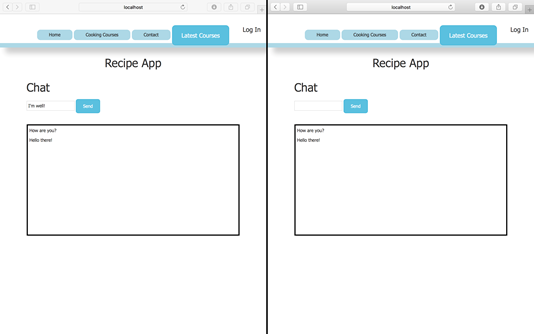
Displaying chats with two sockets
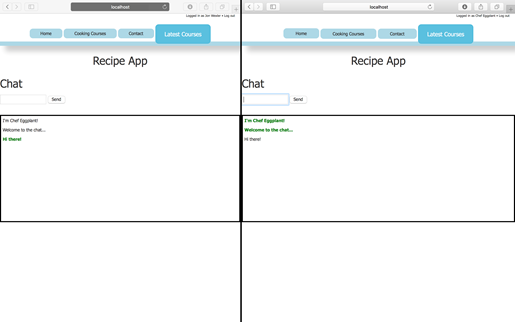
Styling user messages with two sockets
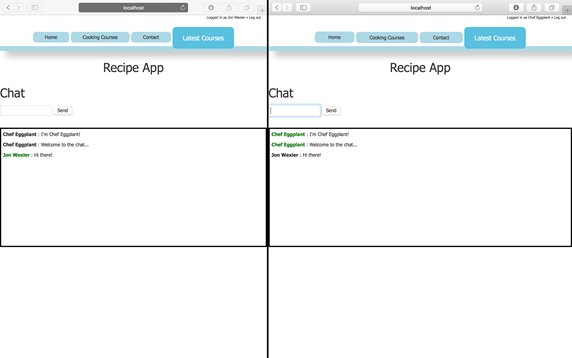
Showing user names with two sockets
FAQ
How do I keep chat messages from disappearing after a page refresh?Persist messages in your database. Create a Message model with Mongoose, save each incoming message in the server’s socket "message" handler, and on every new socket connection query and emit the most recent messages so the client can render them.What data should the client send when emitting a chat message?Send an object with the message content and user info, for example: { content, userName, userId }. Read content from the text input and userName/userId from hidden fields in the form, then socket.emit("message", { ... }).Why compare the message’s user ID to the user ID in the form on the client?The form’s user ID represents the currently logged-in user. Comparing it to message.user lets you detect which messages belong to the current user and apply a special CSS class (for example, "current-user") for styling.Why pass userName with the message instead of looking it up by userId on the server?Including userName avoids an extra database lookup per message, keeping the event-driven flow fast and simple. If you don’t need additional user data, sending the name as part of the payload is sufficient.How should I model a chat message with Mongoose?Define a schema with content: String (required), userName: String (required), user: Schema.Types.ObjectId referencing "User" (required), and enable { timestamps: true } to track createdAt/updatedAt.Where do the socket event handlers belong on the server?Inside io.on("connection", client => { ... }). Only connected sockets can send/receive events. At the top of the controller, require your model (const Message = require("../models/message")).How do I save an incoming message and broadcast it?In client.on("message", data), build a whitelist (messageAttributes), create a new Message(messageAttributes), save it, then on success io.emit("message", messageAttributes) so all clients receive it.How can I load recent messages for a newly connected user?On connection, query Message.find({}).sort({ createdAt: -1 }).limit(10), then emit a custom "load all messages" event to that client with messages.reverse() so the client can prepend them in chronological order.How do I render messages with the sender’s name and highlight the current user?In displayMessage, include message.userName alongside message.content and call a helper like getCurrentUserClass(message.user) to add a "current-user" class when the IDs match.What extra validation or security should I add before saving messages?Verify the userId exists in your database, ensure the user is authenticated, sanitize/validate content, and whitelist accepted properties (e.g., messageAttributes) to prevent unwanted data from being stored.
pro $24.99 per month
access to all Manning books, MEAPs, liveVideos, liveProjects, and audiobooks!

 Get Programming with Node.js ebook for free
