30 Working with Socket.io
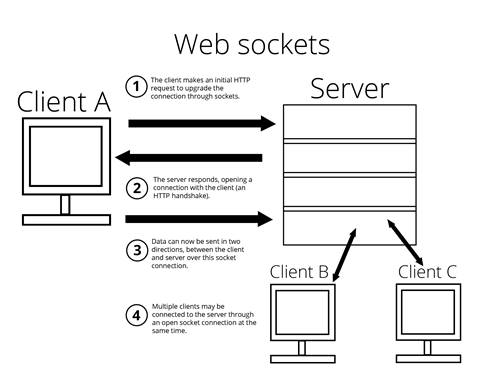
This chapter introduces real-time, event-driven communication in Node.js beyond the traditional request-response cycle. It contrasts polling and long polling with web sockets, explaining how web sockets enable true bidirectional streams while older browsers may require fallbacks. Socket.io is presented as a pragmatic library that uses web sockets when available and falls back to long polling, letting client and server exchange data through custom events for scenarios like live scores or chat.
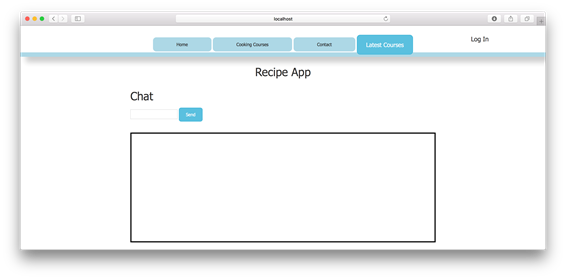
The lesson guides you through creating a simple chat interface. You add a new view with a minimal form for message input and an empty chat container, wire a route to render that view, and note that the chat box is intentionally empty on load so client-side JavaScript can populate it dynamically. With the basic UI in place, you prepare to send user-entered text to the server and display incoming messages in the chat area.
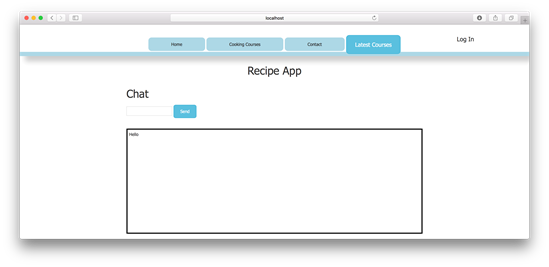
You then attach socket.io to the existing Express server and move socket logic into a dedicated controller. On connection, the server listens for a custom message event from each client and broadcasts messages to all connected clients with an emit call. On the client, you initialize the socket, intercept the form submission to emit a message, clear the input, and listen for server broadcasts to render them in the chat box, after loading the socket.io client script. The result is a functioning real-time chat, with the caveat that messages are ephemeral and not associated with users until persistence and identity are added later.
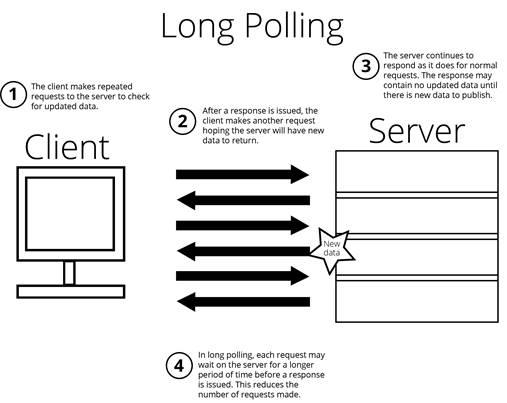
Polling between a client and server
Opening a web socket connection between a client and server
Displaying chat view
Displaying text in the chat box
FAQ
What is Socket.io and how does it enable real-time communication?
Socket.io is a JavaScript library for Node.js and the browser that opens a persistent channel between client and server. It uses WebSocket when possible and transparently falls back to long polling when needed. Both sides communicate by emitting and listening to named events with data.How is long polling different from polling?
Polling makes frequent, separate GET requests for updates. Long polling keeps a single request open longer so the server can reply when new data arrives (or time out), reducing the number of requests and improving efficiency.How do I install Socket.io and attach it to my Express server?
Runnpm i socket.io -S. In your app, capture the HTTP server instance and pass it to Socket.io: const server = app.listen(port); const io = require('socket.io')(server). This attaches Socket.io to your existing Express server.Where should I put my Socket.io logic, and why pass io into a controller?
Keep socket code in a dedicated controller (e.g., chatController.js) for separation of concerns. Require it after creating io: require('./controllers/chatController')(io). Passing io lets the controller register listeners and emit events on the shared Socket.io instance.Which server-side events are essential for a basic chat?
Listen forio.on('connection', client => { ... }), then within that: client.on('disconnect') and a custom client.on('message'). When a message arrives, broadcast it to all clients with io.emit('message', data).What’s the difference between io.emit and socket.emit?
On the server, io.emit broadcasts to all connected clients, while client.emit (or socket.emit) targets just that one client. On the browser, socket.emit sends an event to the server.How do I load the Socket.io client library in the browser?
Add<script src="/socket.io/socket.io.js"></script> to your layout or page. The server hosting Socket.io serves this file automatically.How do I connect the client and send/receive chat messages?
Initialize withconst socket = io(). On form submit, emit an event (e.g., socket.emit('message')) and prevent default submission. Listen for server broadcasts with socket.on('message', data => ...) and update the chat UI (e.g., append/prepend to #chat).
 Get Programming with Node.js ebook for free
