29 Capstone: Implementing an API
This chapter walks through enhancing the Confetti Cuisine app with an API-driven feature that lets users browse and join courses from a modal without leaving the current page. The goal is to improve responsiveness and keep data fresh by loading course information on demand via AJAX. The work centers on reorganizing routes, introducing an API namespace, adding a reusable modal partial, wiring up client-side JavaScript for asynchronous requests, and implementing controller actions that return JSON.
To prepare the codebase, routes are split into dedicated modules (for users, subscribers, courses, home, and errors) and mounted through a central router, clarifying structure and paving the way for API endpoints. A Bootstrap modal is added as an EJS partial and included in the layout. On the client, a jQuery script listens for the modal trigger, fetches course data from /api/courses, and renders each course’s title, cost, and description. It also injects a contextual Join/Joined button and attaches click handlers that fire follow-up requests to enroll in a selected course, updating the button state immediately.
On the server, an /api router delegates to coursesController actions that standardize JSON responses. The index path returns courses along with a filter that marks which ones the current user has already joined; respondJSON and errorJSON provide consistent success and error payloads. The join endpoint (/api/courses/:id/join) verifies authentication and uses Mongoose with $addToSet to enroll the user without creating duplicates, then signals success for the client to reflect in the UI. With the API namespace in place, the app gains a foundation for more single-page, asynchronous interactions and potential external consumption of its JSON data.
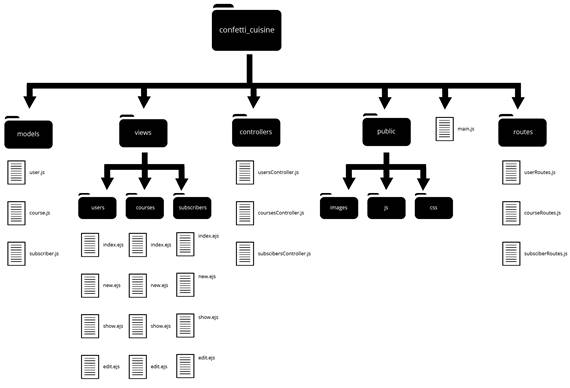
Application structure with routes folder
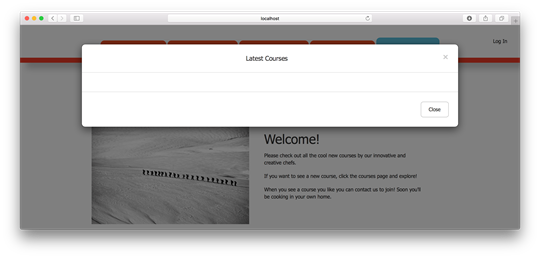
Modal button in layout navigation
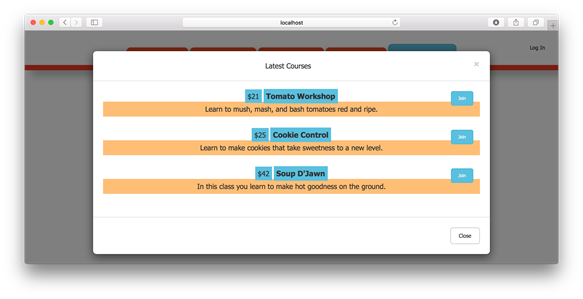
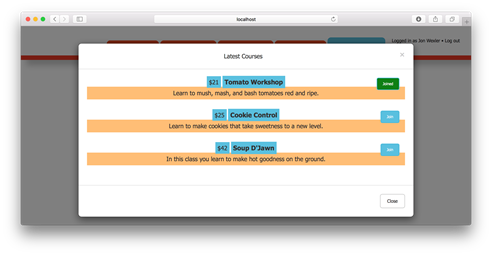
Showing course listing through modal in browser
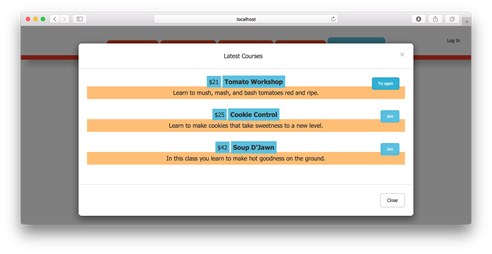
Trying to enroll before logging in
Successfully enrolling in a course
Summary
In this capstone exercise, I improved the Confetti Cuisine application experience by introducing an AJAX request to a new API endpoint. I started by reorganizing my application’s routes and separating the web routes from the API routes. Then I created an AJAX function on the client-side JavaScript to populate a modal with course-listing results from a custom API endpoint. Last, I created a route and action to allow users to enroll in courses from any page in the application. With this new improvement in place, Confetti Cuisine’s marketing team feels better about informing users and encouraging them to join their classes.
FAQ
Why restructure routes into separate modules?
Separating routes into modules (for example,userRoutes.js, courseRoutes.js, subscriberRoutes.js, plus homeRoutes.js and errorRoutes.js) keeps the main application file clean and makes routes easier to find as the app grows. Each module exports a Router bound to its controller, and a central routes/index.js mounts them under namespaces (such as /users, /courses) using router.use. In main.js, require this combined router and call app.use('/', router).How do I set up the API namespace under /api?
Create routes/apiRoutes.js using express.Router() and your coursesController. Add routes like GET /courses (chained to index, filterUserCourses, respondJSON) and GET /courses/:id/join (chained to join, respondJSON), plus router.use(coursesController.errorJSON) for errors. In routes/index.js, mount with router.use('/api', apiRoutes).How do I include the courses modal on every page?
Create a partial viewviews/courses/_coursesModal.ejs using Bootstrap’s modal markup. Include it in layout.ejs (for example, in the navbar) with <%- include('courses/_coursesModal') %>. Ensure jQuery and Bootstrap JS are placed in public/js and referenced via script tags so the modal animates.How does the AJAX flow populate the modal with courses?
Client-side code (for example, inpublic/js/confettiCuisine.js) listens for a click on #modal-button, clears the modal body, and sends GET /api/courses. It expects a response envelope with data.courses, then appends each course’s title, cost, description, and a Join/Joined button to the modal body. After rendering, it wires click handlers to the join buttons.What shape does the API JSON response use?
Successful responses are returned byrespondJSON as an envelope like { status: 200, data: res.locals }. For the course list, res.locals.courses becomes data.courses, and courses can include a boolean joined property to drive UI state. Errors are returned by errorJSON with a structure like { status: 500, message: '...' }.How are courses marked as already joined by the current user?
ThefilterUserCourses middleware checks res.locals.currentUser and maps res.locals.courses, setting joined to true when the user’s courses array contains the course’s _id. The mapped array replaces res.locals.courses, and the client uses course.joined to determine button label/style.How does enrolling in a course work on the server?
Thejoin action in coursesController reads req.params.id for the course and req.user for the current user. If authenticated, it calls User.findByIdAndUpdate with $addToSet: { courses: courseId } to avoid duplicates, then sets res.locals.success = true and calls next(). If unauthenticated, it passes an error (e.g., “User must log in.”) to be handled by errorJSON.Why use $addToSet instead of $push to enroll?
$addToSet adds the course ID only if it’s not already present in the user’s courses array, preventing accidental duplicate enrollments. $push would allow duplicates unless you add extra checks.What front-end endpoint is called to join a course?
The client sends aGET request to /api/courses/:id/join when a Join button is clicked. On a successful response with data.success, the button label changes to “Joined” and its class toggles from join-button to joined-button to reflect status.I get an error about a missing callback for join. What’s wrong?
If you added the /api/courses/:id/join route but haven’t implemented the join controller action yet, Express will complain about the missing handler. Temporarily comment out the join route (or stub the action) until the controller method exists.
 Get Programming with Node.js ebook for free
