27 Accessing your API from your application
This lesson demonstrates how to access your own API from the application by introducing a dedicated API namespace, updating client-side AJAX to consume structured JSON responses, and enabling users to perform actions directly within a modal. The approach emphasizes clearer separation of concerns between view-rendering routes and data endpoints, robust error handling for asynchronous flows, and a smoother, single-page style user experience where browsing and joining courses no longer requires full page reloads.
You begin by creating an apiRoutes module and mounting it under /api so JSON-producing endpoints are isolated from traditional web routes. A courses endpoint is wired to the controller’s index action, which now responds with respondJSON and falls back to errorJSON for failures. With this structure in place, the client updates its AJAX call to request /api/courses and read data from a consistent envelope (results.data), removing earlier format checks and simplifying how the modal fetches and renders course listings.
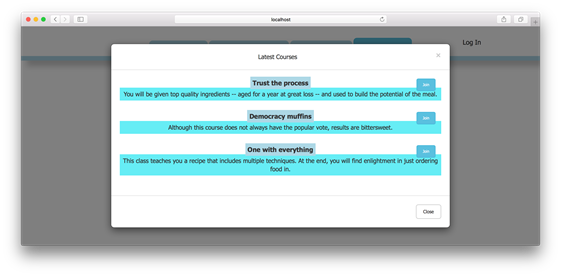
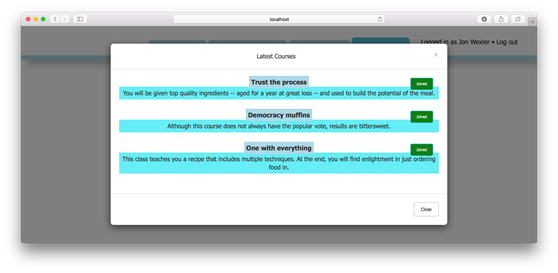
The modal gains interactivity through a join button added to each course entry and an event listener attached after content loads. Clicking the button triggers a GET to /api/courses/:id/join, where a controller action uses Mongoose’s findByIdAndUpdate with the $addToSet operator to associate the current user to a course without duplicates, returning a success flag in JSON. The UI reacts by swapping classes and text to reflect joined status, while an additional filterUserCourses middleware annotates each course with a joined property so the modal can render the correct state up front. Altogether, these changes connect models through MongoDB methods and elevate the UX with immediate, authenticated, in-modal actions.
Adding a join button
Example modal after a course has been joined
FAQ
What is an API namespace and why should I use one in Express?
An API namespace groups all JSON and asynchronous action routes under a common path (for example,/api). It keeps data endpoints separate from view-rendering routes, reduces routing conflicts, and makes it clear that clients should expect JSON from /api/* URLs.How do I set up and mount apiRoutes.js correctly?
CreateapiRoutes.js, require express and your controller(s), add routes like router.get('/courses', coursesController.index, coursesController.respondJSON), and add router.use(coursesController.errorJSON) for API-specific errors. In your main router, mount it with router.use('/api', apiRoutes) and place this above your home and error routes so API URLs are matched first.What do respondJSON and errorJSON do?
respondJSON sends a JSON payload such as { status: 200, data: res.locals } instead of rendering a view. errorJSON is error-handling middleware that responds with a 500 status and a JSON error message when something goes wrong or no prior middleware responded.How should I update my AJAX call after adding the API namespace?
Change the URL from/courses?format=json to /api/courses and read your data from results.data (for example, const data = results.data; if (!data || !data.courses) return;). Because AJAX methods return promises, you can chain .then(...) to run code after the data loads.Why attach the join-button click handler after rendering the modal content?
The buttons are injected dynamically by the initial AJAX call, so they don’t exist when the page first loads. Attach listeners after the content is added (for example, in a.then(...)) or use event delegation.How do I let users join a course from the modal?
Add an API route likeGET /api/courses/:id/join that calls a join action. In the controller, read req.params.id and req.user, update the user with findByIdAndUpdate and $addToSet to include the course, set res.locals.success = true, and return JSON via respondJSON. On the client, send an AJAX request when the Join button is clicked and toggle the button state on success.Why use findByIdAndUpdate with $addToSet for joining?
findByIdAndUpdate performs a single, atomic find-and-update operation. $addToSet ensures the course ID is only added if it isn’t already present, preventing duplicates in the user’s courses array.How can I show which courses the user has already joined?
Add a middleware likefilterUserCourses that runs after fetching courses. If a user is logged in, map over res.locals.courses, check if each course’s _id exists in currentUser.courses, and add a joined boolean per course. Update the client to render buttons with class/text based on course.joined (for example, joined-button vs join-button).What are common pitfalls when wiring API routes and AJAX for the modal?
- Mount/api routes before home/error routes so they’re reachable.
- Always send a response (JSON or error); otherwise the request may hang until error middleware.
- On the client, read results.data after the API wraps the payload.
- Ensure users are authenticated before calling /api/courses/:id/join, and update the correct button classes so repeated clicks don’t re-send requests.How can I extend this API pattern to the rest of my app?
Create API endpoints for other resources’index and show actions under /api, and add actions for creating/updating data that return JSON success/failure messages. Then adapt your UI (modals, forms) to use AJAX against these endpoints. In the next step, secure your API with authentication/authorization.
 Get Programming with Node.js ebook for free
