This lesson deepens the user workflow by adding sign-up and login capabilities, protecting credentials with secure password hashing, and tightening input quality with controller-level validation. You move from a basic login flow to a production-minded approach that stores only hashed passwords, uses clear flash messages and redirects for feedback, and screens incoming data before it ever reaches the database. By the end, users can create accounts, authenticate reliably, and you can trust that sensitive fields are handled safely and consistently.
You begin by creating a minimal login form that collects an email and password and posts to a dedicated route. The routing pairs a GET to render the form with a POST that calls an authenticate action and then a redirect middleware. In the controller, the login action simply renders the view, while authenticate looks up a user by unique email, sets success or error flash messages, and chooses where to redirect. Route order matters: define the explicit /users/login route before parameterized routes like /users/:id so Express won’t mistake “login” for an ID.
To secure credentials, you introduce bcrypt. A Mongoose pre-save hook hashes user.password (commonly with a cost factor of 10) before persistence, and a user instance method (passwordComparison) wraps bcrypt.compare so authentication never touches plaintext. The authenticate action is then rewritten to use this comparison and handle success and failure paths cleanly; new accounts must be created so passwords are stored hashed. Finally, you add express-validator to the users create flow: a validate middleware normalizes and trims email, checks a valid email format, enforces a five-digit numeric zipCode, and requires a nonempty password. Validation results are collected, error messages are flashed, and on failure the request is redirected to the new user form (optionally skipping the create action), ensuring cleaner, safer data enters your system.
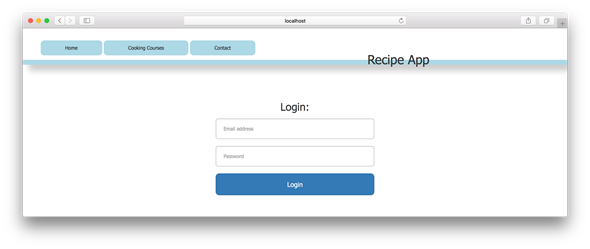
Example of user login page in your browser
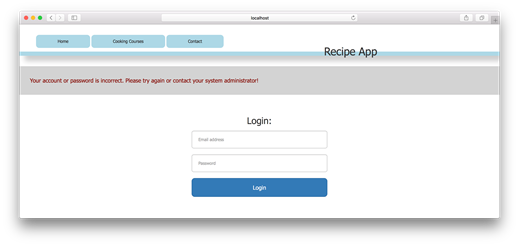
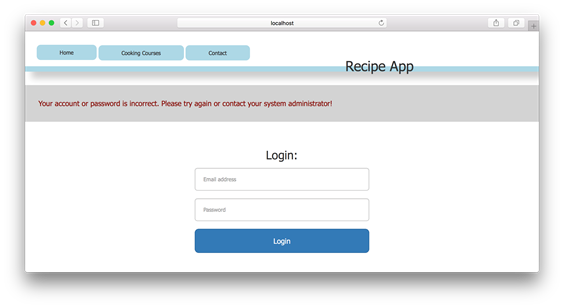
Figure23.2Faileduserloginpageinyourbrowser
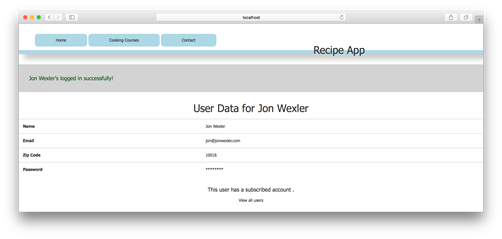
Figure23.3Successfuluserloginpageinyourbrowser
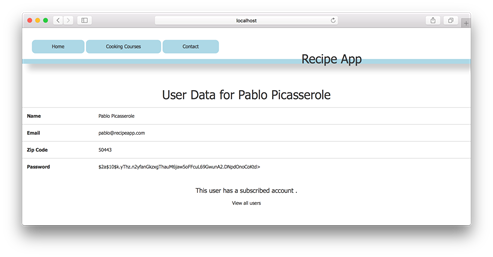
Show hashed password in user’s show page in browser
Incorrect password screen in browser
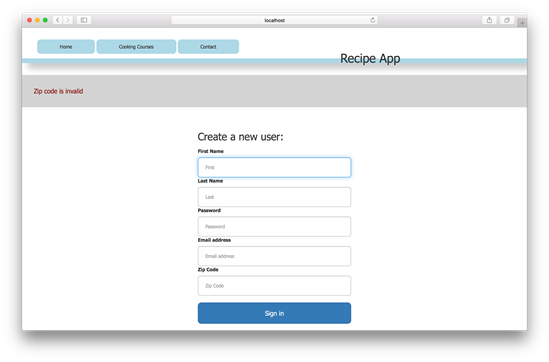
6. Failed express-validator validation messages
FAQ
How do I create a basic user login form and wire it up in Express?Create a login.ejs view with a form that posts email and password to /users/login. Add two routes: router.get('/users/login', usersController.login) to render the form, and router.post('/users/login', usersController.authenticate, usersController.redirectView) to handle the submission and redirect via a shared redirectView middleware.Why must the /users/login route come before /users/:id?Express matches routes in the order they’re defined. If /users/:id appears first, the word “login” will be treated as an :id and Express will try to load a user show page. Placing /users/login before parameterized routes ensures the correct handler runs.What is bcrypt and why hash passwords instead of encrypting them?bcrypt is a one-way hashing function that stores only a hash of the password (with a salt and cost factor). Unlike encryption, hashing doesn’t allow recovering the original password, which is desirable for security: your app should never know or store the plaintext password.Where should password hashing logic live in a Mongoose app?Put it in a Mongoose pre('save') hook on the User schema. Hash user.password (e.g., bcrypt.hash(password, 10)) and replace the field with the hash before saving. This centralizes security, prevents mistakes in controllers, and runs on both create and save.How do I check a login password against the stored hash?Use bcrypt.compare(plainText, hashed) or define userSchema.methods.passwordComparison that returns a promise resolving to true/false. In the authenticate action, find the user by email, call the comparison, then redirect on success or flash an error and return to the login form on failure.What are bcrypt “salt rounds” (cost factor), and what value should I choose?The cost factor controls how computationally expensive hashing is. A common default is 10, which is a good balance of security and performance for many apps. Higher values increase security but also CPU time; choose based on your server’s performance budget.I already stored plaintext passwords. What should I do now?Create new accounts with hashed passwords or run a migration that hashes existing plaintext values. If you don’t, bcrypt.compare will be comparing a hash to plaintext and logins will fail. The simple path for the lesson is to create new accounts moving forward.How do I add request-level validation with express-validator?Install express-validator, register it after bodyParser, and add a usersController.validate middleware before usersController.create in the POST /users/create route. Sanitize and validate inputs (e.g., normalizeEmail+trim; isEmail; zipCode notEmpty/isInt/length 5; password notEmpty), collect errors, flash messages, set res.locals.redirect to /users/new, and call next().What’s the difference between sanitizers and validators?Sanitizers modify input (e.g., trim whitespace, normalize email case). Validators check that input meets rules (e.g., isEmail, required fields, length/format constraints).How should I communicate login and validation results to users?Use flash messages for feedback (success or error) and a central redirectView middleware that reads res.locals.redirect to decide where to send the user. For failed validations, flash the combined error messages and redirect back to the form.
pro $24.99 per month
access to all Manning books, MEAPs, liveVideos, liveProjects, and audiobooks!

 Get Programming with Node.js ebook for free
