This chapter explains how to give users clear, immediate feedback about the success or failure of their actions by adding sessions and flash messages to an Express.js application. It motivates the need for messaging across redirects—since HTTP requests are stateless—and introduces flash messages as short-lived, server-originated notices delivered via sessions and cookies. The lesson frames cookies as encrypted, browser-stored data attached to request/response headers and shows how they help surface validations and other outcomes to users instead of burying errors in the console.
You set up three key middleware packages—connect-flash, express-session, and cookie-parser—then configure cookie parsing with a secret, session options (including cookie expiration), and secure defaults like saveUninitialized: false and resave: false. A middleware bridge exposes req.flash() messages to views via res.locals.flashMessages, enabling custom message types (for example, success and error) that are typically created in controller actions during database operations and shown after redirects. The chapter stresses best practices—encrypting cookies with a strong secret and storing secrets in environment variables—and explains that messages are ephemeral and cleared on the next request.
Finally, the chapter wires the UI by checking for flashMessages in the shared layout and conditionally rendering success or error notices, with optional styles for visibility. It also demonstrates passing flashMessages directly in res.render for cases without a redirect and encourages looping through messages when multiple notices are present. With this foundation in place, you’re prompted to extend flash messaging to all CRUD paths and pair it with validation middleware so users receive immediate, helpful feedback across create, read, update, and delete operations.
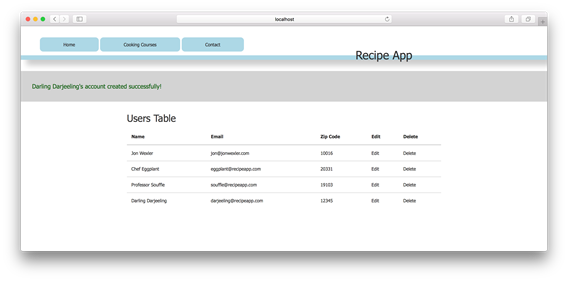
Successful flash message shown on the /users page
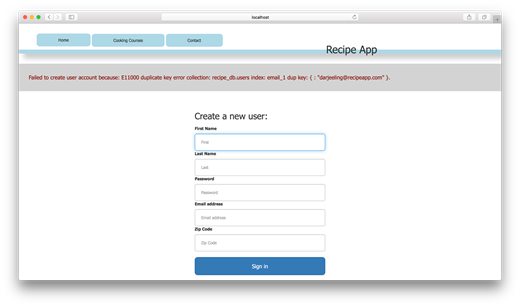
Error flash message shown on the home page
FAQ
What are flash messages, and how do they relate to sessions?Flash messages are short-lived pieces of data used to inform users about the success or failure of an action. They are stored in the session so they can survive a redirect and be displayed once in the next response, after which they are cleared.Which npm packages do I need to enable flash messages in Express?You need connect-flash for the messages, express-session for session storage, and cookie-parser so sessions can parse and sign cookies. Install them with: npm i connect-flash express-session cookie-parser -S.How do I wire cookie-parser, express-session, and connect-flash in my app?Use cookieParser with a secret first, then expressSession with the same secret and options (like cookie maxAge, resave: false, saveUninitialized: false), and finally connectFlash as middleware, in that order.What does the session/cookie secret key do, and where should I keep it?The secret signs (and may encrypt) cookie/session data to prevent tampering and protect user data. Do not hard-code it; store it in an environment variable and access it via process.env.What do the resave and saveUninitialized options mean in express-session?resave: false avoids rewriting an unchanged session on every request. saveUninitialized: false prevents setting a session cookie until something is stored in the session (like a flash message).How do I make flash messages available to my views?Add middleware that assigns res.locals.flashMessages = req.flash(). This moves messages from the request to response locals so templates can render them.How do I set success and error messages in a controller and handle redirects?In your action, call req.flash('success', '...') or req.flash('error', '...'), set res.locals.redirect to the next path, and call next() so your redirect middleware runs. On errors, set an error message and redirect to a form page.How do I display flash messages in an EJS layout?In layout.ejs, check if flashMessages exist. If flashMessages.success, render it with a success style; if flashMessages.error, render it with an error style. Optionally loop if you store multiple messages per type.What arguments does req.flash require, and can I use custom types?req.flash takes two arguments: a type (string key) and a message. Types are arbitrary; you can define any key you want (e.g., 'success', 'error', or 'superUrgent').Why are cookies/sessions helpful across redirects, and how can I show a message without redirecting?HTTP requests are stateless; a redirect is a new request, so messages would be lost without sessions/cookies. connect-flash stores the message in the session so it appears once after the redirect. To show a message without redirecting, pass a flashMessages object directly to res.render.
pro $24.99 per month
access to all Manning books, MEAPs, liveVideos, liveProjects, and audiobooks!

 Get Programming with Node.js ebook for free
