21 Capstone: Adding CRUD models to Confetti Cuisine
This capstone extends Confetti Cuisine’s app from basic database connectivity to a full CRUD experience across subscribers, users, and courses. The goal is to let visitors express interest in courses, sign up for accounts later, and have those records linked so staff can manage offerings before launch. The work includes planning a three-model structure, adding parallel folders for views and controllers, and enabling HTTP method overrides so HTML forms and links can trigger PUT and DELETE operations.
On the data layer, the Subscriber schema gains validation (required name and unique, lowercased email, optional five-digit ZIP), timestamps, an array of referenced courses, and a convenience instance method. The Course schema requires a unique title and a description, and guards against negative values for maxStudents and cost with sensible defaults. The User schema captures trimmed first/last name fields, validated contact info, a required password, course references, and a subscribedAccount reference to a matching Subscriber. It also adds a fullName virtual and a pre('save') hook that automatically links a new user to an existing subscriber with the same email.
On the presentation and control layers, each model gets index, new, show, and edit EJS views: index lists records with edit/delete links, forms in new/edit handle creation and updates, and show summarizes details plus basic relationship info (like the number of associated courses), with the option to populate later. Express Router defines seven RESTful routes per model (index, new, create, show, edit, update, delete), and dedicated controllers implement them with Mongoose queries (find, findById, findByIdAndUpdate, findByIdAndRemove), helpers to collect form parameters, and a redirectView pattern using res.locals. With models, views, routes, and controllers in place, the application supports creating, reading, updating, and deleting subscribers, users, and courses, setting the stage for adding authentication in the next unit.
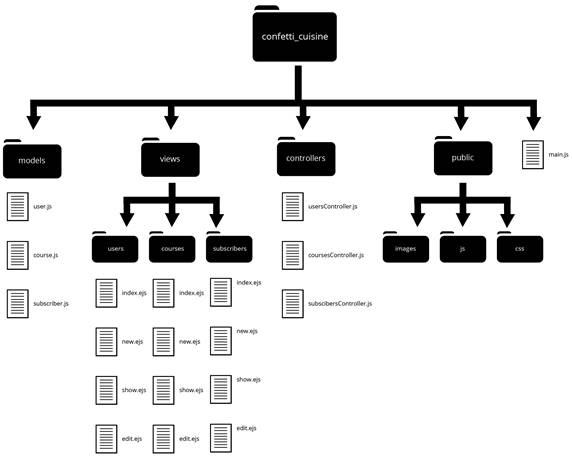
Capstone file structure
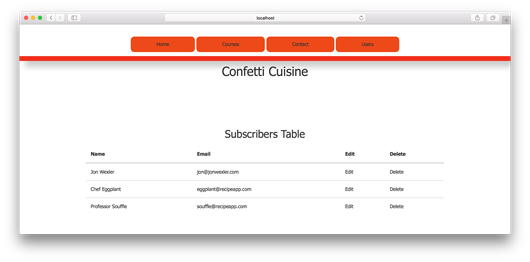
Subscribers index page in the browser
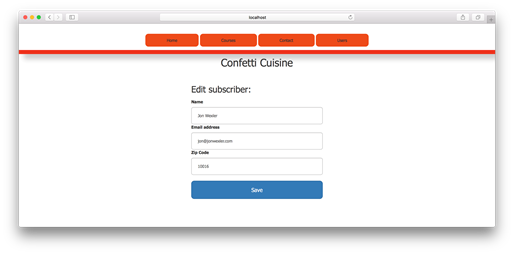
Subscriber edit page in the browser
Summary
In this capstone exercise, I improved Confetti Cuisine’s application by adding CRUD functionality to three new models. These models allow subscribers to sign up for Confetti Cuisine’s upcoming course offerings and create user accounts to get involved with the cooking class product. In unit 5, I clean up these views by adding flash messaging, password security, and user authentication with the passport module.
FAQ
What is the main goal of this capstone chapter?
The chapter adds full CRUD for three models—Subscriber, User, and Course—sets up relationships between them (e.g., subscribers interested in multiple courses and linking a user to a subscriber), and builds the views, routes, and controllers needed to manage records in the Confetti Cuisine app.Why do we need the method-override package and how do we configure it?
HTML forms don’t support PUT and DELETE. Installmethod-override (npm i method-override -S) and add app.use(methodOverride('_method', { methods: ['POST', 'GET'] })); so links/forms can append ?_method=PUT or DELETE and be treated as those HTTP verbs.What are the key fields and validations on the Subscriber model?
Subscriber has requiredname and unique, lowercased email; optional 5-digit zipCode with min 10000 and max 99999; an array of courses referencing Course; timestamps; and an instance method getInfo() to summarize fields.What does the Course model validate?
Course requires uniquetitle and a description; numeric maxStudents and cost default to 0 and cannot be negative (custom error messages enforce this); it also uses timestamps.How is the User model structured and linked to other models?
User storesname.first and name.last (trimmed), unique required email, validated 5-digit zipCode, required password, array of courses (ref Course), and a subscribedAccount (ref Subscriber). It adds a fullName virtual and a pre('save') hook that, if not already linked, finds a Subscriber by email and sets subscribedAccount automatically.How are CRUD views organized and how is delete handled?
Each model gets four views:index, new, show, and edit, placed in separate folders (e.g., views/users). Deletions are triggered from the index page via a link using ?_method=DELETE, rather than a dedicated delete view.What are the key EJS patterns for index, new, edit, and show pages?
- Index: loop through records and render table rows with links to show/edit/delete using the record’s_id.- New: POST form (e.g.,
/subscribers/create) with inputs that match schema fields.- Edit: form posts to an update route like
/subscribers/:id/update?_method=PUT and pre-fills inputs with existing values.- Show: display core attributes and, optionally, relationship info (e.g., number of associated courses).
How are CRUD routes defined with Express Router?
Useexpress.Router() and add routes such as: GET /model (index + indexView), GET /model/new (new form), POST /model/create (create + redirectView), GET /model/:id (show + showView), GET /model/:id/edit (edit), PUT /model/:id/update (update + redirectView), and DELETE /model/:id/delete (delete + redirectView). Mount with app.use('/', router).What do the subscriber controller actions do and why use res.locals + redirectView?
The controller implementsindex (fetch all), new (render form), create, show, edit, update, and delete. Helpers include getSubscriberParams(req.body) to normalize form input and redirectView which reads res.locals.redirect to centralize post-action redirects and reduce repetition.How do we display and work with associations on the show page?
You can surface relationships, e.g., show how many courses a subscriber has withsubscriber.courses.length. For richer details, fetch the record with Mongoose’s populate to render associated course information.Are there any easy-to-miss implementation details or cleanup steps?
- Place same-named views in model-specific folders.- Update nav links (e.g., point contact to
/subscribers/new) and remove deprecated routes.- Ensure method-override query parameters are appended for PUT/DELETE.
- Double-check model exports; for the User model, export with
mongoose.model('User', userSchema) and not the Subscriber schema.
 Get Programming with Node.js ebook for free
