This lesson completes the CRUD cycle you began earlier by adding the ability to update and delete user records. You build an edit experience that pre-fills a user’s existing data, handle the web’s HTTP method limitations, and wire routes, controllers, and views so users can correct mistakes or remove unwanted accounts.
For updates, you create an edit form that populates inputs with the current user data and submits to a path that conveys intent (users/:id/update). Because HTML forms only support GET and POST, you configure method-override to interpret a POST that includes the _method=PUT query parameter as a true PUT request. In the controller, the edit action fetches the user by ID and renders the form, while the update action assembles userParams and calls Mongoose’s findByIdAndUpdate with $set, then redirects (via redirectView) to the user’s detail page. Corresponding routes include a GET for users/:id/edit and a PUT for users/:id/update.
For deletions, you add a Delete control on the index and show pages that appends _method=DELETE (and can prompt for confirmation), enabling method-override to treat the request as a DELETE. The controller’s delete action uses findByIdAndRemove, then redirects to the users index upon success. A DELETE route at users/:id/delete completes the flow. With update and delete now in place alongside create and read, you have full CRUD for users and a clear pattern to replicate for other models.
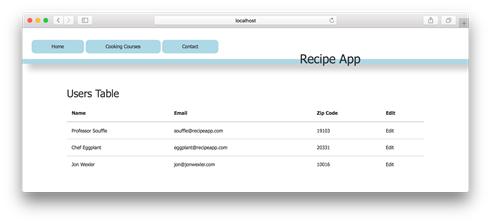
Users index page with edit links in your browser
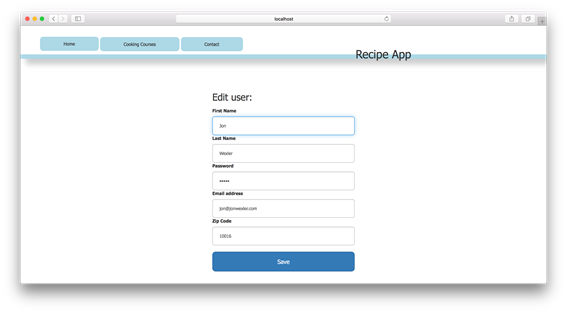
User edit page in your browser
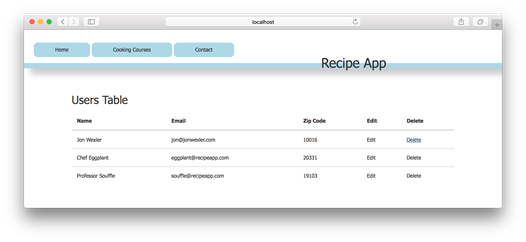
Users index page with delete links in your browser
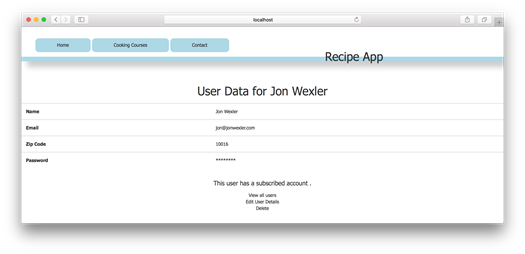
User’s show page with links to edit and delete
FAQ
Why use PUT for editing and POST for creating records?Use POST to create new resources and PUT to update existing ones. Using the correct HTTP verb makes your intent clear and aligns with REST conventions: POST = create, PUT = update.How do I pre-fill the edit form with an existing user’s data?Pass the user object to the edit view from the controller, then set each input’s value to fields from that object (for example, value set to the user’s first name, last name, email, etc.).HTML forms don’t support PUT or DELETE. How can I still use them?Install and use the method-override middleware. Submit the form as POST (or use a link/GET) and append a query parameter like ?_method=PUT or ?_method=DELETE so Express can treat the request as the intended HTTP method.How do I configure method-override in Express?Require method-override and add it as middleware, instructing it to look for the _method query parameter and to consider POST and GET requests for overriding. Then append ?_method=PUT or ?_method=DELETE to your action URLs.What routes are needed to support editing and updating a user?- GET /users/:id/edit to render the edit form for a specific user
- PUT /users/:id/update to process the submitted changes
Often, a redirectView middleware is used after update to send the user to the appropriate page.How do I implement the update action with Mongoose?Read the user ID from req.params.id and the updated fields from req.body, build a userParams object, and call User.findByIdAndUpdate(id, { $set: userParams }). On success, set res.locals.redirect (for example, to the user’s show page) and call next().How do I add an Edit link in the users index?Add a link for each user that points to /users/:id/edit. Clicking it loads the edit form populated with that user’s current data.How do I implement deleting a user from the index page?Add a Delete link that points to /users/:id/delete?_method=DELETE and include a simple confirm() prompt for safety. Create a DELETE route for that path and a controller action that calls User.findByIdAndRemove(id), then redirect back to the users list.Why is ?_method=DELETE (or ?_method=PUT) appended to links/forms?method-override inspects the _method query parameter and treats the incoming GET/POST request as the specified method. Appending ?_method=DELETE or ?_method=PUT enables proper routing and semantics for delete/update operations.Are findByIdAndUpdate and findByIdAndRemove Mongoose methods?Yes. They are Mongoose convenience methods that locate a document by its ID and update or remove it, respectively, making your controller code concise and readable.
pro $24.99 per month
access to all Manning books, MEAPs, liveVideos, liveProjects, and audiobooks!

 Get Programming with Node.js ebook for free
