2 Running a Node.js application
This chapter introduces the fastest path to seeing JavaScript run outside the browser: writing a small script, executing it with Node.js from the terminal, and experimenting interactively in the REPL. You’re guided from a simple “print to the console” program to loading code into the REPL for quick testing, all to establish a smooth feedback loop for learning and debugging. Along the way, the chapter highlights how Node’s console output parallels browser debugging and encourages a disciplined setup with strict mode to catch common mistakes early.
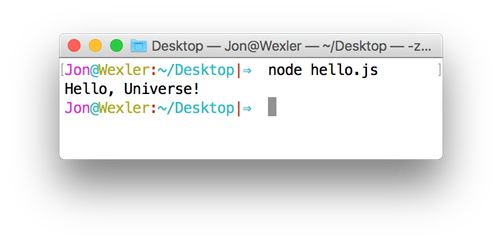
You begin by creating a JavaScript file that logs a message, then run it from the command line with the node command (with or without the .js extension) from the file’s directory. If the script runs correctly, its message appears in the terminal, illustrating how console.log writes to standard output in Node. The chapter also recommends enabling strict mode (by placing 'use strict'; at the top of files) to prevent pitfalls like accidental globals or invalid assignments, reinforcing good habits as you start building applications.
Next, you move into the Node REPL for rapid, line-by-line experimentation. You can load existing code into a session with .load filename, use the imported variables immediately (for example, iterating over an array of messages and logging each one), and then save your interactive work back to a file with .save filename (note that it overwrites existing files). Practical tips include starting the REPL in the same directory as your files or using absolute paths, and exiting with .exit, Ctrl-C twice, or Ctrl-D twice. The chapter closes by encouraging practice with console output, including string interpolation, to build familiarity with Node’s debugging-friendly workflow.
Running a JavaScript file with Node.js
FAQ
How do I create my first JavaScript file for Node.js?
Open your editor, addconsole.log('Hello, Universe!');, and save the file as hello.js.How do I run a JavaScript file with Node.js?
Open terminal, navigate to the file’s directory (for example, cd ~/Desktop), then run node hello.js or node hello.Do I need to include the .js extension when running a file?
No. Node.js accepts both node hello.js and node hello.Nothing prints when I run my file—what should I check?
Confirm the file has content, that your changes are saved, and that you’re running node from the file’s directory.What does console.log do in Node.js?
It writes output to your terminal (standard output), similar to the browser’s developer console.What is strict mode and how do I enable it?
Strict mode catches common mistakes. Add'use strict'; at the top of each JavaScript file in your project.How do I start REPL and load a JavaScript file into it?
Start REPL with node, then load a file with .load filename.js. The file’s variables become available in the REPL.How do I loop through an array and print items in REPL?
Usemessages.forEach(msg => console.log(msg));. REPL will also echo undefined because console.log returns undefined.
 Get Programming with Node.js ebook for free
