This chapter advances the app from listing users to fully supporting the create and read parts of CRUD through browser-based interactions. You build an EJS form to capture user attributes with basic HTML validations, wire routes and controller actions to process submissions, and add a dedicated profile-style page to read and display a single user’s data. The result is a cohesive flow from form input to database write and back to a rendered view.
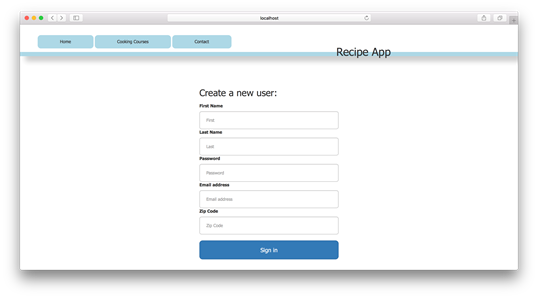
For creation, you add a new view that maps each user attribute to form inputs whose name attributes the controller relies on to construct parameters. The users controller implements a new action to render the form and a create action to persist data, place useful values on res.locals, and hand off to a redirect middleware. Routes are registered (organized with Express Router) to serve the form and handle submissions. To enrich behavior, a Mongoose pre('save') hook checks for an existing subscriber with the same email and associates it to the user, using next to continue the middleware chain and avoiding arrow functions for hook compatibility.
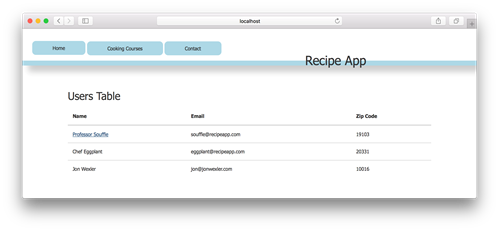
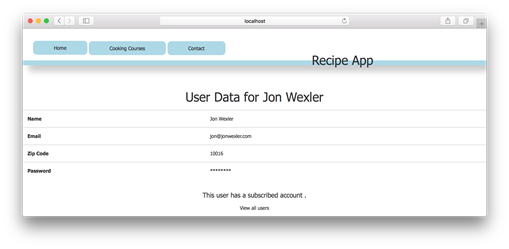
For reading, you add a show view that displays a single user’s details and, when present, indicates an associated subscriber account. The index page links each user to its show route, and the controller introduces a show action that extracts the ID from route parameters, finds the user by ID, stores it on res.locals, and renders via a showView action. With these pieces in place, the application can create users and render individual profiles, setting the stage for update and delete in the next lesson.
Example of user-creation form in your browser
Users' index page with linked names in your browser
Users show page in your browser
FAQ
What is the purpose of users/new.ejs and which route does its form submit to?The new view collects user attributes (first, last, email, password, zipCode) and submits them via POST to /users/create. Each input’s name maps to a property the controller reads from req.body.Which form attribute must be set so the controller can read input values?The name attribute. The controller accesses values as req.body., so each input must have a meaningful name that matches how you build userParams.How do I render the new user form and handle its submission in the controller?Add usersController.new to render 'users/new', and usersController.create to build userParams from req.body, call User.create(userParams), then set res.locals.redirect = '/users' and call next() to continue.What does the redirectView middleware do, and why separate it?redirectView checks res.locals.redirect; if set, it performs res.redirect, otherwise calls next(). Keeping it separate makes post-action redirects reusable across create/update/destroy flows.How do I register the routes for creating users with Express Router?Use router.get('/users/new', usersController.new) to render the form and router.post('/users/create', usersController.create, usersController.redirectView) to process submissions. Mount the router with app.use('/', router).How can I auto-link a new User to an existing Subscriber by email?In user.js, add a Mongoose pre('save') hook. If user.subscribedAccount is undefined, findOne Subscriber by user.email and assign the found document to user.subscribedAccount, then call next().Why does the Mongoose pre('save') hook take next, and can I use arrow functions?It’s middleware; next signals when to continue to the next function. Use a regular function (not an arrow) so this refers to the document instance inside the hook.How do I build a show page for a single user?Create views/users/show.ejs and render a table using the user object (for example, user.fullName, user.email, user.zipCode). Optionally display a link to /subscribers/${user.subscribedAccount} if an associated subscriber exists.Which code fetches a user by ID and renders the show page?Add usersController.show to read req.params.id, call User.findById, put the result on res.locals.user, then next(). Follow with usersController.showView to render 'users/show'. Route: router.get('/users/:id', usersController.show, usersController.showView).How do I link each user on the index page to its show page?In index.ejs, wrap the displayed name in an anchor whose href is /users/${user._id}. Clicking the name navigates to that user’s show page.
pro $24.99 per month
access to all Manning books, MEAPs, liveVideos, liveProjects, and audiobooks!

 Get Programming with Node.js ebook for free
