This chapter moves the app beyond basic Subscriber and Course data by introducing a full-featured User model and integrating it into Express controllers, routes, and views. It focuses on modeling real user accounts, connecting users to courses and existing subscribers, and establishing a clear CRUD workflow so data can be created, viewed, updated, and deleted through the browser. Along the way, it emphasizes practical developer tooling—testing in REPL, building index pages to visualize data, and structuring controllers for maintainability.
On the modeling side, the User schema adds trimmed first and last name fields, unique and lowercased email, zip code validation, and a required password (temporarily stored as plain text for this unit). It also defines relationships to many courses and an optional single subscribedAccount for linking to a Subscriber, plus automatic timestamps. A virtual attribute, fullName, shows how to compute values without persisting them, and the chapter demonstrates testing the model in REPL, creating a sample user, and linking the user to an existing subscriber by matching email.
For application flow, the chapter introduces CRUD in the context of Express and EJS: building an index view that lists all users, wiring a usersController to fetch and render data, and adding routes for the index page. It encourages cleaner controller code by exporting actions together and splitting responsibilities into data-loading middleware and view-rendering middleware using res.locals, while preparing the ground for future API-style responses. Finally, it reviews HTTP methods (including PUT and DELETE) and reinforces best practices for routing, error handling, and organizing model-driven pages that surface database content safely and clearly.
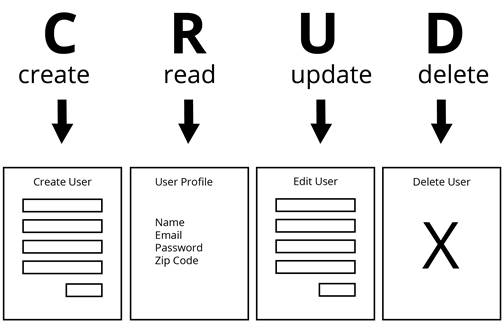
Views for each CRUD action
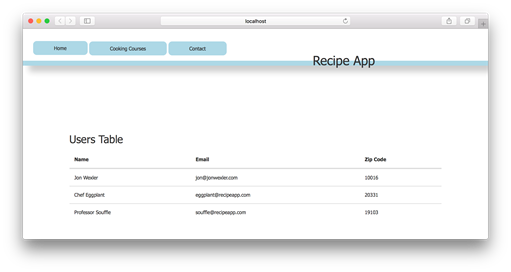
Example of users index page in your browser
FAQ
What does the User model contain and why are those fields chosen?The User schema includes:
- name.first and name.last (trimmed strings) to address users by first/last name separately
- email (required, lowercase, unique) to identify and contact users
- zipCode (number with min/max validation) for basic location data
- password (required string; stored in plain text only for this unit)
- courses: [ObjectId] refs to Course for enrollments
- subscribedAccount: single ObjectId ref to Subscriber to link prior interest
- timestamps: true to auto-manage createdAt and updatedAtHow do you associate a user with courses and an existing subscriber?Use refs in the schema:
- courses: [ { type: Schema.Types.ObjectId, ref: 'Course' } ]
- subscribedAccount: { type: Schema.Types.ObjectId, ref: 'Subscriber' }
To link a user to a subscriber (e.g., by shared email), find the subscriber and assign it: testUser.subscribedAccount = subscriber; then save().What are virtual attributes in Mongoose and how is fullName implemented?Virtual attributes are computed properties that behave like fields on a model instance but aren’t persisted to MongoDB. Example: userSchema.virtual('fullName').get(function() { return `${this.name.first} ${this.name.last}`; }); Access via user.fullName.Why shouldn’t you use arrow functions in Mongoose virtual getters/setters here?Mongoose getters/setters rely on the function’s this binding to refer to the document instance. Arrow functions don’t bind their own this, so use function() { ... } instead of () => { ... }.What does timestamps: true do in the schema?It tells Mongoose to automatically add and maintain createdAt and updatedAt fields for each document. Add this option to related schemas (e.g., Subscriber and Course) to track changes consistently.How can you test the User model in REPL and handle unique email errors?Steps:
- Require and connect Mongoose to mongodb://localhost/recipe_db
- require('./models/user')
- Create a user with User.create({...})
If you get a unique email error, use a different email or fetch the existing user with User.findOne({ email: '...' }).How do CRUD actions map to routes and views in this app?- Create: new (GET form) and create (POST)
- Read: show (GET; profile/details)
- Update: edit (GET form) and update (PUT)
- Delete: delete (DELETE; often triggered by a button, may not need its own view)How do you build the users index page and controller (basic version)?Create views/users/index.ejs that iterates over users to render a table. In usersController.js, implement index to fetch and render: User.find({}).then(users => res.render('users/index', { users })). Then route: app.get('/users', usersController.index).Why split the index action into query and view, and how do you wire it?Splitting improves reuse and flexibility. Have index run the query and place results in res.locals.users; then call next(). In indexView, render the template. Route example: app.get('/users', usersController.index, usersController.indexView). Errors can be passed to next(error) for centralized handling.Which HTTP methods handle updates and deletions, and how are they used in Express?Use PUT for updates (often replacing the record’s attributes) and DELETE for deletions. In Express, register routes with app.put(...) and app.delete(...). Some prefer PATCH for partial updates, but this lesson uses PUT.
pro $24.99 per month
access to all Manning books, MEAPs, liveVideos, liveProjects, and audiobooks!

 Get Programming with Node.js ebook for free
