This chapter shows how to connect Express routes to controller actions that use Mongoose models, completing the flow between requests, data access, and views. You begin with a working MongoDB-backed app, then wire controllers so URL requests trigger queries and responses, and round it out with views and a form to capture subscriber data. Along the way, the code evolves from basic callbacks to ES6 promises for clearer, more flexible asynchronous control.
You first create a subscribers controller that imports the Subscriber model and fetches records with Mongoose’s find method. The route for /subscribers invokes this action and either passes results along middleware or renders an EJS view that lists each subscriber. Next, you add a subscription workflow: a GET action renders a page with a form whose fields match the model (name, email, zipCode), and a POST action maps req.body into a new Subscriber and saves it. With body-parser handling the form payload, successful saves render a confirmation view, and the data appears in the subscribers list.
To improve readability and scalability, database operations are rewritten with promises. After enabling native promises for Mongoose, queries return promises (for example, find().exec()), enabling then and catch chains to render results, forward control, and centralize error handling. The save() call also returns a promise, eliminating callback nesting. Finally, a seed script demonstrates bulk data setup by clearing the collection and using Promise.all to create multiple subscribers at once. The result is a cleaner, predictable async flow between models, controllers, and views.
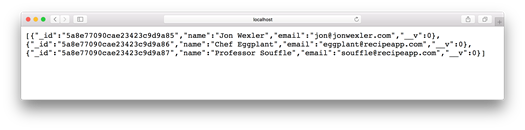
Example browser response with subscriber data
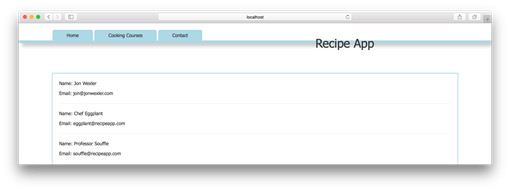
Example browser view with listed subscriber data
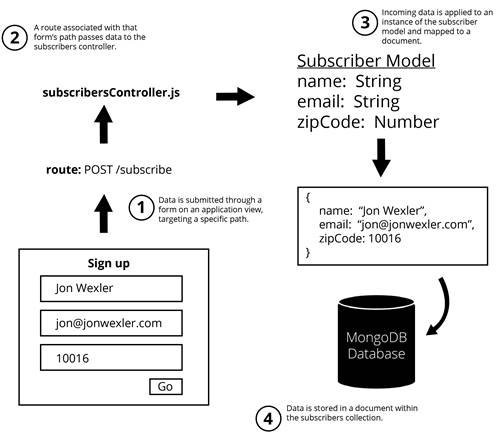
Flow from a web page form to your database
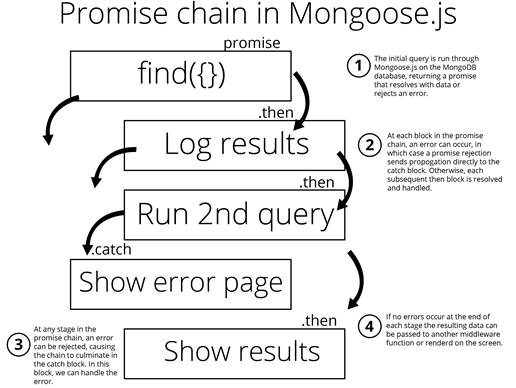
Promise chain in Mongoose.js
FAQ
What role does a controller play when connecting routes to Mongoose models?The controller is the glue between routes, models, and views. It receives the request, queries the Mongoose model, handles errors, and renders a view (or passes data along middleware) with the query results.How do I set up a route to list all subscribers?Require the subscribers controller in main.js, then add a GET route such as app.get('/subscribers', subscribersController.getAllSubscribers). In the action, query Subscriber.find({}) and render a view (for example, res.render('subscribers', { subscribers })).Is Subscriber.find() with no arguments the same as using an empty object?Yes. Calling find() with no arguments is equivalent to find({}), which returns all documents in the collection.Where should I pass data to the EJS view from?From the controller action. After querying with Mongoose, call res.render('viewName', { key: data }) to make the data available in the template.How do I handle posted form data to create a new Subscriber?Use body-parser (or Express’s built-in body parsing in recent versions) so req.body is populated, map req.body fields to a new Subscriber, and call save(). On success, render a confirmation view; on error, handle or send the error.How do I render the subscription form page?Create a controller action like getSubscriptionPage that calls res.render('contact') and add a route such as app.get('/contact', subscribersController.getSubscriptionPage). The form should POST to /subscribe.How do I use promises with Mongoose queries?Enable promises (mongoose.Promise = global.Promise), call exec() on queries like find to get a real Promise, then chain .then(...) and .catch(...). For model.save(), you can use .then/.catch directly without exec().What’s the difference between next and then in controller code?then is for promise chaining and runs after the promise resolves. next is Express middleware flow control; call next() to move to the next middleware function after your async work completes.How do I seed the database with sample subscribers?Create a script (for example, seed.js) that connects to MongoDB, clears existing documents, builds an array of creation promises (Subscriber.create(...)), and waits on Promise.all(...) before logging and closing the connection.Are there conventions for naming controllers and requiring models?Controllers are often named in the plural form of the model (for example, subscribersController). When requiring a model from another folder, use a relative path like const Subscriber = require('../models/subscriber').
pro $24.99 per month
access to all Manning books, MEAPs, liveVideos, liveProjects, and audiobooks!

 Get Programming with Node.js ebook for free
