14 Building models with Mongoose
This chapter introduces Mongoose as an object-document mapper that lets you work with MongoDB using object-oriented patterns aligned with MVC. Instead of issuing raw database commands, you define models that enforce structure and consistency, making it easier to reason about your data over time. After installing the library and connecting it to your database, you confirm the connection with a simple one-time event listener, laying the groundwork for model-driven data access.
The lesson then shifts to schemas—the blueprints that describe what fields and types a document must have—and uses a newsletter subscriber as a concrete example. You define a schema with properties like name, email, and zipCode, then bind it to a model used to create instances. The chapter distinguishes between creating an in-memory instance and actually persisting it, showing two common patterns: constructing and then saving, or using a single-step create method. It emphasizes that validation and structure are enforced by Mongoose (not MongoDB), highlights how errors surface through callbacks, and demonstrates how running the app results in a saved subscriber document.
Finally, the chapter covers organization and querying. You move schema and model code into a dedicated module, export the model, and require it where needed to keep main application files uncluttered. Query examples illustrate chaining (such as combining findOne with where), executing queries explicitly, and handling results and errors, including the expectation of arrays when multiple documents are requested. The section closes by encouraging the creation of additional models and foreshadowing full CRUD patterns and promise-based query handling in subsequent lessons.
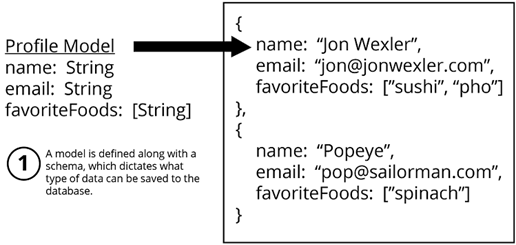
Models created with Mongoose map to documents in MongoDB.
FAQ
What is Mongoose and why use it with MongoDB?
Mongoose is an object-document mapper (ODM) for Node.js. It lets you define schemas and models so your MongoDB documents follow consistent, object-oriented structures, making data validation and querying easier.How do I install and connect Mongoose to my app?
Runnpm i mongoose -S, then in your code: const mongoose = require('mongoose'); mongoose.connect('mongodb://localhost/recipe_db'); const db = mongoose.connection; db.once('open', () => console.log('Connected'));. Make sure the MongoDB server (mongod) is running.What is a Mongoose schema and what problem does it solve?
A schema is a blueprint describing the fields and types a document must have. It prevents inconsistent data (for example, ensuring every subscriber has anemail) by validating against the defined structure.What two components does each schema field require?
Each field needs a property name and a data type (for example,name: String, zipCode: Number).How do I define a simple Subscriber schema?
Example:const subscriberSchema = mongoose.Schema({ name: String, email: String, zipCode: Number });How do I create a model from a schema and save data?
Create the model:const Subscriber = mongoose.model('Subscriber', subscriberSchema);. Save with either const s = new Subscriber({ name: 'Jon', email: 'jon@example.com' }); s.save((err, doc) => { ... }); or Subscriber.create({ name: 'Jon', email: 'jon@example.com' }, (err, doc) => { ... });.Does calling new Subscriber(...) automatically write to the database?
No.new Subscriber(...) only creates an in-memory document. Call save to persist it, or use Subscriber.create(...) to create and save in one step.Who enforces the schema rules: MongoDB or Mongoose?
Mongoose enforces schema rules. MongoDB itself does not enforce your Mongoose schema.How should I organize my models in a Node.js project?
Move model code into a module (for example,models/subscriber.js): define the schema and export the model with module.exports = mongoose.model('Subscriber', subscriberSchema);. Then require it where needed: const Subscriber = require('./models/subscriber');.How do I query documents with Mongoose?
Use query helpers and chaining. Example:Subscriber.findOne({ name: 'Jon Wexler' }).where('email', /wexler/).exec((err, doc) => { ... });. Stored queries run on .exec(). Queries returning multiple items yield arrays (empty if no matches).
 Get Programming with Node.js ebook for free
