13 Setting up a MongoDB database
This chapter introduces persistent data as the final pillar alongside controllers and views in an MVC Express.js app. It explains what databases provide and why MongoDB is a natural fit for Node.js: it stores data as JSON-like documents (BSON), uses key–value pairs, and offers a flexible, nonrelational model. The lesson contrasts this approach with relational databases that rely on predefined tables and joins, and sets the goal of installing MongoDB, understanding its basics, and wiring it to a Node application.
The chapter walks through installing MongoDB (macOS with Homebrew, Windows with an installer), preparing the data directory, and starting the database server. It then introduces the mongo shell to inspect and manage data: checking the current database, listing databases, creating a new one with use, adding documents to collections, and retrieving them with find and findOne. It highlights MongoDB’s automatic _id ObjectId for uniquely identifying records, notes that a new database won’t appear until it contains data, and cautions that shell operations are permanent. A brief suggestion to use a graphical tool (MongoDB Compass) rounds out the local exploration.
Finally, the lesson connects MongoDB to a Node.js app using the official driver: install the mongodb package, require MongoClient, connect to the local server, select (or implicitly create) a database such as recipe_db, query a collection with find().toArray, and insert new documents. It reminds you to ensure the server is running, clarifies that a no-match find returns an empty array, and underscores that MongoDB creates databases on demand rather than erroring. The chapter closes by teeing up the next lesson, which adds more structure and modeling with Mongoose.
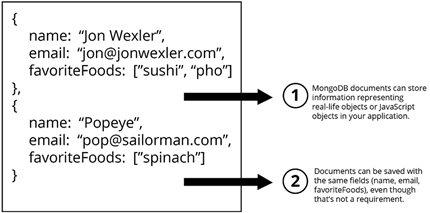
Example document
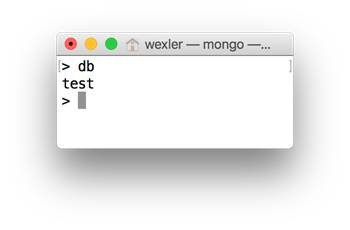
MongoDB shell viewing current test database
FAQ
What is MongoDB and why does it pair well with Node.js?
MongoDB is an open-source, nonrelational (NoSQL) database that stores data as JSON-like documents (BSON). Its document model mirrors JavaScript objects, making it a natural fit for Node.js and simpler to pick up than SQL for many JS developers.How do I install MongoDB on macOS using Homebrew?
Install Homebrew, then runbrew install mongodb. Create the data directory with mkdir -p /data/db and, if needed, give yourself permission using sudo chown <your_username> /data/db.How do I install MongoDB on Windows?
Download the Windows installer (.msi) from the MongoDB website, follow the defaults, then createC:\data\db. You may also need to add the MongoDB bin folder to your PATH so commands like mongod and mongo work in Command Prompt.How do I start MongoDB and open the MongoDB shell?
Start the server withmongod. On macOS with Homebrew, you can use brew services start mongodb or stop it with brew services stop mongodb. Open the shell by running mongo in a new terminal window.What are databases, collections, and documents in MongoDB?
A database contains collections, and a collection stores documents. Documents are JSON-like objects (key-value pairs). For example, acontacts collection might store documents like { name: 'Jon', email: 'jon@example.com' }.How do I create a database and add data from the MongoDB shell?
Useuse recipe_db to switch/create a database. Insert a document with db.contacts.insert({ name: 'Jon', email: 'jon@example.com' }). View documents with db.contacts.find(). Note: a new database won’t appear in show dbs until it has data.What is an ObjectId and how do I query by it?
MongoDB assigns each document a unique_id of type ObjectId that encodes creation time and more. Query by ID using db.contacts.find({ _id: ObjectId('YOUR_ID_HERE') }).Which MongoDB shell commands are most useful to start with?
-show dbs: list databases
- show collections: list collections in the current DB
- db.collection.find() / findOne(): read documents
- db.collection.update(query, update): modify documents
- db.collection.delete(query) / deleteMany({}): remove documents (irreversible)How do I connect MongoDB to a Node.js application?
Install the driver withnpm i mongodb -S. Then use MongoClient.connect('mongodb://localhost:27017'), get the DB via client.db('recipe_db'), and access a collection: db.collection('contacts').find().toArray((err, data) => ...). Make sure mongod is running.
 Get Programming with Node.js ebook for free
