This lesson builds on the routing work from the previous unit by introducing templating in an Express.js application and showing how routes connect to views. It focuses on using Embedded JavaScript (EJS) to mix HTML with JavaScript so pages can render dynamic data, and explains the setup required to make Express process templates. By the end, you understand the core EJS syntax and how to structure an app so controllers pass data to views, along with using layouts and partials to reuse common interface elements.
After installing and configuring EJS as the view engine, the application renders templates instead of plain strings. Views use EJS tags to run logic and output values, while controllers respond with res.render and supply data as an object. The lesson demonstrates moving hardcoded variables out of templates, reading values from route parameters, and matching those values to variables used in the view, letting routes like /name/:myName display personalized content.
To avoid repeating markup, the lesson adds a shared layout with express-ejs-layouts so every page can inject its content into a common shell (for elements like navigation and footers). It also introduces partials—reusable snippets included across multiple views—to keep code DRY and consistent. With EJS templates, controller-driven data, a base layout, and partials in place, the application cleanly renders dynamic pages and is ready for further enhancements in later lessons.
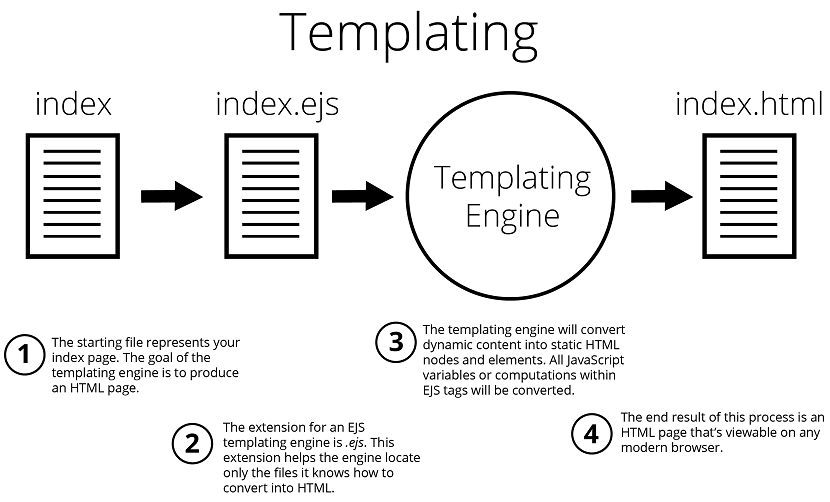
Converting EJS to HTML
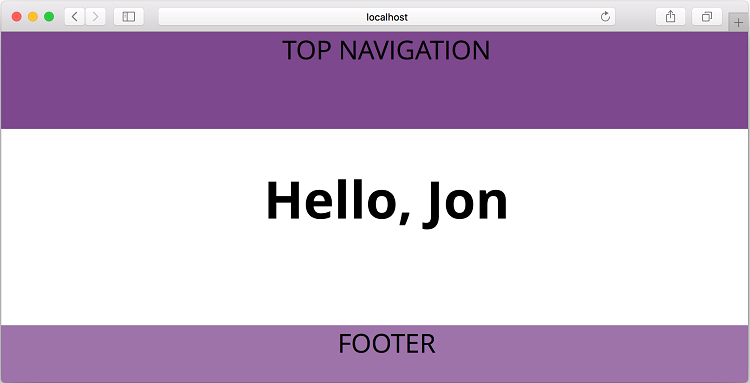
Example view of name page
FAQ
What is a templating engine in Express.js?A templating engine processes your template views (which mix HTML and JavaScript) and converts them into plain HTML that the browser can use. In this chapter, EJS is used as the templating engine.How do I set up EJS in my Express app?Install EJS, then set it as the view engine. Example steps: 1) npm install express ejs --save 2) In main.js add: app.set('view engine', 'ejs').How does EJS syntax work inside a view?Use <% %> to run JavaScript (no output) and <%= %> to output a value into the HTML. Example: <% let name = 'Jon'; %> then
Hello, <%= name %>
.How do I render a view from a controller?Call res.render('index') in your controller action. You don’t include the .ejs extension or the views/ folder path—Express resolves those automatically.How do I pass data from a controller to a view?Pass a JavaScript object as the second argument to res.render. Example: res.render('index', { name: 'Jon' }). The object’s keys should match the variable names you use in the view.How do I read a route parameter and send it to the view?Define a route with a parameter, e.g., app.get('/name/:myName', ...). In the controller, read req.params.myName and pass it to the view: let paramsName = req.params.myName; res.render('index', { name: paramsName }). Note that /name/jon matches, but /name/ (without a value) will not.What does app.set do, and how is it used here?app.set assigns application settings. For example: app.set('view engine', 'ejs') and app.set('port', process.env.PORT || 3000). Retrieve settings with app.get('view engine') or app.get('port').How do I create a shared layout with express-ejs-layouts?Install and enable the middleware: const layouts = require('express-ejs-layouts'); app.use(layouts). Then create views/layout.ejs and include the placeholder for view content: <%- body %>. Your views will render inside that placeholder.What are partials, and how do I include them in a view?Partials are reusable snippets of view markup. Place them under views/partials (e.g., views/partials/navigation.ejs) and include them with: <% include partials/navigation %>. This lets you share elements like navigation bars across pages.Do I need to restart the server after editing view files?No. Changes to EJS view files take effect without restarting the application.
pro $24.99 per month
access to all Manning books, MEAPs, liveVideos, liveProjects, and audiobooks!

 Get Programming with Node.js ebook for free
