In this chapter, data streams are introduced as values delivered over time, and the Reactive Extensions are presented as the functional toolkit for working with them. The core abstraction is IObservable<T>, which fits alongside familiar .NET types by representing asynchronous sequences, while IEnumerable<T> remains a pull-based sequence and Task<T> a single asynchronous result. The chapter emphasizes the push-based nature of observables: consumers subscribe, producers push values, and the observable contract allows a stream to emit many values, then either complete successfully or fail with an error.
Once the basic contract is clear, the chapter shows how to create observables from a variety of sources, including timers, user input, callback-based APIs, single values, tasks, and existing enumerables. Subscription is handled through Subscribe, which can take callbacks or an IObserver, and returns an IDisposable so the consumer can unsubscribe. The discussion also highlights the importance of laziness and why some imperative mechanisms, such as Subject, are useful for illustration but generally less desirable than more declarative creation patterns like Observable.Create.
The later part of the chapter focuses on composing streams with operators such as Select, SelectMany, Concat, Merge, Partition, CombineLatest, Sample, and Scan. Through examples like exchange-rate lookup, key-sequence detection, and monitoring bank-account balances, it shows how Rx can express transformations, coordination between streams, error separation, and stateful logic without explicit mutable state. The chapter closes by explaining when observables are a good fit: especially for one-way, event-driven dataflows where patterns span multiple events, but less so for independent events, request-response interactions, or situations that demand lower-level synchronization control.
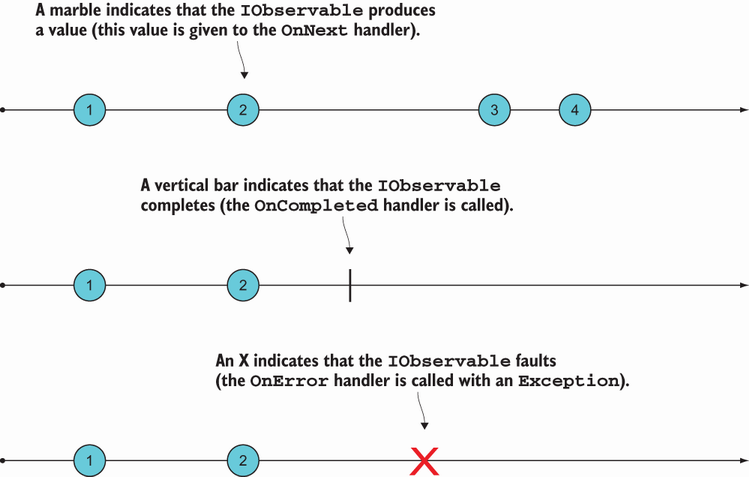
Marble diagrams provide an intuitive way to understand IObservables.




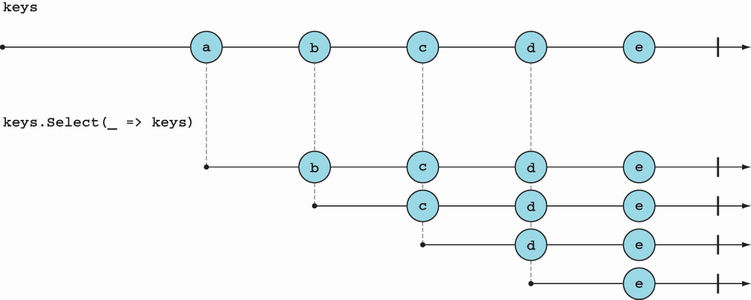
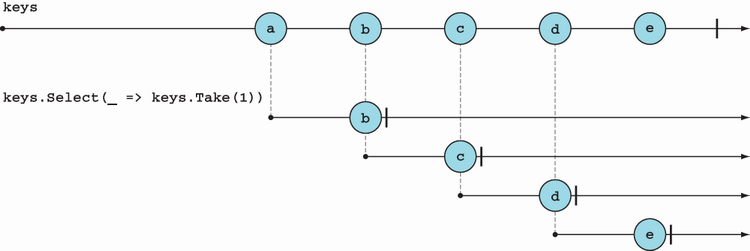
Select maps a function onto a stream.

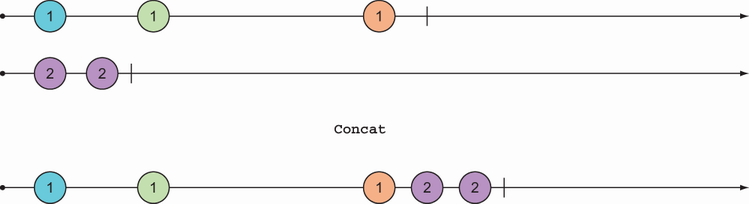
Concat waits for an IObservable to complete and then produces elements from the other IObservable.
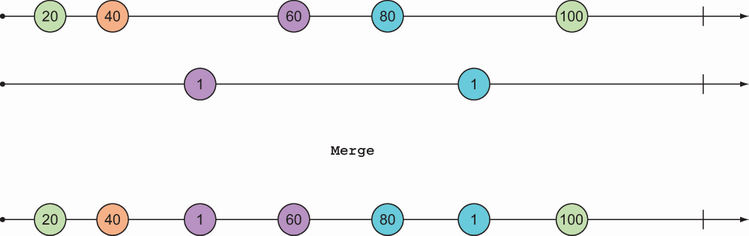
Merge merges two IObservables into one.
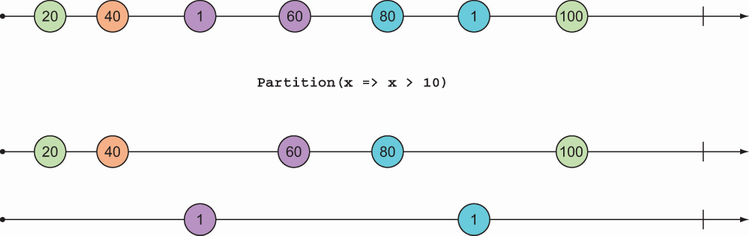
Partitioning an IObservable according to a predicate
Simple dataflow between three IObservables

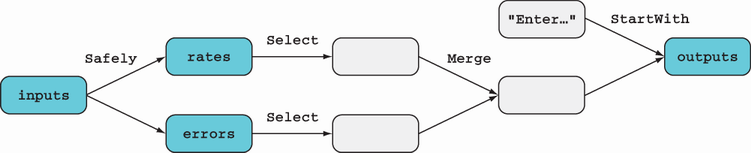
Dataflow with a separate branch for handling errors
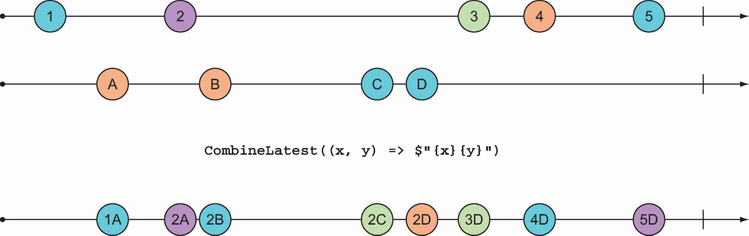
CombineLatest signals whenever one of two IObservables signals.
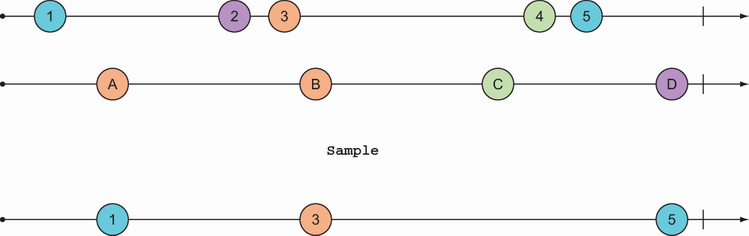
Sample produces the values from a source stream when a sampler stream signals.
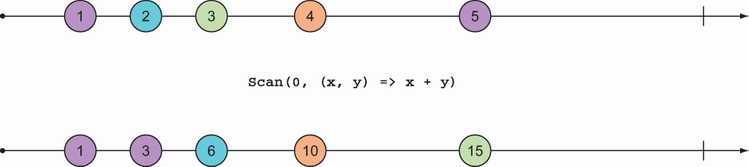
Scan aggregates all values produced so far.
Summary
- IObservable<T> represents a stream of Ts, a sequence of values in time.
- An IObservable produces messages according to the grammar
- Writing a program with IObservables involves three steps:
- Associate an observer to an IObservable with Subscribe.
- Remove an observer by disposing of the subscription returned by Subscribe.
- Separate side effects (in observers) from logic (in stream transformations).
- When deciding on whether to use IObservable, consider the following:
FAQ
```htmlWhat is an IObservable in Rx?
An IObservable represents a stream of values over time. Unlike IEnumerable, which you enumerate at your leisure, an IObservable pushes values to subscribers as they become available.
How is IObservable different from IAsyncEnumerable?
IAsyncEnumerable is consumer-centric and pulls data when the consumer requests it. IObservable is producer-centric and pushes data to observers when values are available.
What messages can an IObservable produce?
An IObservable can produce OnNext messages for values, OnCompleted for normal completion, and OnError for abnormal termination with an exception.
How do you subscribe to an IObservable?
You subscribe by calling Subscribe, either with callback handlers such as onNext, onError, and onCompleted, or by passing an IObserver.
Why does Subscribe return an IDisposable?
The returned IDisposable represents the subscription. Disposing it unsubscribes from the observable and stops receiving further messages.
How can you create a timer as an IObservable?
You can use Observable.Interval to create an observable that signals at regular intervals, such as once per second, producing a growing counter value over time.
Why is Subject discouraged in Rx?
Subject is useful for demonstrations, but it is imperative: you manually tell it when to emit values. This goes against the more declarative, reactive style recommended in Rx, so it should be avoided when possible.
How do you transform an IObservable?
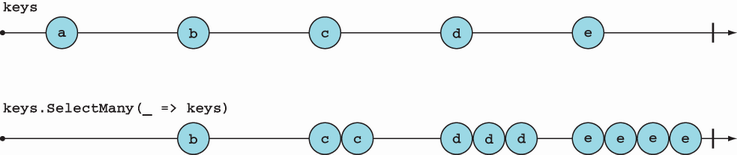
You can use operators like Select to map each item in the stream, and SelectMany to flatten nested observables, much like Bind in other functional contexts.
How do you combine or partition observables?
Use operators such as Concat, Merge, and StartWith to combine streams, and Partition to split a stream into two streams based on a predicate.
When should you use IObservable?
Use IObservable when your logic spans multiple events, when you want to model one-way dataflows, or when you need to react to ongoing streams of data. If events are independent or you need request-response behavior, IObservable is often not the best fit.

 Functional Programming in C#, Second Edition ebook for free
