Build size is one of the few performance signals you can measure with certainty before software reaches users, and that makes it a powerful early-warning system. The chapter argues that teams often ignore the size data already produced by their builds, allowing small increases to accumulate until they become expensive regressions that are much harder to diagnose later. The core habit is simple: inspect size after every build, treat unexpected growth as a clue, and act while the code change is still fresh.
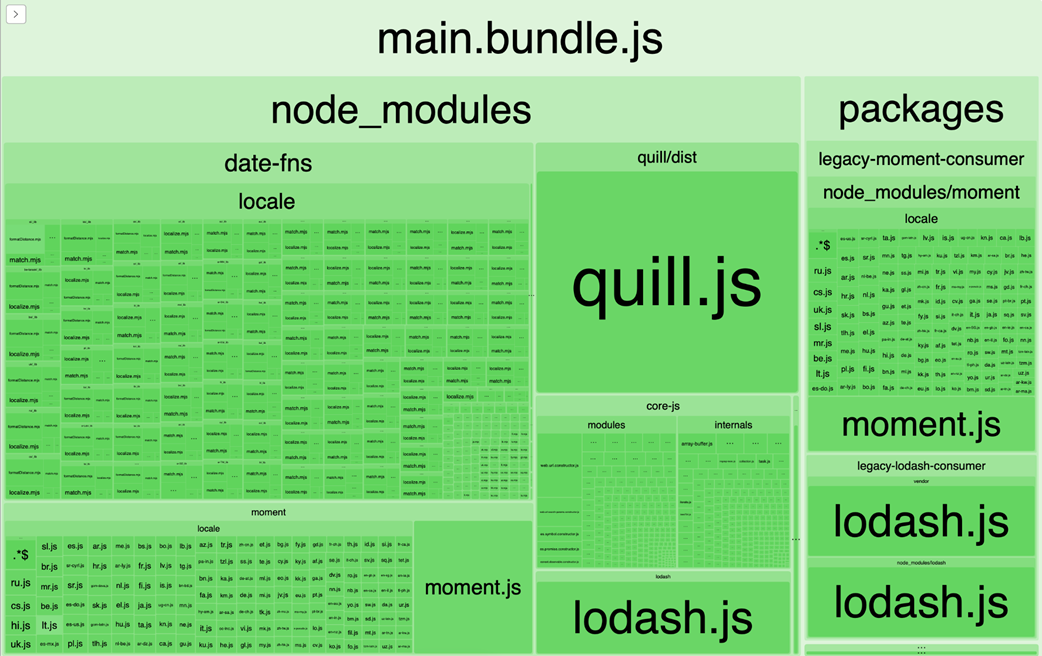
For web applications, the chapter shows how to move beyond a single bundle total and use visual and minified-analysis tools to find what is actually taking up space. Treemaps and source-map-based reports help uncover oversized dependencies, duplicated packages, dead polyfills, and tree-shaking failures caused by CommonJS modules, barrel files, or side effects. Once the causes are visible, fixes usually involve narrower imports, dynamic loading, better dependency choices, and tracking bundle size over time so regressions are caught before release.
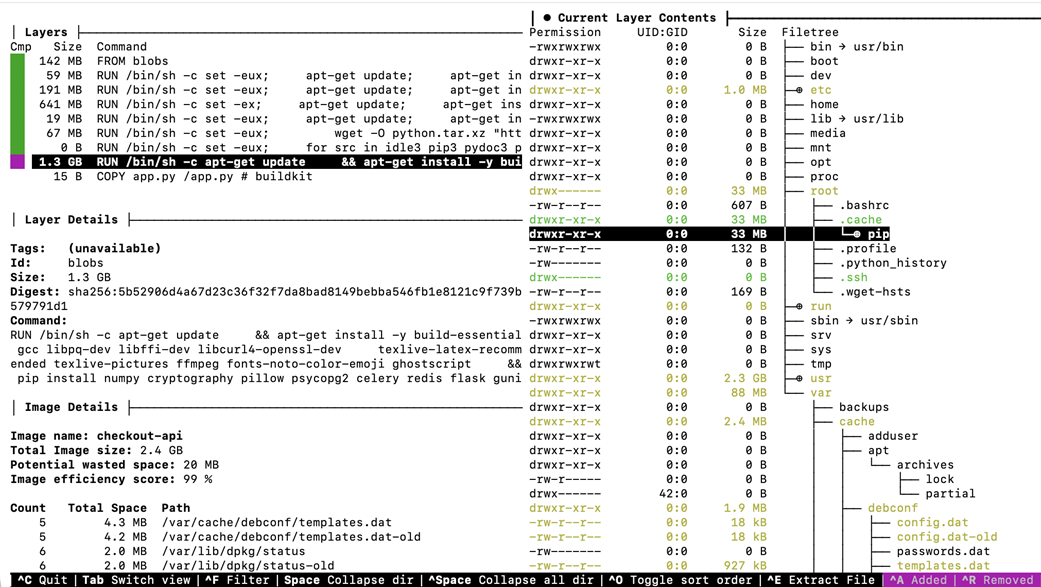
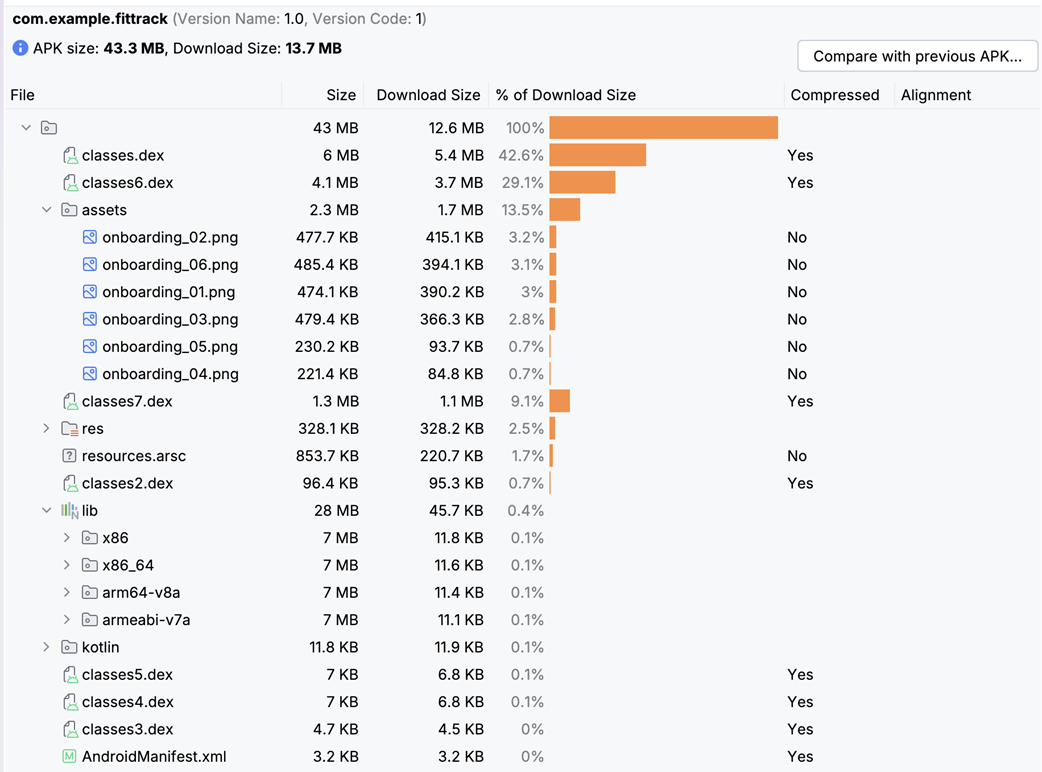
The same diagnostic mindset is then applied to backend containers, mobile apps, and desktop builds, where size affects deployment speed, startup time, install rates, storage pressure, and even customer satisfaction. The chapter recommends inspecting container layers, removing build tools from production images, pruning unused dependencies, shrinking binaries, and separating framework overhead from application-specific weight. Across all platforms, the message is consistent: size problems persist not because they are hard to measure, but because teams fail to make measurement routine, visible, and actionable.
A webpack-bundle-analyzer treemap for the news site's production build, showing the rich text editor, internationalization library, lodash, a duplicated date formatting library, and core-js polyfills.
Dive's layer view for the checkout API's container image, showing the file tree for the 1.3GB package installation layer.
Android Studio's APK Analyzer showing the fitness tracking app's release APK broken down by category and size.
Summary
Every build produces artifacts with a measurable size. Oversized builds mean slower downloads, slower deploys, and slower startup times.
Web bundle visualization tools show which libraries and dependencies take up the most space in your JavaScript builds. Libraries that publish older module formats can prevent bundlers from removing the code your application never uses.
Backend container images grow through reasonable-looking Dockerfile commands that leave caches and build tools in the final artifact. The dependencies inside them grow the same way, as unused packages and their own indirect dependencies accumulate across every language ecosystem.
Mobile binary size directly affects user acquisition. iOS App Thinning and Android App Bundles deliver only what each device needs, but developers must still audit assets and track size across releases.
Desktop applications carry framework overhead that sets a size floor of 120-150MB for Electron apps before any application code ships. When the framework itself is the largest contributor, changing how the artifact reaches the user can matter more than making it smaller.
FAQ
Why is build size worth checking during development?Build size is one of the few performance signals you can measure with certainty before code ships. Unlike real-world latency or scaling behavior, artifact size is available from every build and can reveal regressions immediately.How do I find what is making my web bundle large?Use a bundle analyzer such as webpack-bundle-analyzer or rollup-plugin-visualizer to generate a treemap. The largest modules become obvious, and you can see whether a dependency, duplicate package, or polyfill is taking too much space.What is the difference between a bundle’s total size and its actual cost to users?The total size tells you how much your bundle weighs overall, but tools like source-map-explorer show the contribution after minification, which is closer to what users download. This helps you identify the real sources of weight.What usually causes tree-shaking to fail in JavaScript builds?Common causes include CommonJS modules, barrel files that re-export everything, and side effects such as polyfills or top-level event registration. These patterns make it harder for bundlers to remove unused code.How can I catch oversized container images?Start with docker history to find the largest layers, then use Dive to inspect what is inside them. Look for package caches, build tools, and base images that are much larger than your runtime actually needs.Why should build tools be removed from production container images?Compilers, package managers, and development headers are often needed only during the build stage. If they remain in the final image, they add size without helping runtime behavior, slowing pulls and deployments.How do I find unused or unnecessary backend dependencies?Compare the dependencies your code actually imports against what is declared in your project files. Tools like pipreqs, npm ls, go mod why, Gradle dependency reports, and Maven dependency analysis help identify packages that can be removed.What is the best way to track mobile app size over time?Record size reports for each release and compare them regularly. On iOS, use App Thinning reports; on Android, use APK Analyzer or bundletool. This makes growth visible before it affects installs or reviews.Why can app size directly affect installs and revenue?Large mobile apps can hit platform limits, take longer to download, and consume more storage. That can reduce install completion, especially for users on slower networks, cellular data, or budget devices.How do I decide whether a size reduction effort is worth it?Look at the trade-off between size and value. A large dependency may be justified if it replaces substantial custom work, but if a lighter alternative exists, or the size affects deployment speed, install rates, or user experience, it is usually worth investigating.
pro $24.99 per month
access to all Manning books, MEAPs, liveVideos, liveProjects, and audiobooks!

 Fast by Default ebook for free
