7 Profile your code before it ships
Performance problems are cheapest to fix while code is still in development, so the chapter argues for profiling as a routine part of everyday work rather than a separate testing phase. The core idea is to make speed visible before code leaves the developer’s machine by checking changes against budgets while the code is still fresh. Across web, backend, mobile, and desktop software, the same pattern applies: write code, profile it, investigate any over-budget result, fix it, and profile again.
For web applications, browser developer tools expose three main areas: loading, runtime behavior, and memory. The chapter shows how the network panel reveals oversized bundles, render-blocking resources, dependency chains, third-party overhead, duplicate requests, and missing caching, especially when tested under throttled network conditions. The performance panel then helps identify long tasks, layout thrashing, expensive paints, and interaction delays, while the memory panel catches heap growth, detached DOM nodes, and leaked listeners across navigations or repeated interactions.
The same discipline extends to backend, mobile, and desktop systems, where the chapter recommends profiling realistic data and real devices or long-running sessions instead of toy test cases. Backend work focuses on request timing, query logging, EXPLAIN plans, CPU hotspots, connection pool usage, and leak detection. Mobile profiling emphasizes main-thread work, smooth rendering, battery impact, and memory leaks on physical devices across different tiers, while desktop profiling looks for startup cost, idle CPU, resource leaks, rendering hitches, and memory growth over hours of use. The chapter closes by promoting a lightweight two-minute profiling habit so teams can catch most issues before review and make profiling a default part of shipping fast software.
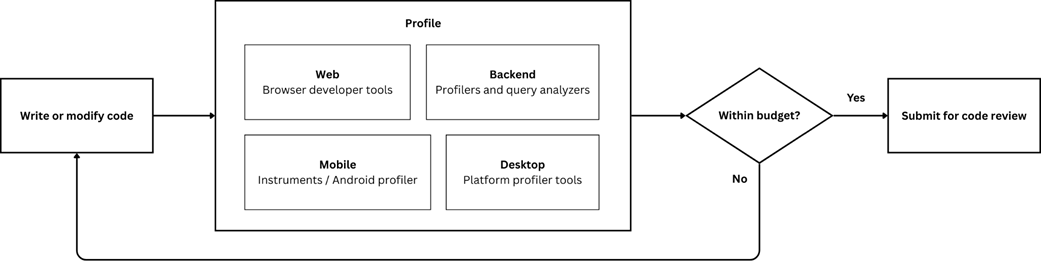
The profiling loop during development. After writing or modifying code, the developer profiles the change against the performance budgets defined in chapter 6. If the result exceeds the budget, the developer investigates and fixes it while the code is still fresh, then profiles again. Code that meets its budget moves to review.
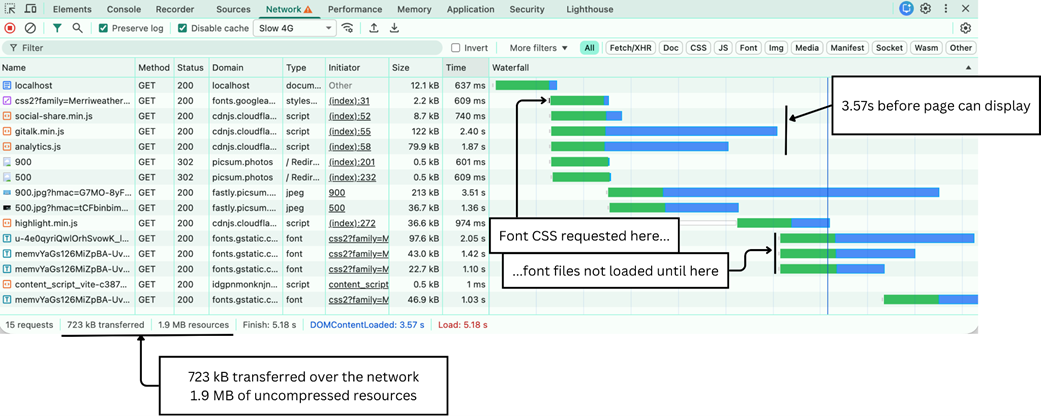
A network waterfall under Slow 4G throttling. Three synchronous scripts block rendering for over two seconds. The font dependency chain shows how font files cannot begin loading until the CSS that references them has downloaded. The bottom bar reveals the gap between transfer size (723 kB compressed) and resource size (1.9 MB uncompressed).
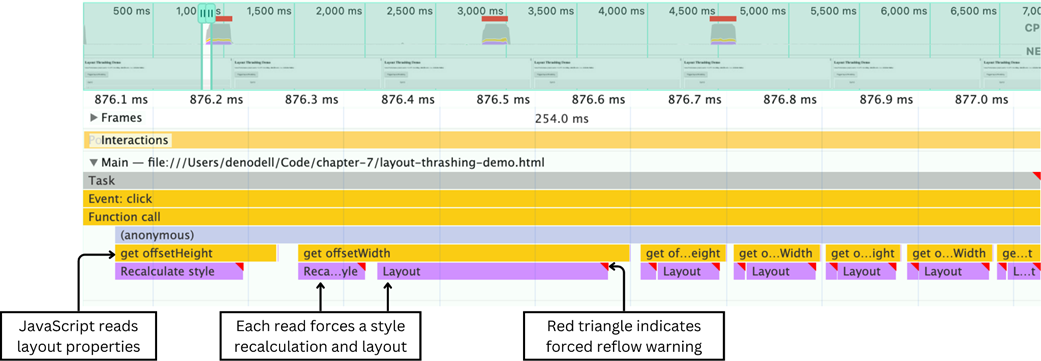
Layout thrashing in the Chrome DevTools flame chart. The alternating Recalculate Style and Layout blocks in purple show the browser being forced to recalculate layout repeatedly by a read-write loop in the JavaScript above in yellow. The red triangles flag each recalculation as a forced reflow.
The snapshot-compare-investigate pattern for memory profiling and leak detection.

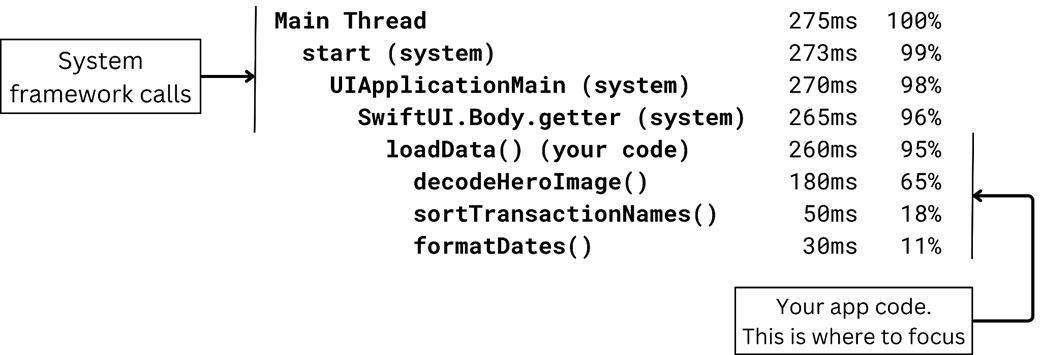
An example call tree showing where time is spent. The top rows are system code you cannot change. Keep expanding until you reach your own functions at the bottom, which is where you focus your attention to improve performance.
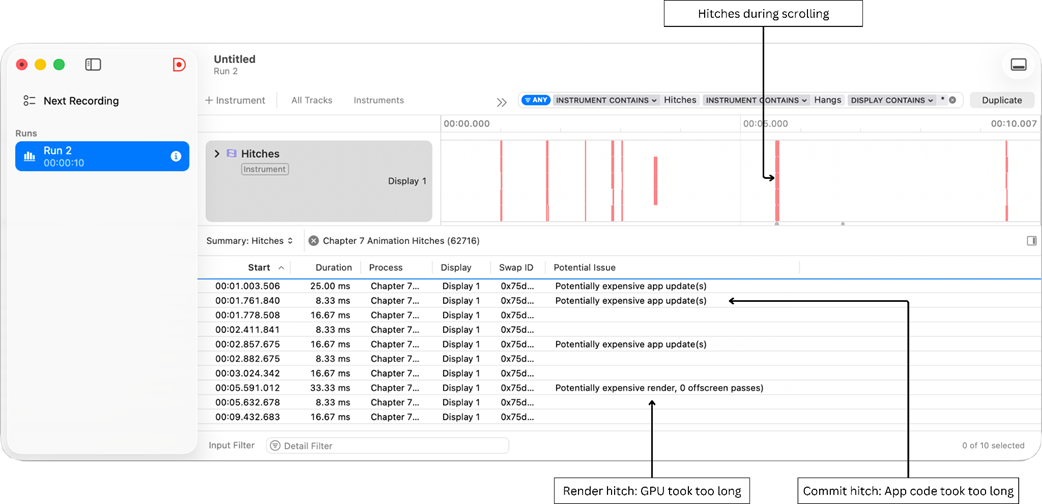
The Animation Hitches instrument in Xcode Instruments. Red markers in the timeline indicate frames that missed their deadline. The Potential Issue column distinguishes between commit hitches, where the app's main thread took too long preparing the frame, and render hitches, where the GPU took too long drawing it.
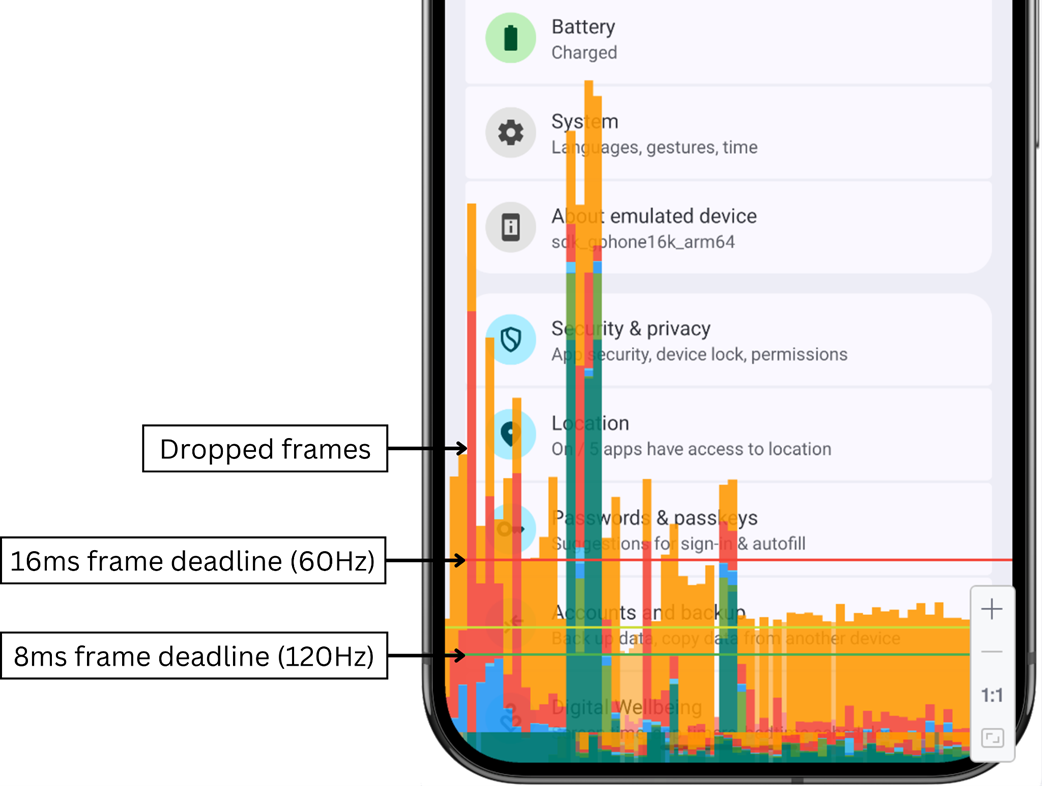
Profile HWUI Rendering on Android showing frame timing as a bar chart overlay. Each bar represents one frame. Bars below the green line meet the 120Hz deadline. Bars above the red line exceed even the 60Hz deadline, resulting in dropped frames visible as stuttering during scrolling.
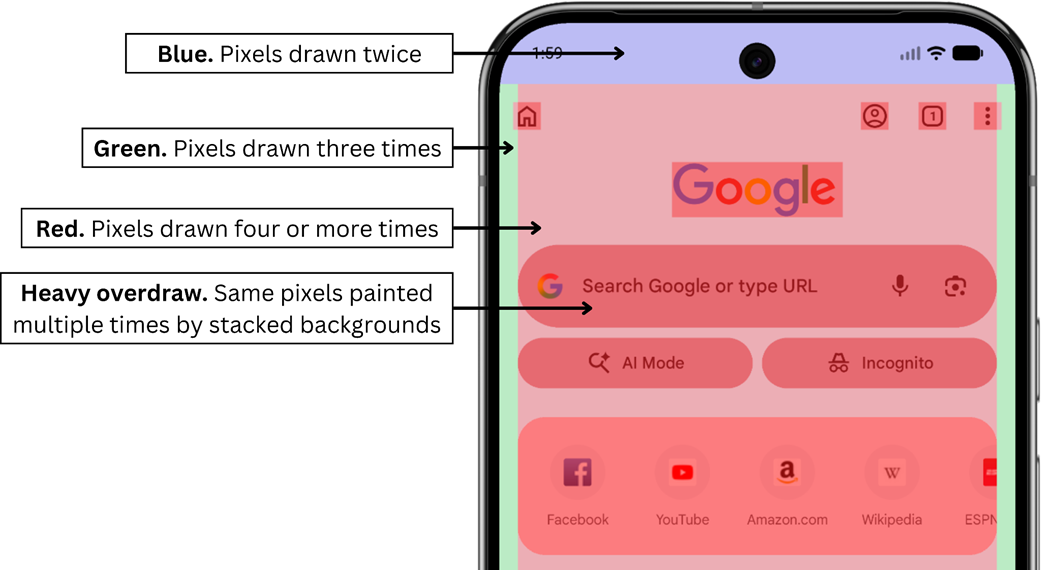
Android overdraw visualisation on the Chrome home screen. The tint colour indicates how many times each pixel is drawn. Red areas show heavy overdraw where stacked backgrounds paint the same pixels four or more times, wasting GPU work on every frame.
Summary
- Profiling during development reveals performance problems while code is fresh and fixes are cheap.
- Browser developer tools provide comprehensive performance analysis for web applications. The three key panels cover loading performance measured against your page weight budget, runtime behavior including long tasks and layout recalculation, and memory stability across navigations.
- Backend profiling covers both your code and your database. CPU profilers show where your application spends its time, query logging and EXPLAIN analysis expose slow queries and N+1 patterns, and request tracing connects both to the response times users actually experience.
- Mobile profiling requires attention to constraints that desktop development hides: CPU usage, memory, energy consumption, and frame rendering. Always profile on the cheapest device your users carry rather than relying on simulators or flagship hardware.
- Desktop applications run for hours or days, giving memory leaks and unclosed system resources time to accumulate. Profile over longer sessions than you would on other platforms, and across every operating system you ship to.
- The two-minute profiling check makes this sustainable: before each code review, run your platform's most relevant tool and check one number against your budget. Tech leads define which changes require the check; engineering managers track whether it is happening.

 Fast by Default ebook for free
