Overview

6 Turn performance goals into budgets

Performance goals are useful because they define the user experience you want, but they do not stop gradual regression on their own. Performance budgets turn those goals into enforceable limits that code changes must respect, making growth visible before users feel the impact. The chapter argues that budgets are most effective when they reflect what the architecture can actually deliver, protect hard-won performance gains, and give engineers, tech leads, and managers a shared way to discuss trade-offs.

The chapter then explains what kinds of things to budget and how to choose the right thresholds. It covers memory, JavaScript bundle size, visual stability, API response time, database query time, startup time, and desktop input responsiveness, showing that different platforms need different measurements and checkpoints. It also emphasizes using representative devices and network conditions, keeping budgets tied to real users rather than developer machines, and setting thresholds with enough headroom to catch problems early while still being achievable.

Another major theme is granularity and governance. Some products work with global budgets, while others need per-route, per-endpoint, or phase-based budgets, especially when different teams contribute to the same experience. The chapter outlines clear ownership for technical decisions and exceptions, recommends lightweight documentation for budget changes, and describes escalation paths that match the size of the overage. Finally, it frames budgets as creative constraints: when teams treat them as shared challenges instead of arbitrary blockers, they often find simpler, better, and more user-friendly solutions, and when a budget stops fitting reality, it should be reset thoughtfully rather than quietly ignored.

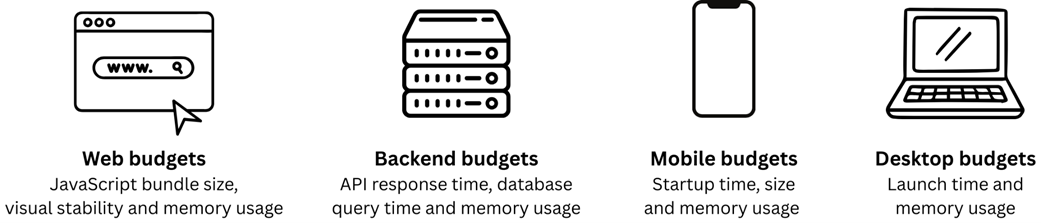
Key performance budget types by platform. Memory usage is the only budget that applies across all platforms.
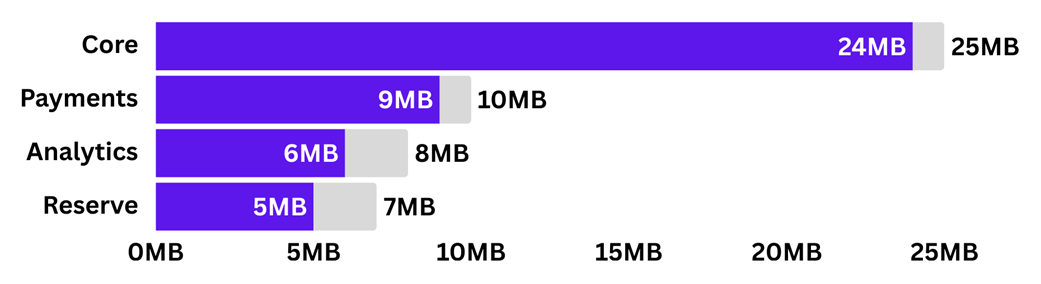
A budget allocation dashboard showing each team's current usage against their allocation. Core is nearly at capacity, while Analytics and Reserve have room for growth.
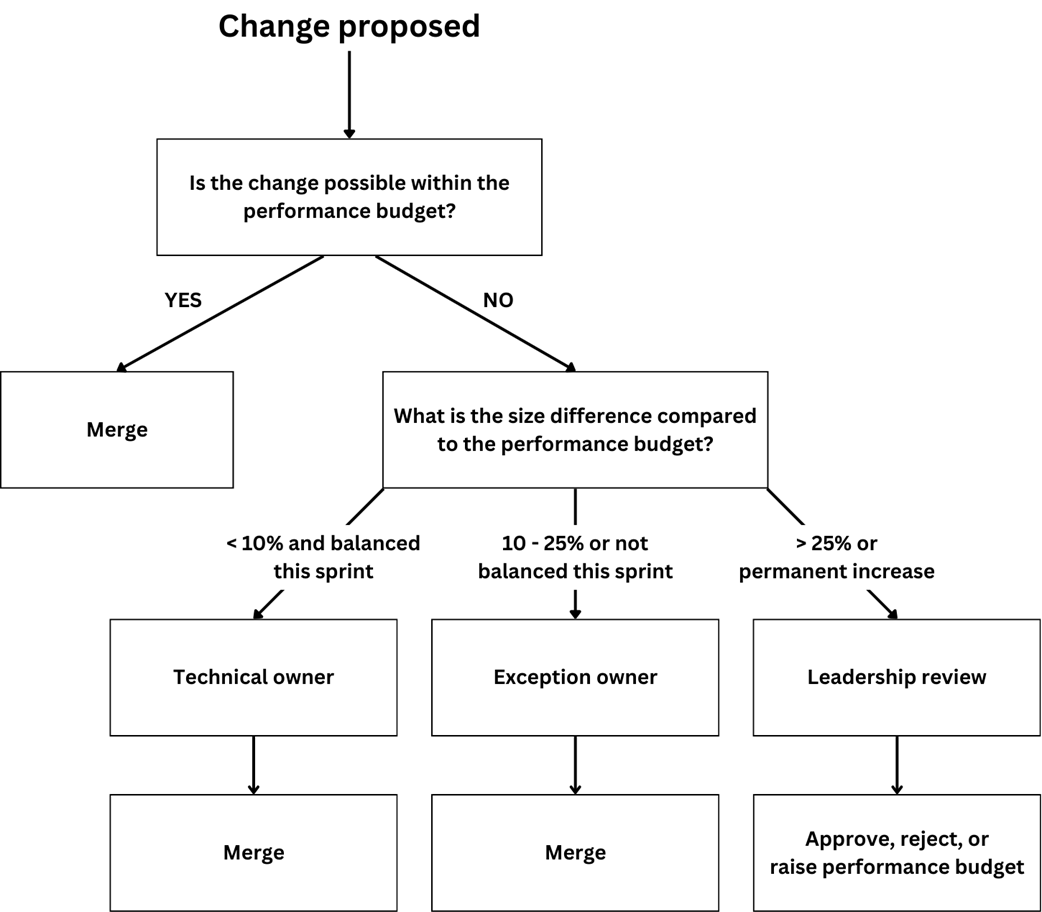
Budget exception escalation flow. Changes that fit within the budget merge without additional review. Changes that exceed the budget follow one of three paths depending on the size of the overage, with larger exceptions requiring more senior approval and more documentation.
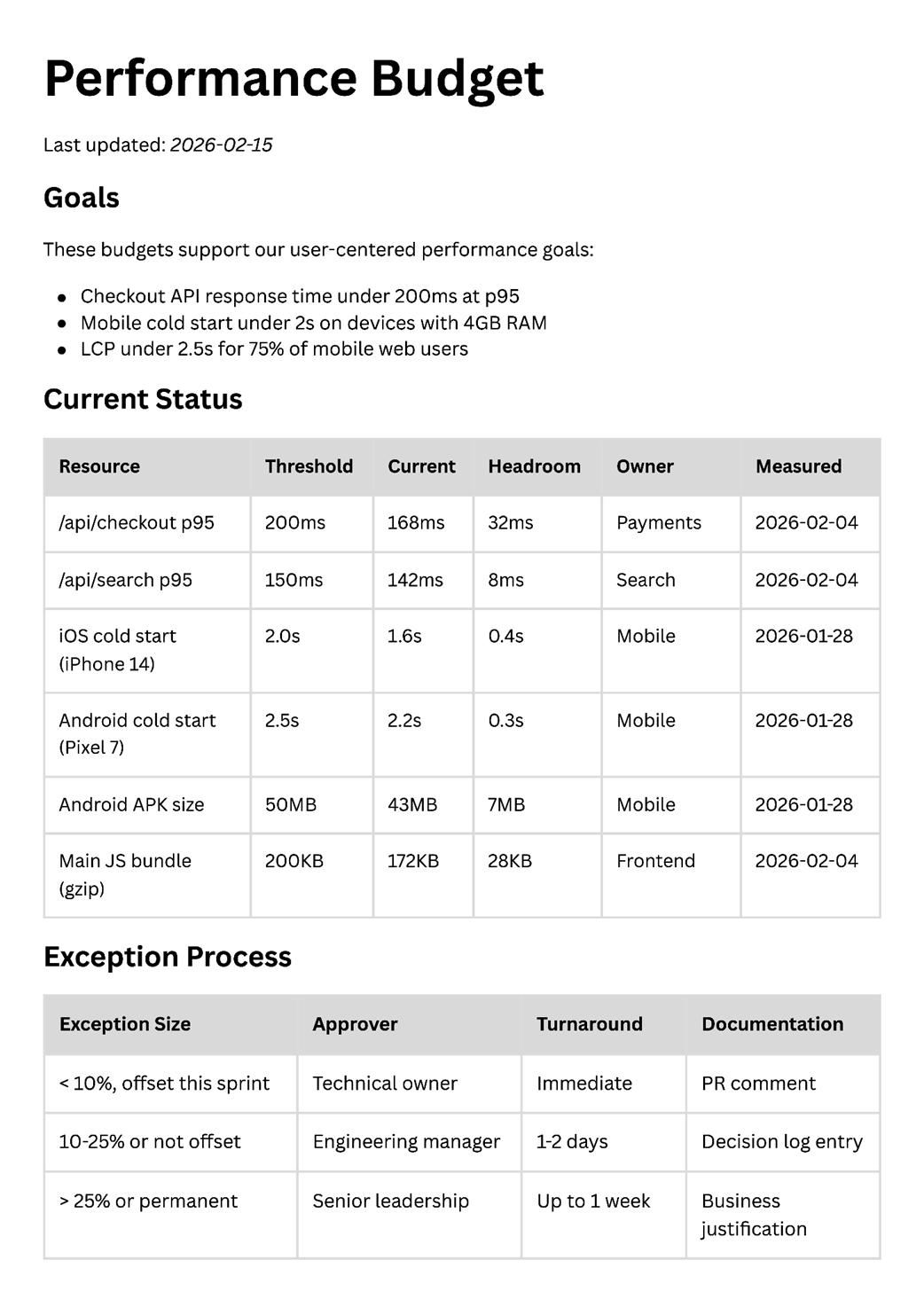
An example performance budget document showing goals, current status with headroom, and the exception process.
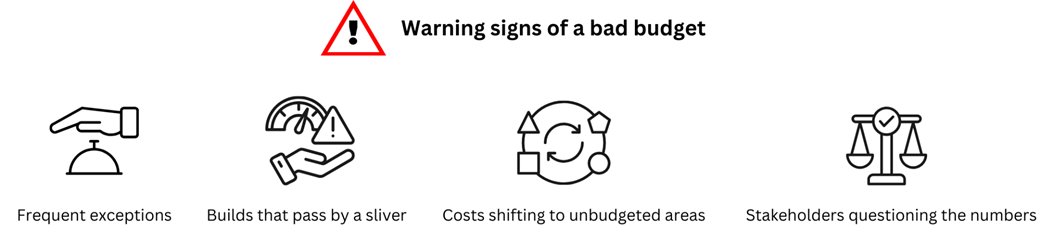
Warning signs that a budget needs resetting. Any one of these suggests the budget no longer fits the product's current state.
Summary

  • Budgets translate goals into thresholds you can enforce. Goals describe what users should experience; budgets describe what code changes are allowed.
  • Budgets protect gains by making every addition visible against a fixed limit and forcing explicit trade-off conversations.
  • Effective budget types vary by platform: JavaScript bundle size for web, API response time for backend, startup time and memory for mobile, launch time and resource consumption for desktop.
  • Measure your baseline before setting thresholds. A budget without data is a guess.
  • Start with global budgets, add per-page or per-feature granularity when variation affects users, and allocate headroom explicitly when multiple teams share a budget.
  • Assign technical owners for routine decisions and exception owners for trade-offs that require broader context.
  • Set budgets tighter than goals to catch problems early, then tighten further as performance improves.
  • Your architecture constrains what budgets are achievable. Set thresholds your system can realistically deliver.
  • Constraints drive creativity. Teams with tight budgets discover better architectures than teams with unlimited headroom.
  • Budgets will break. Diagnose why, reset thoughtfully with phased approaches if needed, and make budget reviews a regular practice.

FAQ

What is the main purpose of turning performance goals into budgets?Performance goals describe the user experience you want, while performance budgets turn that goal into an enforceable limit on code or resource changes. Budgets help prevent gradual regressions and make trade-offs visible before users notice a problem.
How is a performance budget different from a performance goal?A goal says what you want users to experience, such as a page loading in under 3 seconds. A budget says what the team is allowed to spend to stay on track, such as a maximum JavaScript bundle size or response-time threshold that can be checked in CI or during development.
What kinds of resources can be budgeted?Common performance budgets include memory usage, JavaScript bundle size, visual stability, API response time, database query time, startup time, input responsiveness, app size, and launch time. The right choice depends on the platform and the parts of performance that matter most to users.
Why should budgets be based on actual architecture instead of aspirational targets?Budgets should reflect what the current architecture can realistically deliver. If a threshold requires a major redesign to meet, it will likely be ignored or cause frustration. Good budgets are challenging, but still achievable through optimization and trade-offs, not a complete rebuild.
How do you choose a sensible threshold for a budget?Set the budget tighter than the user-facing goal, usually by about 15–25%, so there is room to catch regressions early. If the current system is far from the target, start with a phased budget below the current state and tighten it over time. Also leave headroom for future growth.
When is a global budget enough, and when do you need more granular budgets?A global budget works when the app is fairly uniform and users experience it in similar ways across the product. More granular budgets help when some pages, endpoints, or flows are much more important or much slower than others. Add granularity when global metrics hide real user pain.
How should teams handle multiple contributors sharing the same budget?Teams can use shared budgets with allocated portions, where each team gets a defined slice, or pooled budgets with contribution tracking, where teams share a common limit with visible usage. The best approach depends on how stable the teams are and how predictable their contributions are.
Who should own a performance budget and who approves exceptions?The technical owner is usually the team closest to the work, because they understand the code and available trade-offs. Exception approval should sit with someone who can weigh performance against broader product priorities, such as a tech lead, engineering manager, or product manager.
How should budget exceptions be escalated?Small breaches can often be approved quickly by the technical owner if they can be balanced within the sprint. Medium overages usually need exception-owner approval and a documented plan to return within budget. Large or permanent increases should go to senior leadership with a clear business justification.
What should a team do when a budget is no longer realistic?First diagnose whether the problem is legitimate product growth or accumulated bloat. Then reset the budget thoughtfully: measure current performance, understand user impact, and set a new threshold below the current level rather than simply matching it. If the gap is large, use phased resets and document the decision.

pro $24.99 per month

  • access to all Manning books, MEAPs, liveVideos, liveProjects, and audiobooks!
  • choose one free eBook per month to keep
  • exclusive 50% discount on all purchases
  • renews monthly, pause or cancel renewal anytime

lite $19.99 per month

  • access to all Manning books, including MEAPs!

team

5, 10 or 20 seats+ for your team - learn more


choose your plan

team

monthly
annual
$49.99
$499.99
only $41.67 per month
  • five seats for your team
  • access to all Manning books, MEAPs, liveVideos, liveProjects, and audiobooks!
  • choose another free product every time you renew
  • choose twelve free products per year
  • exclusive 50% discount on all purchases
  • renews monthly, pause or cancel renewal anytime
  • renews annually, pause or cancel renewal anytime
  • Fast by Default ebook for free
choose your plan

team

monthly
annual
$49.99
$499.99
only $41.67 per month
  • five seats for your team
  • access to all Manning books, MEAPs, liveVideos, liveProjects, and audiobooks!
  • choose another free product every time you renew
  • choose twelve free products per year
  • exclusive 50% discount on all purchases
  • renews monthly, pause or cancel renewal anytime
  • renews annually, pause or cancel renewal anytime
  • Fast by Default ebook for free
