4 Identify your critical paths
This chapter argues that performance work should begin with a simple but powerful idea: speed comes from understanding what users are actually waiting for. The critical path is the smallest set of operations that must finish before a user can perceive a screen, action, or request as complete, and everything outside that path is a candidate for deferral. The core lesson is that you do not make an application fast by optimizing randomly; you make it fast by focusing relentlessly on the work that blocks user progress.
To find critical paths, start from the user’s goal and work backward through the operations required to satisfy it. Using traces, dependency graphs, and profiling tools, separate true blockers from tasks that can happen later or in parallel. The chapter emphasizes common mistakes that lengthen critical paths, such as sequential requests that have no real dependency, waiting on analytics or logging before rendering, and fetching more data than the user needs to complete the task. It also shows that improving these paths especially benefits users on slower devices, weaker networks, and assistive technologies, making performance an access issue as much as a speed issue.
The chapter then applies the same thinking across platforms and at scale. Web apps should acknowledge input immediately and push non-essential work into the background; backend services should respond quickly and defer secondary processing; mobile apps must optimize both launch and interaction latency; and desktop apps should stay responsive while heavy work runs elsewhere. It also covers practical data strategies such as parallel fetching, batching, coalescing, and prefetching to reduce unnecessary waiting. Finally, it extends the idea to scaling, showing how databases, caches, rate limiting, and asynchronous job systems must be designed so critical paths stay fast as traffic and data grow.
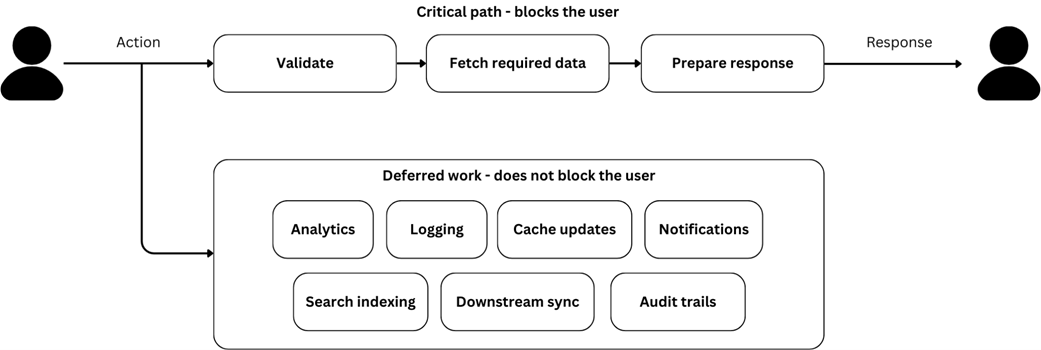
Critical path and deferred work. The critical path blocks the user while deferred work happens afterward without affecting what they experience.
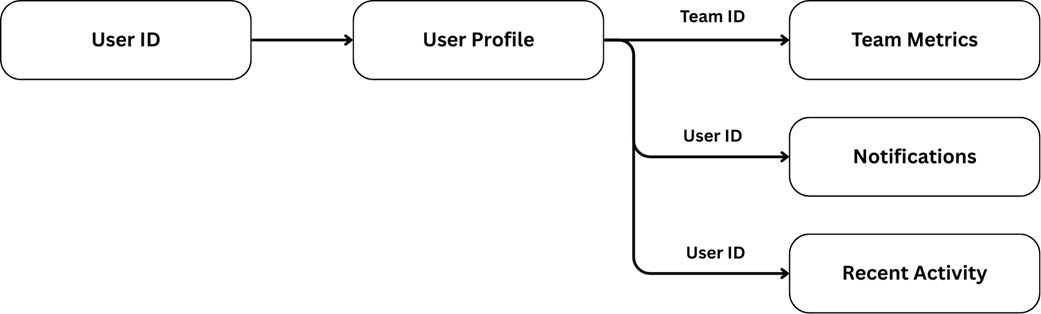
A team dashboard dependency graph before optimization.
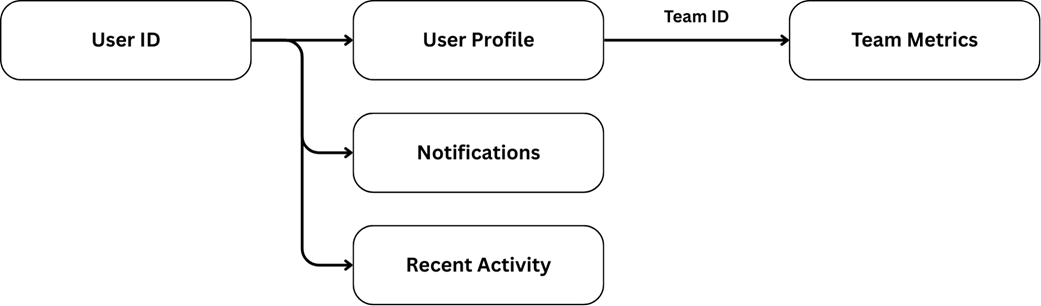
A team dashboard dependency graph after optimization.
Summary
- The critical path is the minimum set of operations that must complete before users can accomplish their goal. Everything else can happen later, in parallel, or not at all.
- Speed comes from knowing what users are actually waiting for, not from making everything faster.
- Each user goal has its own critical path. A product page, a checkout flow, and a dashboard filter each have different minimum operations that determine perceived performance.
- Platform-specific patterns shape what lands on the critical path. Web applications optimize for time to content and interaction readiness. Mobile apps focus on launch time and main thread availability. Desktop applications balance immediate responsiveness with long-running operations. Backend services minimize the time to response.
- Deferral patterns move work off the critical path. Lazy loading, optimistic updates, background processing, and async boundaries all reduce what users wait for without reducing total functionality.
- Waterfall data fetching is often accidental. Requests that appear sequential in code may have no real dependency between them. Drawing a dependency graph reveals which requests can run in parallel.
- Prefetching loads data before users request it, making interactions feel instant. The key is predicting high-probability user actions and loading data just before they happen.
FAQ
What is the critical path in an application?
The critical path is the minimum set of operations that must complete before a user can perceive the application as responsive or accomplish their goal. Anything not required for that immediate experience can usually be deferred, done in parallel, or moved to the background.
Why is identifying the critical path more important than optimizing everything?
Because users only experience the operations that block their progress. Optimizing unrelated work does not improve perceived speed. Focusing on the critical path ensures effort goes where it has the biggest impact on what users actually wait for.
How do you find a screen’s or flow’s critical path?
Start with the user’s goal, then work backward to the operations that must complete before that goal is possible. Use profiling tools, network waterfalls, or distributed traces to see the actual sequence of work and identify dependencies.
What kinds of work are usually not on the critical path?
Analytics, logging, cache warming, secondary data fetching, notifications, and background synchronization are typically not user-blocking. These tasks add value, but they usually can happen after the user has already received feedback or completed the task.
How do critical paths differ on web apps?
On the web, the critical path is often about giving immediate visible feedback after a user action. A click should be acknowledged quickly, and optimistic updates or instant success states can make interactions feel fast even if the real work continues in the background.
How do critical paths differ in backend services?
Backend critical paths focus on returning the response as quickly as possible. The service should do only the minimum work needed before responding, while logging, analytics, cache invalidation, and downstream workflows should usually happen after the response is sent.
What is the critical path on mobile apps?
Mobile apps have two major critical paths: launch to first useful screen, and touch interaction to feedback. Because touch devices lack physical feedback, immediate visual acknowledgment is especially important, even if the real processing happens later.
How should desktop apps think about the critical path?
Desktop apps should initiate complex work quickly, show progress, and keep the UI responsive. Long-running tasks like syncing large datasets or rendering heavy content should not block the interface from becoming usable.
When should work be deferred instead of done immediately?
Defer work when users do not need it to complete their immediate goal and when failure can be handled asynchronously. Good candidates include email notifications, analytics, background processing, and cache updates. Work that users expect to complete before success, like authentication or payment, should not be deferred.
How do parallel fetching, batching, and prefetching help critical paths?
Parallel fetching removes unnecessary sequential waits, batching reduces the number of requests, and prefetching loads data before users ask for it. All three shorten perceived latency by making sure the data needed for the critical path is available sooner, or already waiting when the user needs it.

 Fast by Default ebook for free
