Appendix A. The Neo4j environment
This appendix walks you through the Neo4j environment used for the book’s hands-on graph theory and algorithms. It introduces Neo4j as a native graph database where nodes and relationships are first-class entities, both able to hold properties. Implemented in Java and accessed via the Cypher query language over HTTP or the Bolt protocol, Neo4j is built for scalability with flexible indexing and ACID transactions, while Cypher provides an expressive, human-readable way to query and manipulate graph data.
Beyond the basics, the text presents Cypher and the broader move toward standardization. The openCypher initiative promotes Cypher as a common graph query language across multiple vendors, and an ISO effort is defining a unified Graph Query Language (GQL) that builds on SQL and incorporates proven ideas from existing languages, including Cypher—making Cypher a strategic skill. Two essential plugins round out the environment: APOC, a rich toolkit for import/export, transformations, date/time handling, geospatial and text processing; and Graph Data Science (GDS), which offers scalable implementations of algorithms such as shortest path, PageRank, and community detection, plus embeddings and machine learning workflows for tasks like node classification and link prediction.
Practical setup options include Neo4j Desktop, Docker, and Neo4j Aura. With Desktop, you create a local DBMS (version 5.9.0 or later is recommended), install the APOC and GDS plugins, start the database, open Neo4j Browser, and run Cypher in the editor. The Docker path uses a single run command to expose ports, persist data, set credentials, and auto-install plugins. Aura provides a managed cloud instance; note that the free tier lacks GDS, so use AuraDS where GDS is required. The appendix also suggests a simple Browser tweak—disabling “Connect Result Nodes” to avoid visual confusion—and offers multiple ways to load the sample Movies dataset: via the built-in “Movie Graph Guide,” an online read-only instance, or a full Cypher script.
Figure A 9 The Cypher query editor in Neo4j Browser
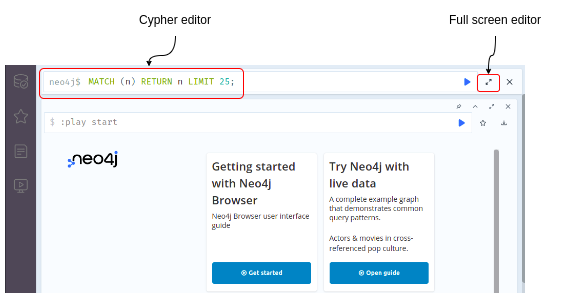
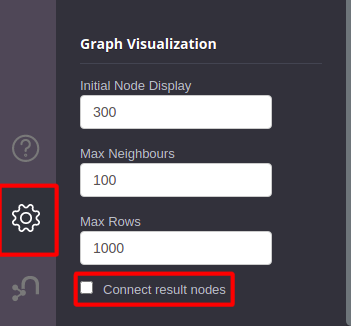
Figure A 10 Untick Connect Result Nodes in Neo4j Browser.
FAQ
What is Neo4j?
Neo4j is a native graph database built in Java to store, query, and manipulate graph data. It treats nodes and relationships as first-class citizens, both with key–value properties. It’s highly scalable, offers flexible indexing, supports ACID transactions, and is accessed using the Cypher query language over a transactional HTTP endpoint or the Bolt protocol.What is Cypher and what does a simple query look like?
Cypher is a declarative, human-readable graph query language that uses ASCII-art-style patterns. Example:MATCH (a:Person)-[:FOLLOWS]->(b:Person) WHERE a.name = "Alice" RETURN b.nameWhat is the APOC plugin and what can I use it for?
The Awesome Procedures On Cypher (APOC) plugin is a large library of procedures, functions, and utilities that adds capabilities such as data import/export, data transformation and manipulation, date/time/interval handling, geospatial processing, text processing, and more.What is the Graph Data Science (GDS) plugin?
The GDS plugin provides efficient, parallel implementations of graph algorithms (for example, shortest path, PageRank, community detection), as well as node embedding algorithms and machine learning workflows supporting node classification and link prediction.What are openCypher and ISO GQL, and why learn Cypher?
openCypher promotes Cypher as a common, open language for graph databases and has been adopted by Amazon, Agens Graph, Katana Graph, Memgraph, RedisGraph, and SAP HANA. There’s also an ISO project for a unified Graph Query Language (GQL) that builds on SQL and integrates ideas from languages including Cypher. Learning Cypher is therefore a strong foundation for interacting with many graph databases and future ISO GQL.What installation options are available for Neo4j?
You can use Neo4j Desktop, Neo4j Docker, or Neo4j Aura (cloud). Note: the free Aura tier does not include GDS; to run GDS algorithms (needed for chapter 7), use AuraDS or a local/Desktop/Docker setup with GDS.How do I set up Neo4j Desktop with APOC and GDS?
- Download and install Neo4j Desktop from https://neo4j.com/download- Register (or click Register Later)
- Stop the default Movies DBMS if it’s running
- Add a new Local DBMS; choose a name/password and select version 5.9.0 or greater
- In the DBMS pane, open Plugins and install APOC and GDS
- Start the database, open Neo4j Browser, and run Cypher in the editor (use fullscreen for longer statements)
How do I run Neo4j in Docker with APOC and GDS and persist data?
docker run \
  -p 7474:7474 -p 7687:7687 \
  -d \
  -v $HOME/neo4j/data:/data \
  -e NEO4J_AUTH=neo4j/password \
  -e 'NEO4J_PLUGINS=["apoc", "graph-data-science"]' \
  neo4j:5.26.0
/data volume. After starting, visit http://localhost:7474 and log in with the password you set in NEO4J_AUTH (for example, password).How should I configure Neo4j Browser for clearer results?
Disable the Connect Result Nodes feature. By default, Neo4j Browser may visualize relationships between result nodes that weren’t explicitly returned, which can be confusing. Untick Connect Result Nodes to only see relationships from the actual query results.How can I load the Movies dataset?
- In Neo4j Browser, open the “Movie Graph Guide” from the guides sidebar or run:play movies- Use the provided Cypher script (Listing A.3) to create constraints and load nodes/relationships directly
- Try the online read-only dataset: Browser URL: https://demo.neo4jlabs.com:7473/browser/ — Bolt: https://demo.neo4jlabs.com:7687 — Database:
movies — Username: movies — Password: movies
 Essential GraphRAG ebook for free
