Overview

6 Communication strategies: Disclaimers, feedback, and prompt tuning

This chapter emphasizes that successful Enterprise RAG systems are as much about communication as they are about code. It starts by establishing the role of a clear, always-visible disclaimer and a concise user guide to align expectations: define the domain, enumerate accessible data sources and known limitations, and show users how to phrase effective queries (for example, using full sentences). By setting scope early and consistently, teams reduce confusion, preempt unanswerable requests, and create a shared baseline that turns each interaction into actionable feedback rather than frustration. Courtesy, transparency, and predictable messaging become the foundation for trust as the system evolves.

The chapter then operationalizes feedback as a product pipeline. A lightweight UI captures simple thumbs-up/down ratings with optional comments and an email for follow-up, while a secure, serverless function relays this data to a database for analysis—keeping credentials server-side and decoupling quick, bursty writes from long-lived chat streaming. It walks through local setup, environment configuration, deployment, and CORS considerations, all in service of a robust, low-friction path from user input to structured signal. The goal is steady telemetry that teams can review regularly, spot patterns, and prioritize fixes without exposing secrets or entangling components.

Finally, the chapter shows how to close the loop and turn feedback into better answers. Each negative rating is traced to either retrieval (wrong or missing documents) or generation (right documents, wrong answer). Retrieval issues are addressed by verifying embeddings and index settings, tightening search parameters, and giving agents explicit field lists and filter syntax (plus a simple preprocessor to pass filters cleanly). Generation issues lead to prompt tuning for the writer agent—adding concrete rules, few-shot examples, citation requirements, brevity and language preferences, and business-specific instructions (such as prioritizing certain products), sometimes alongside small code changes for ordering. After testing and redeploying, the team contacts the reporting user to confirm the fix. Over time, this courteous, evidence-driven cycle—anchored by clear disclaimers, structured feedback capture, and targeted prompt updates—steadily reduces errors and builds durable user trust.

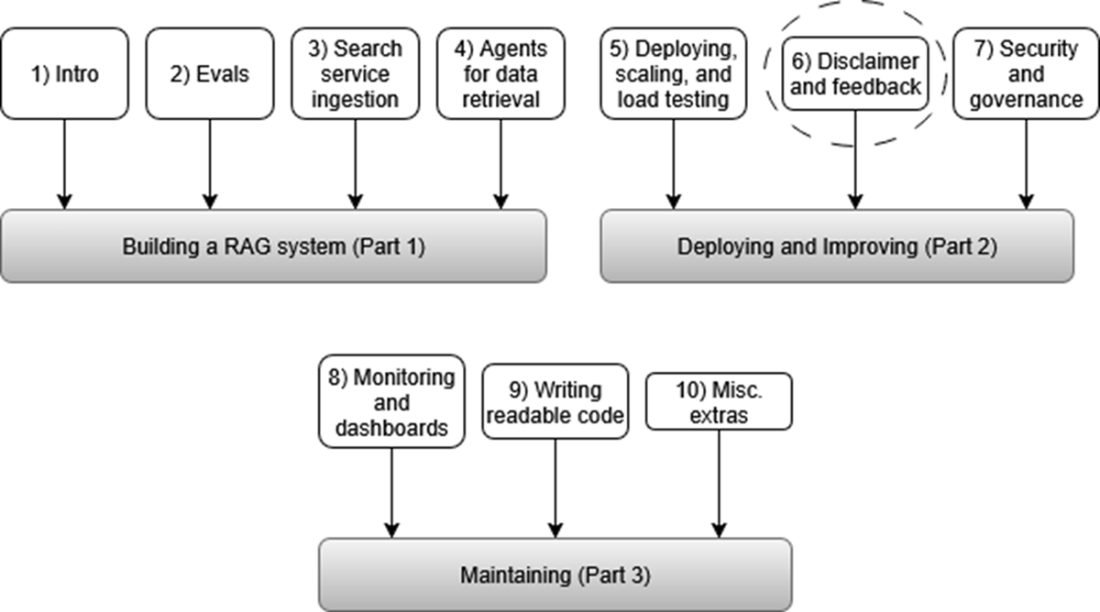
This mental model shows where we are in the overall process of building our RAG system, see the section highlighted by the dashed circle above.
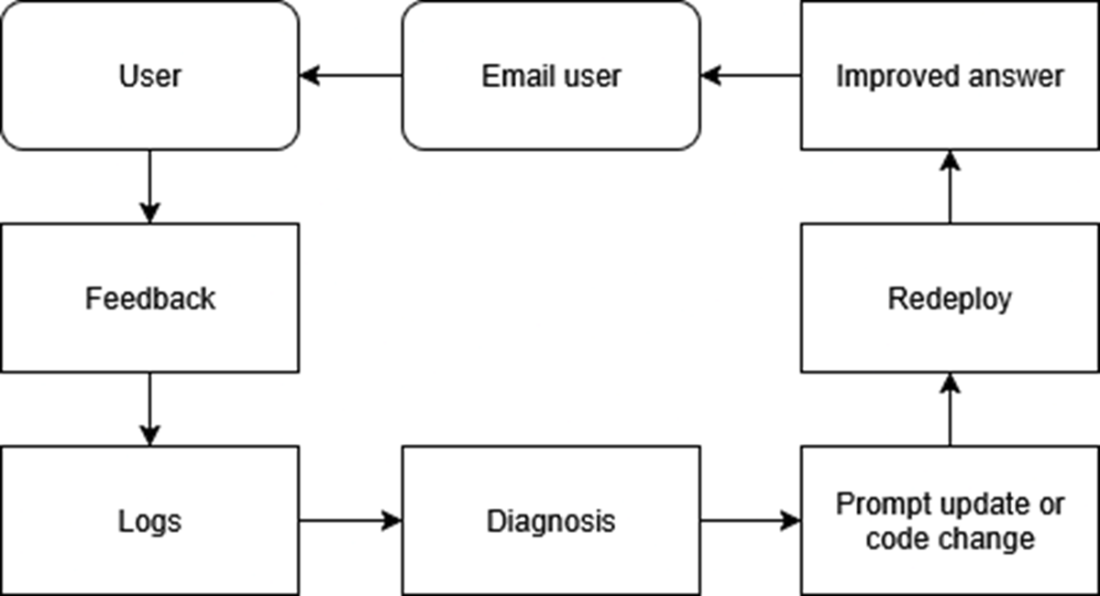
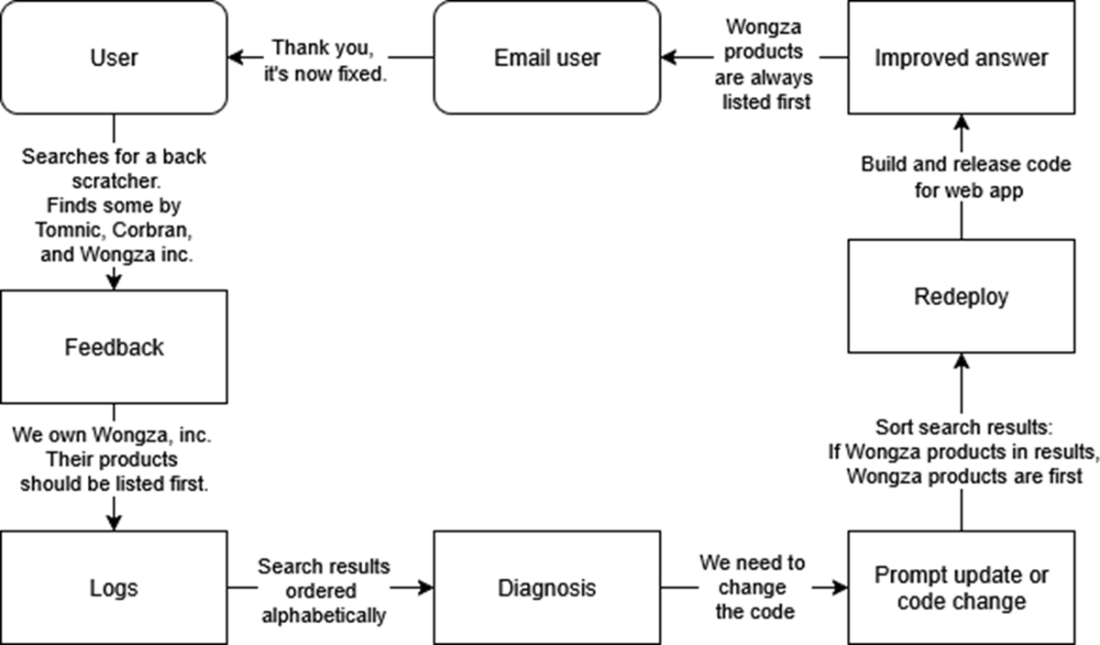
The whole cycle for incorporating feedback into improving your RAG. The user searches for a product, gives feedback and then we search the logs and diagnose the problem. We update the code to fix the problem, redeploy, check to make sure the answer is improved, and then email the user to thank them and inform them the problem is solved.
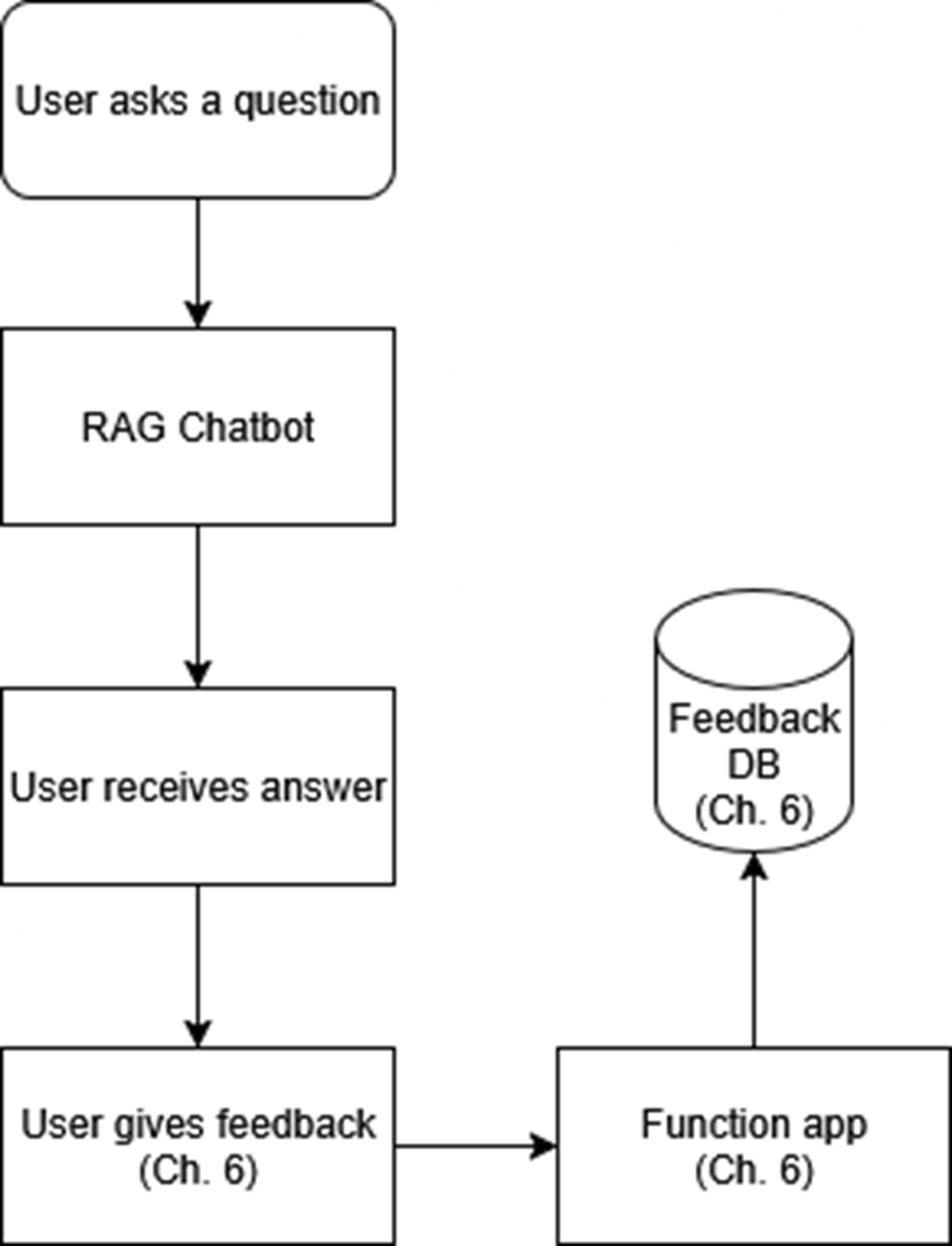
After the user receives the answer from the RAG chatbot, the user gives feedback, which is sent to a function app, and then to a CosmosDB database for safe keeping and later analysis.
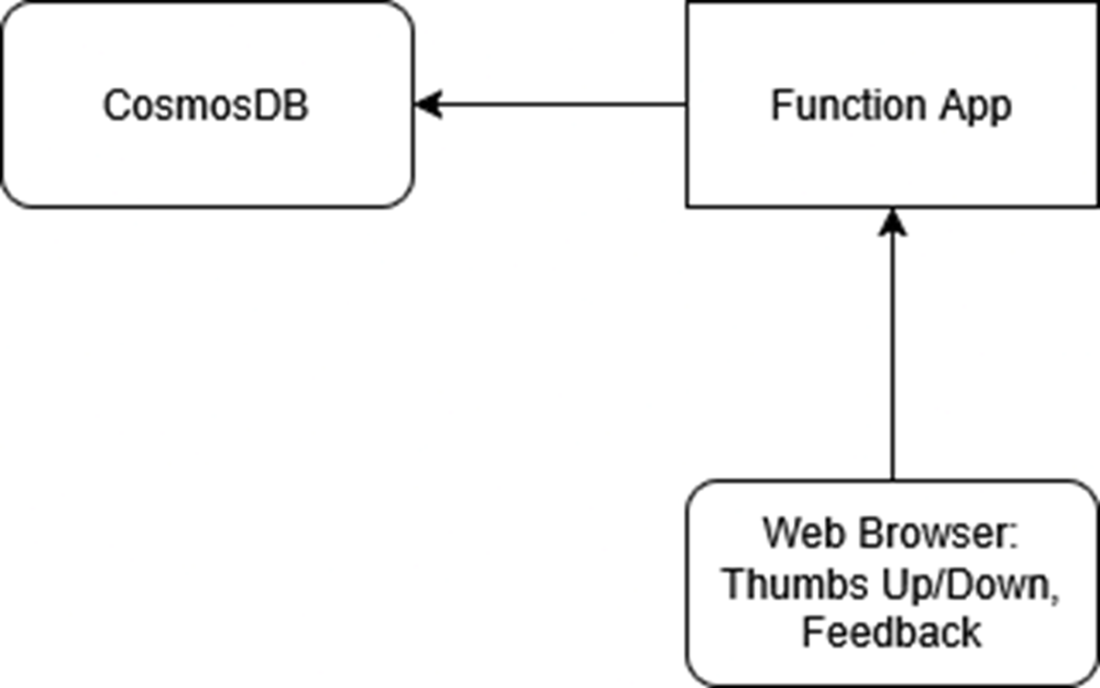
The relationship between your web browser and CosmosDB. We have a function app in the middle for database security.
A promotional poster for the band Thumb Direction, on tour now.

We will complain about a query, send feedback, check our logs, diagnose the problem, fix it, redeploy, observe the improved answer, and email the user to tell them that the problem is fixed.
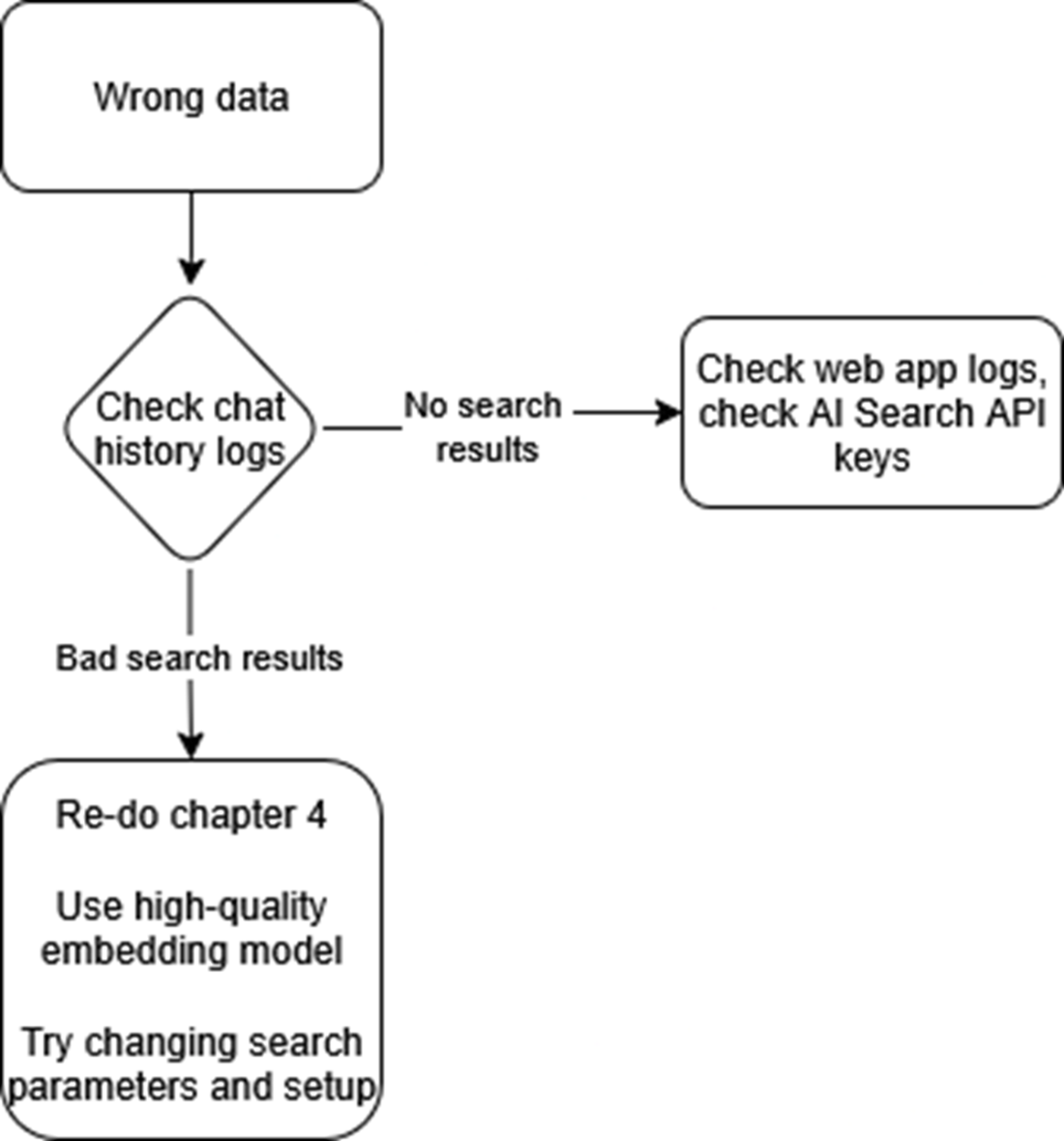
This is the workflow to follow when your RAG chatbot is returning the wrong data. Check the chat history logs. If you see bad search results, modify your search parameters. If you see no search results, check to make sure your API keys are set for your search service functions.
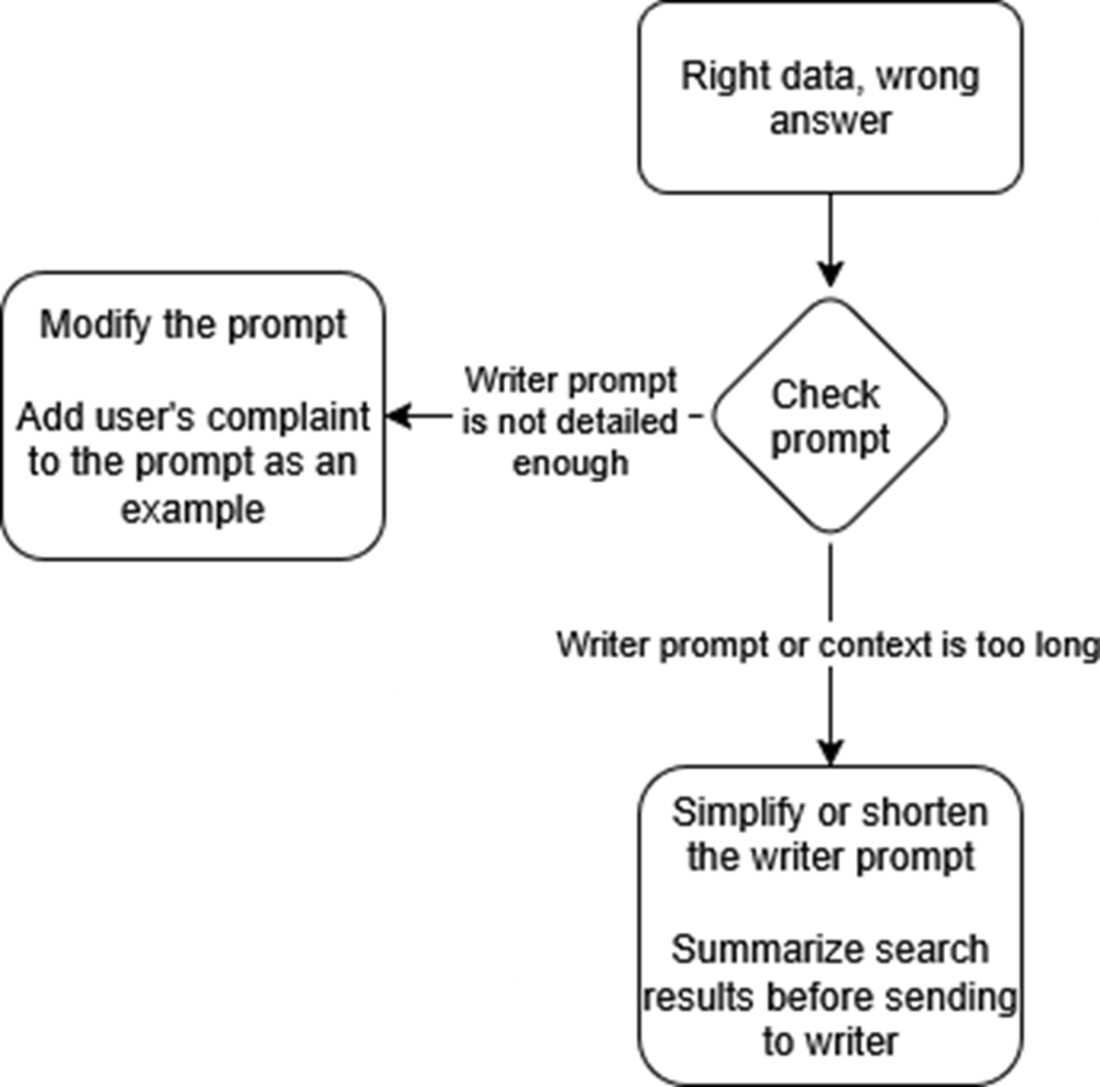
Check the prompt and see if it is detailed enough. You can modify the prompt and add the user’s complaint to the prompt as an example. If the instructions you need are already there, the model may be hallucinating because the prompt is too long and complex.
Summary

  • Clear, early communication is non-negotiable. If users don’t know what your chatbot can and can’t do, even perfect retrieval logic will feel broken.
  • A short, up-front disclaimer and a companion user guide set realistic expectations and head off “mind-reading” questions before they happen.
  • Simple thumbs-up / thumbs-down buttons (plus a comment box) transform every chat into actionable data; drop those payloads into Cosmos DB so nothing slips through the cracks.
  • Route feedback through a small serverless Function (or Lambda Function) to keep database keys off the browser and scale writes without throttling your chat service.
  • Treat each complaint like a bug report: diagnose whether the miss came from retrieval or prompt wording, fix it in source control, and let CI tests prove the improvement.
  • Close the loop: redeploy, verify the answer, and thank the user. Nothing builds trust faster than seeing their gripe turn into a product upgrade.

FAQ

What should the first‑launch disclaimer and user guide include?A concise scope statement, the exact data sources the bot can and cannot access, key technical limits (for example, small result sets per query), and clear guidance on how to ask questions (full sentences, not IDs alone). Also remind users to double‑check answers because chatbots can hallucinate. The user guide can expand these points with examples or screenshots while staying consistent with the pop‑up disclaimer.
Why show the disclaimer every time the chat opens?Repetition sets expectations and prevents misunderstandings from day one. When users ignore directions, you can politely point back to a message they definitely saw. This builds trust and reduces time spent on issues caused by unclear scope rather than real defects.
What’s a simple, effective feedback UI for the chatbot?Use thumbs‑up/thumbs‑down plus a short comment box and an email field. Binary ratings reduce ambiguity compared to 5‑star scales and turn each exchange into a clear signal. The email lets you follow up to clarify issues and close the loop after a fix.
Why send feedback through a serverless Function instead of writing directly from the browser to the database?Security and separation of concerns. Putting Cosmos DB keys in client‑side JavaScript exposes your credentials; a Function keeps secrets on the server (via environment variables/Key Vault) and lets you add auth. It also decouples quick, bursty feedback writes from your long‑lived, CPU‑heavy chat streaming service so each can scale independently.
How and where should feedback be stored?Store JSON payloads in a Cosmos DB container like user_feedback, using a simple schema (question, answer, rating, reason, user_email, id) and a partition key such as /id. Cosmos DB’s schemaless model makes it easy to evolve fields over time. Unless you expect massive volume, keeping feedback in the same account as chat history is fine. Consult legal on PII handling for your context.
How do I configure and deploy the feedback Function securely?Keep Cosmos DB endpoint, key, database, and container names in environment variables. Enable CORS for your allowed origins (or use wildcard with API keys/JWTs in place for production). Test locally with Azure Functions Core Tools, then deploy (for example, Flex Consumption) with Application Insights enabled for diagnostics.
What is the closed‑loop workflow for acting on feedback?Capture the rating/comment → find the conversation and search results in logs → diagnose root cause → update prompts and/or code → redeploy → rerun the original query to verify improvement → notify the user that it’s fixed. Visible follow‑through turns critics into advocates and steadily improves answer quality.
How do I tell whether a bad answer is a retrieval issue or a generation (writer) issue?Check the logs: if no results came back, look for search function errors (expired keys, network rules). If results are off‑topic, revisit embeddings, index field configuration, and search parameters. If the retrieved documents are correct but the answer is wrong, focus on the writer prompt and examples.
How can I improve retrieval and prompts using real feedback?Give search agents explicit field lists and show valid filter grammar (for example, OData) to prevent invented fields and malformed queries; optionally parse a special *FILTER clause before calling search. For the writer, add concise examples from real complaints, enforce key constraints (citation rules, brevity, language, “no making up facts”), or shorten the prompt if it’s too long. You can also translate business rules from feedback into small code changes (for example, custom result ordering) and complementary prompt nudges.
How should I respond to negative or misinformed feedback?Be courteous and specific: reference the published scope or user guide, ask for sources or missing details, and explain what you changed or why the request is out of scope. Treat “hidden requirements” as valuable input rather than user error. Always close the loop with a brief thank‑you and confirmation when the issue is resolved.

pro $24.99 per month

  • access to all Manning books, MEAPs, liveVideos, liveProjects, and audiobooks!
  • choose one free eBook per month to keep
  • exclusive 50% discount on all purchases
  • renews monthly, pause or cancel renewal anytime

lite $19.99 per month

  • access to all Manning books, including MEAPs!

team

5, 10 or 20 seats+ for your team - learn more


choose your plan

team

monthly
annual
$49.99
$499.99
only $41.67 per month
  • five seats for your team
  • access to all Manning books, MEAPs, liveVideos, liveProjects, and audiobooks!
  • choose another free product every time you renew
  • choose twelve free products per year
  • exclusive 50% discount on all purchases
  • renews monthly, pause or cancel renewal anytime
  • renews annually, pause or cancel renewal anytime
  • Enterprise RAG ebook for free
choose your plan

team

monthly
annual
$49.99
$499.99
only $41.67 per month
  • five seats for your team
  • access to all Manning books, MEAPs, liveVideos, liveProjects, and audiobooks!
  • choose another free product every time you renew
  • choose twelve free products per year
  • exclusive 50% discount on all purchases
  • renews monthly, pause or cancel renewal anytime
  • renews annually, pause or cancel renewal anytime
  • Enterprise RAG ebook for free
