Overview

5 Hosting, scaling, and load testing

This chapter takes a RAG chatbot from “works on my machine” to a resilient, production-ready service. It promotes statelessness as the core deployment principle—containers as the immutable unit, configuration via environment variables, and durable state kept outside the runtime—so any replica can handle any request. The story ties packaging, observability, and automation together into a disciplined loop: build a container, deploy it reliably, instrument it with logs and metrics, validate it under pressure, and scale or optimize based on data.

Concretely, the prototype’s local SQLite is replaced with Cosmos DB for durable, cheap, globally accessible chat logs, and the code is refactored to upsert structured records and to return a final answer in test mode so integration checks pass. Dependencies are pinned, a lean Docker image (Python 3.11 slim plus required system libs) is built, secrets are kept out of the image, and a quick WebSocket smoke test proves parity with local runs. The deployment path then standardizes on Azure: push images to a private registry, host on Azure Web App (with WebSockets, a sensible plan tier, and Application Insights), inject configuration as environment variables, and wire GitHub Actions to build, test, push, and roll out on every commit—turning “git push” into a safe, repeatable release.

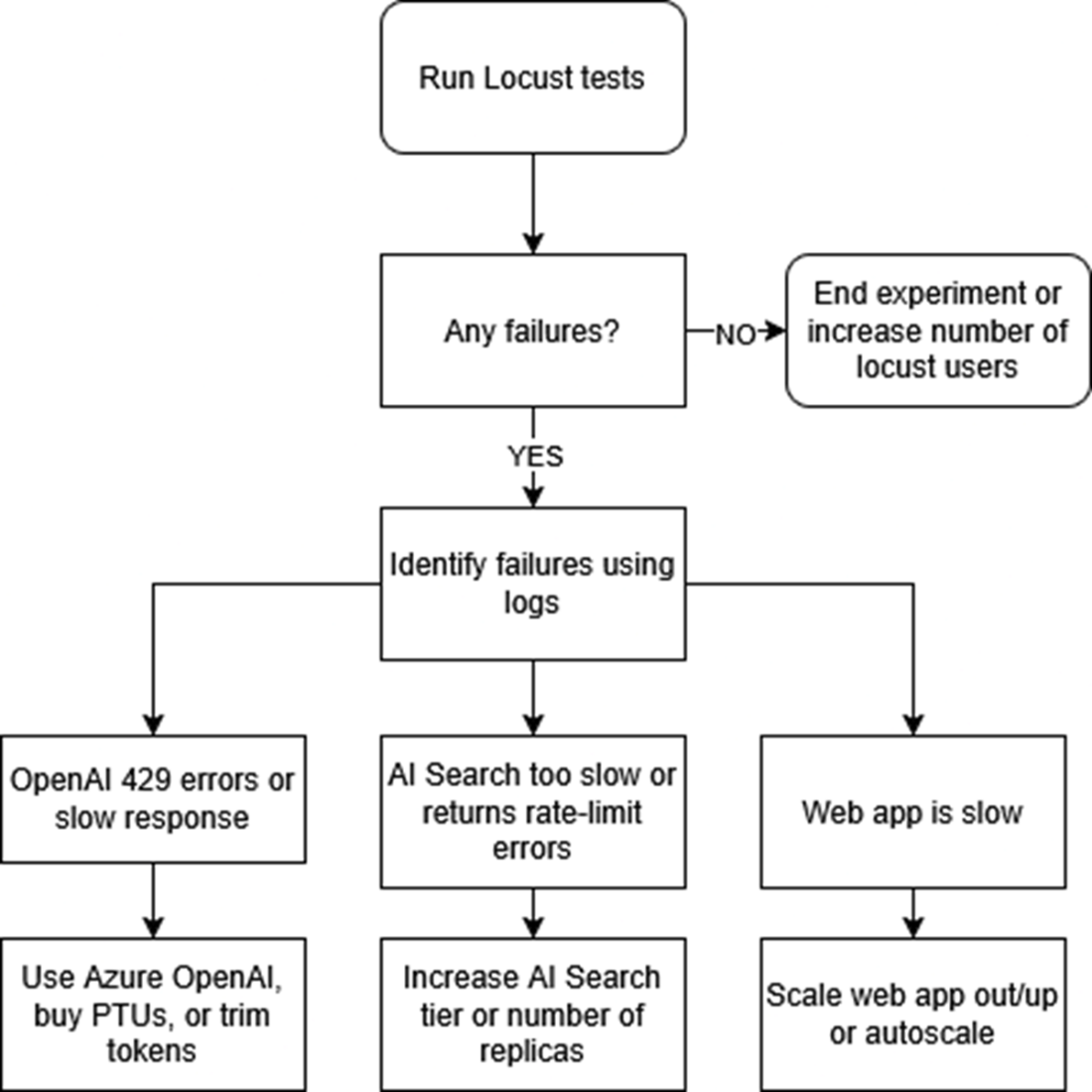
To ensure the service survives real traffic, the chapter adds structured logging and introduces Locust to simulate concurrent WebSocket users, capturing latency, error rates, and throughput while streaming logs and Application Insights highlight bottlenecks. Common pressure points and remedies are mapped: alleviate model 429s by increasing model throughput (or moving to Azure OpenAI and trimming token usage), resolve slow responses by scaling the App Service up or out, and remove search throttling by stepping up Azure AI Search capacity. The result is a pragmatic feedback cycle—deploy, observe, load-test, adjust, repeat—that converts scaling from guesswork into a measured, cost-aware practice.

This flowchart shows the key stages of this chapter. We will start by packaging our app as a container, then deploy it to Azure’s app service, then test it remotely. Finally, we will perform load testing using logging and simulated users with Locust.

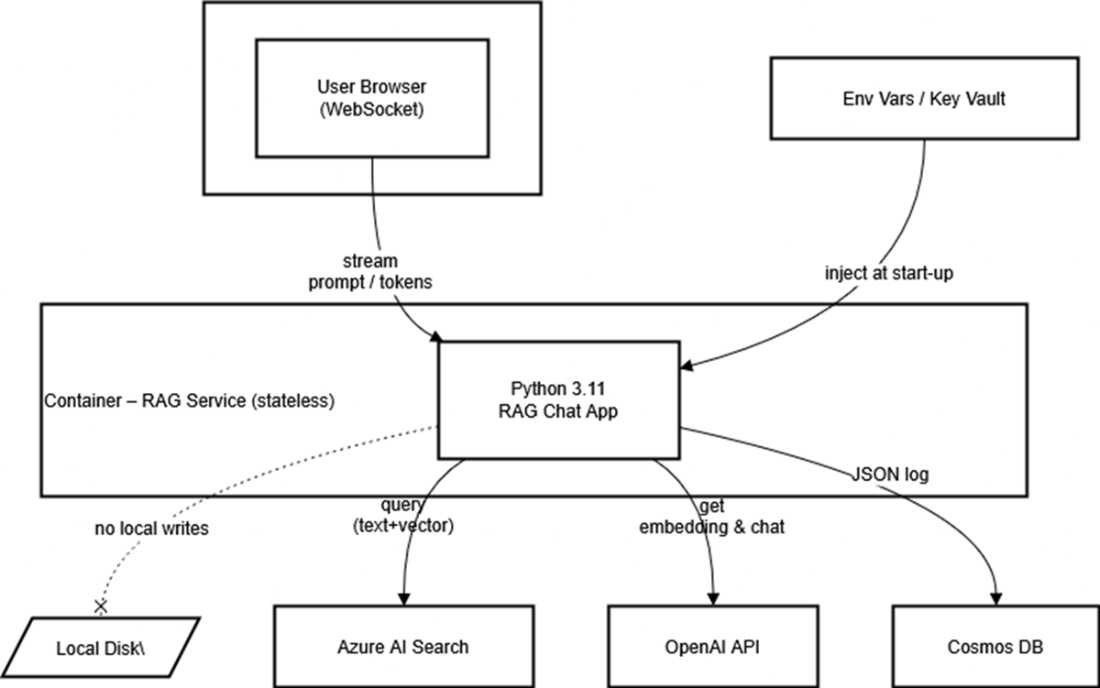
The RAG container keeps no secrets and writes nothing to its own disk; it simply streams prompts from the browser, fans out to AI Search and OpenAI for retrieval and generation, and drops a JSON record into Cosmos DB for posterity. All configuration arrives at launch via environment variables or a key vault. The dashed line to “Local Disk” drives home the point: local storage is strictly off-limits in a truly stateless service.
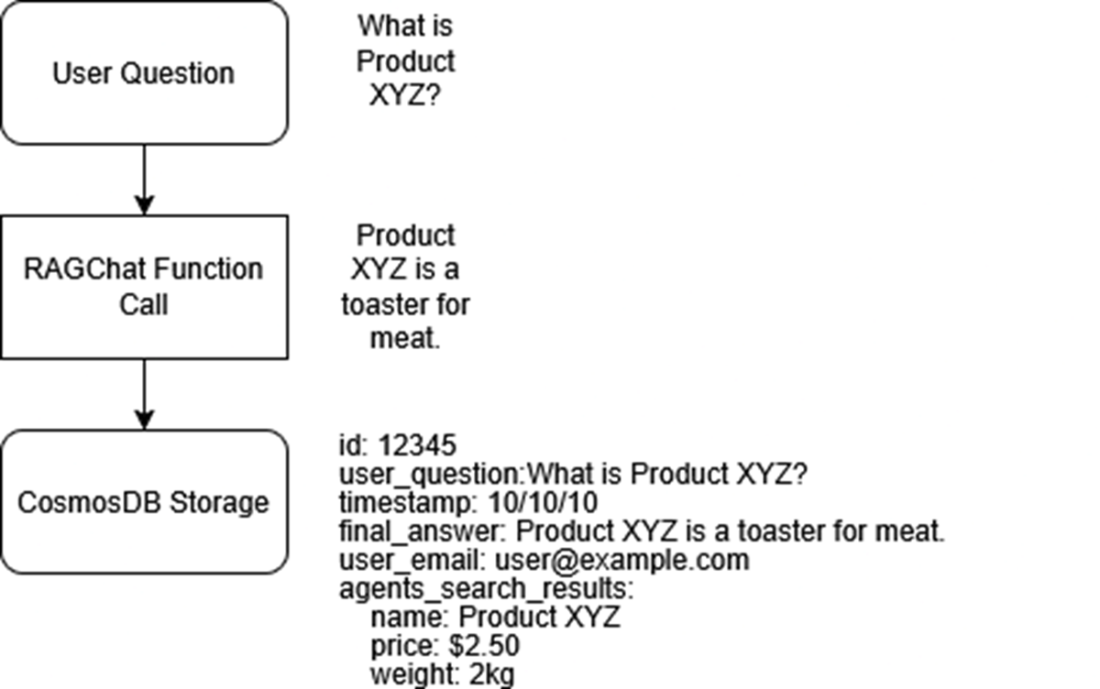
An overview of the new logging path: each answer that streams to the user is also packaged into a JSON document and sent over HTTPS to Cosmos DB, where it can be queried later to debug slow responses, audit model behaviour, or train future ranking tweaks..
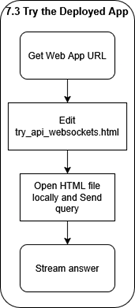
In this section, we will get our web app’s URL, add it to our test website, open it, and send a query, then wait for the streaming answer to come back.
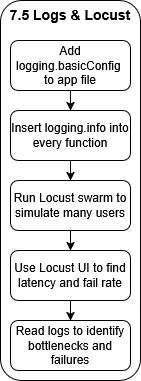
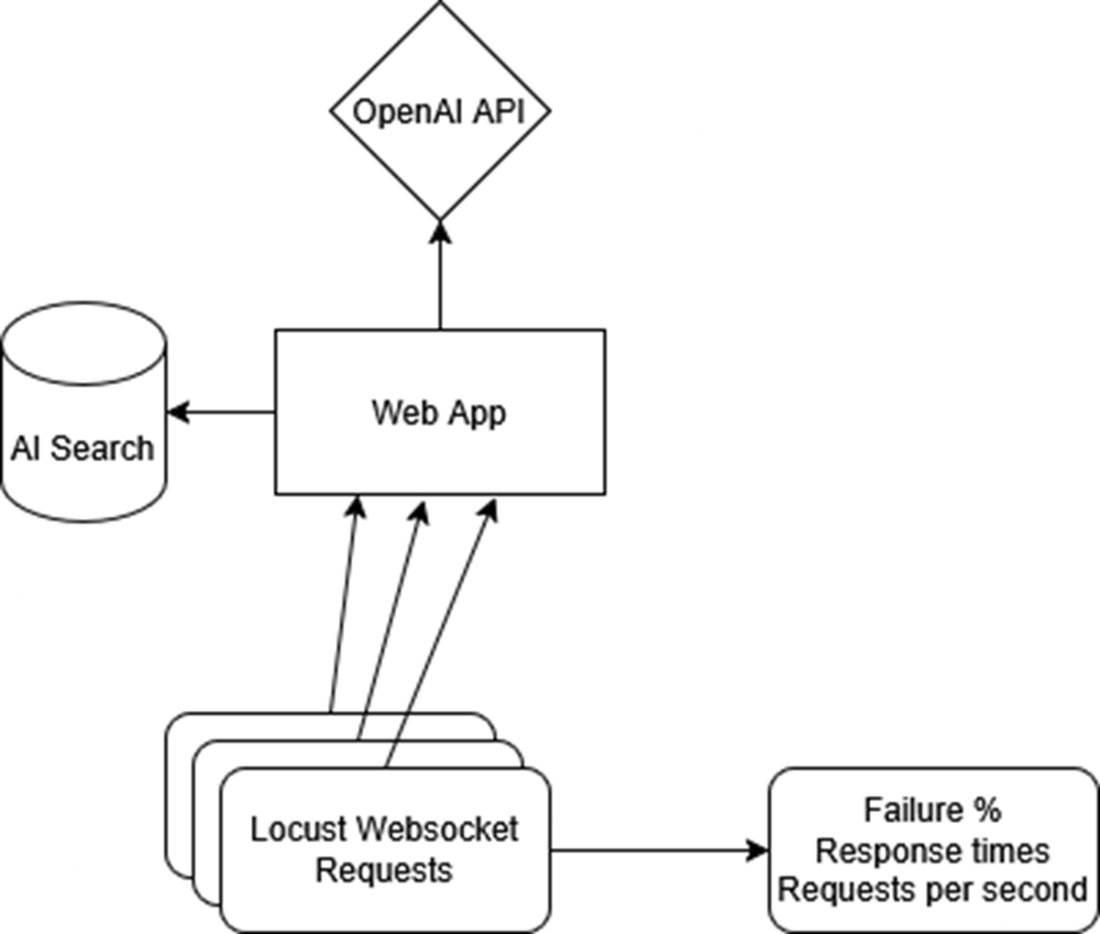
We will add logging to our file to catch any errors, then run Locust to simulate users and cause our app to fail. We will use the Locust dashboard and logs to find bottlenecks so we can fix them.
A Locust swarm batters the public Web App endpoint while Application Insights logs every request and latency spike. Those metrics show up in real time, giving you the data needed to nudge the App Service scale slider from one replica to many.
If we experience any failures during out Locust tests, we first look at our logs in our web app. Next, once we have identified the error, we fix it by scaling out that particular part of our system. For example, if we are getting rate limits from OpenAI, we increase the amount of requests we can send.
Summary

  • Rolling out a RAG app is easier when you pair an Azure Web App with GitHub Actions, because every code push magically turns into a live app.
  • By moving chat logs into Cosmos DB and pinning every package in requirements.txt, we turned our scripts into cloud-worthy code that can reboot safely and retain chat logs.
  • Setting up a CI/CD pipeline means tests run automatically on each commit, so broken code gets caught in the pipeline instead of embarrassing you in front of real users.
  • Adding friendly logging.info() calls throughout the code gives us play-by-play insight, so when something misbehaves under load we can trace the exact moment and function where it stumbles.
  • Locust lets us unleash a pretend stampede of users, revealing performance potholes in a safe sandbox, so we can prepare for the real users.
  • When bottlenecks appear, we learned to crank up AI Search tiers, boost our OpenAI token quotas, or spin up extra Web App instances—scaling only what’s necessary to keep response times snappy without lighting our budget on fire.

FAQ

What does “stateless” mean for this RAG app, and why does it matter in production?Stateless means any replica can handle any request without relying on local disk or in-process memory that must persist between restarts. Durable data (chat logs) and configuration live outside the container: logs go to Cosmos DB, and settings arrive via environment variables. This enables fast restarts, safe scaling to multiple instances, and consistent behavior across laptops, Azure App Service, and Kubernetes. Containers reinforce this by packaging code, libraries, and ports into a single, repeatable artifact.
Why choose a managed container Web App instead of serverless functions?The chatbot streams over WebSockets and ships a fairly large Python stack—both are awkward for many serverless platforms (e.g., cold starts and ZIP size limits like 250 MB on AWS). App Service for Containers keeps sockets open reliably, avoids cold-start penalties, and runs your image exactly as built. You still get autoscaling and a managed front door with SSL, but without the serverless constraints that would complicate streaming and package size.
How do I persist chat logs if containers are replaceable and short‑lived?Move logs out of the container and into Azure Cosmos DB (serverless mode). Create a database (e.g., ragchat_info) and a container (e.g., ragchat_logs) with partition key /id, then write one small JSON document per user question using container.upsert_item(). Inject URI and KEY via environment variables (never bake them into the image), and perform the write after streaming the answer so latency is invisible to users. This provides durable, globally accessible audit trails while preserving statelessness.
What Dockerfile choices matter and why (base image, libraries, ports, command)?Use python:3.11-slim to minimize size and ensure consistent runtime versions with your pinned requirements.txt. Install libgomp1 because libraries like scikit-learn rely on OpenMP; without it you can see crashes. Expose port 8000 because the app listens there and hosting needs to route traffic correctly. Start with “python app.py” since the Autogen WebSocket server manages its own asyncio loop; no extra WSGI/ASGI wrapper is required.
How do I keep secrets out of images and source control?Store keys in a local .env file but add .env to .dockerignore so it never enters the image. In Azure App Service, define the same values as environment variables (you can paste a JSON blob in Advanced edit). In GitHub, put them in Actions secrets and bind the workflow to an environment (e.g., Production) so tests and builds receive secrets at runtime. This keeps one immutable image reusable across environments without leaking credentials.
How do I build, run, and smoke‑test the container locally over WebSockets?Build with “docker build -t ch5-image .” and run with “docker run -it --env-file .env -p 8000:8000 ch5-image”. Open the provided try_api_websockets.html and point it to ws://localhost:8000 (or 8080 on Windows if needed). Type a question and confirm tokens stream back. If nothing appears, read the container logs in the terminal to diagnose configuration or connectivity issues.
What’s the high‑level Azure deployment flow (ACR + App Service + image pull)?Create an Azure Container Registry (enable Admin user), tag your image with “.azurecr.io/” and docker push it. Create an Azure Web App (Linux, Publish: Container) on at least B1 to avoid WebSocket throttling; enable Application Insights, and set the startup command to “python app.py”. In Deployment Center, connect the app to your GitHub repo and ACR so each push rebuilds, pushes, and redeploys the image automatically. Finally, set all required environment variables in the Web App’s Configuration.
How do I wire CI/CD with GitHub Actions, including tests for a streaming app?In your workflow, set “environment: ” so GitHub injects secrets. Add a test stage that runs “python -m pytest -s” with “test_environment=True” so your RAGChat function returns the final answer (instead of only streaming) for assertions. The pipeline then builds the same container used in production, runs tests with live services (Cosmos, Search, OpenAI), pushes to ACR, and instructs App Service to pull the new image only when tests pass.
How do I load test a WebSocket RAG endpoint with Locust?Install “locust websocket-client” and write a locustfile.py that creates a WebSocket to your wss:// Web App URL, sends a question payload, times connect/send/recv, and reports via events.request.fire. Start Locust (http://localhost:8089), enter user count and spawn rate, and watch latency, RPS, and failures live. Keep Azure’s Log stream and Application Insights open during the test to correlate spikes and errors with code paths.
When Locust finds bottlenecks, what should I scale or change first?429 rate limits from OpenAI: move to Azure OpenAI, deploy in-region, and consider Provisioned Throughput Units; also cut token usage (e.g., fewer retrieved chunks). Slow or stalled responses: scale App Service up (more CPU/memory) or out (more instances via Scale out). Search throttling or empty results under load: raise your Azure AI Search tier/replicas in Settings → Scale. Use logs and Insights to pinpoint the chokepoint, make a single targeted change, retest, and iterate.

pro $24.99 per month

  • access to all Manning books, MEAPs, liveVideos, liveProjects, and audiobooks!
  • choose one free eBook per month to keep
  • exclusive 50% discount on all purchases
  • renews monthly, pause or cancel renewal anytime

lite $19.99 per month

  • access to all Manning books, including MEAPs!

team

5, 10 or 20 seats+ for your team - learn more


choose your plan

team

monthly
annual
$49.99
$499.99
only $41.67 per month
  • five seats for your team
  • access to all Manning books, MEAPs, liveVideos, liveProjects, and audiobooks!
  • choose another free product every time you renew
  • choose twelve free products per year
  • exclusive 50% discount on all purchases
  • renews monthly, pause or cancel renewal anytime
  • renews annually, pause or cancel renewal anytime
  • Enterprise RAG ebook for free
choose your plan

team

monthly
annual
$49.99
$499.99
only $41.67 per month
  • five seats for your team
  • access to all Manning books, MEAPs, liveVideos, liveProjects, and audiobooks!
  • choose another free product every time you renew
  • choose twelve free products per year
  • exclusive 50% discount on all purchases
  • renews monthly, pause or cancel renewal anytime
  • renews annually, pause or cancel renewal anytime
  • Enterprise RAG ebook for free
