3 Search service ingestion
This chapter challenges the assumption that vectors and embeddings are mandatory for RAG. The core objective is not “find the most similar embedding,” but “retrieve the right passage of text.” Mature text search excels at messy, human queries with tools like filters, fuzzy matching, typo tolerance, and semantic ranking, and hybrid search (keywords plus vectors) often outperforms vector-only approaches in accuracy and debuggability. The authors focus on Azure AI Search because it reliably delivered fast, precise retrieval at scale in their experience, while acknowledging viable alternatives and trade-offs. Compared with rigid and slow SQL lookups on large datasets, a dedicated search service yields quicker, more flexible results; however, it comes with setup complexity, costs, and isn’t meant for analytical aggregations.
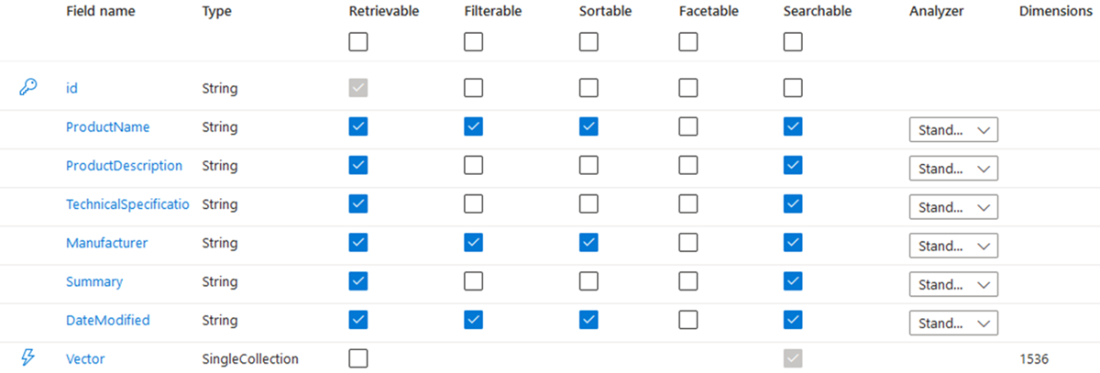
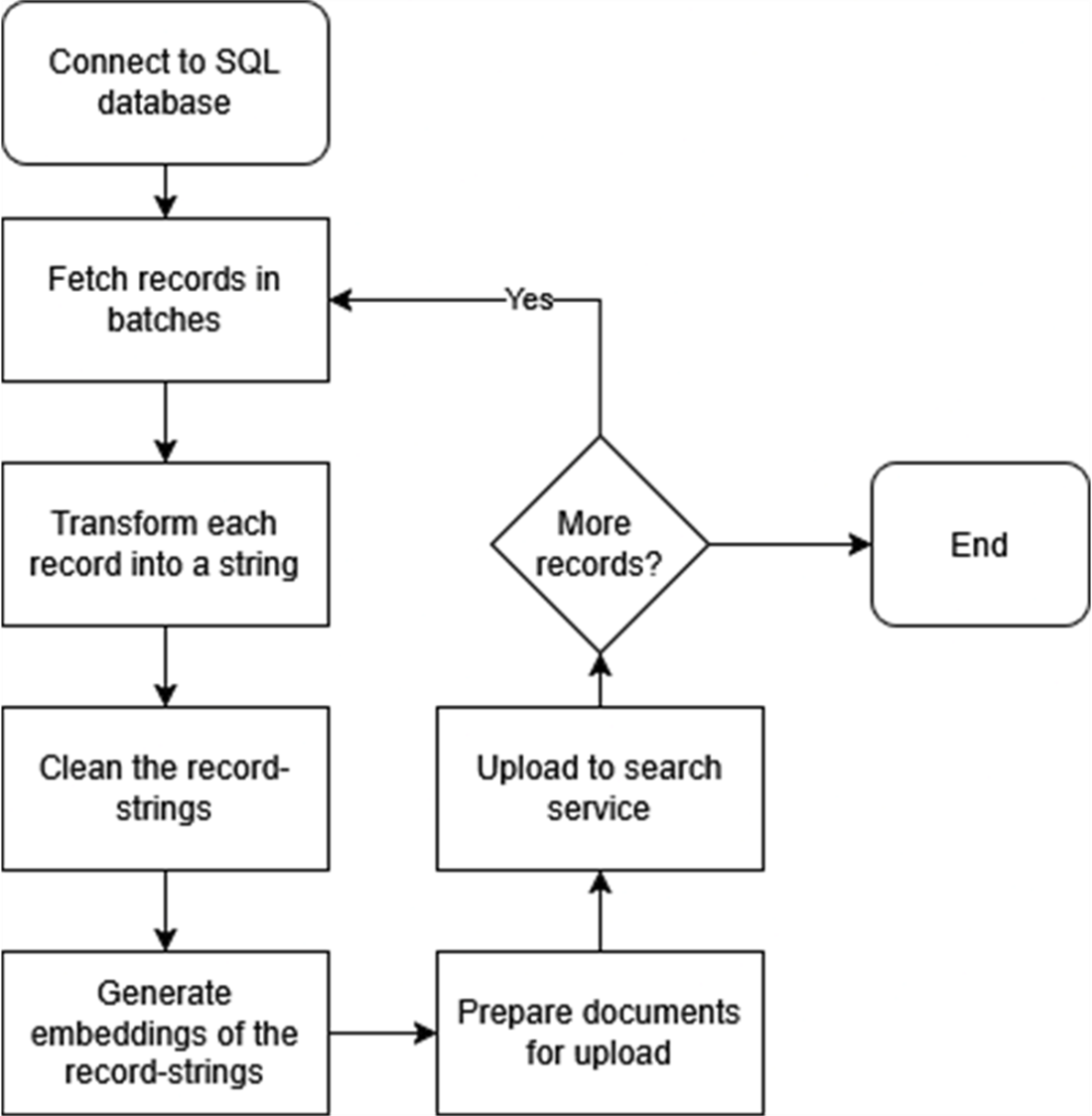
The chapter then walks through ingesting structured SQL data into a search index designed for hybrid retrieval. You create an index with key text fields (for example, product name, description, specs, manufacturer), a combined Summary field, and a Vector field sized to the embedding model (1536 dimensions). Field capabilities (retrievable, filterable, sortable, facetable, searchable) are chosen deliberately, and cosine similarity with exhaustive KNN is selected for small datasets. An ingestion pipeline processes records in batches: fetch from SQL, summarize the row into a coherent string, clean problematic characters, generate embeddings (for example, text-embedding-3-small with 1536 dimensions), and merge-or-upload the document (ID, original fields, summary, vector, and DateModified) to Azure AI Search. The workflow includes progress tracking, options for asynchronous embedding to speed up large jobs, and careful credential management.
With data loaded, you query using hybrid search: embed the user query for semantic matching while also running a keyword query to capture exact and partial term matches, then combine and rank the results. Practical features include OData filters (to narrow by attributes like manufacturer), field selection (to reduce payloads and token usage), and enforcing stable ordering (for consistent user experiences) by sorting on a chosen field or relevance score. The chapter also covers operational upkeep: scheduled updates for newly created or modified records, and a “soft delete” pattern (a Deleted flag) that triggers removal from the index by ID without reprocessing. Finally, the same principles extend to unstructured content by indexing per-page text from PDFs (plus embeddings and metadata), and even to images or video via multimodal-generated descriptions that are embedded and stored—ensuring a robust, maintainable retrieval layer that reliably surfaces the right text for RAG.
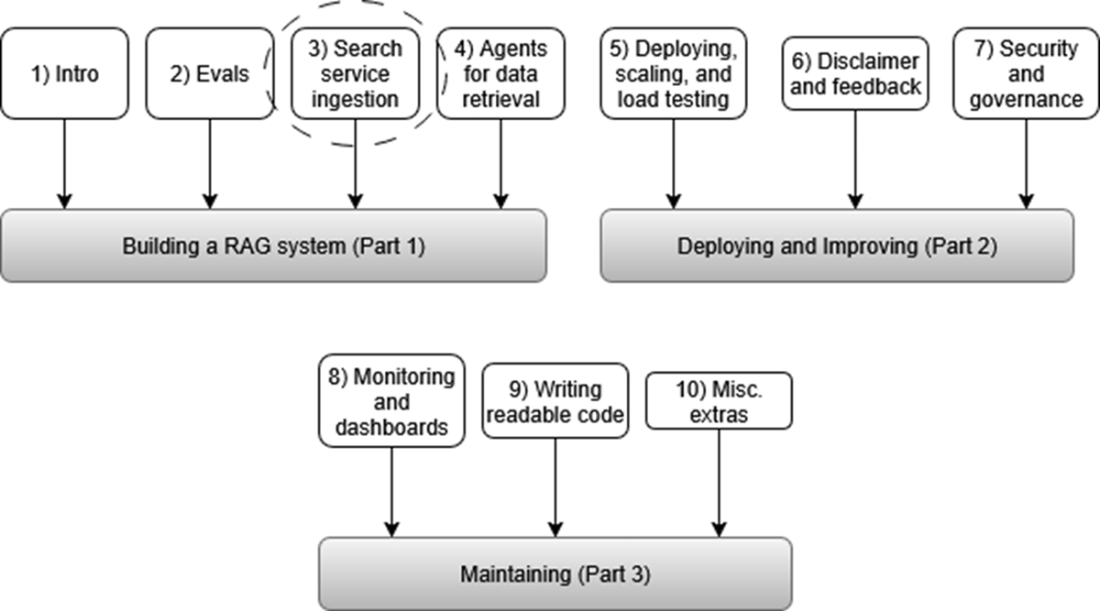
This flowchart shows the key stages of the RAG pipeline. The focus is on Search service ingestion (dashed circle), where raw data is preprocessed and embedded before being added to Azure AI Search for semantic search. This step bridges the transition from data preparation to retrieval.
A correctly set-up Azure AI Search Index. Make sure to set the Retrievable, Filterable, Sortable, Facetable, and Searchable columns exactly as shown in this image.
Workflow for ingesting structured SQL data into Azure AI Search. The process begins by connecting to an SQL database and fetching records in batches. Each batch is summarized, cleaned, embedded, and prepared as documents for upload. The pipeline loops through remaining records until all data is processed and uploaded.
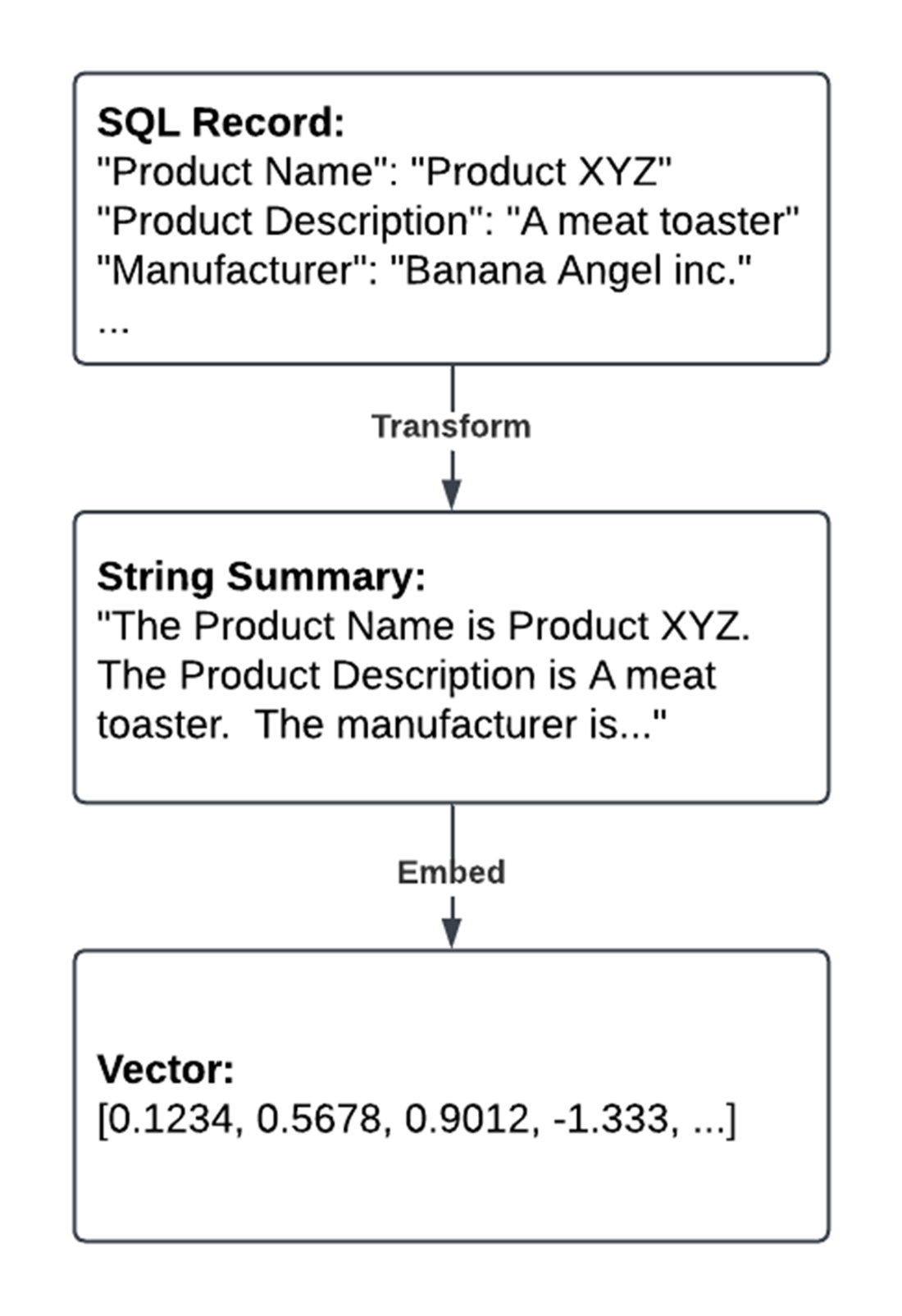
Converting an SQL record into a vector embedding. The process begins by transforming the raw SQL record into a natural language string summary. This summary is then passed through an embedding model to generate a vector representation, which can be used for vector search.
The iterative process for handling SQL records. The loop starts by connecting to the database and fetching the next batch of records. Each batch is summarized and embedded, with a counter updated to track progress. If no more records remain, the loop breaks, and resources like the cursor and connection are closed to ensure efficiency.
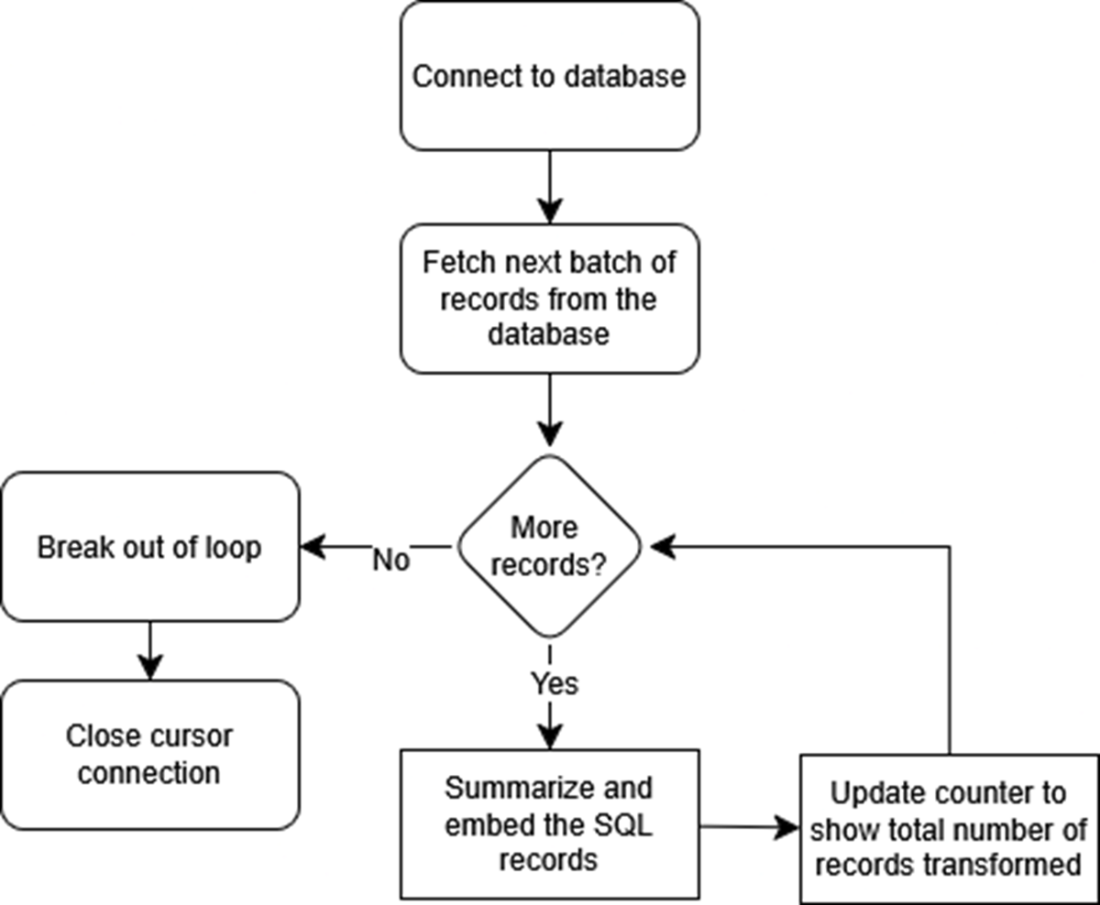
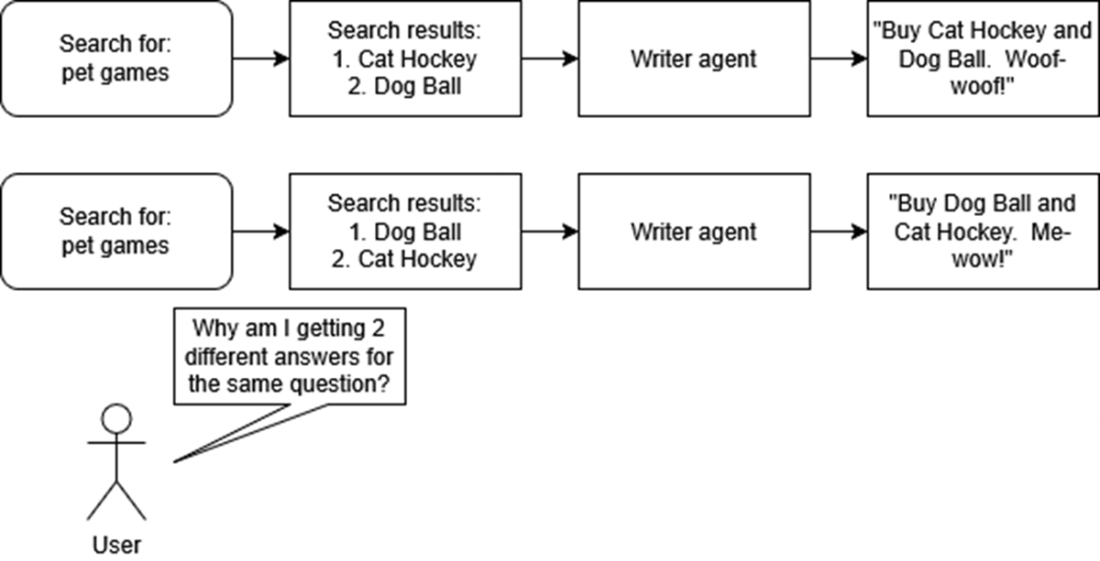
Illustration of user confusion caused by inconsistent search result ordering. Two identical searches for "pet games" return the same items in a different order, leading to contradictory responses from the writer agent. This highlights the importance of consistently ranked search results to ensure clarity and user trust.
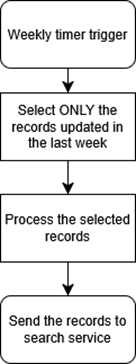
Workflow for updating records in AI Search. A weekly timer trigger initiates the process, selecting only the records that have been updated in the past week. These records are processed and then sent to AI Search, ensuring the system remains up-to-date with the latest data.
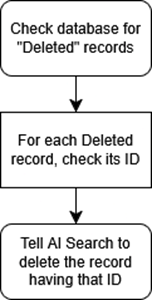
Process for handling "soft delete" records in AI Search. The workflow begins by checking the database for records marked as "Deleted." For each deleted record, its ID is retrieved and used to instruct AI Search to remove that entry from the index, ensuring the search index matches the source database.
Summary
- Azure AI Search may be more effective than many traditional vector databases. By combining text search, vector search, and natural language processing, Azure AI Search delivers results that are typically more relevant and precise.
- Setting up an Azure AI Search service and creating an appropriate search index requires defining the right fields for the data. This setup includes adding a vector field of the correct dimensionality and configuring vector search profiles to leverage both text and vector searches.
- Structured data like SQL records must first be transformed into text that is optimized for retrieval. This transformation involves summarizing the records, removing any unnecessary characters, and generating embeddings that capture the semantic meaning of the data.
- Uploading processed and embedded SQL records into Azure AI Search enables a hybrid search function that combines vector similarity with semantic understanding. This approach allows more efficient and accurate retrieval than relying on keyword matching or vector matching alone.
- Maintaining a synchronized search index is crucial when handling frequent data changes. Implementing code to update modified records and remove deleted ones in Azure AI Search ensures that the index remains current.

 Enterprise RAG ebook for free
