12 Tools and Tech for Modern Data Analytics
This chapter traces the rapid evolution of data work from manual, paper-based analyses to automated, code-driven workflows and highlights how each technological shift reshapes the analyst’s role. It emphasizes that the environment in which insights are delivered is as critical as the analysis itself, since clarity, interactivity, and discoverability determine impact. The overarching theme is to embrace change—cultivating new skills and adopting modern tools—to deliver faster, more scalable insights and create meaningful organizational value.
The chapter surveys the modern tooling landscape and how to use it effectively. Traditional visualization platforms (e.g., Tableau, Power BI) excel at intuitive dashboards but have limits in collaboration, long-form exploration, and refresh speed. Interactive notebooks (e.g., Jupyter, Google Colab, RStudio) and emerging notebook platforms (such as Hex, Deepnote, Mode) enable code-and-markdown workflows, collaboration, native charting, and report publishing. Data-powered apps (e.g., Streamlit, Shiny) support rapid prototyping and custom interactivity without heavy web development. Beyond tool choice, the chapter promotes building reusable “libraries of analyses” organized by topic with clear naming and documentation, reducing duplicate requests and raising data literacy. It also outlines self-service strategies—adding thoughtful filters, creating interactive reports, training stakeholders, and providing pre-aggregated data—to shift routine questions from analysts to business users while keeping analysts focused on higher-value work.
Finally, the chapter examines artificial intelligence—especially generative AI—and its growing role in analytics. It details where AI adds value (drafting content, accelerating coding, embedded assistants) and where it falls short (hallucinations, stale knowledge, context limits, bias, and energy costs), urging cautious and responsible adoption. A practical framework for prompt engineering—defining the task, audience, and format, then iterating for consistency—helps improve output quality and reliability. Looking ahead, the text anticipates continued AI integration across tools and workflows alongside sustained attention to ethics, risk, and societal impact. The closing message is clear: analysts who keep learning, systematize knowledge, enable self-service, and judiciously integrate AI will amplify their impact and help steer their organizations with data.
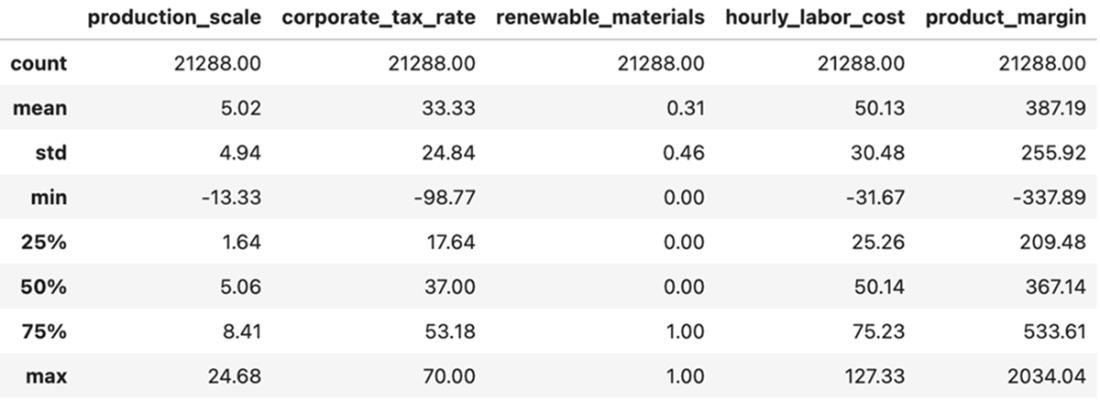
Datasets like the production_costs csv contain tens of thousands of rows. Can you imagine manually entering the data and calculating each of these summary statistics by hand?
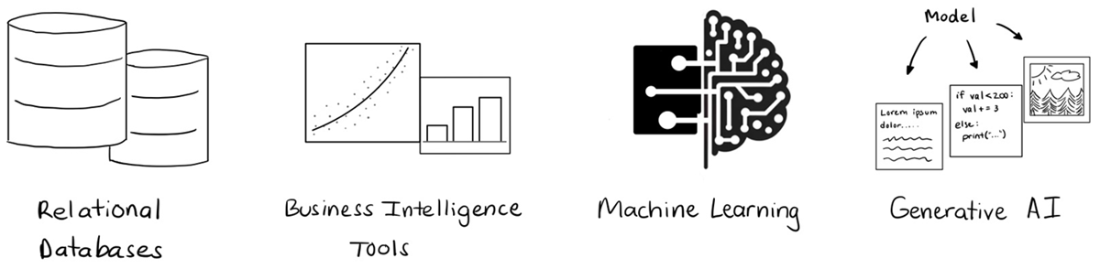
Many milestones in the past decades have transformed the field of data analytics.
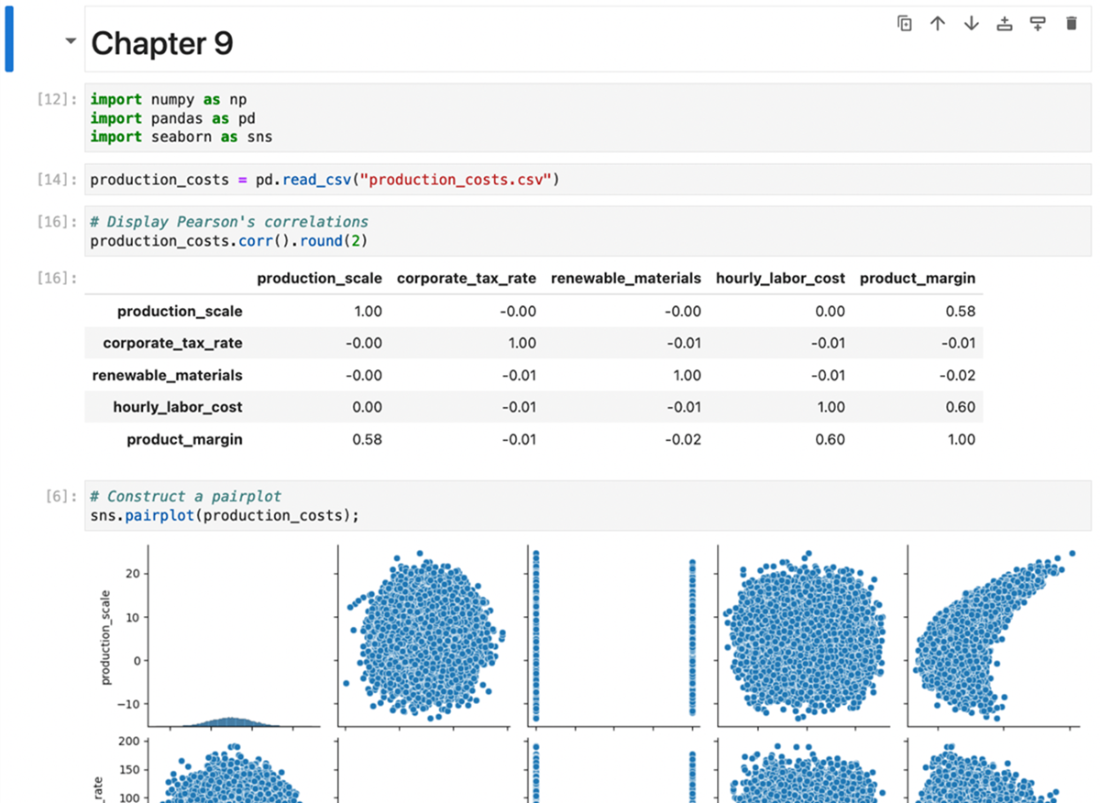
Notebooks are nearly ubiquitous in the data analytics space.
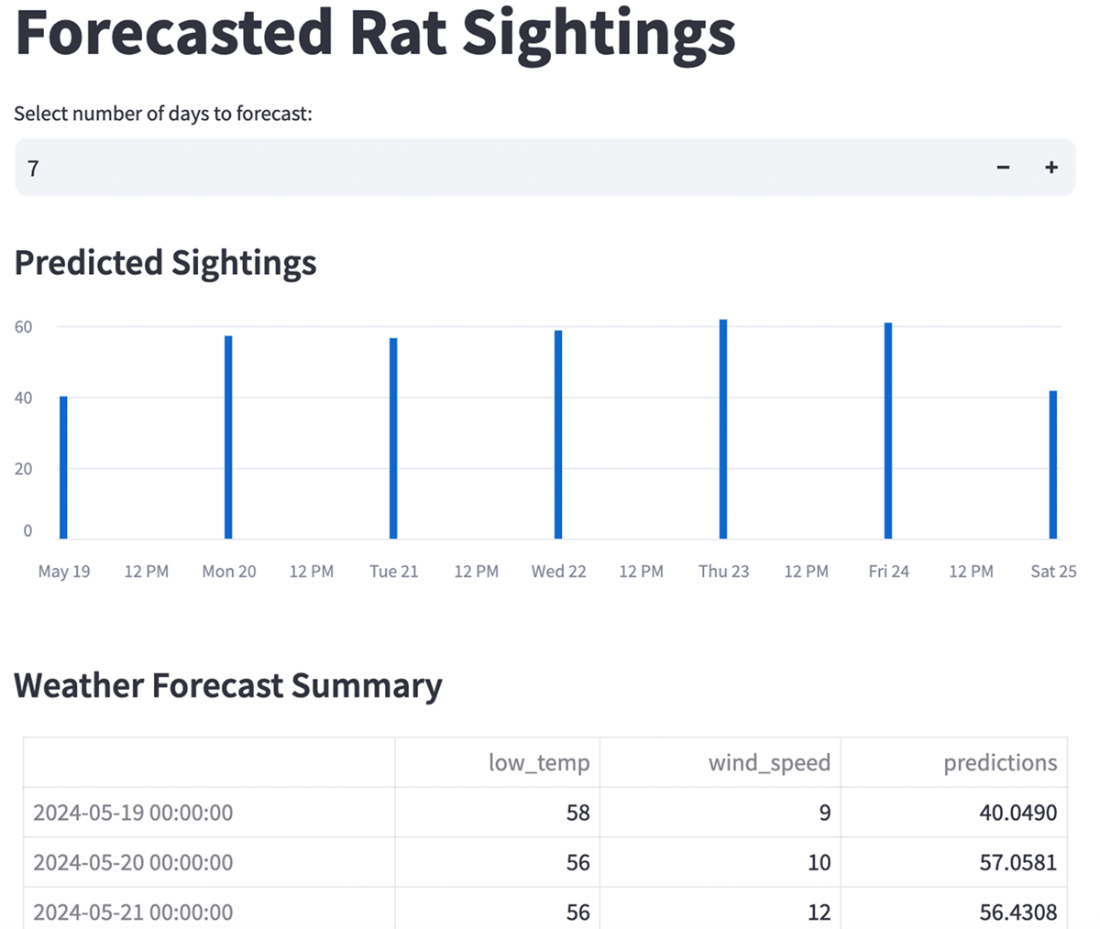
An interactive data powered app predicting rat sightings created using Streamlit.
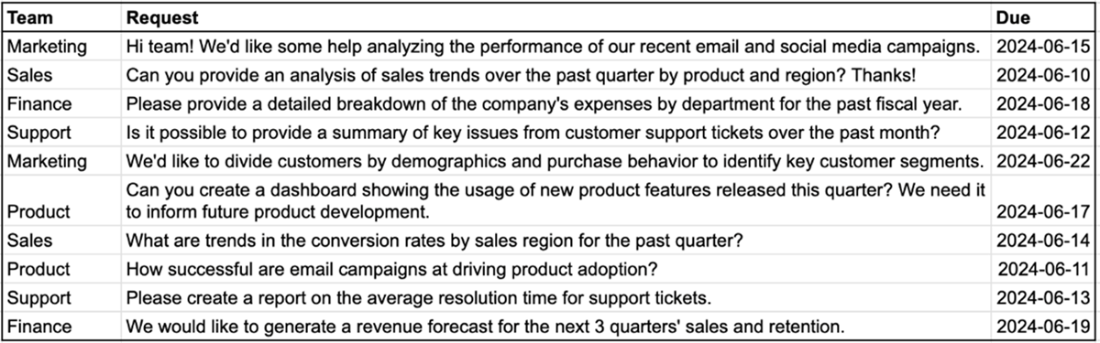
How many of these data requests seem like they overlap? Can they be answered by strategically creating and sharing resources with your stakeholders?
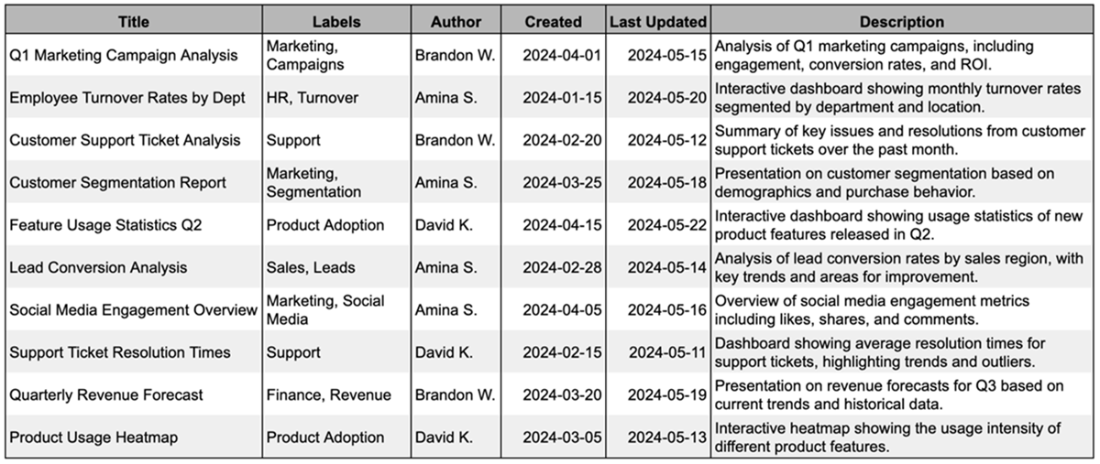
A library is a searchable reference of analyses with clear labels and naming conventions.
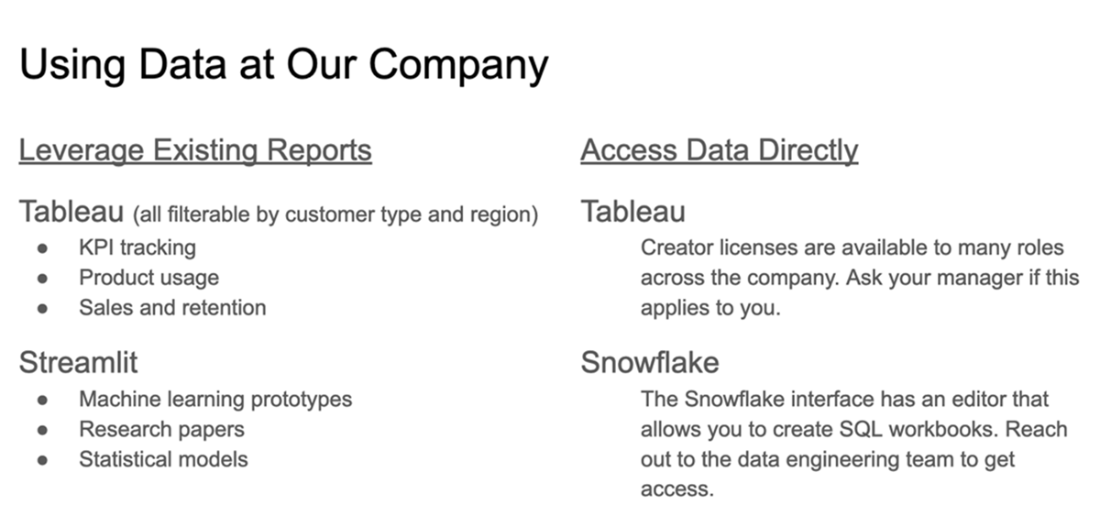
Adding information about your data and self-service tools to new employee onboarding documentation can help maximize their visibility.
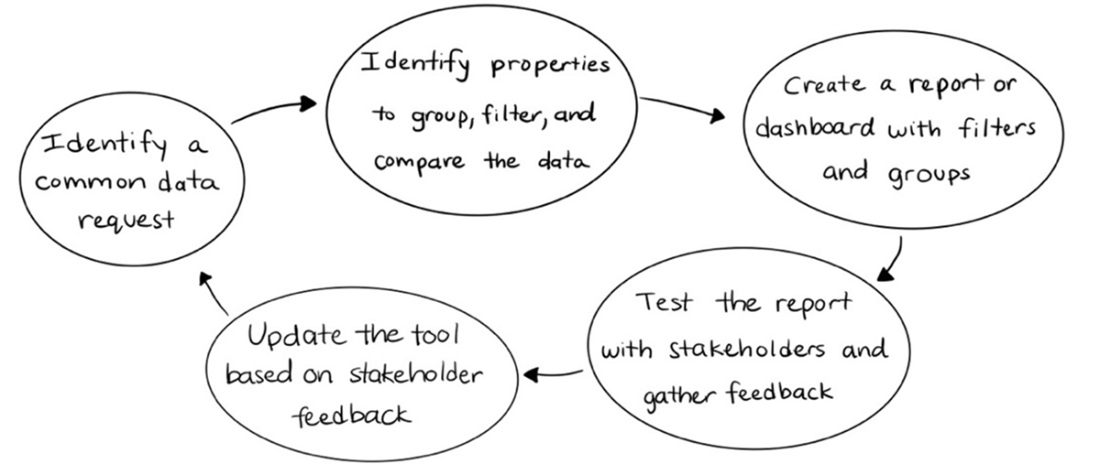
Creating self-service tools involves routinely evaluating requests, creating or updating resources, and circulating the updates with your stakeholders.
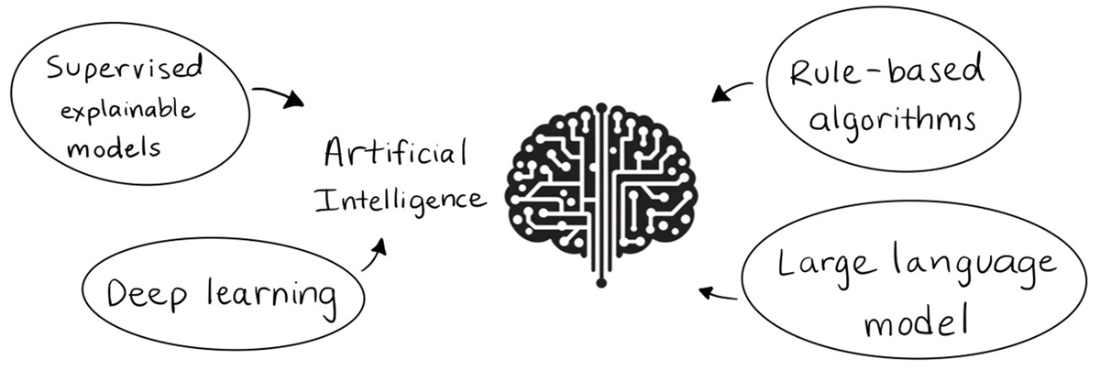
Artificial intelligence can incorporate many techniques and is often applied to computer systems that learn from new data and are used in decision-making.
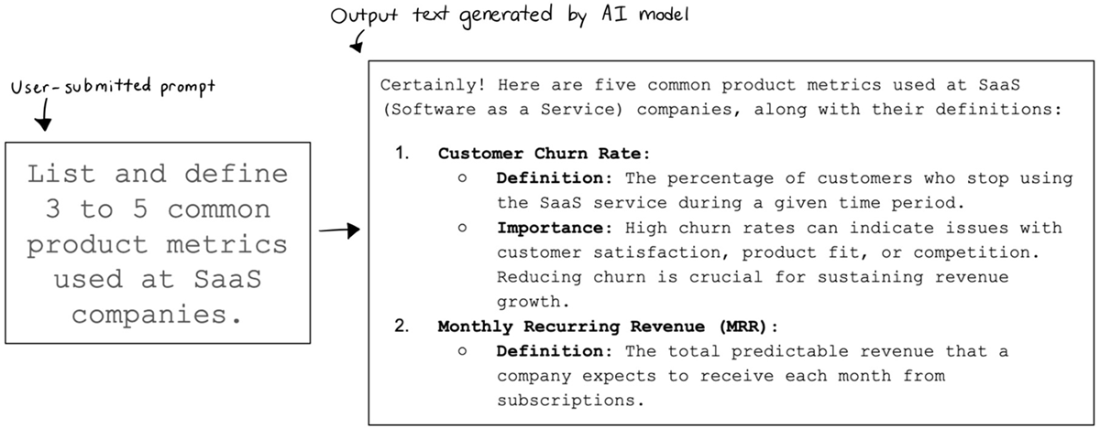
Generative AI creates new content based on user-submitted prompts.
Summary
- Analytics has evolved in the past few decades from a manual, time-consuming process to automated systems that leverage vast data sources. This evolution has enabled faster decision-making and deeper insights into complex problems.
- Data visualization tools enable you to transform raw data into graphs, charts, and summary tables, making it easier to identify patterns and trends. These tools are essential for simplifying complex information and communicating insights to stakeholders.
- Notebooks such as Jupyter and Google Colab provide a versatile environment for programming, visualizing, and documenting analysis workflows. Interactive notebook solutions build upon this familiar interface to enable collaboration, interactivity (e.g., filters and parameters on reports), and the ability to store complex reports and insights for the organization.
- Data-powered web applications (data apps) allow you to create custom tools for your users to explore and manipulate data in a dynamic way. These tools (e.g., RShiny, Streamlit) can combine data from multiple sources, present output from statistical and machine learning models, and otherwise share technical information to a lay audience with an intuitive interface.
- Knowledge management is the process of intentionally structuring, storing, and surfacing analytical insights within an organization. Effective knowledge management boosts the productivity of the analytics teams and the ability of stakeholders to discover information on their own.
- A library of analyses contains records of the reports, dashboards, and other analytical resources that you and your colleagues create. A library is designed to be an accessible, searchable resource through which your stakeholders will discover your work while also being easy for your analyst colleagues to maintain.
- Self-service analytics is the practice of setting up tools to enable non-technical stakeholders to explore and analyze data without the direct support of data professionals. These tools are often set up as interactive reports and dashboards, allowing users to filter, group, or explore a dataset to meet their needs. This approach helps foster a data-informed culture at the organization by making data more easily accessible and understandable.
- Artificial intelligence (AI) is a discipline that seeks to develop machine systems that can perform tasks, solve problems, and make decisions. This is often accomplished by leveraging one or more machine learning, natural language processing, or deep learning models to detect and replicate underlying patterns in datasets containing previous decisions.
- Generative AI is a subset of artificial intelligence that creates new content (text, code, audio, video, etc.) based on patterns in existing data. Many generative AI models are trained on massive datasets, minimizing the need to train the model to produce reasonable quality results.
- Large language models (LLMs) are a class of models trained on vast amounts of text to enable them to meet needs across multiple use cases. These models are designed to interpret and generate text content that might be written by a human.
- Prompt engineering is the practice of crafting input prompts for generative AI models that result in consistent, reliable output for the user. Prompt engineering is an iterative and experimental process that requires updating and testing prompts to optimize for the desired content.
- The role of AI in analytics is still evolving. Analysts will often play a role in helping their organizations leverage AI for internal efficiency, tapping into data sources they haven’t previously analyzed, and consulting on how AI is used to improve customer experiences. There are still a lot of unknowns, but it’s clear that analysts can be critical drivers of technological advancement for their teams and organizations.

 Effective Data Analysis ebook for free
