8 Streamlining complex flows
Complexity in conversational AI is a double-edged sword: without it, assistants can’t perform high-value tasks, yet too much of it frustrates users and delays deployments. The chapter argues for empathetic, goal-oriented design that makes interactions feel natural and simple, because ease of use drives adoption and justifies ongoing investment. It frames simplification as a balancing act between user needs and business constraints, highlighting the tradeoffs required to maintain a conversational feel while implementing the integrations and logic that make self-service truly useful.
Unnecessary complexity increases friction, failure points, and abandonment, while well-designed flows improve task completion and satisfaction. Real-world examples show how small changes can have outsized impact: an insurance claim lookup improved success by removing a default step (only asking for a claim number when multiple matches appeared) and reduced failures by half; a late-stage “read or fax” choice led to disproportionate opt-outs, which disappeared when details were read immediately and fax was offered afterward. These changes not only helped users but also boosted business metrics like containment, reduced escalations, and improved self-serve completion rates.
The chapter outlines practical ways to streamline complex flows: spot anti-patterns (asking for hard-to-retrieve data, rigid inputs, ambiguous questions, disjointed order, choice overload, channel-inappropriate content), leverage known context (e.g., caller ID) to skip steps, align with users’ mental models, and use slot filling to capture multiple details in one turn. Design flexible prompts that accept a range of valid responses, use disambiguation instead of error retries, and handle inline corrections (e.g., offering an alternate number without forcing a “no” path). Where appropriate, add backend logic and APIs to do work for the user (such as normalizing IDs), while weighing cost/benefit with strong metrics and the 80/20 rule. Finally, prepare graceful fallbacks—retries, alternate paths, and escalation—to keep users moving toward successful outcomes.
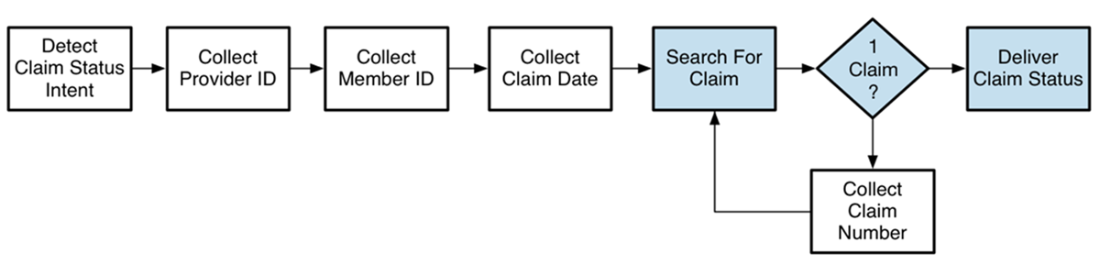
The process to deliver a claim status involved seven steps. The caller has provided five pieces of information before the solution performs a search and (if the search is successful) delivers the claim status.

The updated process to deliver a claim status requires only four pieces of information for most callers. The caller is asked for a fifth piece of information only when necessary.
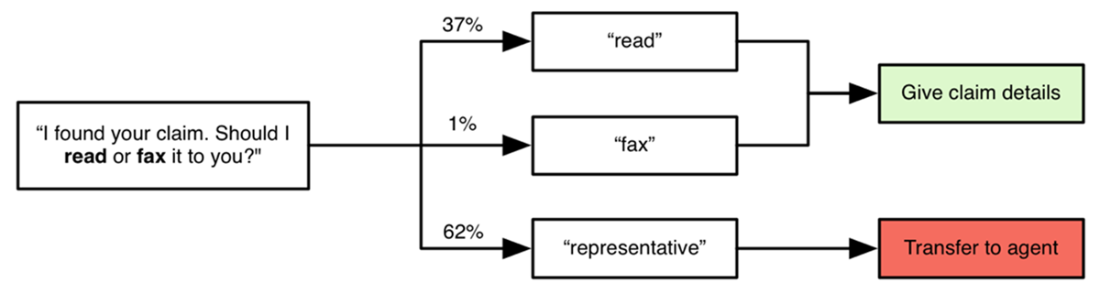
Callers asked for a representative almost two-thirds of the time. The most logical option — having the information read to the caller (i.e. delivered via the same channel over which they were currently engaged) — was the second most popular choice. Just one percent of users chose the option to receive a fax of the information they sought.
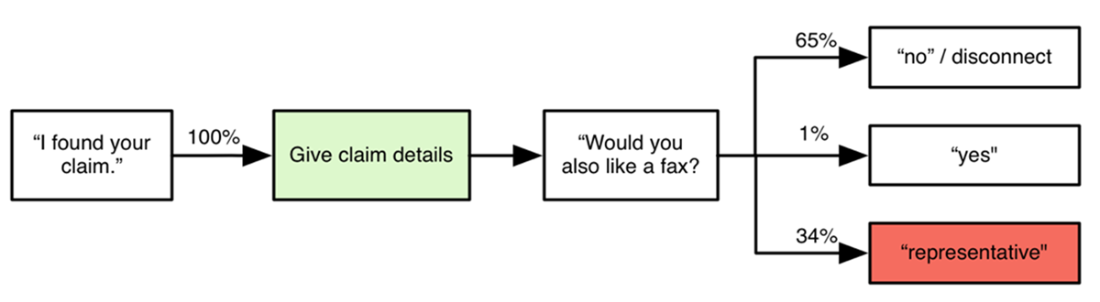
The updated experience immediately reads claim details, then provides a fax option for the small percentage of users who require a fax.
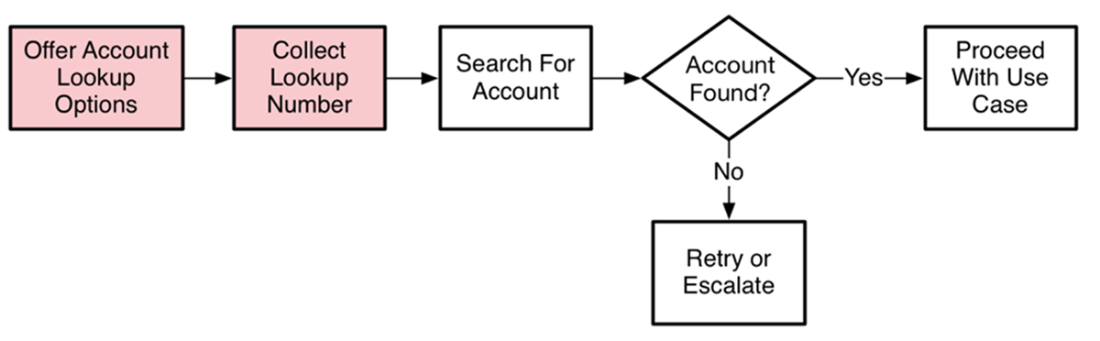
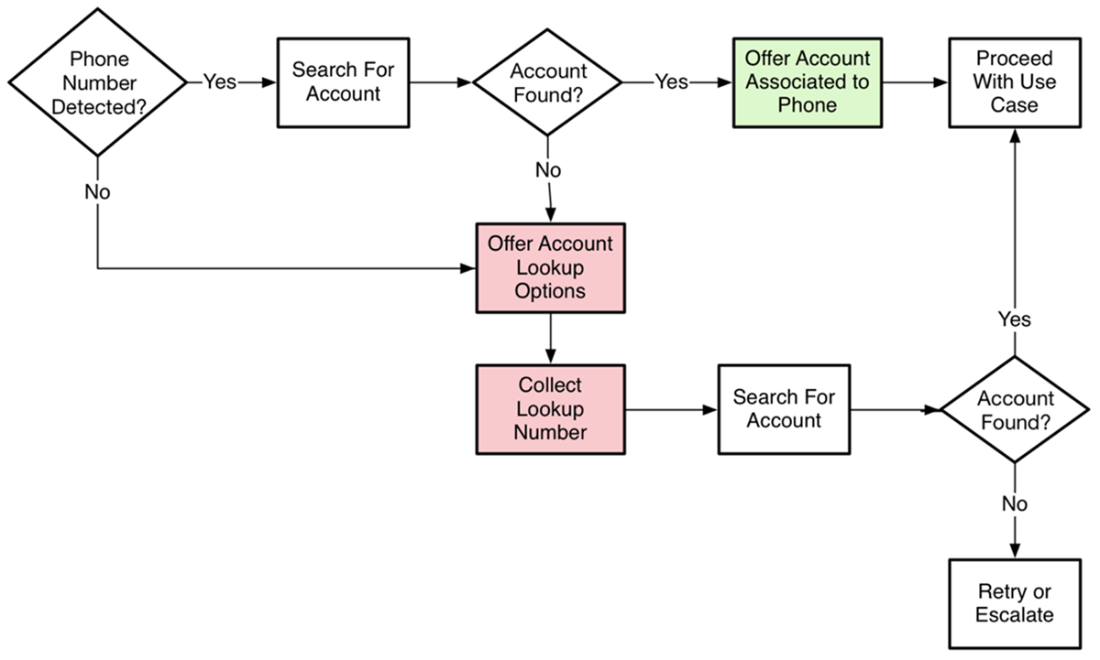
The caller must provide two pieces of information before they can proceed in the flow.
Using what we know about a user (their called ID), we are able to reduce pain points and eliminate the potential failures that can occur while collecting information from a user.
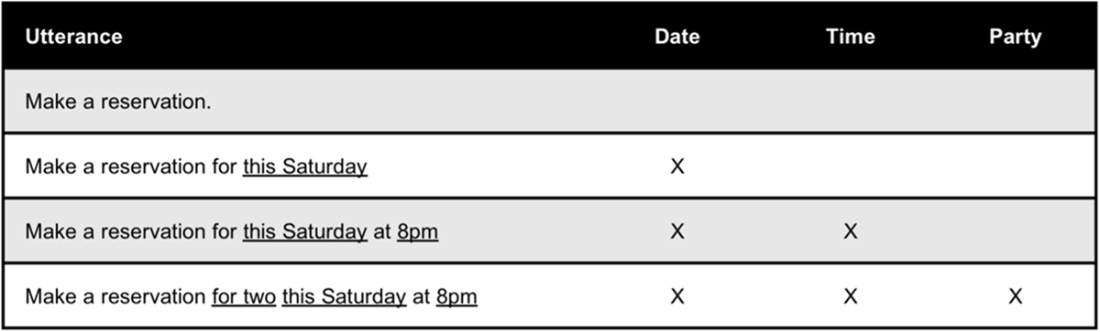
As the user provides more information, each mention (the underlined words) fills the corresponding slot, eliminating the need to ask for this information in downstream steps.
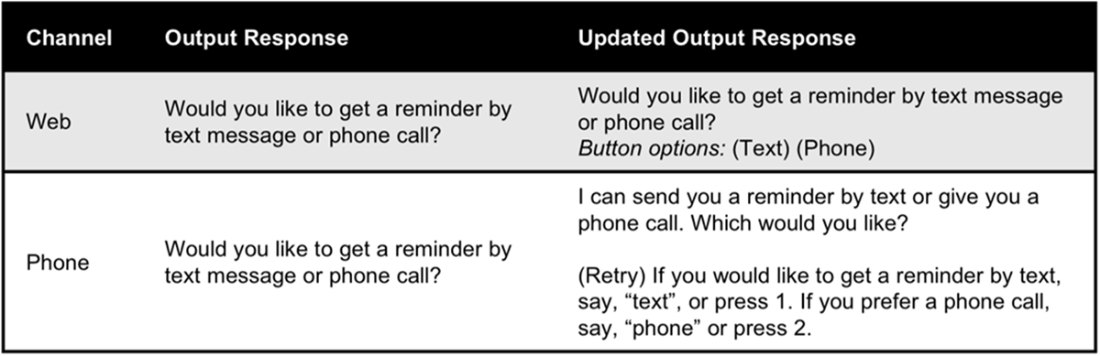
Output responses can be tailored for the channel to ensure the best chance of success.
The original flow asked a complicated question. Inputs were prone to high failure rates.
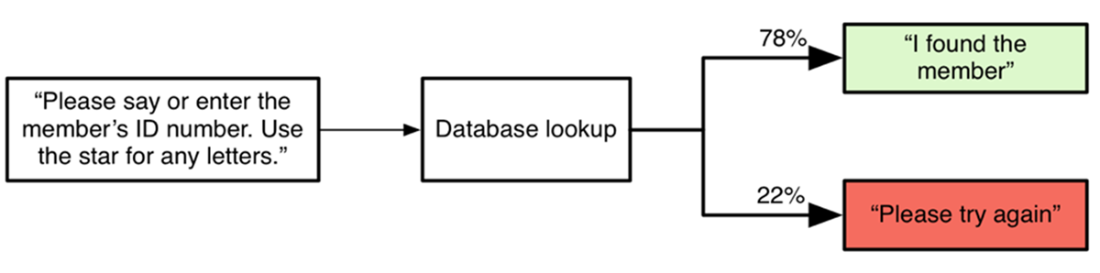
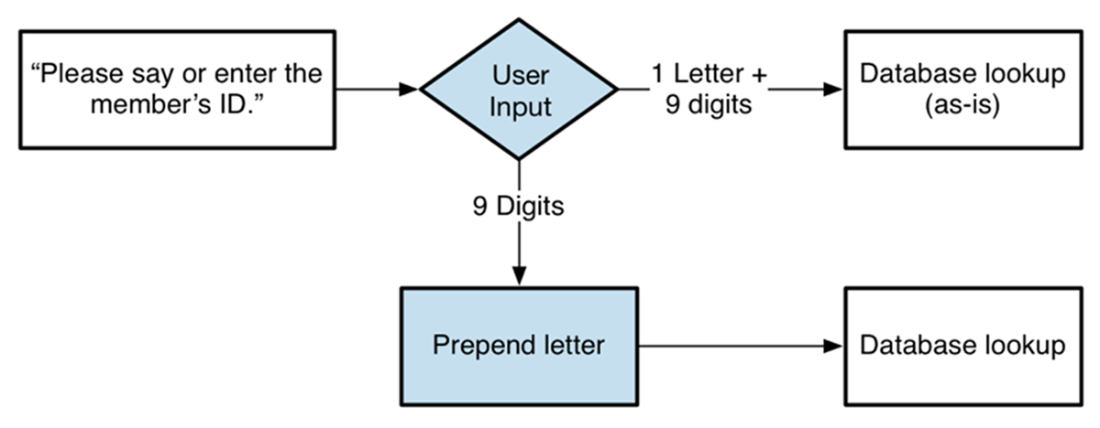
By adding a backend step to perform work for the user, we are able to ask a less complex question.
Summary
- The less natural a conversation feels, the harder it is for users to successfully navigate a complex process using a chatbot.
- Reducing complexity for the user wherever possible will result in the highest containment and task completion rates.
- A rigid or robotic interaction can be disorienting and even sound rude — this can be particularly frustrating when the user is engaged in a complex interaction.
- Research about your intended user base should inform the design of your conversational solution.
- Reducing complexity for the user may mean expanding the functional capabilities of your solution, which adds complexity to the chatbot ecosystem.
FAQ
Why is unnecessary complexity so costly in conversational AI flows?
Complexity adds friction and failure points that increase retries, escalations, and abandonment. It also slows delivery and raises maintenance costs. A simple, natural-feeling conversation boosts adoption, which is essential to justify ongoing investment in the technology.
How does complexity impact the end user’s experience?
Complex transactional flows can feel intimidating and confusing, especially when they require long strings of inputs or many steps. Each added step creates new chances to fail. A better approach is to collect only the minimum information needed and ask for more only when necessary (for example, disambiguate only if multiple results are found), which improves completion rates and reduces failures.
Which business metrics suffer when flows are overly complex?
- Higher opt-out and escalation rates
- Lower self-serve task completion
- Reduced NPS or satisfaction scores
Example: Asking users to choose between having claim details read or faxed led to unnecessary opt-outs. Reading the information immediately and offering fax afterward improved containment and outcomes.
How can I tell if my dialogue is too complex?
Watch for these anti-patterns:
- Requesting information users are unlikely to have on hand
- Rigid input formats with little tolerance for variation
- Ambiguous questions that create uncertainty
- Treating all users/scenarios the same (asking unnecessary questions)
- Choice overload or options that don’t match user mental models
- Disjointed ordering of questions
- Channel-mismatched inputs/outputs (e.g., email over voice, long URLs read aloud)
Use performance metrics and user-perspective walkthroughs to uncover problem areas.
What practical techniques reduce steps without sacrificing outcomes?
- Collect the minimum required information; ask for extras only when needed (conditional disambiguation)
- Remove or defer questions that rarely change the result
- Reorder steps to match how users naturally provide information
- Let users give multiple details in one turn (slot filling)
- Prefill or infer values when possible, then confirm
How can leveraging known context streamline the user journey?
Use what you already know about the user (from caller ID, authentication status, prior turns, or backend data) to personalize and shorten flows. For example, auto-searching with caller ID and asking for a quick confirmation removes multiple questions and eliminates input-related failure points for most users.
What does aligning with the user’s mental model involve?
Ask for and present information in the order users naturally expect, using terminology they recognize. Support slot filling so users can provide multiple needed details in one utterance (e.g., “Table for two this Friday at 8pm”), skipping redundant steps and advancing the flow faster.
How should I handle ambiguous or unexpected responses without derailing the flow?
- Allow flexible, multiple “correct” responses (e.g., accept a correction like “Use this other number: 867-5309” instead of forcing a yes/no plus another step)
- Prefer disambiguation over retries (“Great—would you like a text or a phone call?”) to signal progress
- Leverage channel capabilities (buttons or quick replies in chat; clear prompts and summaries in voice) to reduce confusion
When should I add backend/API logic to simplify the user’s task, and how do I manage failures?
Add integrations when the cost/benefit justifies them (use metrics to decide). Examples include inferring missing elements (like a required prefix letter) or validating partial inputs server-side to allow simpler prompts.
Design graceful handling for failure points:
- Retries for correctable user errors (e.g., wrong number of digits)
- Offer alternate paths (e.g., different lookup methods)
- Escalate to an agent when backend systems are down
How do I prioritize streamlining work and measure success?
- Use the 80/20 rule: prioritize improvements that benefit most users
- Tie design changes to KPIs (containment, completion, opt-outs, NPS)
- Practical workflow: list all steps, mark the hardest for users, and remove or reorder where feasible

 Effective Conversational AI ebook for free
