12 Getting ready for scenario automation
The chapter explains that scenario automation should be approached carefully, because teams often expect it to deliver fast feedback and lower effort but instead end up with brittle, slow, and costly tests. To reduce that risk, the team in the example treats automation as a proof-of-concept: they experiment with a small set of scenarios, learn from the results, and only then expand automation more broadly. This creates room to address common obstacles such as limited automation experience, weak testability, missing tools, and uncertainty about maintainable design without rushing into a solution that could accumulate quality debt.
To support that learning, the chapter introduces software design patterns as a way to capture repeated challenges and reusable solutions in automation work. It also gives a practical overview of scenario automation tools, showing how scenarios are turned into executable tests through step definitions, expressions, parameters, hooks, and glue code organization. The text emphasizes that step definitions should remain reusable building blocks, that matching logic can become complicated with optional text or custom parameter types, and that keeping the structure of automation code clear and consistent makes the suite easier to maintain and extend.
The chapter’s main guidance is summarized in the SUITABLE principles: use shortcuts to set up context efficiently, provide understandable diagnostics, keep scenarios isolated, maintain high test-code quality, prefer atomic assertions, use business terminology, keep coupling loose, and evolve the system with fast feedback. Finally, it stresses that automation strategy is a separate decision from BDD itself: teams should choose the most appropriate interfaces and dependencies to exercise, whether through inner layers, technical interfaces, or the UI, and should balance speed, robustness, and coverage rather than relying on a single approach. The overall message is that effective scenario automation comes from deliberate experimentation, disciplined design, and a strategy shaped by the product’s needs.
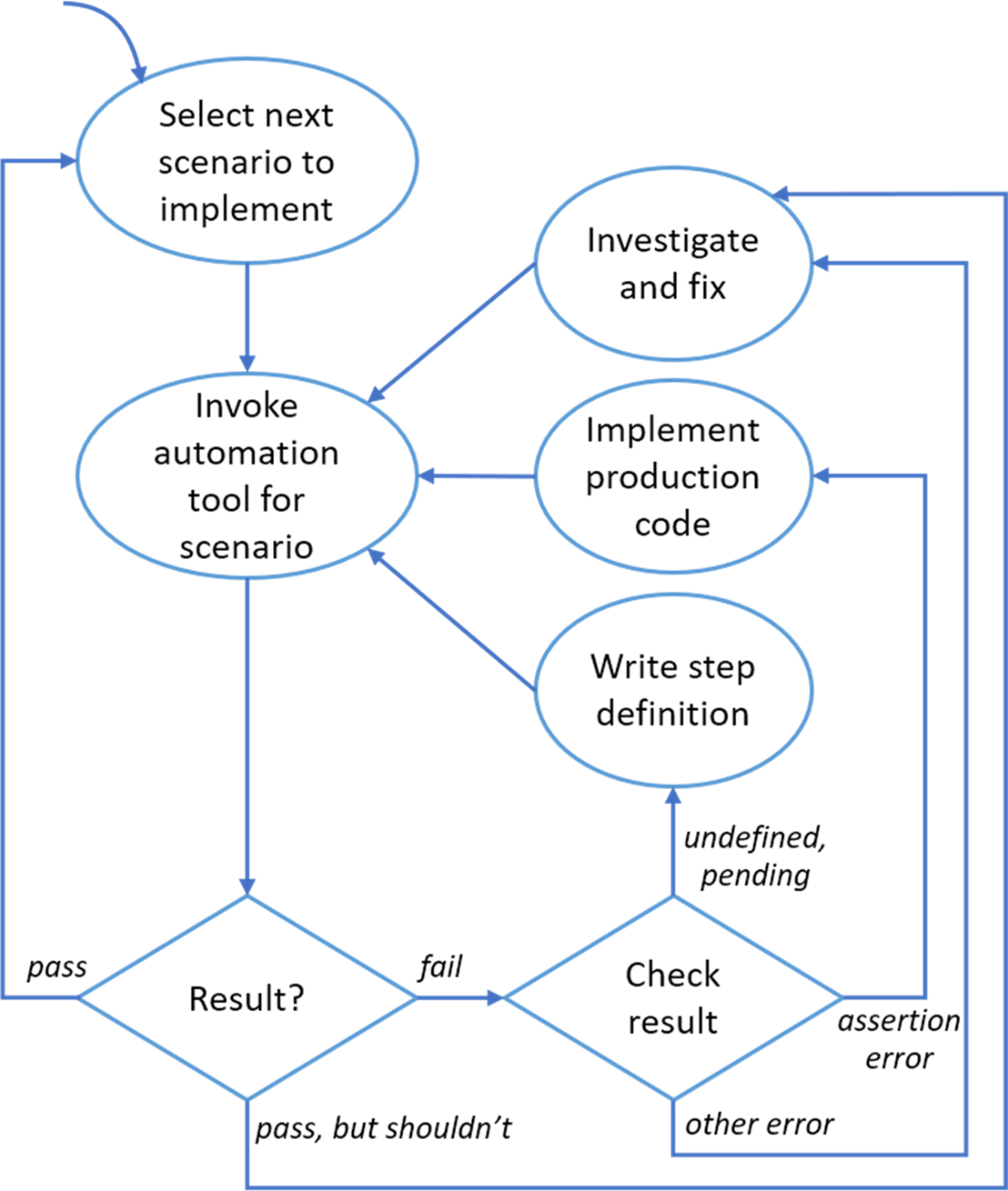
Developer workflow for automating a scenario
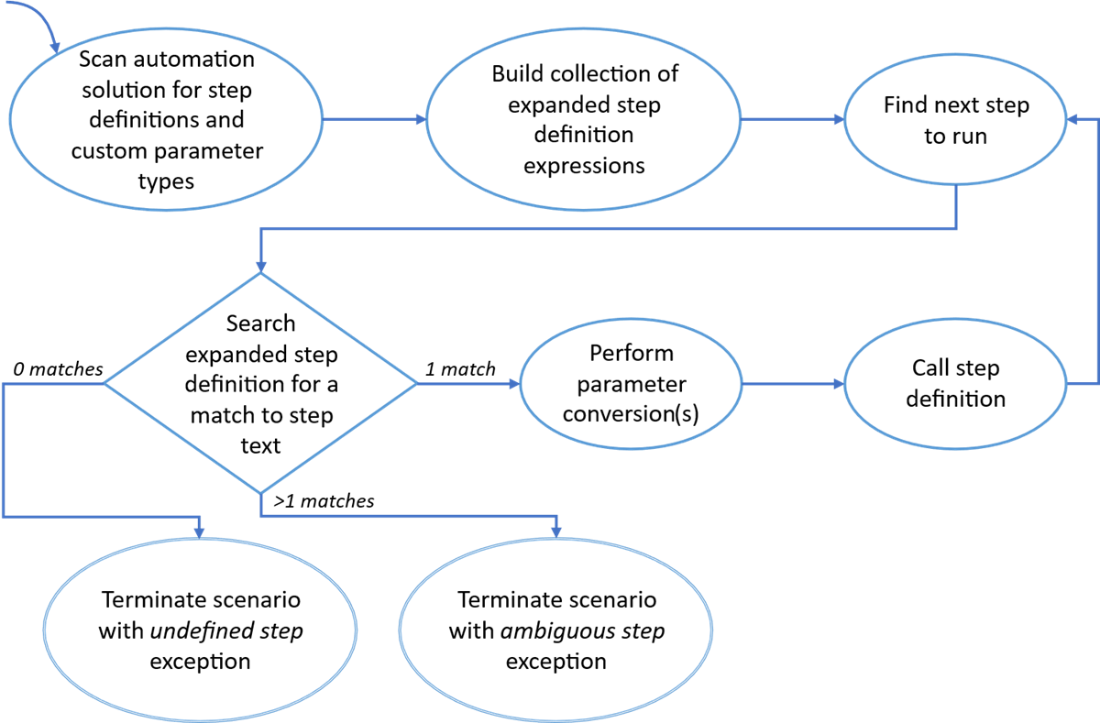
Conceptual approach for matching step text to step definition
A simple folder hierarchy for glue code

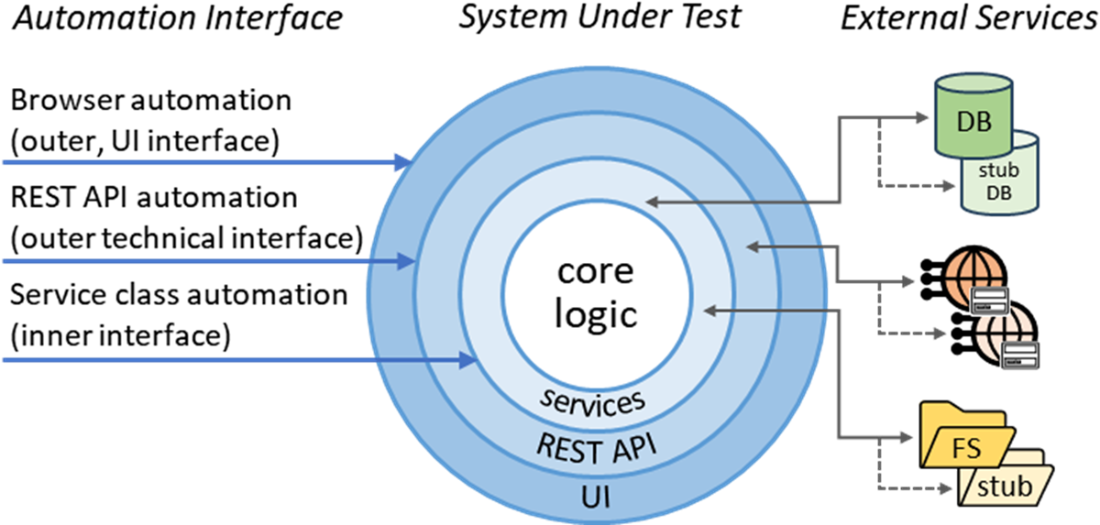
Various possible automation interface layers
Summary
- Take a low risk, proof-of-concept approach to adopting BDD automation.
- A design pattern is a general, reusable solution to a specific challenge occurring within a given context.
- Software design patterns are a concise way to document successful solutions for future reference.
- Although there are many different formats for design patterns, they should always have a descriptive name that can be used in design discussions.
- A scenario automation tool is a tool that turns scenarios into automated tests.
- Common BDD frameworks include Cucumber and Reqnroll.
- Although all scenario automation tools turn specifications into automated tests, there are some differences in their functionality and syntax.
- Glue code is what we call the automation code that is invoked by the scenario automation tool, because it connects the specification to the system being developed.
- Glue code is usually defined in a global scope which means that all glue code is considered for invocation no matter where in the file system the scenario is located.
- Step definitions are the blocks of glue code invoked by the scenario automation tool in response to text in the scenarios.
- The scenario automation tool determines which step definition to call by matching the text in the specification against all expressions used when registering step definitions.
- If the scenario automation tool can’t find a registration expression that matches the scenario step text, it fails that scenario with an undefined step error.
- If the scenario automation tool finds more than one registration expression that matches the scenario step text, it fails that scenario with an ambiguous step error.
- Step definition registration expressions are usually written using Cucumber Expressions, which offer parameter placeholders, as well as optional/alternative text.
- Most scenario automation tools also permit registration expressions to be written using regular expressions, for backwards compatibility.
- In addition to the step text, that is matched against the registration expressions, steps can also contain extra information (contained in docstrings and data tables) that can be passed to the step definition. This extra data is not used when deciding which step definition should be called.
- Data tables are 2-dimensional arrays of textual data, that typically have a header row.
- Docstrings are blocks of multi-line text that preserve most whitespace.
- The development team can define Custom parameter types to ensure that step definition registration expressions can accurately model domain concepts.
- Custom parameter types are also implemented by glue code using scenario automation tool specific syntax. Reqnroll requires a custom parameter type method to have the StepArgumentTransformation attribute.
- Custom parameter type regular expressions contribute to step definition matching.
- Hooks are blocks of glue code that are called by the scenario automation tool, in response to predefined events in the execution process, such as before every scenario or after all scenarios have been run.
- Glue code should be organized in a way that makes it easy to navigate and this typically means that it will use a different file hierarchy structure to that used by the feature files.
- Typically, step definitions with be organized by domain concept under a StepDefinition folder, while hooks and custom parameter types will be kept separate under a Support folder.
- There are eight key principles of BDD automation, captured by the SUITABLE mnemonic.
- Short cuts automation engineers should use appropriate mechanisms to accelerate scenario setup.
- Understandable diagnostics reduce the cognitive load when the system does not behave as specified.
- Isolated scenarios can be run repeatably no matter whether they are run on their own or as part of a larger set of scenarios.
- Test-code quality is just as important as production code quality.
- Atomic assertions ensure that all the available diagnostic information is provided whenever a scenario fails.
- Business terminology should be used throughout the system—from business-facing documentation to implementation code.
- Loose coupling is desirable to make code components testable on their own—without needing to always test through the UI or utilize resource hungry dependencies.
- Evolving software using the iterative and incremental BDD approach requires fast, frequent feedback.
- It is critical to choose a test automation strategy that maximizes confidence in the product while minimizing the time it takes to get feedback.
- The test automation pyramid is a useful metaphor that can help you design your test automation strategy, but it is frequently misunderstood.

 Effective Behavior-Driven Development ebook for free
