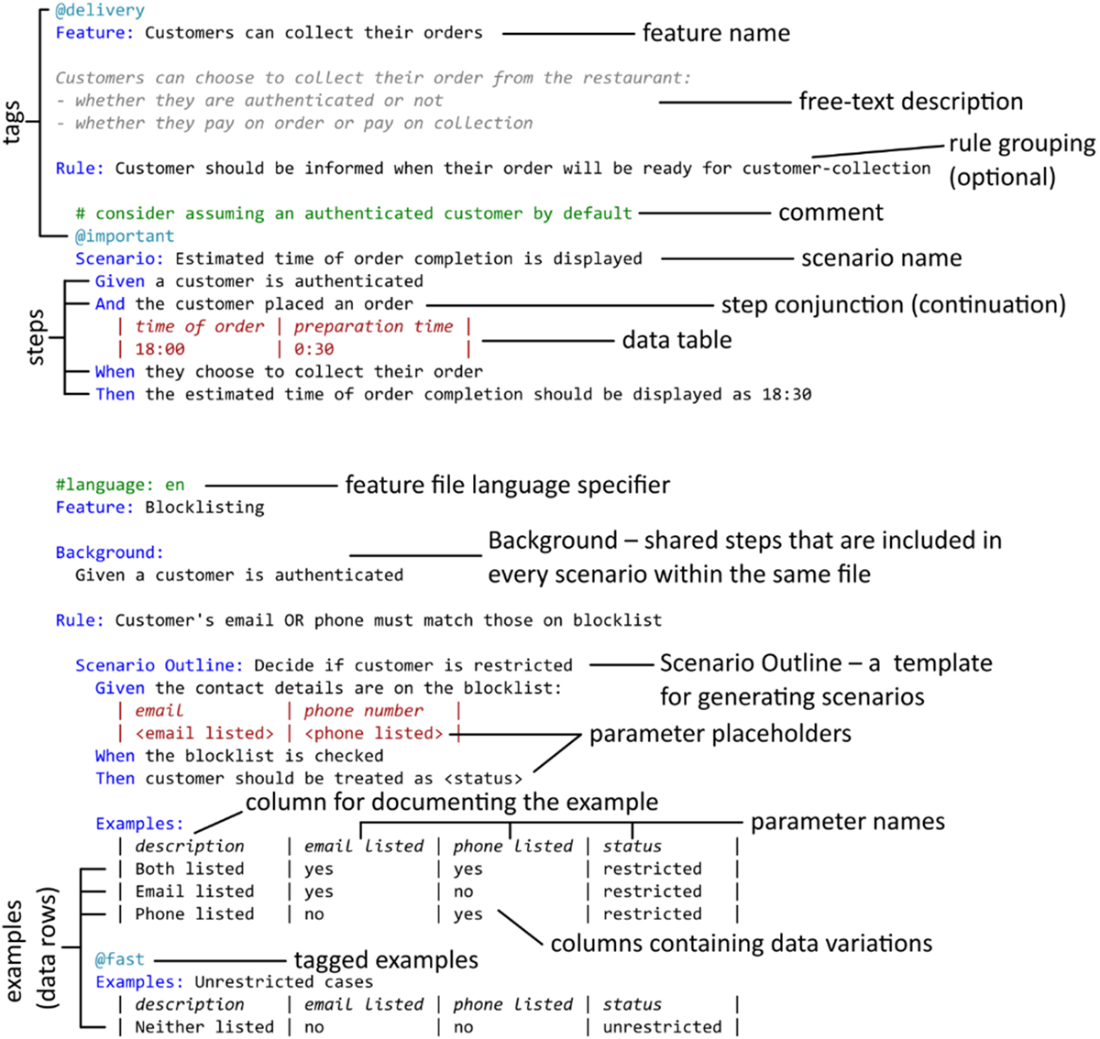
Gherkin is presented as a lightweight, structured way to describe behavior in a form that both people and automation can understand. It uses simple, domain-oriented language to express the intended behavior of a system, helping teams capture requirements in a clear, testable format. The emphasis is on readability and shared understanding, so the text is written to communicate what the software should do rather than how it is implemented.
The core pattern revolves around features, scenarios, and steps. A feature describes a business capability, while scenarios illustrate specific examples of that capability in action. Steps are expressed with a small set of keywords that frame the story of the behavior, typically setting up context, describing an action, and stating the expected outcome. This structure keeps specifications concise while still allowing teams to cover important examples and edge cases.
The cheat-sheet also highlights practical conventions for keeping scenarios maintainable and expressive. It encourages writing steps that focus on observable behavior, reusing wording consistently, and using examples to explore variations without cluttering the specification. By keeping the language precise and business-focused, Gherkin supports collaboration between developers, testers, and nontechnical stakeholders, making automated behavior specifications easier to understand, review, and evolve.
FAQ
What is Gherkin used for in Behavior-Driven Development?Gherkin is the language used to describe software behavior in a clear, readable format that business and technical stakeholders can share. It helps express requirements as examples and scenarios.What are the main keywords in a Gherkin scenario?The core Gherkin keywords include Feature, Scenario, Given, When, Then, and supporting keywords such as And and But.What does the Feature keyword represent?Feature introduces a high-level description of the functionality being described. It usually states the business value or capability under discussion.What is the purpose of Scenario in Gherkin?Scenario describes one specific example of how the feature should behave. It is a concrete case that illustrates the expected outcome.What do Given, When, and Then mean?Given sets up the initial context, When describes the action or event, and Then states the expected result or outcome.How are And and But used in Gherkin?And and But are used to add more steps while keeping the same grammatical flow as the preceding keyword. They make scenarios easier to read.What is a Background section?Background defines steps that are repeated before each scenario in a feature file, helping avoid duplication when the same setup is needed repeatedly.What are Scenario Outline and Examples used for?Scenario Outline lets you run the same scenario with different data sets, and Examples provides the table of values used for those runs.What are Doc Strings in Gherkin?Doc Strings are used to include longer blocks of text as step arguments, such as multi-line messages, JSON, or other structured content.What are Data Tables in Gherkin?Data Tables are used to pass structured tabular data to a step. They are helpful when a step needs multiple related values or rows of input.
pro $24.99 per month
access to all Manning books, MEAPs, liveVideos, liveProjects, and audiobooks!

 Effective Behavior-Driven Development ebook for free
