10 Profiling Insights
This chapter explains how ONNX Runtime profiling can be used to understand and improve the performance of models converted to ONNX, including large language models. It begins with the idea that ONNX Runtime offers strong cross-hardware execution, but real deployments often require additional tuning based on latency, throughput, and memory goals. Profiling is enabled through session options, after which runtime execution produces a JSON file containing low-level data about session activity, operator execution, durations, providers, tensor shapes, and threading behavior.
The chapter emphasizes that raw profiling output is not very useful by itself, especially for large models with thousands of operator calls. Built-in visualization utilities can provide a broad view, but deeper insight requires transforming the JSON data into a cleaner tabular form and aggregating it. Using examples based on linear regression and GPT-2, the text shows how to analyze total duration per operator, the number of times each operator is invoked, and each operator’s share of total inference time. These views help identify performance bottlenecks and guide decisions about where graph optimization may be worthwhile.
The final part focuses on optimizing ONNX graphs and validating the effects of those optimizations. It shows how ONNX’s reference evaluation tools can run an entire graph, individual nodes, or custom operators with different verbosity levels to inspect intermediate computations. The chapter introduces operator fusion through a simple custom operator example, demonstrating that fused operations can preserve output quality while reducing execution time. It then applies ONNX Runtime’s transformer optimizer to GPT-2, showing how automated graph optimizations such as node removal, layer-normalization fusion, and activation fusion can reduce model size and improve runtime performance, providing practical guidance for optimizing ONNX-based LLM deployments.
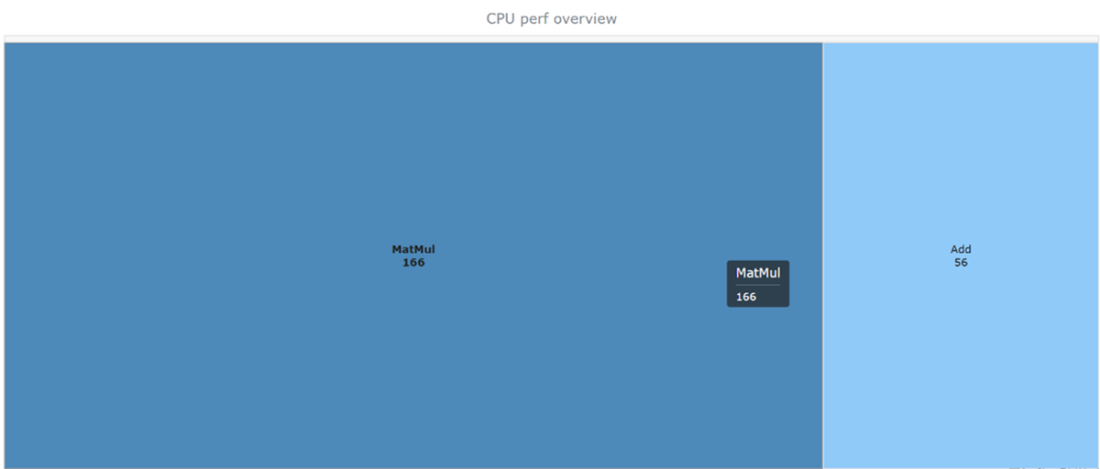
The Ort_perf_view rendering of the performance stats related to an inference execution for the linear regression ONNX model
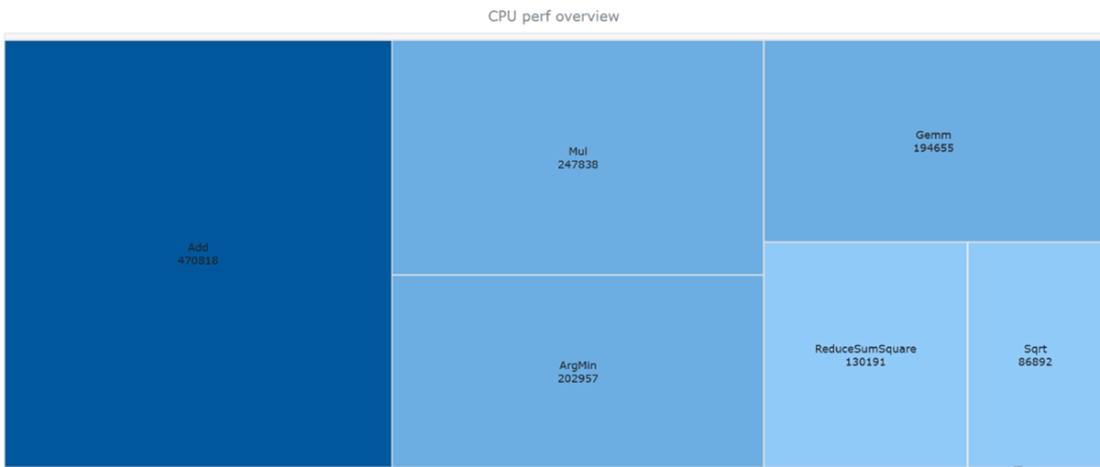
The Ort_perf_view rendering of the performance stats related to an inference execution for a large ONNX model
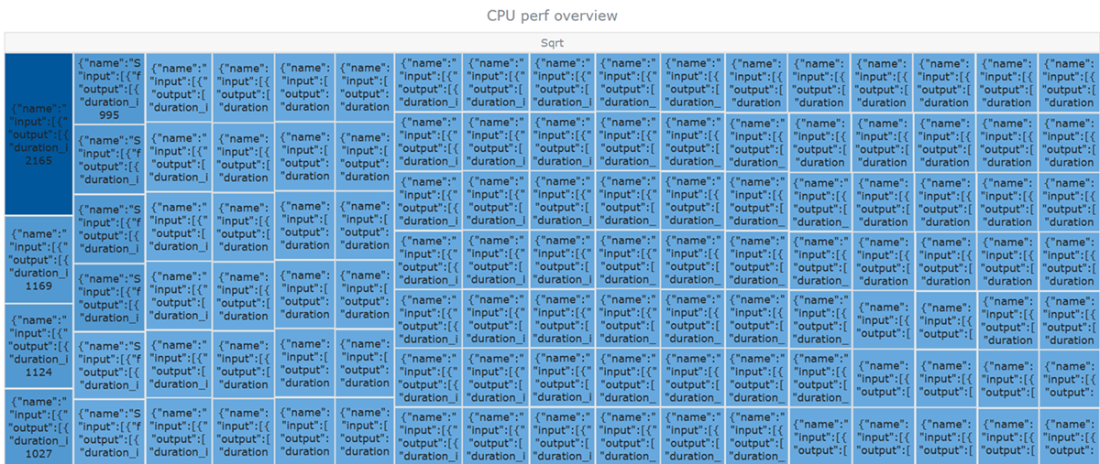
The Ort_perf_view expanded visualization for all the calls to the Sqrt operator at inference time for the model under test
The head rows of the profiling data for the regression model example, in tabular format

The total duration (in milliseconds) for the 3 ONNX operators used in our linear regression model’s graph
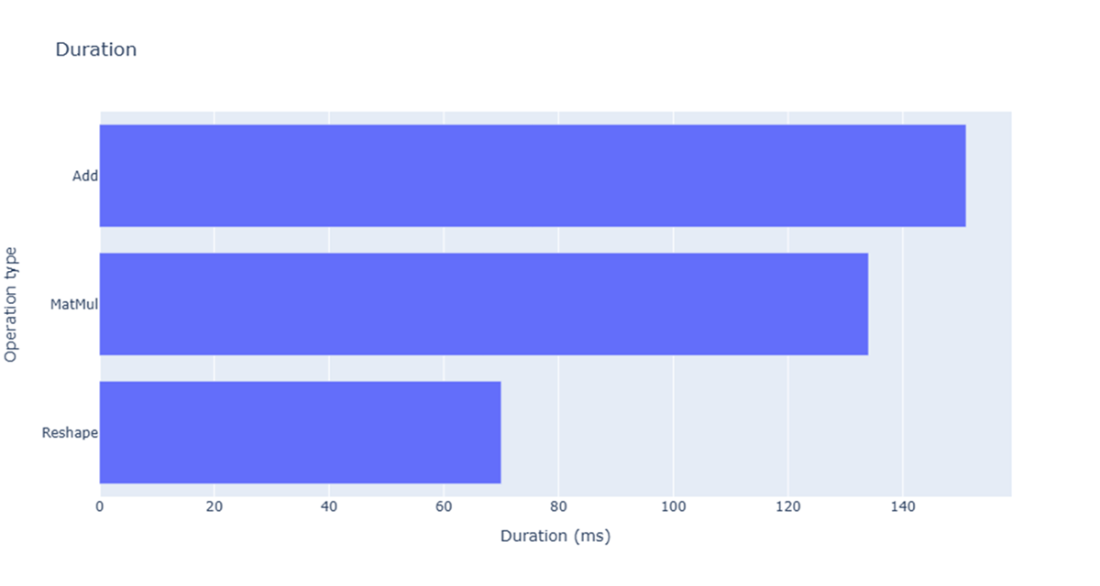
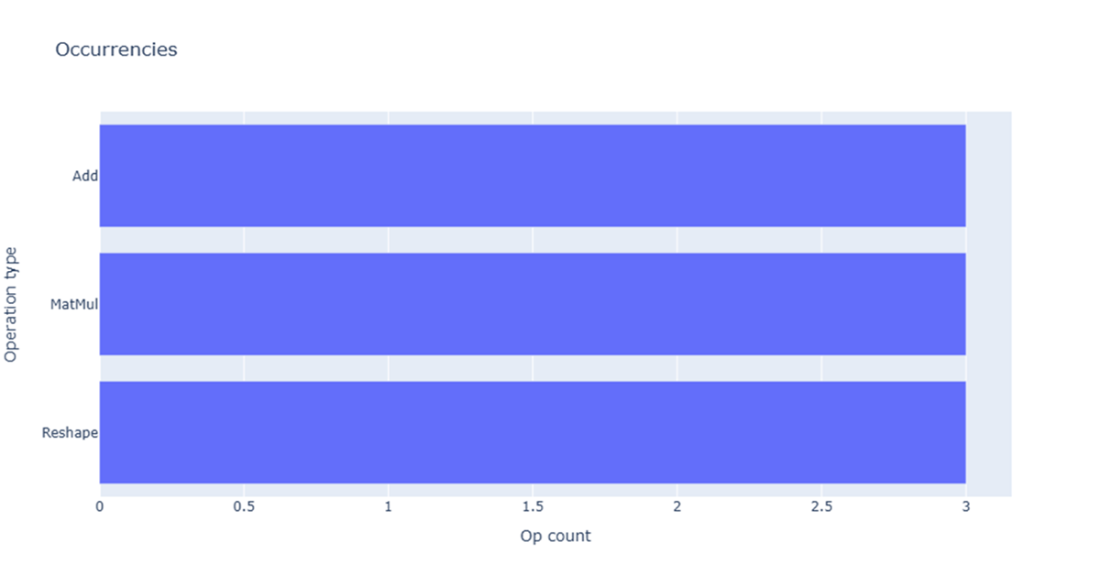
The count of invocations of the 3 ONNX operators used in our linear regression model’s graph
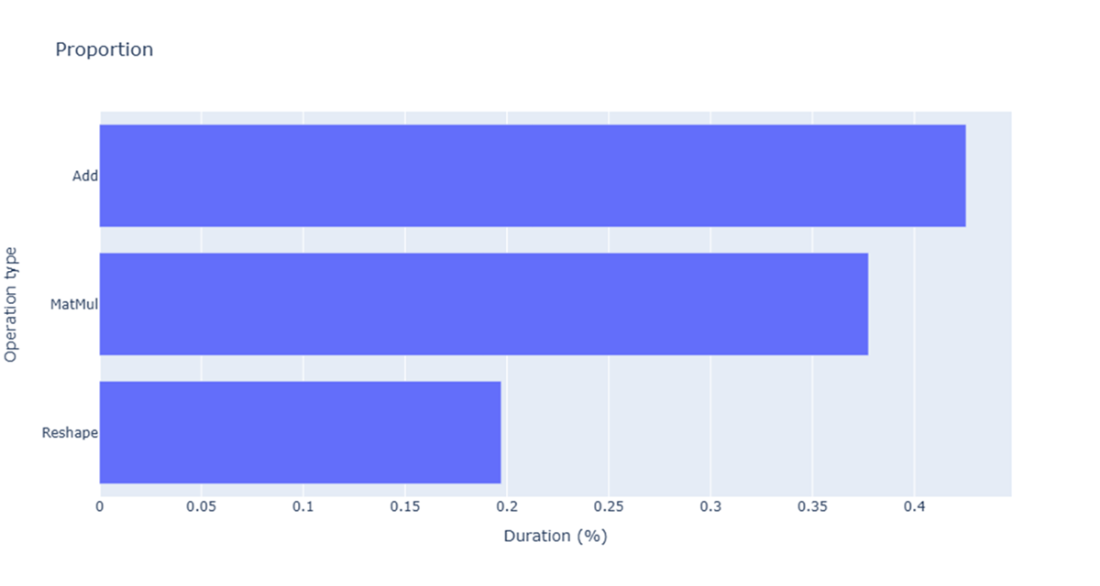
The percentage of overall inference time for each ONNX operator call in our linear regression model
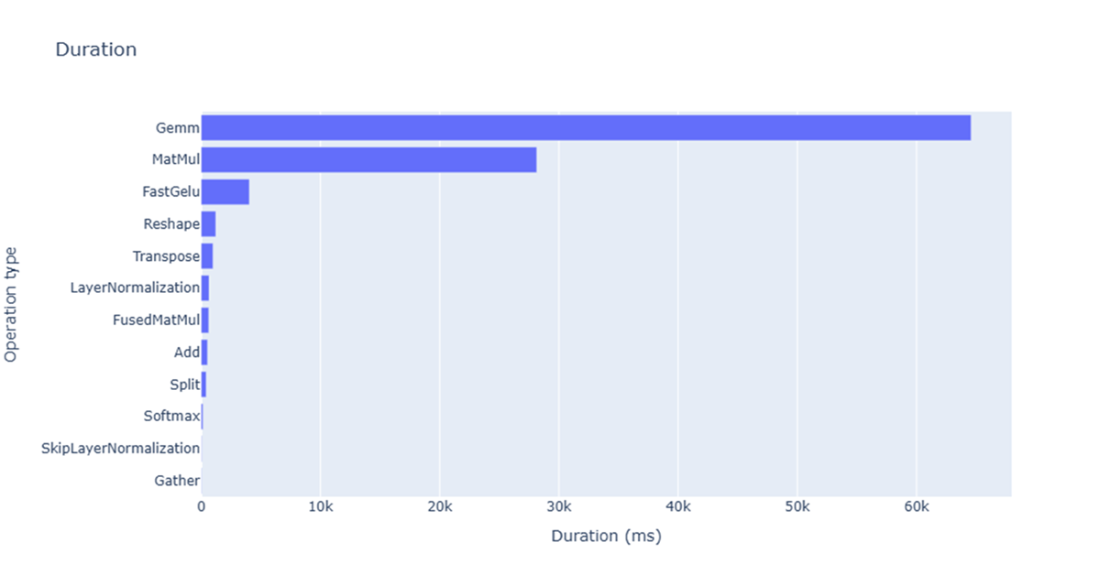
The total duration (in milliseconds) for the ONNX operators used in the GPT-small linear regression model’s graph during profiling
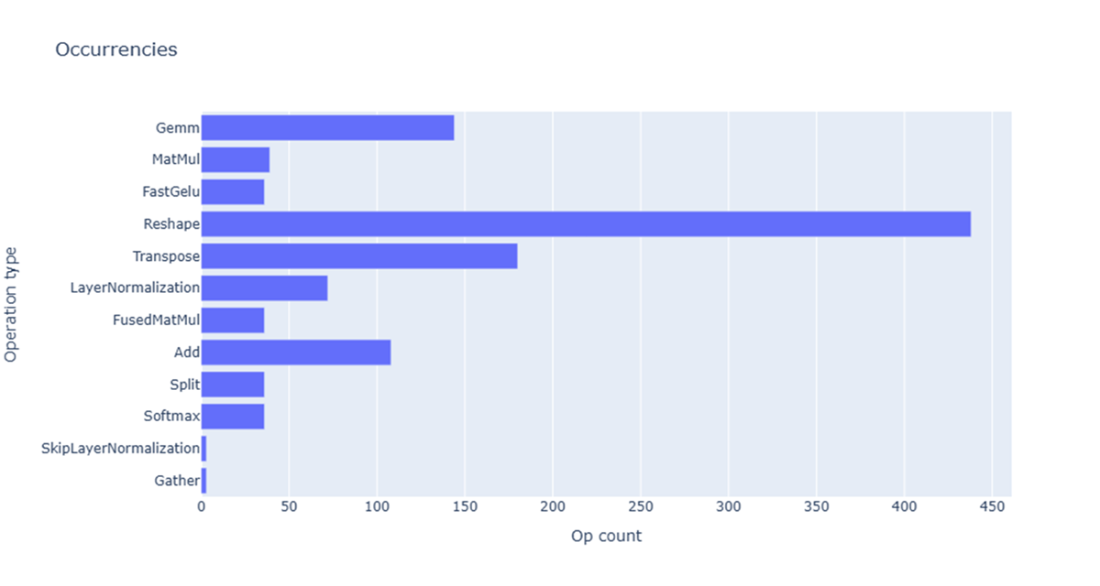
The count of invocations of the ONNX operators used in the GPT-2 small model’s graph during profiling
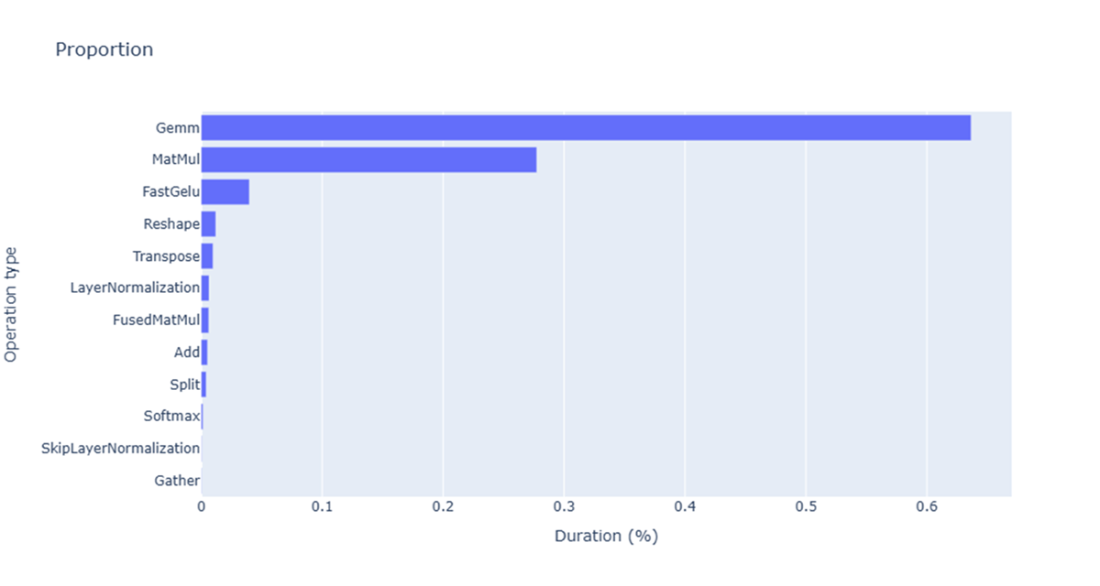
The percentage of overall inference time for each ONNX operator call in the GPT-2 small model during profiling
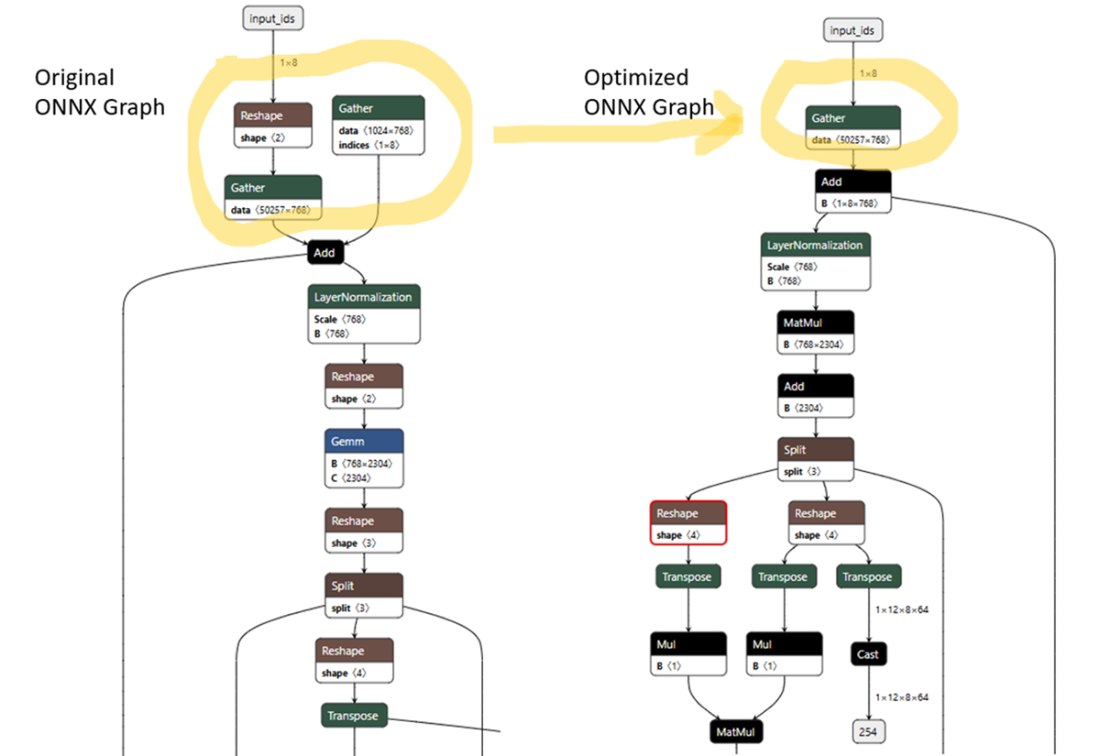
Comparison between the input layers of the GPT-2 ONNX converted model’s graph before and after optimization
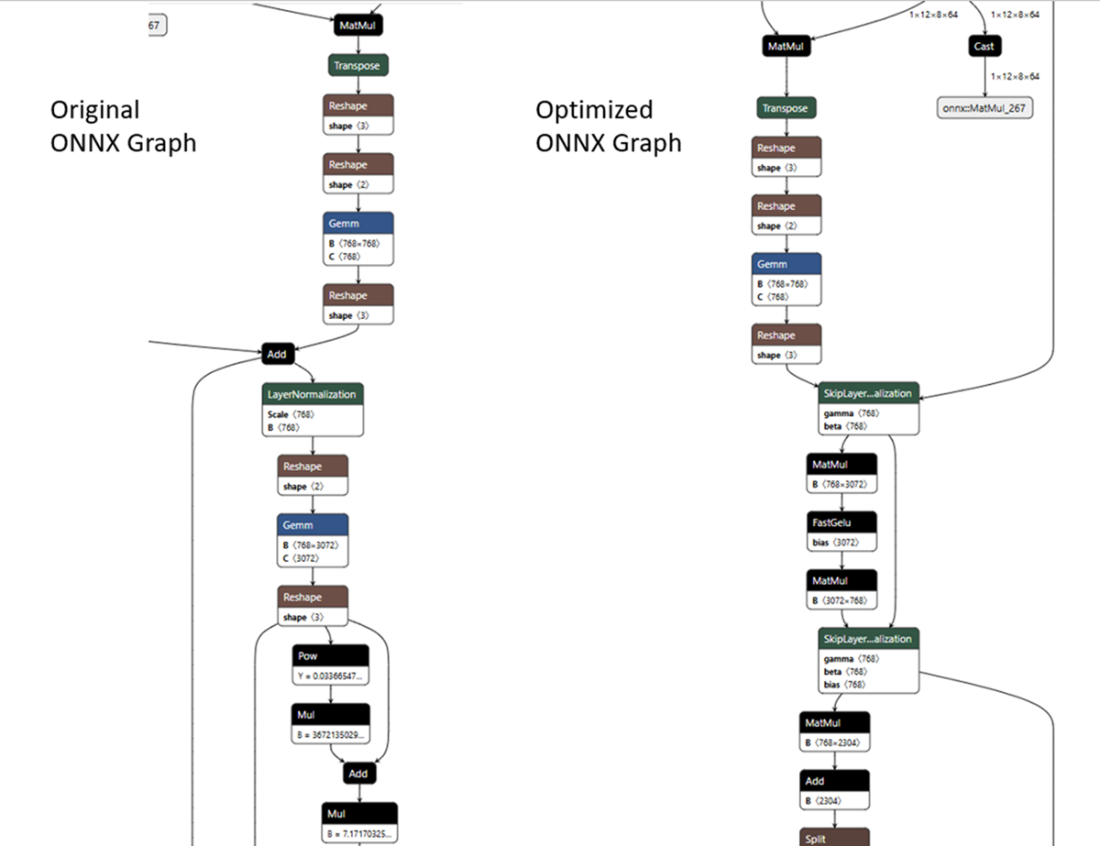
Comparison between part of the GPT-2 ONNX converted model’s graph before and after optimization that shows that the Skip Layer Normalization Fusion optimization has been applied
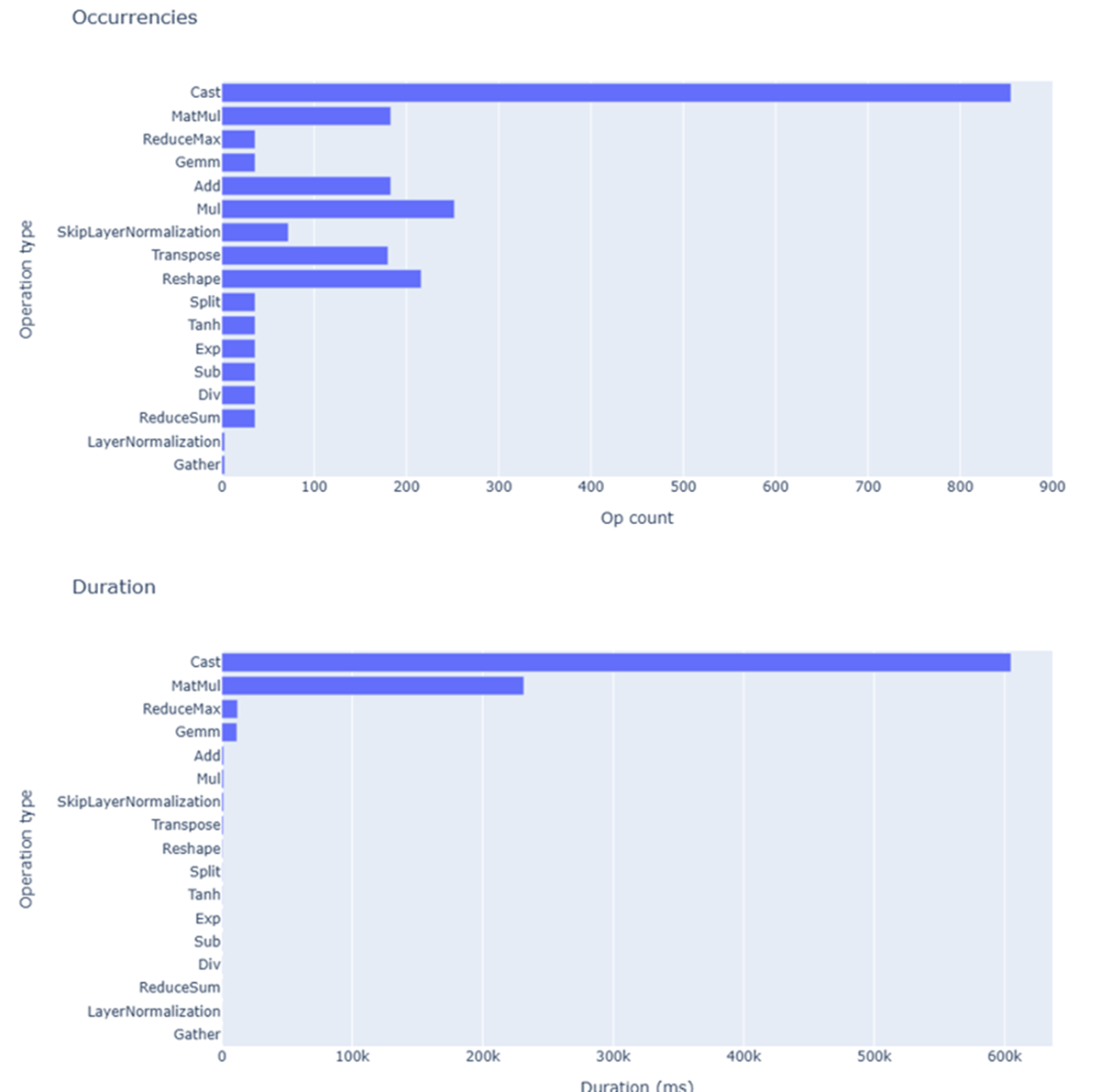
The operators count and duration for each ONNX operator in the GPT-2 model graph after profiling its optimized version
Summary
- ONNX runtime enables performance profiling by setting enable_profiling to True in SessionOptions.
- Raw profiling data gets stored in JSON files with timing information for each operator execution.
- OnnxWholeSession.process_profiling converts messy JSON profiling data into clean tabular DataFrame format.
- Plotly Express is a valid option to create interactive bar charts showing operator duration, call counts, and execution percentages for performance analysis.
- ReferenceEvaluator class evaluates entire ONNX models or individual nodes for debugging and optimization.
- Verbosity levels 1 through 4 control the detail of step-by-step evaluation output for debugging purposes.
- Operator fusion combines multiple consecutive operators into single optimized nodes to improve execution speed.
- Custom operators require extending OpRun class and implementing the _run method for evaluation.
- ONNX runtime optimizer automatically applies basic and extended optimizations to transformer models.
- Graph optimization reduces model size by removing unnecessary nodes like redundant Reshape operations.
- Skip Layer Normalization Fusion combines bias layers, skip connections, and layer normalizations into single operations.
- Fast GELU Fusion optimization gets applied automatically when the model architecture type is specified.
- Netron tool enables visual inspection of ONNX graph structures to understand applied optimizations.
- Model evaluation ensures optimization changes do not affect prediction quality or accuracy.
- Basic optimizations include constant folding, redundant node elimination, and semantics-preserving fusions.
- Extended optimizations apply complex node fusions specific to CPU, CUDA, or ROCm execution providers.
FAQ
How do you enable profiling for an ONNX Runtime inference session?
You enable profiling by creating aSessionOptions object and setting enable_profiling to True, then passing those options to the InferenceSession constructor.What does ONNX Runtime profiling generate?
ONNX Runtime profiling generates a JSON file containing raw performance data about the inference session, including model loading, session initialization, execution time, operator latency, execution provider information, input/output shapes, and thread scheduling statistics.How do you retrieve the ONNX Runtime profiling file?
After running inference, callsess.end_profiling(). This method stops profiling and returns the name of the generated JSON file, typically following the pattern onnxruntime_profile__YYYY-MM-DD_hh-mm-ss.json.Why is raw ONNX profiling data not enough by itself?
Raw profiling data is detailed but difficult to interpret directly. It contains low-level event records for sessions, nodes, operators, and execution providers. To get useful insights, the data should be aggregated, transformed, and visualized.What is Ort_perf_view used for?
Ort_perf_view is a visualization tool included with ONNX Runtime. It renders profiling statistics from ONNX Runtime JSON files as tree maps and summarizes latency per ONNX operator. It is useful for a high-level view, especially with small models.Why can Ort_perf_view become less useful for large LLMs?
For large models, such as LLMs, the ONNX graph may contain thousands of operator calls. Ort_perf_view can show an overview, but drilling into individual calls often exposes too much raw detail, making it less practical for performance analysis.How can ONNX profiling data be transformed into more useful insights?
The chapter demonstrates loading the profiling JSON, processing it withOnnxWholeSession.process_profiling from the mlprodict library, and converting it into a Pandas DataFrame. This tabular format can then be grouped and visualized using tools such as Plotly Express.Which visualizations are useful for analyzing ONNX operator performance?
Three useful visualizations are: total duration per ONNX operator, count of invocations per operator, and percentage of total inference time spent in each operator. Together, these charts help identify bottlenecks and potential graph optimization opportunities.What is the purpose of ONNX ReferenceEvaluator?
ReferenceEvaluator allows evaluating an ONNX model graph, individual nodes, or graphs containing custom operators. It can also provide step-by-step execution details using different verbosity levels, which helps debug and understand model behavior.What is operator fusion in ONNX graph optimization?
Operator fusion combines multiple consecutive operations into a single optimized operation. In the chapter’s example,EyeLike and Add are fused into a custom AddEyeLike operator, reducing execution time while preserving identical outputs.
 Domain-Specific Small Language Models ebook for free
