8 Building images automatically with Dockerfiles
This chapter explains how to automate image creation with Dockerfiles so builds are repeatable, shareable, and easy to version and audit. It shows how the builder executes instructions top to bottom, creating a new layer at each step, which enables aggressive caching for fast rebuilds and traceability; you can also opt out with a full rebuild when needed. A simple example migrates a manually built Git image to a Dockerfile-driven build to illustrate core ideas like choosing a base with FROM, tagging builds, and understanding how each instruction contributes to the final image.
Readers are introduced to the most commonly used instructions and how to structure maintainable Dockerfiles. Metadata and environment are managed with ENV, LABEL, WORKDIR, EXPOSE, and USER; filesystem changes come from COPY, ADD, and VOLUME; and the container’s process model is controlled with ENTRYPOINT and CMD, including when to prefer exec form and how CMD serves as default arguments. The chapter covers .dockerignore, image inspection to verify substitutions, and ONBUILD triggers for base images that inject downstream build behavior. For maintainability and portability it shows parameterizing builds with ARG and modern multi‑stage builds to separate compile and runtime concerns, copy only the artifacts you need, and compose minimal images (e.g., builder plus scratch runtime).
Beyond assembly, the chapter focuses on durable and hardened images. It recommends defensive startup scripts that fail fast by validating environmental preconditions (links, variables, secrets, networking, volumes, user) and, for multiprocess containers, using an init system (or Docker’s --init) to supervise, signal, and clean up processes. Health checks are defined with HEALTHCHECK or at runtime to detect stuck or degraded apps. For security hardening it advises minimizing dependencies, pinning trusted bases with content-addressable digests in FROM, defaulting to non‑root users and dropping privileges at the earliest practical moment, and mitigating privilege escalation by removing SUID/SGID bits. Together, these practices produce efficient, reproducible, robust, and safer application images.
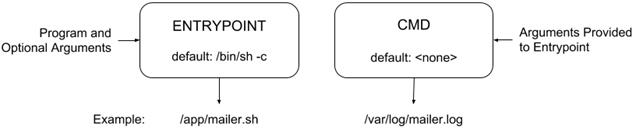
Relationship between ENTRYPOINT and CMD
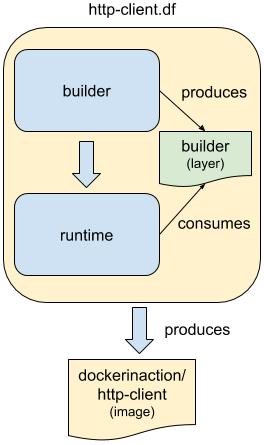
Multi-stage Docker Builds
Summary
Most Docker images are built automatically from Dockerfiles. This chapter covers the build automation provided by Docker and Dockerfile best practices. Before moving on, make sure that you’ve understood these key points:
- Docker provides an automated image builder that reads instructions from Dockerfiles.
- Each Dockerfile instruction results in the creation of a single image layer.
- Merge instructions to minimize the size of images and layer count when possible.
- Dockerfiles include instructions to set image metadata like the default user, exposed ports, default command, and entrypoint.
- Other Dockerfile instructions copy files from the local file system or a remote location into the produced images.
- Downstream builds inherit build triggers that are set with ONBUILD instructions in an upstream Dockerfile.
- Dockerfile maintenance can be improved with multi-stage builds and the ARG instruction.
- Startup scripts should be used to validate the execution context of a container before launching the primary application.
- A valid execution context should have appropriate environment variables set, network dependencies available, and an appropriate user configuration.
- Init programs can be used to launch multiple processes, monitor those processes, reap orphaned child processes, and forward signals to child processes.
- Images should be hardened by building from content addressable image identifiers, creating a non-root default user, and disabling or removing any executable with SUID or SGID permissions.
FAQ
What is a Dockerfile and why should I use it to build images?
A Dockerfile is a text file that describes how to build a Docker image step by step. Benefits include: - Reproducible, version-controlled builds defined as code - Easy collaboration and review - Layered builds with aggressive caching for fast iteration - Simple, declarative instructions to add files, install packages, set entrypoints, and more - Easier optimization and security hardening compared to manual image creationHow do I build and tag an image, choose a Dockerfile, and set the build context?
- Build and tag:docker image build -t repo/name:tag .- Choose a Dockerfile name:
docker image build -f CustomName.df -t repo/name:tag .- The final argument is the build context (often .). Docker sends the context to the daemon and resolves relative paths for COPY/ADD from there. - If your Dockerfile isn’t named Dockerfile, use -f to point to it; the location of the file is still determined by the context argument.
How does Docker’s layer caching work during builds, and how can I force a full rebuild?
- Each Dockerfile instruction creates a new layer. If an instruction and its inputs haven’t changed, Docker can reuse the cached layer (“Using cache”). - Cache saves time on expensive steps like downloads or compilation. - Force a rebuild by disabling cache:docker image build --no-cache -t repo/name:tag .- Suppress verbose build logs with quiet mode:
docker image build -q .
What do the metadata instructions (ENV, LABEL, WORKDIR, EXPOSE, USER) do, and can they use variables?
- ENV: Define environment variables available at runtime and for substitutions in later instructions. - LABEL: Add key/value metadata (e.g., maintainer, version). Prefer a namespaced convention (for example, org.label-schema.*). - WORKDIR: Set the default working directory (created if missing). - EXPOSE: Document intended ports (metadata for tooling; doesn’t publish ports by itself). - USER: Set default user:group for subsequent build steps and runtime. - Variable substitution: You can reference ENV/ARG values in ENV, LABEL, WORKDIR, EXPOSE, VOLUME, USER, ADD, and COPY (for example, ${VERSION}).ENTRYPOINT vs CMD: what’s the difference and which form should I use?
- ENTRYPOINT defines the executable run when the container starts; CMD provides default arguments for it. - Exec form (recommended) keeps signals and arguments predictable:ENTRYPOINT ["app"]- Shell form runs via a shell and can ignore CMD/extra args for ENTRYPOINT:
ENTRYPOINT app arg1- Default entrypoint is /bin/sh -c if not set. Combine with CMD for flexible defaults:
ENTRYPOINT ["myapp"] CMD ["--flag", "value"]
What’s the difference between COPY and ADD, and what does VOLUME do during a build?
- COPY copies files from the build context into the image. Ownership defaults to root; change ownership/permissions in a subsequent RUN step. - ADD is like COPY but can: - Fetch from a URL (not recommended—use RUN curl/wget and clean up instead) - Auto-extract local archives - VOLUME declares a mount point in image metadata; at build time it only declares the path. Bind mounts or read-only options are set at runtime.How do build-time arguments (ARG) work, and how do they help maintainability?
- ARG defines variables available only at build time (not at runtime by default). - Use them to parameterize builds (for example, version numbers) and avoid hardcoding:ARG VERSION=unknown
ENV VERSION="${VERSION}"
- Pass values with --build-arg:
docker image build --build-arg VERSION=0.6 -t repo/app:0.6 .
What are multi-stage builds and how do I move artifacts between stages?
- A multi-stage Dockerfile uses multiple FROM statements; each starts a named stage (FROM base AS builder). - You can COPY artifacts from a previous stage to a later one:COPY --from=builder /path/in/builder /path/in/runtime- Benefits: - Separate build and runtime concerns - Ship minimal runtime images (for example, FROM scratch) containing only the needed binaries and assets - Reuse dependencies and reduce final image size
What does ONBUILD do, and when should I use it?
- ONBUILD registers “triggers” (instructions) that run later when the image is used as a base for another Dockerfile. - Example use cases: prepare a build directory or run a compilation step for downstream app code. - Triggers run immediately after the downstream FROM and before its next instruction. - Helpful for “archetype” base images that provide build-time behavior, but be explicit—surprising triggers can confuse adopters.How do I design durable and secure images (startup scripts, init, health checks, and hardening)?
- Durable startup - Validate preconditions at startup (env vars, links, secrets, ports, volumes). Fail fast with clear errors if misconfigured. - Use an init process to manage multiple processes and signal/cleanup: run with --init or include a lightweight init (for example, tini, runit). - Define HEALTHCHECK to detect “stuck” apps and publish health to orchestrators:HEALTHCHECK --interval=5s --retries=2 \ CMD nc -vz -w 2 localhost 80 || exit 1- Hardening the image - Minimize software to reduce the attack surface. - Pin trusted base images by digest (CAIID) in FROM:
FROM debian@sha256:...- Run as a non-root user by default (create dedicated users/groups; drop privileges ASAP). - Remove or strip SUID/SGID bits where not needed to limit privilege escalation paths.

 Docker in Action, Second Edition ebook for free
