Overview

7 Packaging software in images

This chapter explains how to package software into Docker images with an emphasis on manual image construction and the implications of image design. It introduces a simple workflow—start a container from a suitable base, make changes, and commit those changes into a new image—then walks through practical examples from a Hello World tweak to packaging Git. Along the way it highlights that images capture not only filesystem changes but also execution context metadata such as environment variables, working directory, exposed ports, volumes, entrypoint, and default command, all of which shape how users interact with the resulting image.

Digging deeper, the chapter details how union file systems and layers work: additions, modifications, and deletions are recorded on the top writable layer and revealed via docker container diff, while copy‑on‑write explains why changing existing files can inflate size and impact performance. It clarifies the relationship between layers, images, repositories, and tags, showing how commits produce identifiable layers that form images and how tags offer human-friendly references. From these mechanics flow design practices: favor small, cacheable layers; understand that “removing” files typically adds whiteouts without shrinking lower layers; inspect history to locate size culprits; and branch from a clean base rather than undoing prior work, since modern storage drivers remove most practical layer-count limits but not the costs of unnecessary data.

The chapter also covers exporting and importing flat filesystems to build minimal images, including using scratch and streaming tar archives, illustrated by a tiny statically linked Go example. It weighs trade-offs: flat images can be very small and simple but lose history and layer reuse, which may matter with larger stacks. Finally, it presents pragmatic versioning and tagging guidance: maintain multiple coexisting tags (e.g., major, minor, and patch levels) so adopters can control drift; ensure latest points to the latest stable, not just the newest build; and encode meaningful platform or base-image variants in tags because an image’s contract includes its packaged dependencies.

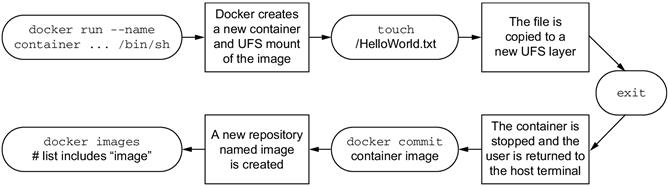
Building an image from a container
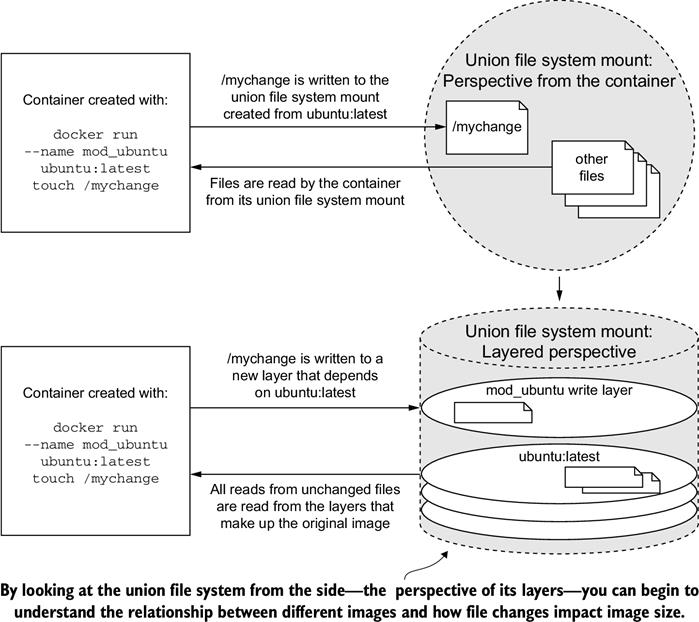
A simple file write example on a union file system from two perspectives
07_02
Reading files that are located on different layers
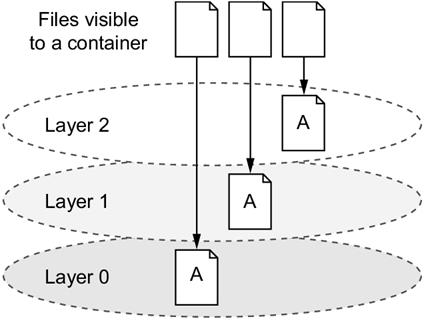
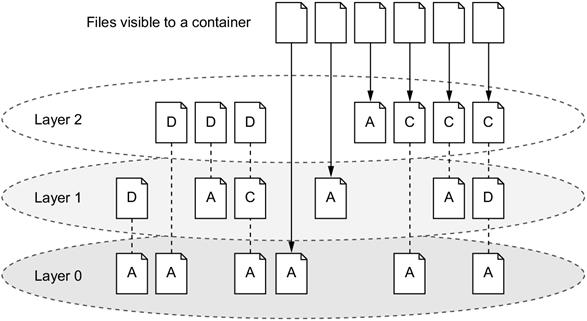
Various file addition, change, and deletion combinations over a three-layered image
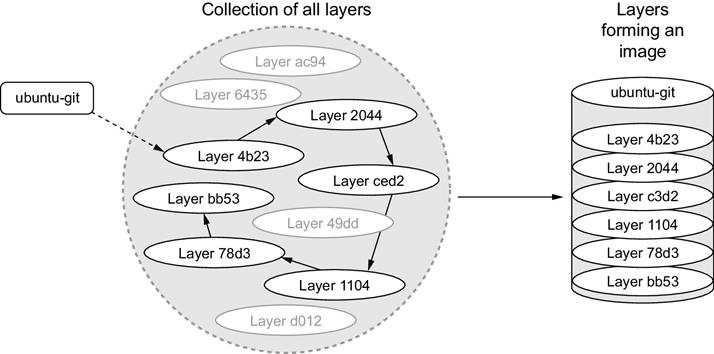
An image is the collection of layers produced by traversing the parent graph from a top layer.
07_05
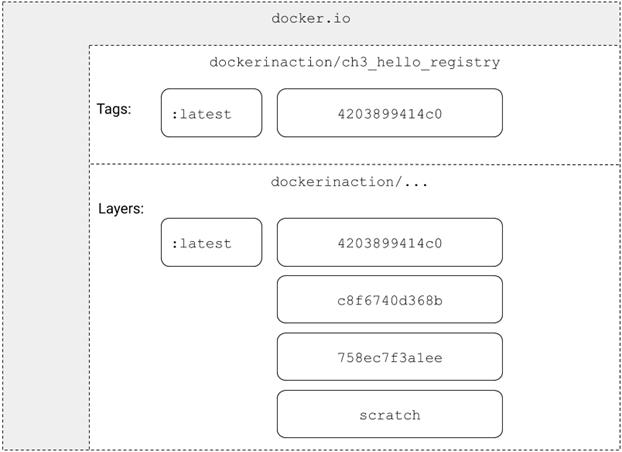
  A visual representation of repositories
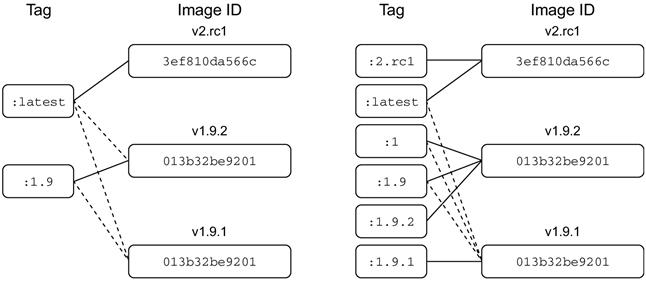
Two different tagging schemes (left and right) for the same repository with three images. Dotted lines represent old relationships between a tag and an image.
   Summary

This is the first chapter to cover the creation of Docker images, tag management, and other distribution concerns such as image size. Learning this material will help you build images and become a better consumer of images. The following are the key points in the chapter:

  • New images are created when changes to a container are committed using the docker container commit command.
  • When a container is committed, the configuration it was started with will be encoded into the configuration for the resulting image.
  • An image is a stack of layers that’s identified by its top layer.
  • An image’s size on disk is the sum of the sizes of its component layers.
  • Images can be exported to and imported from a flat tarball representation using the docker container export and docker image import commands.
  • The docker image tag command can be used to assign several tags to a single repository.
  • Repository maintainers should keep pragmatic tags to ease user adoption and migration control.
  • Tag your latest stable build with the latest tag.
  • Provide fine-grained and overlapping tags so that adopters have control of the scope of their dependency version creep.

FAQ

What is the basic workflow for building a Docker image from a container?Start from a base image, make changes, then commit: - Create a container from a suitable base (for tools and OS you need) - Modify the container’s filesystem or runtime context - Commit to a new image Example: - docker container run --name hw_container ubuntu:latest touch /HelloWorld - docker container commit -a "you@example.com" -m "Add HelloWorld" hw_container yourrepo/hw_image - docker container rm -vf hw_container
How can I see exactly what changed in a container before I commit it?Use docker container diff to list file changes: - A prefix A means Added - C means Changed - D means Deleted Example: - docker container diff image-dev
What’s the difference between CMD and ENTRYPOINT, and how do they affect committed images?- ENTRYPOINT is the executable that always runs when the container starts. - CMD provides default arguments (or a default command if no ENTRYPOINT is set). - When you commit a container, its ENTRYPOINT and CMD are saved as image metadata. Set and commit an entrypoint: - docker container run --name cmd-git --entrypoint git ubuntu-git - docker container commit -m "Set ENTRYPOINT git" cmd-git ubuntu-git
Which container settings are captured into an image when I commit?The commit includes: - Environment variables - Working directory - Exposed ports - Volume definitions - Entrypoint - Command and arguments If not explicitly set in the container, these are inherited from the base image.
How do union file system layers work for adds, changes, and deletions?- Each change is recorded on a new top layer. - Reads see the topmost version of a file (copy-on-read through lower layers). - Deletions write a “delete record” on the top layer that hides lower copies. - Modifying a file in a lower (read-only) layer triggers copy-on-write (the file is copied up, then changed), which can increase size and affect performance.
Why did my image get bigger after I removed a package?Deleting files doesn’t remove the bytes from lower layers; it adds deletion markers in a new layer. The original data remains in the image history. To avoid bloat: - Rebuild by branching from a clean parent (e.g., the base image) and install only what you need - Avoid “install then remove” patterns when authoring final images
How do images, layers, repositories, and tags relate?- Each layer has an ID and a parent pointer; an image is the stack formed by following parents from the top layer. - Repositories are name locations containing tags. - Tags point to a specific top-layer ID (thus the entire image). - docker image tag creates new tags that reference existing images.
How can I keep image size reasonable and design with modern layering in mind?- Prefer branching from a base instead of removing content from an already-built image. - Minimize file changes to avoid copy-on-write churn. - Be cautious with bulk chmod/chown—these can copy many files into a new layer. - Use docker image history to inspect where size is introduced. - Modern drivers don’t impose tight layer-count limits; optimize for size and cacheability rather than minimizing layers at all costs.
When should I use export/import or build a flat (single-layer) image?Use docker container export and docker import when: - You want a flat image (e.g., a statically linked binary) with minimal size - You’re importing a full filesystem tarball (optionally with -c to apply a Dockerfile instruction such as ENTRYPOINT) Trade-offs: - Pros: very small, single-layer, simple runtime - Cons: lose layer history and reuse benefits; less cacheability; not ideal for large stacks
What are best practices for tagging and versioning Docker images?- Provide multiple tags that reflect version levels users care about (e.g., major, major.minor, major.minor.patch). - Keep latest pointing to the latest stable, not a release candidate. - Include platform/base variants in tags when relevant (e.g., -alpine, -stretch). - Allow adopters to choose how much drift they accept by selecting the appropriate specificity (e.g., 1, 1.10, 1.10.2).

pro $24.99 per month

  • access to all Manning books, MEAPs, liveVideos, liveProjects, and audiobooks!
  • choose one free eBook per month to keep
  • exclusive 50% discount on all purchases
  • renews monthly, pause or cancel renewal anytime

lite $19.99 per month

  • access to all Manning books, including MEAPs!

team

5, 10 or 20 seats+ for your team - learn more


choose your plan

team

monthly
annual
$49.99
$499.99
only $41.67 per month
  • five seats for your team
  • access to all Manning books, MEAPs, liveVideos, liveProjects, and audiobooks!
  • choose another free product every time you renew
  • choose twelve free products per year
  • exclusive 50% discount on all purchases
  • renews monthly, pause or cancel renewal anytime
  • renews annually, pause or cancel renewal anytime
  • Docker in Action, Second Edition ebook for free

choose your plan

team

monthly
annual
$49.99
$499.99
only $41.67 per month
  • five seats for your team
  • access to all Manning books, MEAPs, liveVideos, liveProjects, and audiobooks!
  • choose another free product every time you renew
  • choose twelve free products per year
  • exclusive 50% discount on all purchases
  • renews monthly, pause or cancel renewal anytime
  • renews annually, pause or cancel renewal anytime
  • Docker in Action, Second Edition ebook for free
choose your plan

team

monthly
annual
$49.99
$499.99
only $41.67 per month
  • five seats for your team
  • access to all Manning books, MEAPs, liveVideos, liveProjects, and audiobooks!
  • choose another free product every time you renew
  • choose twelve free products per year
  • exclusive 50% discount on all purchases
  • renews monthly, pause or cancel renewal anytime
  • renews annually, pause or cancel renewal anytime
  • Docker in Action, Second Edition ebook for free