This chapter introduces the essentials of single-host container networking by grounding the reader in core concepts—protocols, interfaces, IP addresses, ports, and basic routing—then mapping them to how Docker connects containers. It explains Ethernet versus loopback, how addresses make processes reachable, and how Docker’s bridge and NAT model let containers communicate locally while isolating them from external networks. With this foundation, you learn to choose the right level of network exposure for an application, connect services across containers, and understand their interaction with the host stack.
Docker treats networks as first-class objects and provides three defaults: bridge (inter-container on one host), host (shares the host’s network stack), and none (no external connectivity). The guidance is to prefer user-defined bridge networks for better control and modern features (custom subnets, attachable, built-in DNS). Containers receive private IPs on virtual Ethernet pairs, can join multiple networks, and discover peers by name via Docker’s DNS. When you need multi-host connectivity, options include underlay drivers (macvlan/ipvlan) that give containers first-class, routable identities on the physical LAN, or overlay networks (with Swarm) that span nodes yet remain internal to the cluster. Special modes serve edge cases: host for system services that must tune or share the host stack, and none for maximal isolation.
Because bridge and overlay networks sit behind NAT, inbound access requires NodePort-style publishing (-p) to forward host IP:port to container ports for TCP/UDP; ephemeral host ports are common, and docker port reveals active mappings. The chapter highlights caveats and customizations: Docker networks don’t enforce inter-container firewalls or policies, so rely on application-level authentication and authorization; tune name resolution with --hostname, --dns, --dns-search, and --add-host; and remember DNS settings are applied at container creation. For organizations that externalize networking, run containers on the none network and let external tooling or orchestrators manage interfaces, service discovery, and load balancing—while avoiding mixed setups that blend Docker-managed and externally managed networking due to operational complexity.
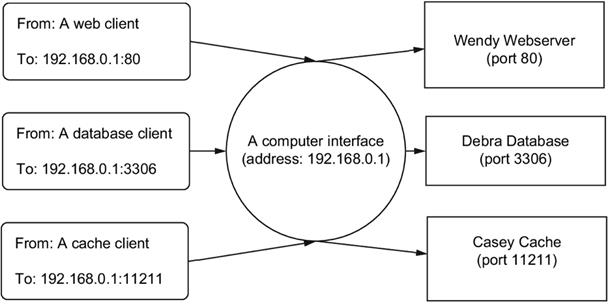
Processes use the same interface and are uniquely identified in the same way multiple people might use the same mailbox.
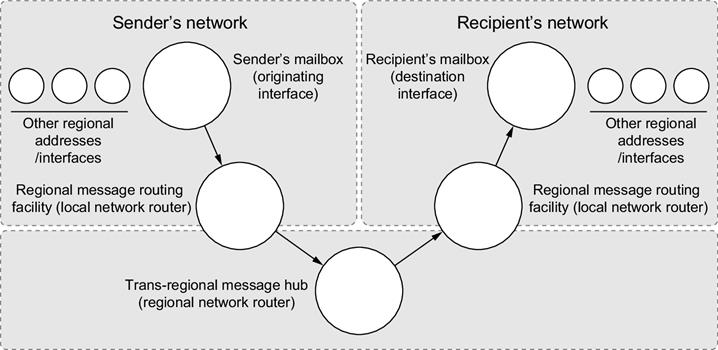
The path of a message in a postal system and a computer network
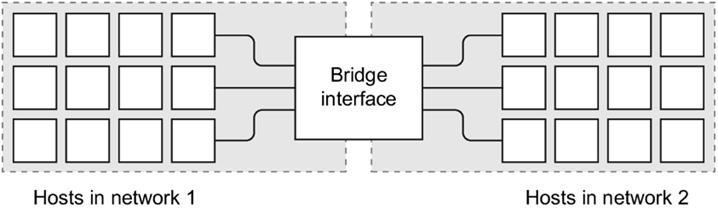
A bridge interface connecting two distinct networks
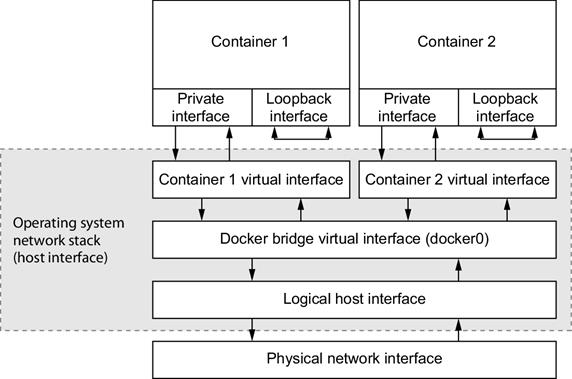
The default local Docker network topology and two attached containers
Summary
Networking is a broad subject that would take several books to properly cover. This chapter should help readers with a basic understanding of network fundamentals adopt the single-host networking facilities provided by Docker. In reading this material, you learned the following:
Docker networks are first-class entities that can be created, listed, and removed just like containers, volumes, and images.
Bridge networks are a special kind of network that allows direct inter-container network communication with built-in container name resolution.
Docker provides two other special networks by default: none and host.
Networks created with the none driver will isolate attached containers from the network.
A container on a host network will have full access to the network facilities and interfaces on the host.
Forward network traffic to a host port into a target container and port with NodePort publishing.
Docker bridge networks do not provide any network firewall or access control functionality.
The network name resolution stack can be customized for each container. Custom DNS servers, search domains, and static hosts can be defined.
Network management can be externalized with third-party tooling and by using the Docker none network.
FAQ
What do protocols, interfaces, and ports mean in container networking?Protocols are the “languages” processes use to communicate (for example, HTTP over TCP). Interfaces are network endpoints with IP addresses (like eth0 or the loopback 127.0.0.1). Ports are numbered recipients on an interface (for example, TCP 80 for HTTP) that let multiple services share the same IP.How does Docker connect containers to the outside world on a single host?Containers on bridge networks reach the internet via NAT, appearing as traffic from the host. Their private IPs are not directly reachable from outside. To accept inbound connections you must publish ports on the host and forward them to the container.What are the default Docker networks and what does “scope” mean?Docker provides three defaults: bridge (container-to-container on one host), host (no separate namespace; uses the host stack), and none (isolated; loopback only). Network scope indicates reach: local (per-host), global (created on each node without cross-host routing), or swarm (spans a Swarm).Why create a user-defined bridge network instead of using the default “bridge”?The legacy default bridge lacks modern features. A user-defined bridge gives embedded DNS-based service discovery, better isolation, labels, attachability, and control over subnets and IP ranges, yielding predictable addressing and easier service-to-service communication.How do I attach a running container to multiple networks and see its interfaces?Use “docker network connect” to add a running container to another network. Inside, you’ll see loopback plus one virtual Ethernet per attached network (for example, eth0, eth1), each with an IP in that network’s subnet. Containers can talk only to peers on the same network(s).How do I publish container ports and what does the -p flag actually do?-p uses hostIP:hostPort:containerPort/protocol. Omitting hostIP binds on all interfaces; omitting hostPort chooses a random ephemeral host port. You can publish multiple ports and protocols. Use “docker port [containerPort[/proto]]” to discover the assigned host port(s).When should I use the host network or the none (network-less) network?Use host mode for system services that need full access to the host network stack (not recommended in multi-tenant setups). Use none for maximum isolation or apps that don’t need networking; only loopback is available, so no external connectivity is possible.What options exist for multi-host networking beyond a single machine?Underlay networks (macvlan/ipvlan) give each container a first-class, routable address on the physical network (Linux-only and environment-specific). Overlay networks (Swarm) provide multi-host, container-to-container routing across nodes but container IPs remain non-routable from outside the cluster.Do Docker networks enforce firewalls or policies between containers?No. Containers on the same Docker network have unrestricted, bidirectional access to each other. Enforce security at the application layer (authentication/authorization) and via external firewalls or policy engines; don’t rely on Docker networking for intra-network isolation.How can I customize DNS and name resolution for containers?Set a hostname with --hostname, DNS servers with --dns, and search domains with --dns-search (these affect /etc/resolv.conf). Override specific names with --add-host (adds to /etc/hosts). You can set default DNS and search domains at engine startup; --add-host is per-container only.
pro $24.99 per month
access to all Manning books, MEAPs, liveVideos, liveProjects, and audiobooks!

 Docker in Action, Second Edition ebook for free
