4 Working with storage and volumes
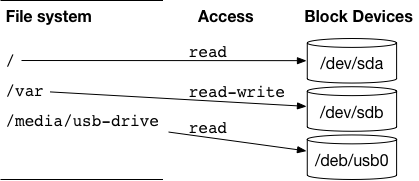
This chapter bridges the gap from toy containers to real applications by focusing on how containers work with data. It explains Linux file trees and mount points, how each container has its own mount namespace, and why the union file system isn’t suitable for long‑lived or shared data. The chapter introduces the three common ways to attach storage to containers—bind mounts, in‑memory tmpfs mounts, and Docker‑managed volumes—and shows how to use the --mount flag to attach them. The core theme is decoupling application images from their data so that containers stay portable, secure, and operable across different environments.
Bind mounts map specific host paths into containers, making them useful for injecting configuration or exporting logs, and they can be made read‑only to reduce risk, but they couple workloads to host layout and can cause conflicts. Tmpfs mounts provide memory‑backed storage for sensitive files and transient buffers, with options to control size and permissions for safer defaults. Docker volumes are named, engine‑managed file trees that abstract away host paths, simplify sharing between containers, and enable durability; the chapter demonstrates this with a Cassandra example and emphasizes the architectural value of separating relatively static images from dynamic data to enable polymorphic and composable patterns.
For sharing, volumes avoid the host‑path coordination problems of bind mounts, and the chapter compares named volumes with anonymous ones and shows how --volumes-from can copy mount definitions between containers, along with its limits around remapping, conflicts, and permissions. It then covers lifecycle management—listing, inspecting, pruning, and removing volumes; differences in cleanup between anonymous and named volumes; and practices to keep environments tidy. Finally, it addresses cross‑host persistence and mobility using volume plugins that map volumes to external storage systems, rounding out a practical toolkit for designing portable, durable, and maintainable containerized data workflows.
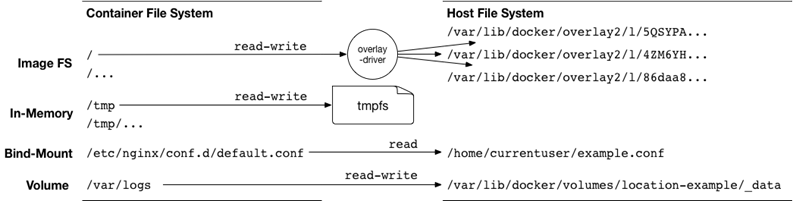
A host files shared as a bind mount volumes
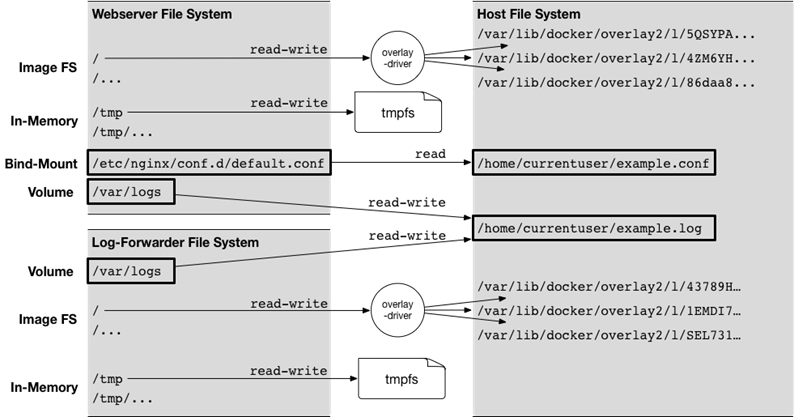
: Sharing files between containers with a volume
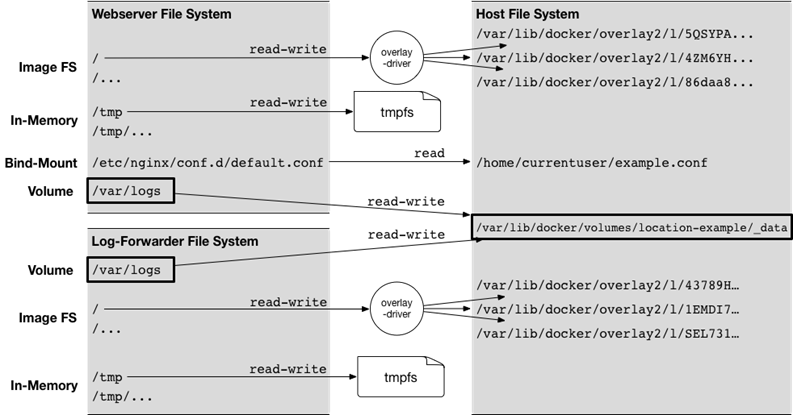
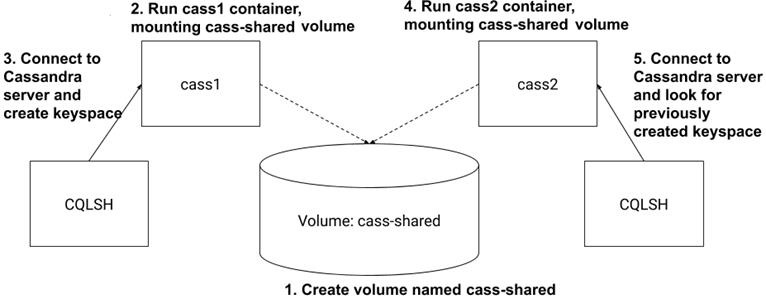
Key steps in creating and recovering data persisted to a volume with Cassandra
Summary
One of the first major hurdles in learning how to use Docker is understanding how to work with files that are not part of images and might be shared with other containers or the host. This chapter covers mount points depth, including the following:
- Mount points allow many file systems from many devices to be attached to a single file tree. Every container has its own file tree.
- Containers can use bind mounts to attach parts of the host file system into a container.
- In-memory file systems can be attached to a container file tree so sensitive or temporary data is not written to disk.
- Docker provides anonymous or named storage references called volumes.
- Volumes can be created, listed, and deleted using the appropriate docker volume subcommand.
- Volumes are parts of the host file system that Docker mounts into containers at specified locations.
- Volumes have life cycles of their own and might need to be periodically cleaned up.
- Docker can provide volumes backed by network storage or other more sophisticated tools if the appropriate volume plugin is installed.
FAQ
What is a mount point in Linux, and why does it matter for containers?
A mount point is a location in the single Linux file tree where a storage source (disk, partition, network share, or memory-backed FS) is attached with specific access properties. Containers have their own MNT namespace and root ("/"), and Docker attaches image layers and additional mounts there. Managing mount points is how you persist data, share files with the host, and share data between containers.What are the common storage types I can mount into a container?
Three main types are used: bind mounts (host path → container path), tmpfs (in-memory, non-persistent), and Docker-managed volumes (named file trees managed by Docker, often host-disk by default, but can use plugins). All can be created with --mount on docker run/create.How do I share a host file or directory with a container using a bind mount?
Use --mount with type=bind and absolute host paths. For example:docker run -d --name app --mount type=bind,src=/absolute/host/file.conf,dst=/app/config.conf image. The mounted content overrides whatever the image provides at the destination path.How can I make a bind mount read-only to protect host files?
Add readonly=true to the mount spec. Example:--mount type=bind,src=/path/secure.conf,dst=/etc/app.conf,readonly=true. Processes in the container will be unable to modify the mounted files.What are the drawbacks of bind mounts?
- They reduce portability because they depend on exact host paths. - They can cause conflicts if multiple containers write to the same host location (risking corruption without extra coordination). - They tie deployments to host-specific layout and are better suited for developer workstations or special-purpose hosts.When should I use in-memory storage (tmpfs), and how do I configure it?
Use tmpfs for sensitive material (keys, passwords) and ephemeral scratch space (upload buffers) that should never hit disk. Example:--mount type=tmpfs,dst=/tmp. You can set limits and permissions: --mount type=tmpfs,dst=/tmp,tmpfs-size=16k,tmpfs-mode=1770. tmpfs is non-persistent, lives in memory, and commonly uses restrictive options like nosuid,nodev,noexec.What are Docker volumes, and why use them instead of bind mounts?
Volumes are named, Docker-managed file trees decoupled from host paths. They improve portability, simplify cleanup, and are ideal for data whose lifecycle is independent of any single container (databases, logs, outputs). Create and inspect them withdocker volume create and docker volume inspect, then mount with --mount type=volume,src=NAME,dst=/path.How do I share data between containers using volumes?
- With a named volume: create once (or let Docker create it on first use), then mount the same name into multiple containers:--mount type=volume,src=myvol,dst=/data. - Without host path knowledge: containers only need the volume name. Note: any existing named volume of the same name will be reused and shared.What are anonymous volumes and how does --volumes-from work? Any limitations?
Anonymous volumes are created without a human-friendly name (Docker assigns an ID). You can “inherit” all mount definitions from another container with--volumes-from SOURCE (can be repeated for multiple sources), avoiding name/path coupling. Limitations: - You can’t remap mount points to different destinations. - Conflicting mount points from multiple sources race; only one wins. - You can’t change write permissions (read-only vs read/write) when copying; the definition is copied as-is.How do I clean up volumes, and what’s different between named and anonymous volumes?
- List volumes:docker volume ls. - Remove by name/ID: docker volume rm VOL1 VOL2. - Prune unused volumes: docker volume prune (supports --filter and --force). Anonymous volumes are removed automatically with their container if you use --rm or docker rm -v. Named volumes are never auto-removed; you must delete them explicitly. For clustered portability and remote storage, consider volume plugins (e.g., via docker plugin).
 Docker in Action, Second Edition ebook for free
