13 Orchestrate Services on a Cluster of Docker Hosts with Swarm
This chapter explains how Docker Swarm orchestrates containerized applications across multiple hosts to improve availability, scalability, and operational consistency. Swarm mode, built into the Docker Engine, introduces managers and workers, desired-state reconciliation, and a cluster-level model built around Services, Tasks, Networks, Volumes, Configs, and Secrets. Using a simple multi-tier example (API and Postgres), the chapter shows how application definitions translate into a running stack, how Swarm supervises health and updates, and how declarative settings drive automated rollouts and repairs.
The chapter dives into networking and traffic flow with the Swarm routing mesh, which exposes published service ports on every node and forwards connections through virtual IPs. It clarifies that Swarm’s load balancing is connection-based at layer 4, not request-based at layer 7, and highlights best practices like terminating TLS at services for end-to-end encryption. Overlay networks are used to segment communications, simplify service discovery through Docker’s built-in DNS, and isolate tiers; however, because peers on the same overlay can talk freely, the chapter emphasizes using network design plus application-layer authentication and authorization to control access. Secrets are handled securely via file mounts, and shared or centralized services should be exposed via published ports rather than shared internal overlays.
On scheduling and resilience, the chapter contrasts replicated and global service modes, covers resource reservations and limits, and explains restart, update, and rollback policies that help keep services healthy during changes. It shows how to control placement with constraints and labels (for example, draining managers, separating “public” and “private” zones, and avoiding colocation of sensitive tiers), and illustrates how Swarm spreads tasks while honoring capacity and constraints. Finally, it warns that local volumes tie data to nodes, so stateful services need careful design or external volume drivers, and it closes by reinforcing Swarm’s core value: continuous convergence toward the operator’s declared state, guided by thoughtful topology, security, and data-management choices.
- Swarm Cluster Deployment
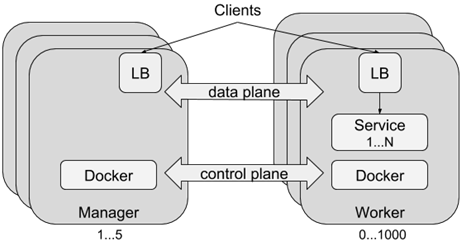
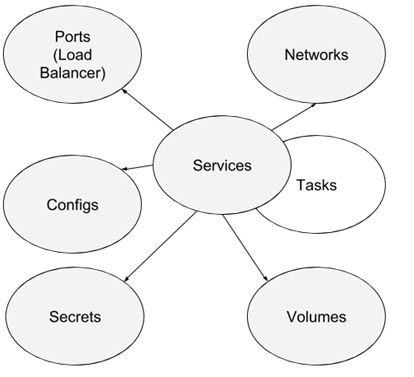
- Docker Swarm Resource Types
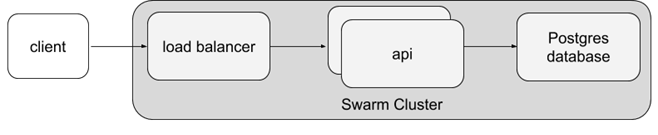
- Logical Architecture of Example Application
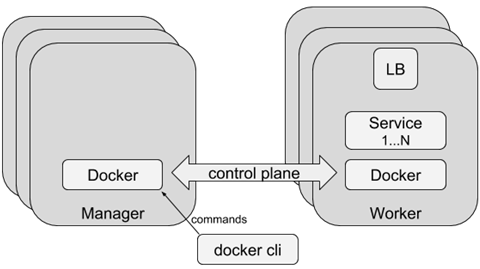
- Communication path for Docker Control Plane
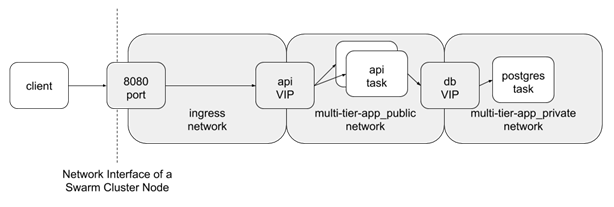
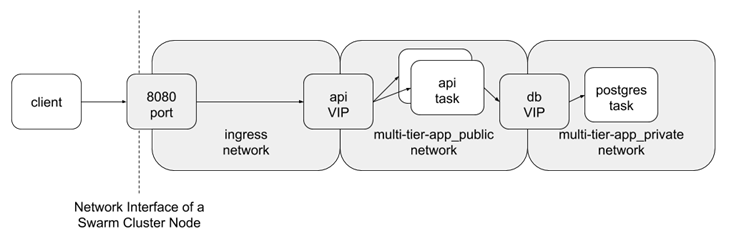
- Swarm Network Components for Example App
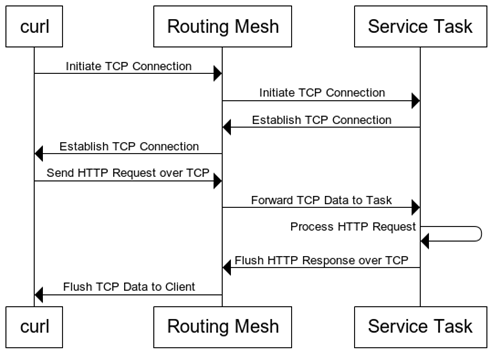
- Routing an HTTP request to a Service Task
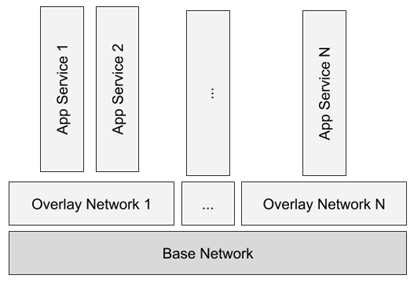
- Layered View of Overlay Networks
- Swarm Network Components for Example App
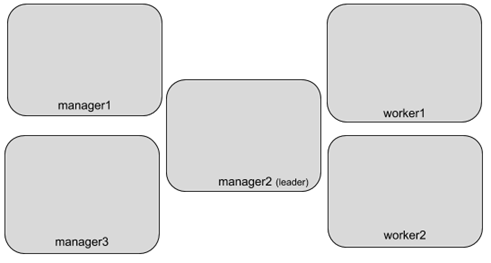
– The test Swarm cluster
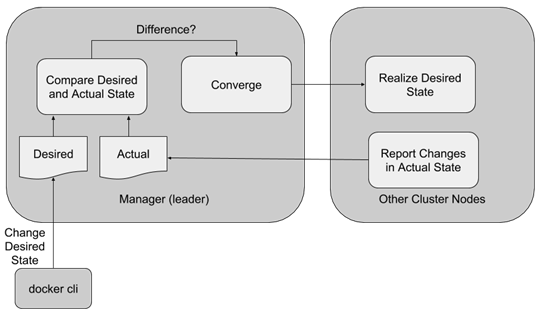
- Event Reconciliation Loop
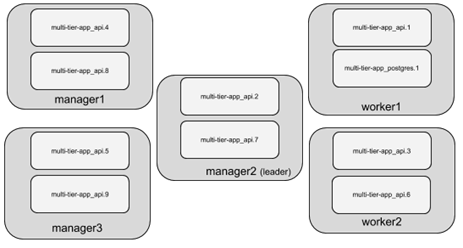
- API service tasks are everywhere
Summary
This chapter explored many aspects of running Docker services on a cluster of hosts managed by Swarm. The exercises in this chapter demonstrated how to deploy several kinds of applications using Swarm's most important and commonly used features. We saw what happens when a cluster runs out of resources and showed how to recover from that condition. We reconfigured a cluster and service deployment to implement user-defined architectural goals.
The key points to understand from this chapter are:
- How and when to use cluster-scoped resources such as networks, configurations, and secrets
- How service-scoped resources such as networks, tasks, and volumes are provisioned and assigned to a node
- Service tasks are ephemeral and service updates cause tasks to be replaced with new containers
- Service tasks can be scaled to the desired state as long as the cluster has enough resources available on nodes that fulfill the service's placement constraints
- Swarm managers manage the descriptions of the desired state of the cluster
- Swarm managers converge actual application and resource deployments to the desired state when sufficient resources are available
FAQ
What is Docker Swarm mode and what does it provide?
Swarm mode is Docker’s built-in orchestrator that clusters multiple Docker Engines and lets you deploy and operate applications as Services across many hosts. It offers desired-state reconciliation (keeps the declared number of replicas running), scheduling, rolling updates/rollbacks, built-in service discovery, overlay networking, and a routing mesh to expose services. It’s included with the Docker Engine and CLI—no extra components required.How do I form a Swarm cluster and what network ports must be open?
- Initialize a manager on one node (docker swarm init), then join other managers/workers with the provided join tokens.- Recommended: 3 or 5 managers for quorum and control-plane availability.
- Open these ports between nodes: TCP 2377 (cluster management), TCP/UDP 7946 (node gossip), UDP 4789 (overlay networks).
What Swarm resource types will I use?
- Services: the long-running processes you deploy and scale.- Tasks: the unit Swarm schedules; each task runs one container instance.
- Networks: typically overlay networks that span nodes for service-to-service traffic.
- Volumes: persistent storage mounted into tasks (local by default).
- Configs and Secrets: distribute non-sensitive and sensitive data to services safely.
How do I deploy a multi-tier app with docker stack and manage secrets?
- Describe the app in a Compose v3+ file (services, networks, volumes, configs/secrets).- Create required cluster-scoped dependencies first (for example, docker secret create my-secret -). If a declared external resource is missing, deployment fails fast.
- Deploy with docker stack deploy --compose-file docker-compose.yml
- Services can read secrets from files mounted at /run/secrets/..., avoiding environment-variable leaks.
How does the Swarm routing mesh expose services, and when would I use PublishMode=host?
Publishing a port creates a listener on every node; iptables redirects traffic to a virtual IP (VIP) that ipvs load-balances to healthy tasks, regardless of which node they run on. This is layer-4 (TCP/UDP) balancing, not HTTP-aware. PublishMode=host bypasses the mesh so clients must connect to the specific node running a task; it’s commonly used with global services to avoid port collisions.How do services discover and reach each other on overlay networks?
Containers on an overlay network resolve service names via Docker’s embedded DNS (127.0.0.11). A lookup returns the service’s VIP, and connections are routed to healthy tasks. Within a given overlay network, traffic is open on any port between attached containers. You can enable network encryption via driver options in Compose.How can I isolate service-to-service communication in Swarm?
- Use multiple, purpose-specific overlay networks and attach each service only to the networks it needs.- Do not rely on network-level firewalls within an overlay (there are none between peers). Enforce access control at the application layer (e.g., database users/passwords, mutual TLS).
- For shared, centralized services (e.g., logging), publish a port (ingress) and require client authentication.
How are connections load balanced and what are the limits of the routing mesh?
With endpoint-mode=vip (default), connections to the service VIP are balanced across healthy tasks. The mesh is layer-4, so it balances TCP/UDP connections, not individual HTTP requests; multiple HTTP requests over one TCP connection go to the same backend. Docker may route a local client to a task on another node; locality is not guaranteed.How do replicas, scaling, and resource reservations work, and what happens when capacity runs out?
Replicated services declare a desired replica count; Swarm’s reconciliation loop starts/stops tasks to match it. You can set restart policies, rolling update/rollback behavior, and resource reservations/limits (CPU/memory). If reservations can’t be satisfied, tasks remain pending with “no suitable node (insufficient resources).” Swarm also supports mode=global for one task per eligible node.How can I control task placement (labels, constraints, draining) and what about stateful services and volumes?
- Control where tasks run using node availability (active/pause/drain) and placement constraints (e.g., node.role == worker, node.labels.zone == public). Label nodes to define zones (public/private, env=dev, etc.).- For stateful services, the default local volume stores data on a single node. If a task moves to a different node, it won’t see that data. Options: use a volume plugin that supports multi-host persistence/replication, or pin the service to a specific node (constraints) so it consistently mounts the same local volume.

 Docker in Action, Second Edition ebook for free
