12 First-Class Configuration Abstractions
Modern applications must adapt to multiple environments and evolving requirements, and this chapter explains how to model that adaptability with first-class configuration and secret abstractions in Docker. It distinguishes between configuration (non-sensitive data that shapes runtime behavior) and secrets (sensitive values that must remain confidential), and shows how to keep their lifecycles aligned with, yet decoupled from, application delivery. The overarching goal is to enable per-environment behavior safely and predictably, preserving backward compatibility while avoiding the pitfalls of baking volatile or sensitive data into images or pipelines.
The chapter demonstrates Docker Config resources as mountable, read-only files that services can consume alongside configuration embedded in images and values passed via environment variables. Using a greetings service example, it shows how to parameterize deployments (for example, with DEPLOY_ENV), map config files to precise paths with specific ownership and permissions, and merge common and environment-specific settings at startup. It then dives into the operational model: configs are immutable, stored in the cluster, and referenced by ID in service definitions, which enforces dependency stability. Because configs can’t be updated in place, the chapter recommends versioned resource names and describes automation patterns for substituting version identifiers and cleaning up unused resources, while noting that config data is transported in base64 (not encrypted) and always mounted read-only on tmpfs.
Secrets are treated as a special class of configuration that require strict confidentiality and controlled distribution. The chapter addresses the “First Secret Problem” and shows how Docker Swarm’s identity-driven control plane (service and task identities) securely injects secrets into containers via an in-memory, read-only filesystem (typically under /run/secrets), avoiding the leakage risks of environment variables. An end-to-end example provisions a TLS private key as a Secret and a public certificate as a Config, marks them as external in compose, maps them into the container, and passes file locations via env vars so the service can start an HTTPS listener. By combining configs, secrets, env vars, and image-bundled files, Docker enables secure, repeatable, per-environment deployments without compromising the application or its delivery pipeline.
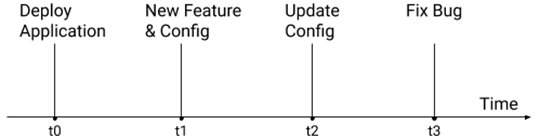
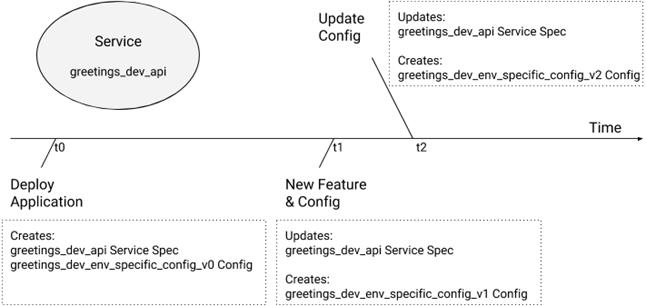
Timeline of Application Changes
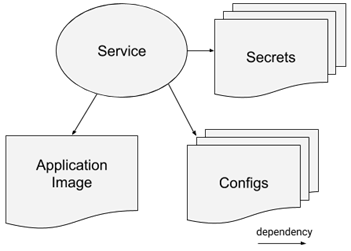
: Applications Depend on Configurations
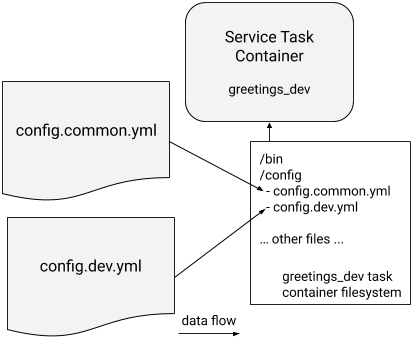
: The greetings service supports common and environment-specific configuration via files
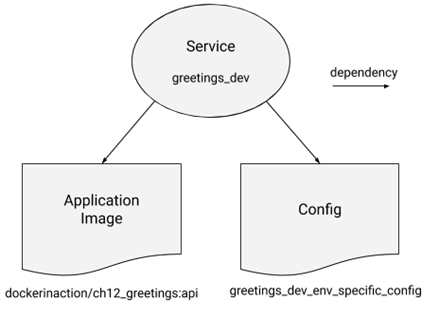
: Docker Services Depend on Config Resources
: Copy on Deploy
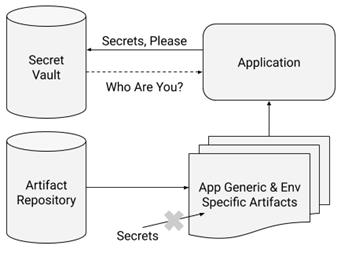
The First Secret Problem
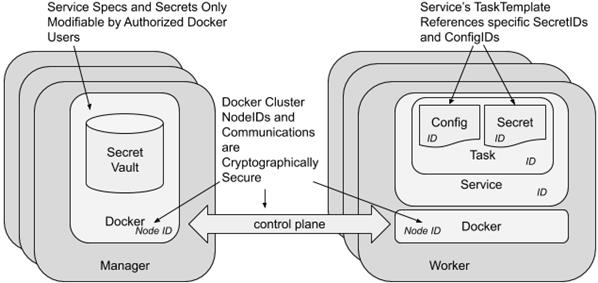
: The Docker Swarm Cluster's Chain of Trust
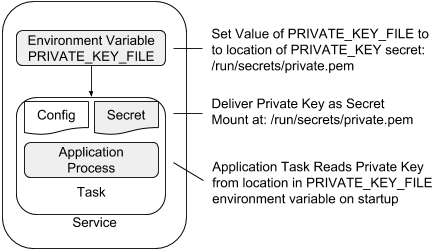
: Provide Location of Secret File to Read as Environment Variable
Summary
This chapter described the core challenges of varying application behavior at deployment time instead of build time. We explored how you can model this variation with Docker's configuration abstractions. The example application demonstrated using Docker's Config and Secret resources to vary its behavior across environments. This culminated in a Docker Service serving traffic over https with an environment-specific dataset.
The key points to understand from this chapter are:
- Applications often must adapt their behavior to the environment they are deployed into.
- Docker Config and Secret resources can be used to model and adapt application behavior to different deployment needs.
- Secrets are a special kind of Configuration data that is challenging to handle safely.
- Docker Swarm establishes a chain of trust and uses Docker Service identities to ensure Secrets are deliver correctly and securely to applications.
- Docker provides Config and Secrets to Services as files on a container-specific tmpfs filesystem that applications can read at startup.
- Deployment processes must use a naming scheme for Config and Secret resources that enables automation to update Services.
FAQ
Why separate application code from configuration when deploying Docker Services?
To reuse the same image across environments (dev, stage, prod) while varying behavior safely at deploy time. Apps read configuration on startup (files, env vars, config servers), so Docker provides first-class Config and Secret resources to inject environment-specific data without rebuilding images.How do I provide environment-specific configuration with Docker Compose?
Define a top-levelconfigs entry that points to a file interpolated by an environment variable (for example config.${DEPLOY_ENV:-prod}.yml), then map it under the service’s configs with a target path. Also pass DEPLOY_ENV to the container so the app knows which file to read. Example: configs: env_specific_config: file: ./api/config/config.${DEPLOY_ENV:-prod}.yml and map it to /config/config.${DEPLOY_ENV:-prod}.yml.What is a Docker Config resource and how does it appear in a container?
A Config is a Swarm-scoped object (max ~500 KB) that stores runtime, non-sensitive data. When referenced by a service, Swarm mounts it as a read-only file inside each task container. By default it appears at/<config_name>, but you can choose a custom target path.How can I control the path, ownership, and permissions of a Config inside a container?
In the service’sconfigs mapping, set target (path), uid, gid, and mode. Defaults are root ownership (0:0) and 0444 permissions. For stricter access, use something like uid: '1000', gid: '1000', mode: 0400.Configs are immutable—how do I roll out configuration changes?
Create a new Config with a new name (commonly versioned, for exampleenv_specific_config_v2) and update the service to reference it. Since Compose can’t parameterize Config names directly, CI/CD often rewrites tokens (like _vNNN) before deploy. Periodically remove unused Configs after verifying they’re not referenced.How do I manage Configs directly with the Docker CLI?
Usedocker config create|inspect|ls|rm. inspect shows metadata and a base64-encoded Data field (not encrypted). You can’t update a Config in place or remove one that’s in use. Stack-deployed Config names are usually prefixed with the stack name (for example greetings_dev_env_specific_config).What is the “First Secret Problem,” and how does Swarm solve it?
Apps need a secret to authenticate to a vault, but can’t have that secret ahead of time. Swarm solves this by using strong, built-in identities (Service and Task IDs) and a secure control plane to authorize and deliver secrets directly to the right tasks—no bootstrap secret needed.How are Docker Secrets delivered to containers, and why avoid environment variables for secrets?
Secrets are mounted as in-memory, read-only files in/run/secrets (tmpfs). Env vars are risky because they’re hard to restrict, may leak to subprocesses, and can end up in logs or crash dumps. Prefer passing the file path via an env var (for example CERT_PRIVATE_KEY_FILE=/run/secrets/key.pem) and read the secret from the file.How do I provide a TLS certificate and key using Configs and Secrets?
Store the private key as a Secret and the public certificate as a Config. Mark themexternal: true in Compose, create them with docker secret create and docker config create, map them into the service (set target, uid, gid, mode), and pass their locations via env vars (for example CERT_PRIVATE_KEY_FILE and CERT_FILE). Then deploy the stack.
 Docker in Action, Second Edition ebook for free
