Overview
11 Services with Docker and Compose
Modern applications are built from interdependent processes that must be discoverable and reliably available over networks. This chapter introduces “services” as the abstraction for those network-accessible workloads, and shows how Docker’s Swarm mode provides first-class tooling to manage them. An autonomous orchestrator continually reconciles a user’s desired state with the current state—starting, stopping, and replacing containers as needed—so operators can focus on intent rather than low-level mechanics. The concepts and workflows presented map cleanly to other container orchestrators, making them broadly applicable.
Starting with a simple web service, the chapter demonstrates enabling Swarm mode, creating a service, and observing how tasks (one container per task) implement service replicas. Key capabilities include self-healing (automatic resurrection of failed containers), scaling via replicated or global modes, and controlled rollouts that specify update order, batch size, and delays until the system converges. It also covers resilient deployment strategies: pausing on failures, rolling back automatically based on thresholds, and defining service health independently of process status with health checks configurable in images or service definitions, including retry, interval, timeout, and the option to disable checks when inappropriate.
The second half moves from imperative commands to declarative environments using Compose V3 and stacks. It explains the YAML-based model, how docker stack deploy creates and updates collections of services, and how changes like scaling are applied without tearing down the stack, with explicit pruning for safe deletions. For stateful workloads, it models named volumes at the stack level and mounts them in services to persist data across restarts and replacements. Finally, it details Docker’s networking for services: the ingress network for published ports, per-stack overlay networks for service-to-service communication, built-in DNS that resolves service names to virtual IPs, and integrated load balancing across replicas, along with Compose options to create, share, or isolate networks as needed.
Summary
This chapter introduces higher-level Docker abstractions and working with the Docker declarative tooling, and using Compose to model the desired state for multi-service applications. Compose and declarative tooling relieve much of the tedium associated with command-line management of containers. The chapter covers the following:
- A service is any processes, functionality, or data that must be discoverable and available over a network.
- Orchestrators like the Swarm track and automatically reconcile user-provided desired state and the current state of Docker objects like services, volumes, networks.
- Orchestrators automate service replication, resurrection, deployments, health checking, and rollback.
- The “desired state” is what the user wants the system to be doing, or what it is “supposed” to be doing. People can describe desired state in a declarative style using Compose files.
- Compose files are structured documents represented in YAML.
- Declarative environment descriptions with Compose enables environment versioning, sharing, iteration, and consistency.
- Compose can model services, volumes, and networks. Consult the official Compose file reference material for a full description of its capabilities.
FAQ
What is a Docker “service,” and how does it differ from a container?
A service is any process, functionality, or data that must be discoverable and available over a network. In Swarm mode, a service is an abstraction that declares the desired state (image, replicas, ports, rollout/rollback rules). The work is executed by tasks, and each task runs exactly one container. Swarm continuously reconciles the declared (desired) state with the actual (current) state to keep the service running.Why do I need to run “docker swarm init” before creating services?
Services are a Swarm-only feature. docker swarm init starts Swarm mode, initializes the internal state store, and runs the orchestration loop that maintains services. It also enables the docker service and docker stack subcommands and creates the ingress networking needed for published ports.What happens if I kill a container that backs a service?
Swarm notices the divergence between desired and current state and recreates a replacement task/container automatically. You can see this by removing the container and then checking docker service ls and docker service ps <name>: the old task appears as Shutdown/Failed and a new one appears as Running. This “resurrection” is the orchestrator reconciling state.How do I scale a service, and what replication modes exist?
Use docker service scale name=N to set the number of replicas in replicated mode (the default). Scaling down removes the highest-numbered tasks first. The global mode runs exactly one replica per Swarm node, useful for per-node agents and infrastructure services.How do I roll out a new version safely, and how can I roll back?
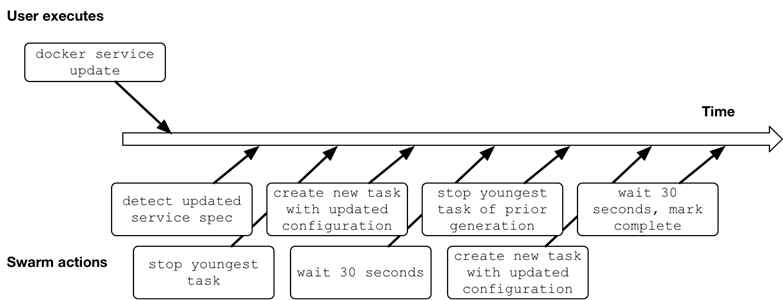
Update with docker service update --image IMAGE:TAG plus rollout controls such as --update-order, --update-parallelism, and --update-delay to tune batch size, order, and pacing. Swarm reports progress and “Service converged” when the current state matches the desired state. If things go wrong, use docker service update --rollback to return to the prior spec, or set --update-failure-action rollback and a tolerance via --update-max-failure-ratio to automate rollback on failure.How do health checks work for services?
“Running” isn’t the same as “healthy.” Define a health check per task via a Dockerfile HEALTHCHECK or at service update/create with flags like --health-cmd and --health-interval. Swarm executes the command inside each task on a schedule; the container’s health is visible via docker container ps or docker inspect. You can also disable checks with --no-healthcheck if needed.Why use Compose/Stacks, and how do I deploy or update them?
Compose (V3) provides a declarative way to model whole environments (services, volumes, networks, secrets, configs) in YAML. Deploy or update with docker stack deploy -c file.yml STACK; Swarm reconciles differences between the file (desired state) and what’s running. Resources are prefixed with the stack name, and you can inspect tasks with docker stack ps STACK.What’s the right way to remove a service from a stack?
Deleting a service from the Compose file alone doesn’t remove it from the running stack. Redeploy with docker stack deploy -c file.yml --prune STACK to delete resources not present in the file. You can remove a service manually with docker service rm, but it will be recreated by the next stack deploy if it’s still in the file, so keep a complete, authoritative Compose file.How do I persist database data with Compose?
Declare a named volume at the top level (volumes:) and mount it in the service using the long-form volume spec (source/target). For example, mount a pgdata volume at /var/lib/postgresql/data for Postgres. If the service is removed and recreated, Swarm reattaches the volume so your data survives container replacement.How do service discovery, load balancing, and networks work in Swarm and Compose?
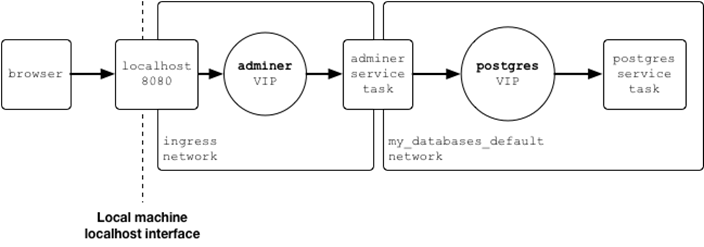
Swarm assigns each service a virtual IP (VIP) and balances connections across its replicas. Docker’s built-in DNS returns the service’s VIP when resolving by service name on a network. Published ports are handled via the ingress network; service-to-service traffic inside a stack uses the stack’s default network unless you define your own. In Compose, declare networks: at the top level and attach services to them; you can also mark networks as external to share them across stacks.




 Docker in Action, Second Edition ebook for free
