10 Image Pipelines
Image pipelines streamline how Docker images are produced and delivered so teams can ship updates quickly and reliably. They automate a consistent sequence: prepare inputs, build with a Dockerfile, verify structure and behavior, optionally scan for vulnerabilities, then tag and publish to a registry. These practices mirror continuous integration workflows and emphasize reproducibility, traceability, and confidence that an image will behave correctly in its runtime environment. As images advance through the pipeline and pass tests, trust in the artifact increases, enabling consumers to deploy with fewer surprises.
The chapter compares key build patterns and how they affect size, security, and maintainability. An all‑in‑one image bundles build tools and runtime for fast starts and portable dev environments, but it is large and broadens the attack surface. Splitting the build and runtime yields a slimmer, safer production image while keeping heavy tooling in a separate build step. Multi‑stage builds go further by producing specialized variants (for example, a debug image) without duplicating definitions, using named stages and targeted builds. To aid operations, publishers embed metadata at build time with labels (name, version, build date, and VCS reference) and may include the Dockerfile; simple orchestration with make can coordinate metadata gathering, artifact creation, linting, image builds, and tests.
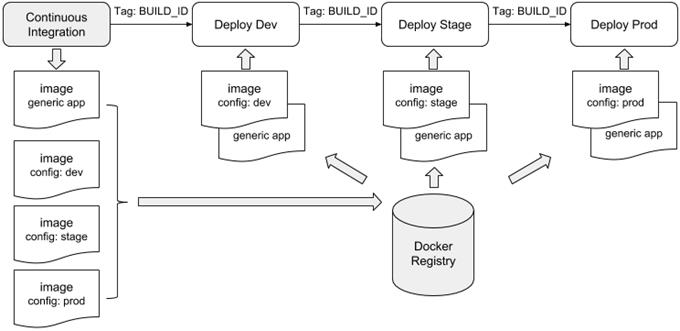
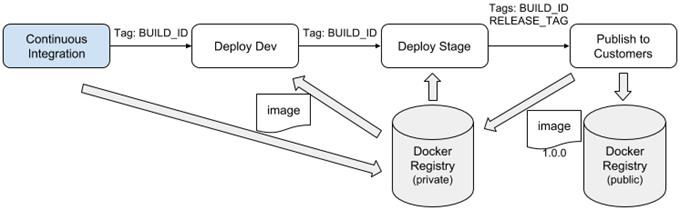
Quality checks are woven into the pipeline: lint Dockerfiles to catch errors and anti‑patterns, validate image contents and behavior with structure tests (files, permissions, commands, and labels), and integrate image vulnerability scanning to gate releases. Tagging strategy is crucial because tags are mutable and the meaning of “latest” varies; unique, precise tags (such as a time‑and‑commit BUILD_ID) promote the exact artifact through environments. For multi‑environment delivery, ship a generic application image and pair it with environment‑specific configuration images rather than rebuilding the app per environment. When serving broad audiences, semantic versioning communicates change impact and coexists with unique tags behind the scenes. Promotion should always resolve human‑friendly tags to a single immutable identifier so the intended image is the one that gets deployed and published.
Generic artifact build pipeline

A Docker image build pipeline
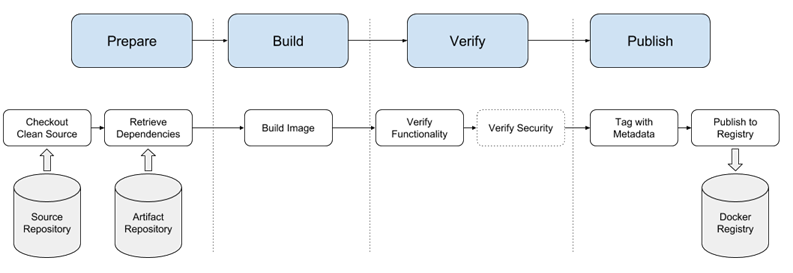
Image build pattern maturity
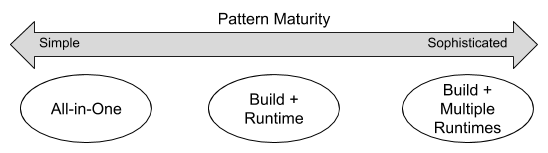
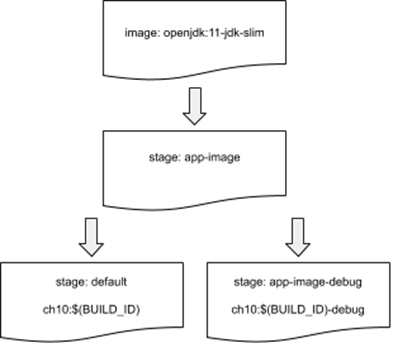
Image Hierarchy for Multi-Stage Build Example
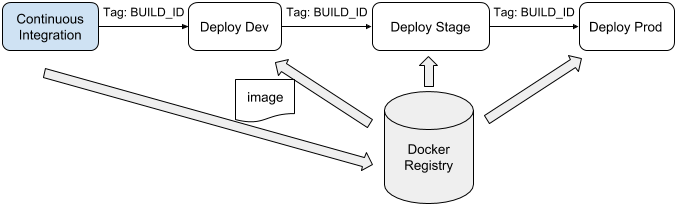
Continuous Delivery with Unique Tags
Configuration image per environment
Tag and Publish Image Release with Semantic Versioning
Summary
This chapter covered common goals, patterns, and techniques used to build and publish applications in Docker images. The options described in this chapter illustrate the range of options available when creating image delivery processes. With this foundation, you should be able to navigate, select, and customize options that are appropriate for delivering your own applications as Docker images. The key points to understand from this chapter are:
- Pipelines for building images have the same structure and goals for assuring quality of Docker images as other software and infrastructure build pipelines.
- Tools for detecting bugs, security problems, and other image construction problems exist and can be incorporated into image build pipelines easily.
- Codify the image build process using a build tool such as make and use that process in local development and CI/CD processes.
- There are several patterns for organizing Docker image definitions and these patterns provide tradeoffs in managing application build and deployment concerns such as attack surface and image size versus sophistication.
- Information about the source and build process of an image should be recorded as image metadata to support traceability, debugging, and orchestration activities when deploying images.
- Docker image tags provide a foundation for delivering software to consumers using styles ranging from continuous delivery in a private service deployment to publishing long-lived releases using semantic versioning to the public.
FAQ
What is a Docker image build pipeline, and what steps does it include?
A Docker image build pipeline automates producing deployable images from source. Typical steps are: (1) check out a clean copy of the image definition and scripts, (2) retrieve or generate application artifacts, (3) build the image (for example, with a Dockerfile), (4) verify structure and behavior, (5) optionally scan for known vulnerabilities, (6) tag the image for consumption, and (7) publish it to a registry.Which tools are commonly used to automate Docker image pipelines?
Continuous integration systems such as Jenkins, Travis CI, and Drone are frequently used. The specific platform is an implementation detail—the goal is to apply a consistent, repeatable set of build, test, and publish practices to produce trustworthy images.What are the main patterns for building images, and when should I use each?
- All-in-one: build and run in a single image. Best for quick starts, dev environments, or legacy apps with many dependencies.- Separate build and runtime images: build artifacts in one container and run them in a slimmer runtime image. Good for smaller, more secure runtime images.
- Multi-stage builds with variations: define the core app image once, then create specialized variants (debug, profiling, etc.) in additional stages to avoid duplication and stay in sync.
What are the pros and cons of an all-in-one image?
Pros: simplest to author, fast to get started, great for demos and portable dev environments. Cons: larger images (often hundreds of MB), broader attack surface due to extra tools, and more frequent updates driven by build-time dependencies.How does splitting build and runtime images improve results?
Building artifacts in a dedicated build container (for example, Maven) and copying only the final artifact into a lean runtime base (for example, OpenJDK slim) reduces image size and attack surface. It also separates concerns, aligns well with CI systems that provide containerized build runners, and speeds distribution.How do multi-stage builds help create variants like a debug image?
Name the main stage (for example, “app-image”), then define additional stages “FROM app-image” that make minimal changes (such as a different ENTRYPOINT or extra tooling). Use docker build’s --target to produce the desired variant. You can add a final “default” stage pointing to the main stage so building without --target yields the primary image.What metadata should I capture at image build time, and how?
At minimum: application name, version (or BUILD_ID), build date/time, and VCS commit. Add these as LABELs (for example, using the Label Schema keys) and pass values via build args. Optionally include the Dockerfile and package manifests in the image to aid traceability, audit, and operations.How can I orchestrate an image pipeline using make?
Use a Makefile to declare targets and dependencies for steps like metadata collection, building app artifacts, linting Dockerfiles, building images, testing, tagging, and publishing. make computes the execution order from dependencies, so each step runs only when needed. This works locally and in CI/CD systems.How do I test images in the pipeline for correctness and security?
- Lint Dockerfiles (for example, with hadolint) to catch best-practice and syntax issues.- Validate image structure and behavior with Container Structure Tests (verify files, permissions, labels, and command output).
- Optionally integrate a vulnerability scanner that compares packages and files against a vulnerability database and gates releases on severity thresholds.
What image tagging schemes work well in CI/CD, and how should I use tags like latest?
- Prefer unique, immutable tags (for example, BUILD_ID that includes timestamp and VCS ref) for promotion across environments.- Avoid relying solely on latest because tags are mutable and ambiguous; define what latest means in your context if you use it.
- For multi-environment releases, use a generic app image plus separate config images per environment, all tagged with the same BUILD_ID.
- For broad distribution and long-term support, add semantic version tags (MAJOR.MINOR.PATCH). Promotion pipelines should resolve friendly tags to a unique tag or digest at deploy time.

 Docker in Action, Second Edition ebook for free
