9 The Workflow Service: orchestrating and deploying AI applications
This chapter explains how the platform turns a developer’s decorated Python function into a deployed AI application that can be called over HTTP. The key idea is a split between the control plane, which handles deployment, scaling, routing, and job management, and the data plane, which runs inside each workflow container and handles incoming requests. The @workflow decorator stores metadata such as the workflow name, API path, scaling rules, resource limits, timeout, and retry settings, and that metadata is consumed both by the deployment pipeline and by the runtime server.
Inside each container, the SDK’s runtime server imports the developer’s module, finds the decorated workflow, and exposes it as an HTTP endpoint. It supports synchronous, streaming, and asynchronous execution modes: sync returns a single JSON result, streaming sends Server-Sent Events as the function yields chunks, and async creates a job record and immediately returns a job ID while the work continues in the background. The chapter also shows how async jobs are stored in a simple database-backed table, how clients poll for status, and how workflows can report progress and save checkpoints so long-running jobs can resume after failure.
The chapter then broadens to production concerns and orchestration. It covers concurrency with multiple worker processes, automatic retry for transient gRPC and HTTP failures, and shallow health probes that let Kubernetes manage container liveness and readiness without creating dependency cascades. It also shows how workflows can call other workflows sequentially or in parallel through a single SDK method, with the SDK hiding differences between sync, stream, and async children. Finally, the Workflow Service contract, deployment pipeline, route registration with the API Gateway, and Kubernetes-based runtime management come together to provide versioned, scalable, and rollback-capable deployment of AI workflows.
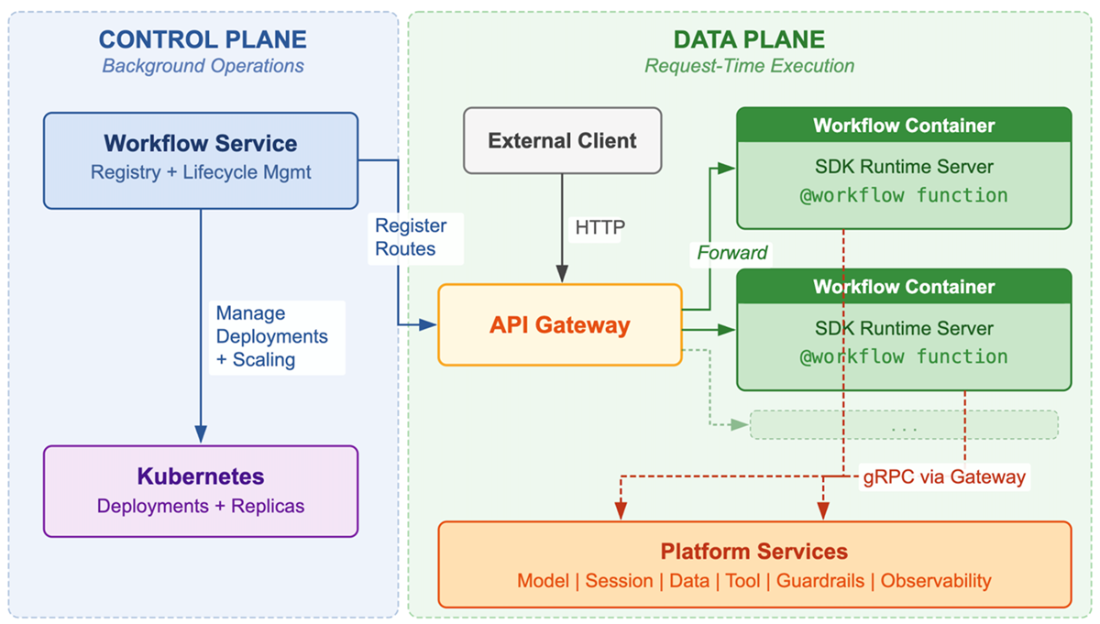
Control plane vs. data plane. On the left, the Workflow Service (control plane) connects to Kubernetes to manage container Deployments and to the API Gateway to register routes. On the right, the data plane: multiple workflow containers, each running the SDK's runtime server, receiving HTTP requests from the API Gateway and making gRPC calls to platform services through the gateway. For synchronous and streaming workflows, the control plane and data plane do not communicate during request handling. For asynchronous workflows, the data plane calls the control plane to manage job state.
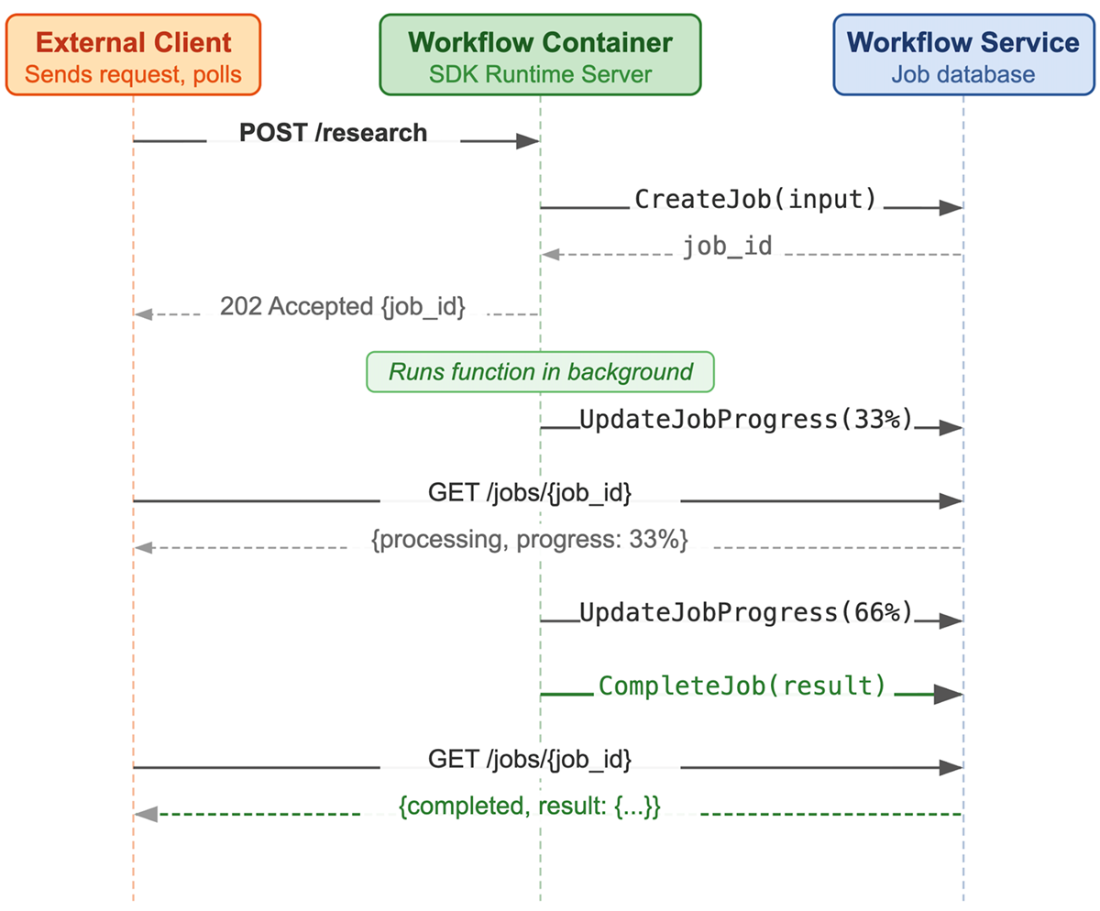
The async job lifecycle. An external client sends a request to the workflow container. The SDK's runtime server calls CreateJob on the Workflow Service, which stores the job record and returns a job_id. The runtime server immediately returns 202 Accepted with the job_id to the client and runs the workflow function in the background. As the function executes, the runtime server reports progress through UpdateJobProgress. The client polls the Workflow Service directly at GET /jobs/{job_id} to check status and see progress. When the function completes, the runtime server calls CompleteJob with the result. The client's next poll returns the completed status with the full result. The Workflow Service serves the polling endpoint from its own database, not from the workflow container.
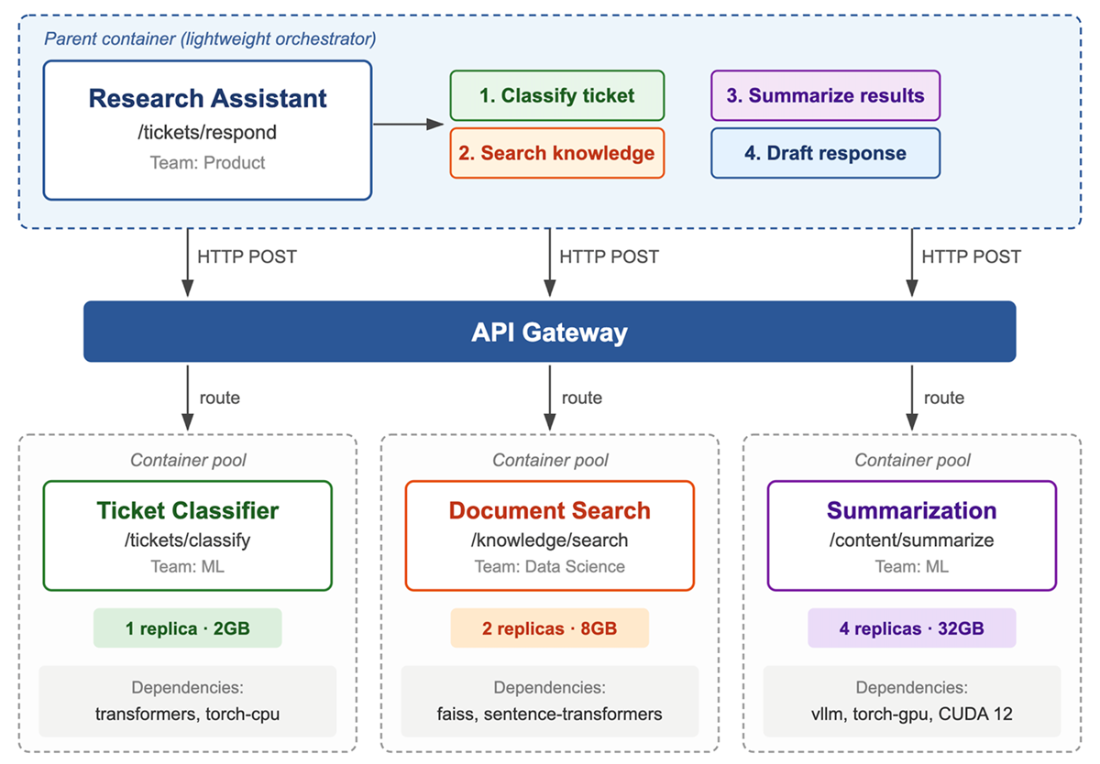
Workflow composition. A parent workflow ("Research Assistant") calls three child workflows through the API Gateway. The parent's container runs the orchestration logic: classify the ticket, call the knowledge search workflow, use the results to draft a response. Each child workflow runs in its own container pool with independent scaling, dependencies, and team ownership. The Document Search workflow has two replicas; the Summarization workflow has four replicas with higher resource limits. The API Gateway treats the parent's HTTP requests to child workflows identically to requests from external clients: same routing, same load balancing, same authentication. The parent does not know or care how many replicas each child has or what dependencies they use. It sends a request to an api_path and gets a result back.
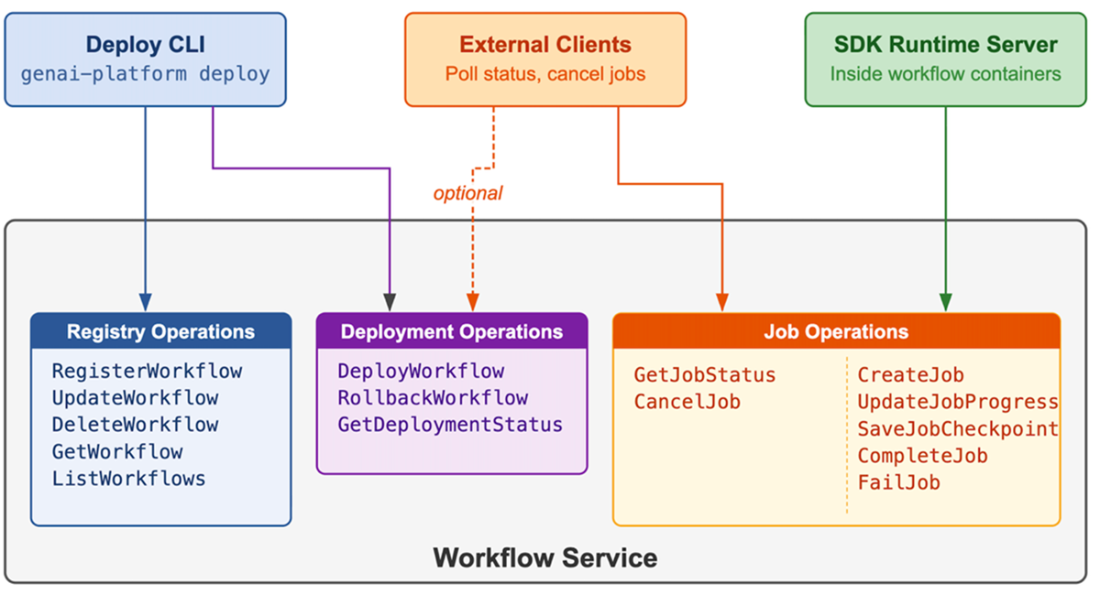
The three consumers of the Workflow Service contract. The deploy CLI connects to registry operations (RegisterWorkflow, UpdateWorkflow, DeleteWorkflow) and deployment operations (DeployWorkflow, RollbackWorkflow). The SDK's runtime server inside workflow containers connects to job operations (CreateJob, UpdateJobProgress, CompleteJob, SaveJobCheckpoint , FailJob). External clients connect to job operations (GetJobStatus, CancelJob) and optionally to deployment status (GetDeploymentStatus).
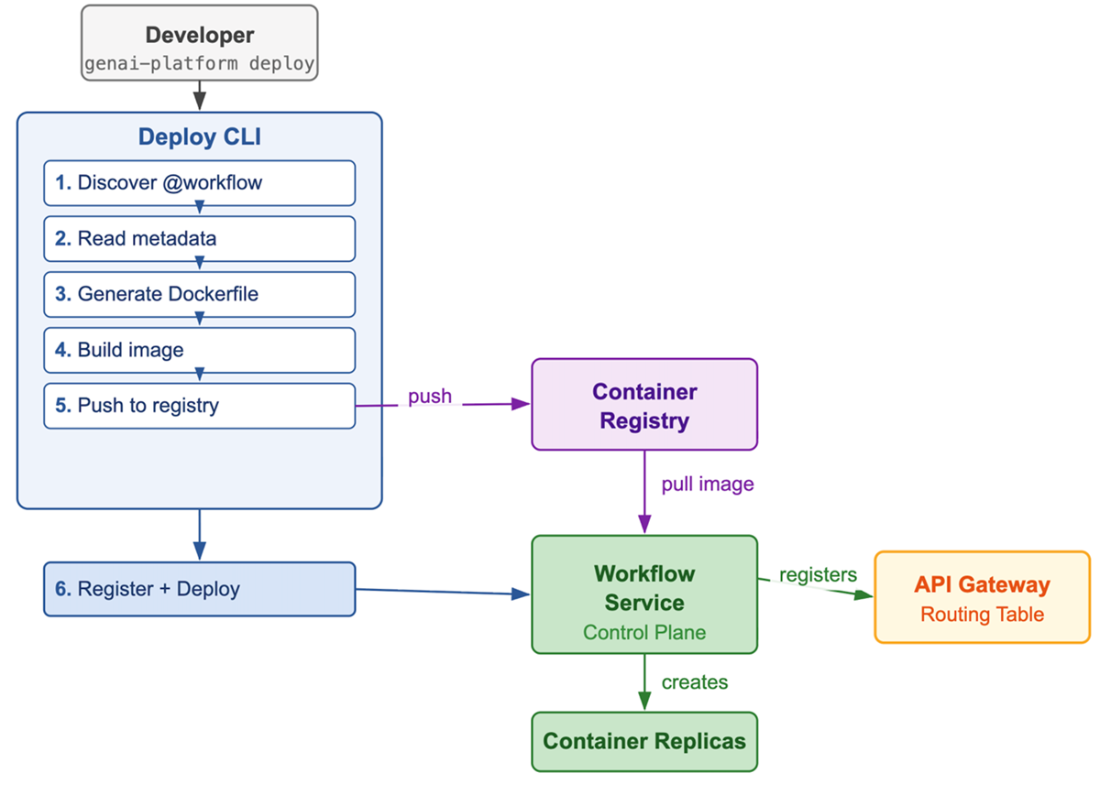
The deployment pipeline. The developer runs genai-platform deploy. The deploy CLI reads the file, discovers the @workflow metadata, and generates a Dockerfile. It builds the container image and pushes it to the container registry. It then calls RegisterWorkflow on the Workflow Service with the WorkflowSpec, followed by DeployWorkflow. The Workflow Service creates container replicas and, once they are healthy, registers the workflow's API path with the API Gateway.
Summary
- The Workflow Service has two distinct halves. The control plane manages deployment, scaling, and health monitoring as a platform service. The data plane is the SDK's runtime server running inside each workflow container, handling HTTP requests and coordinating calls to platform services. For synchronous and streaming workflows, the control plane is never in the request path.
- The @workflow decorator captures three categories of configuration as function metadata. Scaling parameters control auto-scaling. Resource parameters set container CPU and memory limits. Reliability parameters configure request timeouts and retry behavior. Scaling and resources flow through the deployment pipeline to the Workflow Service. Reliability stays inside the container where the runtime server enforces it.
- The runtime server wraps a decorated function in a FastAPI application. It discovers the function through the WORKFLOW_NAME environment variable, deserializes JSON request bodies into keyword arguments, and serializes return values back to JSON responses.
- The runtime server supports three response modes. Synchronous mode runs the function with a configurable timeout and returns a JSON response. Streaming mode iterates over a generator and sends Server-Sent Events. Asynchronous mode creates a job record with the Workflow Service, returns a job ID immediately, and runs the function in a background thread.
- The runtime server extracts trace context from the API Gateway's request headers and stores it in a context variable. The GenAIPlatform constructor reads from this variable, linking every subsequent platform service call to the same distributed trace without the developer writing any tracing code.
- Each workflow container runs multiple uvicorn worker processes, each with its own event loop and thread pool. Concurrent requests are isolated: each creates its own GenAIPlatform instance, and context variables are copied per-thread, preventing cross-contamination between simultaneous requests.
- Every SDK service client retries transient network failures between the workflow container and the API Gateway with exponential backoff. A gRPC interceptor attached to the BaseClient handles this automatically, using the max_retries value from the decorator. This is independent of the retry logic inside individual platform services like the Model Service
- Health endpoints use readiness gating: the readiness probe returns 503 until the runtime server has fully initialized, including importing the developer's module and all its dependencies. Both probes are deliberately shallow to prevent cascading outages when the gateway restarts
- For async workflows, the Workflow Service stores job records in a jobs table that includes the original request body, assigned container endpoint, status, and progress message. It serves a polling endpoint at /jobs/{job_id} from its own database. Developers report progress through platform.workflows.update_job_progress(), which reads the job ID from a context variable.
- Workflows can call other workflows through platform.workflows.call(), which sends an HTTP request through the gateway to the child workflow's containers. The method transparently handles different response modes: it returns JSON for sync children, polls the jobs endpoint for async children, and consumes the event stream for streaming children. The call_parallel() helper executes multiple child calls concurrently and returns results in submission order.
- The Workflow Service contract defines three operation groups: registry operations for managing workflow specifications, deployment operations for creating and updating running infrastructure, and job operations for the asynchronous interaction pattern.
- The deploy CLI imports the developer's Python file, discovers decorated functions, generates a Dockerfile with the SDK runtime server as the entrypoint, builds and pushes the container image, and registers the workflow with the Workflow Service. Developers who need custom base images or system packages can provide their own Dockerfile.
- The Workflow Service registers each workflow's API path with the API Gateway's routing table after containers pass their readiness probes. It updates the routing table whenever replicas are added, removed, or replaced.
- The Workflow Service generates Kubernetes Deployments and HorizontalPodAutoscalers from the decorator's configuration. Rolling updates deploy new versions incrementally, and the Workflow Service monitors error rates through the Observability Service to trigger automatic rollbacks when a new version degrades performance.

 Designing AI Systems ebook for free
