10 Building an AI assistant: putting the platform to work
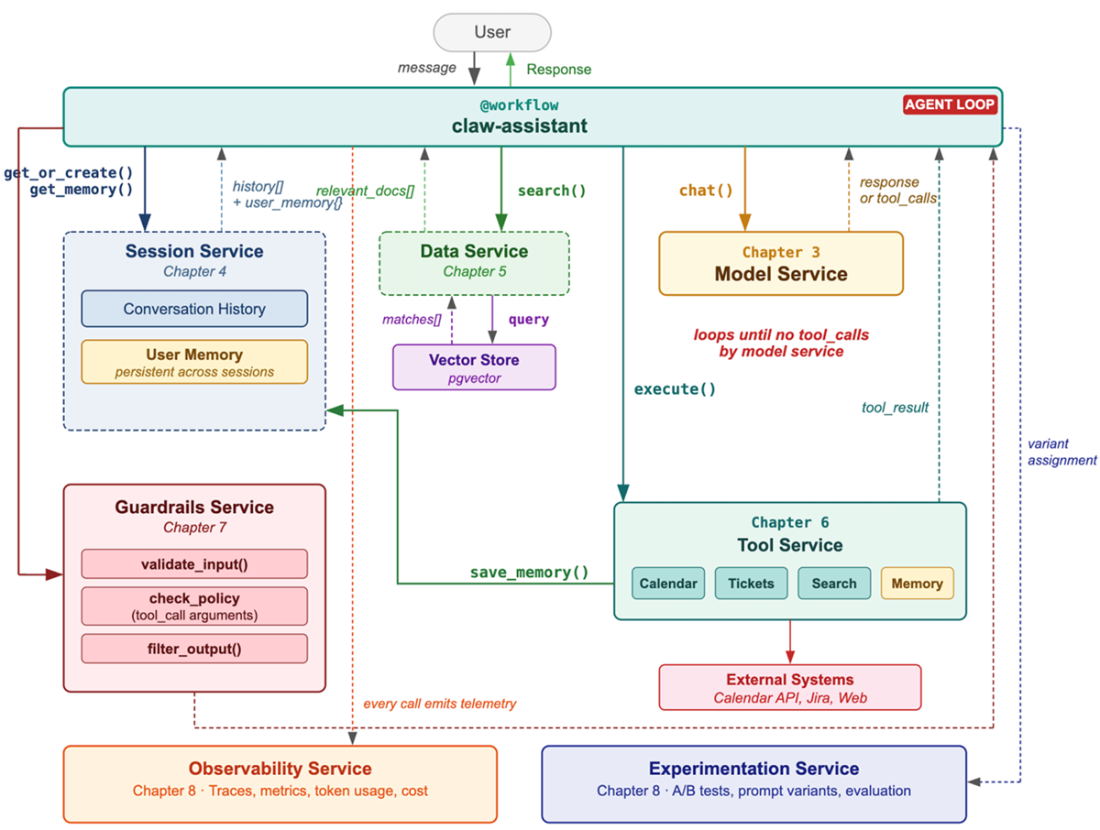
In this chapter, the platform services are combined into a full personal AI assistant called Claw, showing how each service solves a different part of the application puzzle. The assistant begins as a simple workflow around a model call, then steadily gains conversation memory, long-term user preferences, knowledge grounding, tool use, safety checks, observability, and deployment through the Workflow Service. The core idea is that the application code stays small and focused on behavior, while the platform handles the infrastructure and operational complexity behind the scenes.
Claw becomes useful by learning to remember within a session and across sessions, retrieve relevant company documents, and act through tools such as calendar and ticket creation. The chapter emphasizes that retrieval and action should be agentic rather than rigid: the model decides when to search, what to search for, and when to call tools, guided by carefully written prompts and structured tool definitions. This agent loop lets the assistant reason, act, observe the outcome, and continue until it has enough information to respond well.
Safety, context management, and production readiness are treated as first-class concerns throughout. Guardrails filter unsafe inputs, validate tool arguments, and redact or hedge outputs, while context engineering decides how to fit prompts, memory, documents, history, and tools into the model’s limited window. Observability and experimentation then make the assistant measurable and improvable, and the Workflow Service makes deployment and scaling straightforward. The result is a production-grade assistant built from composable services rather than custom ad hoc plumbing.
The complete Claw architecture. The workflow function orchestrates calls to every platform service, each solving a specific capability: memory, knowledge, actions, safety, and visibility.
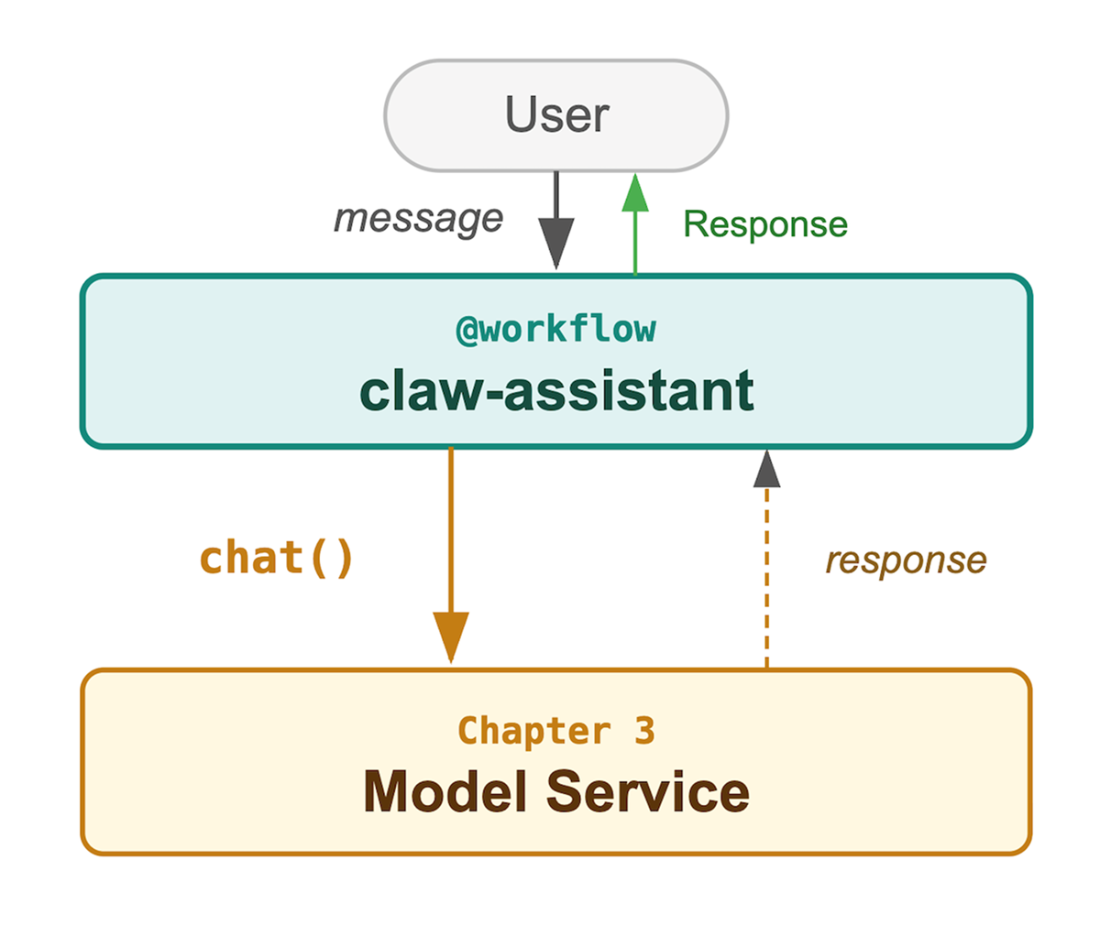
The simplest possible assistant. A workflow function wraps a single Model Service call.
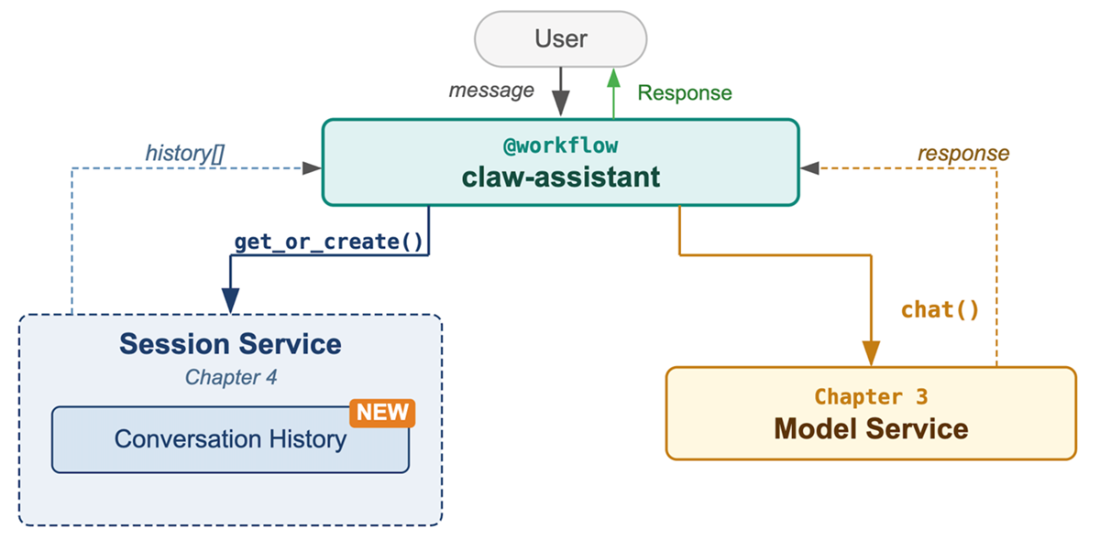
Adding conversation memory. The Session Service stores and retrieves conversation history, giving Claw continuity within a session.
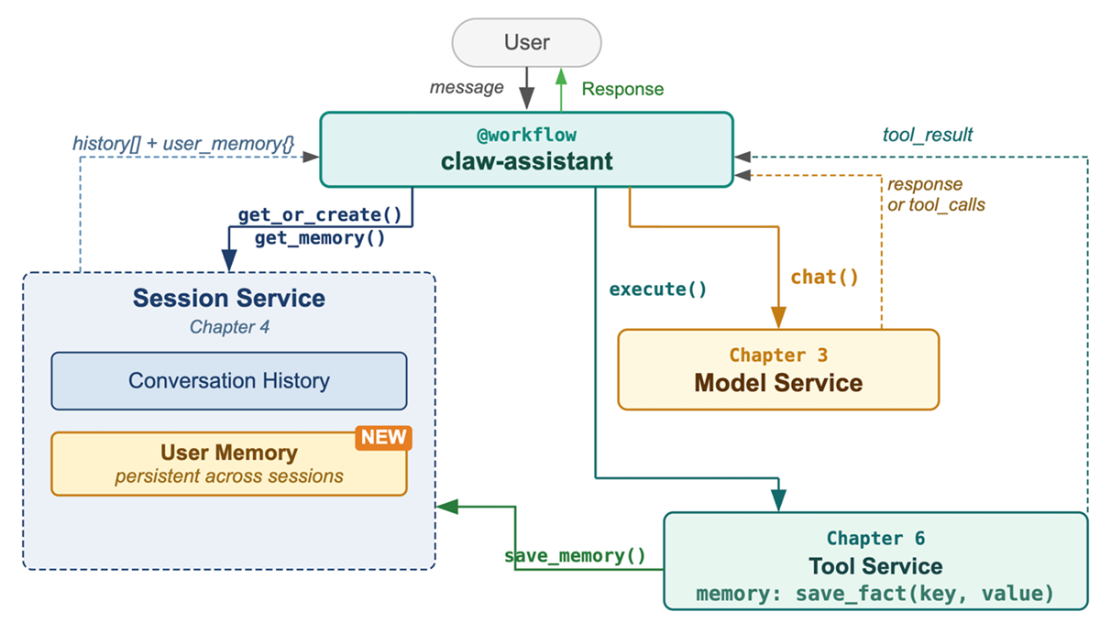
Long-term memory. The Session Service now provides both conversation history and persistent user memory that spans sessions.
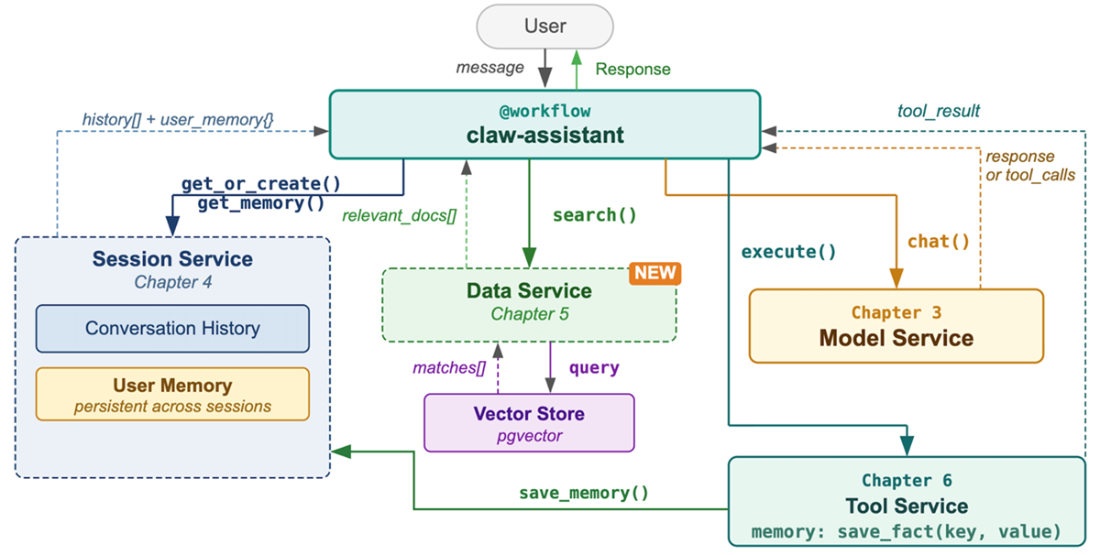
Adding organizational knowledge. The Data Service provides grounding by retrieving relevant documents before the model generates a response.
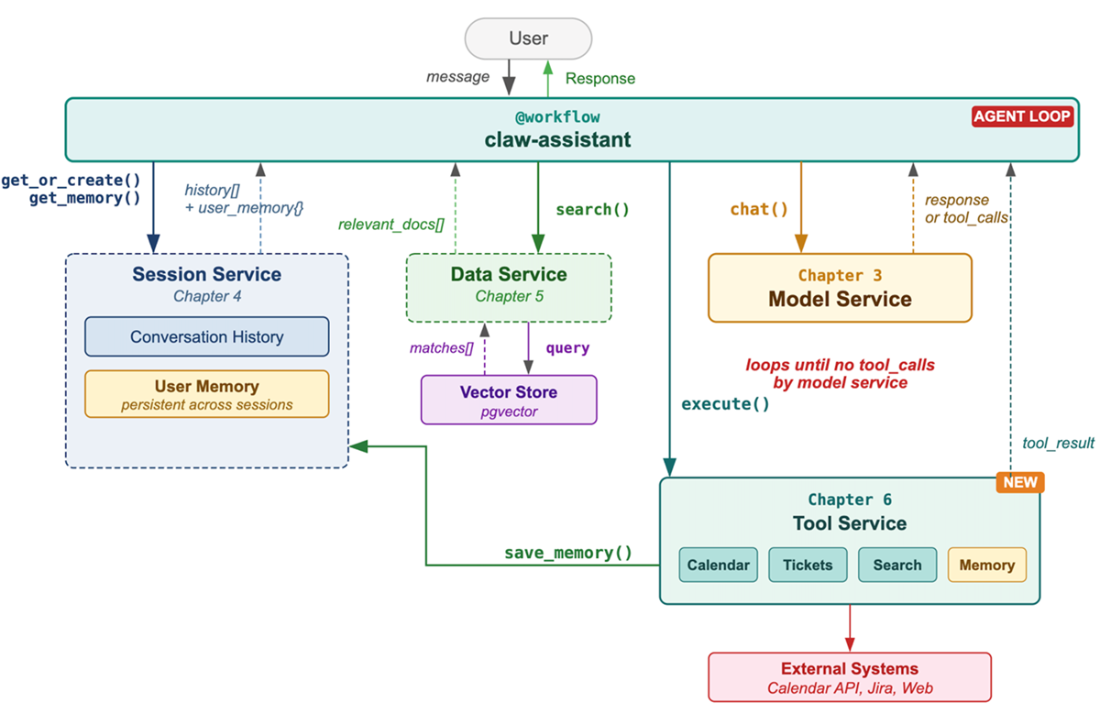
Adding tools and the agent loop. The Tool Service connects Claw to external systems, and the agent loop lets it reason, act, observe, and continue.
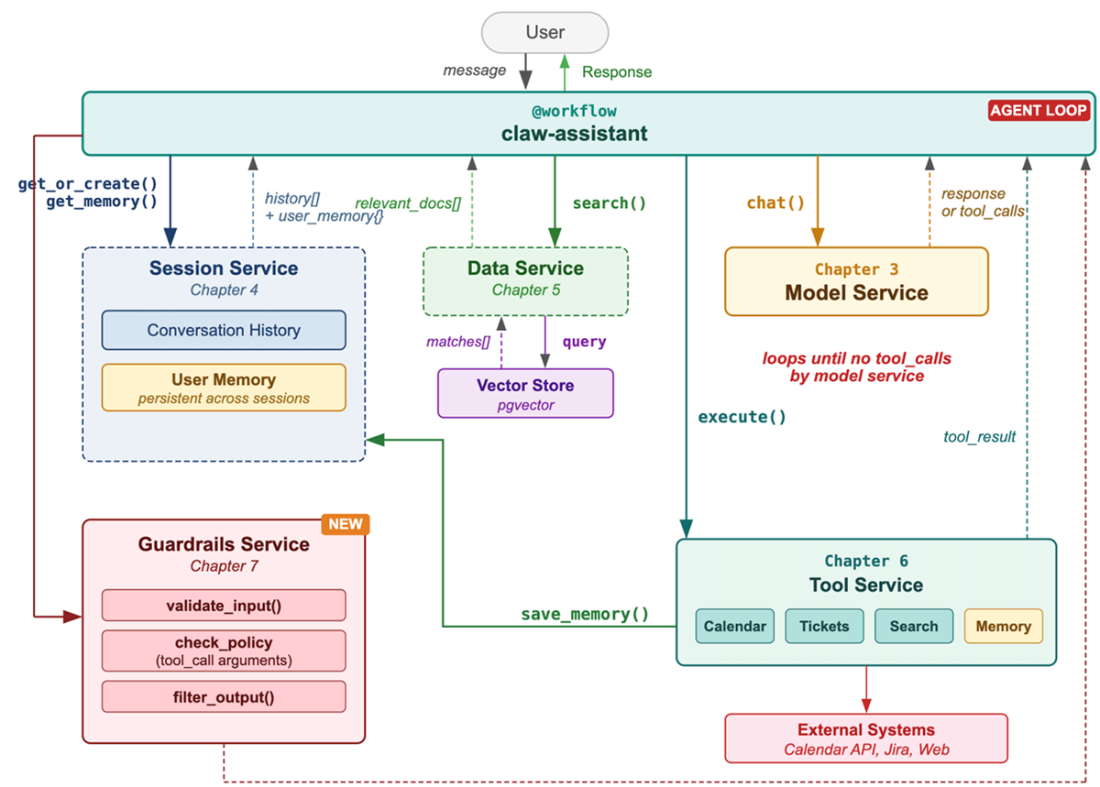
Adding guardrails. Safety policies validate inputs, tool arguments, and outputs at multiple points in the request flow.
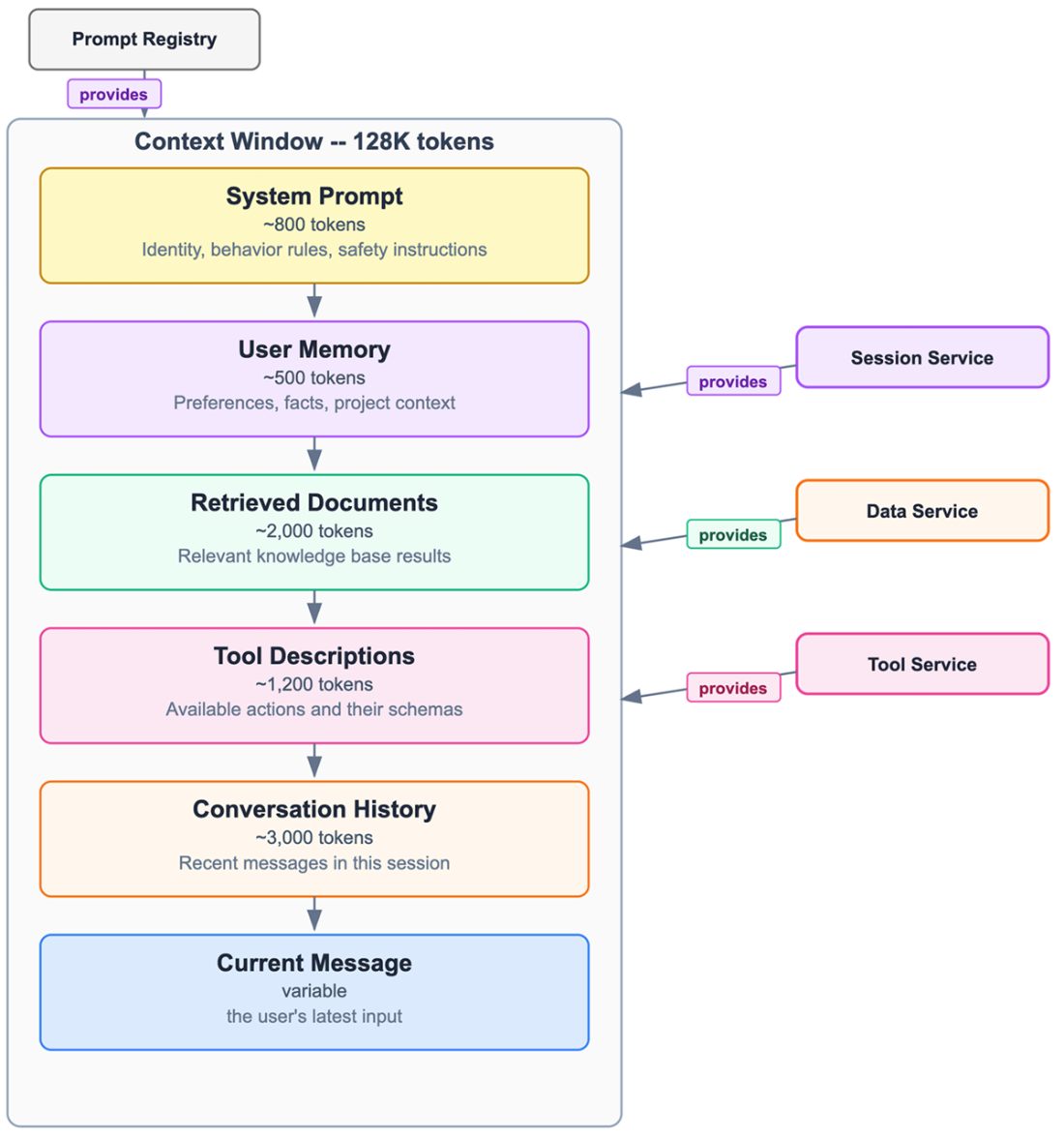
Context window assembly. Six sources compete for space within the model's context window. The assembly strategy determines what Claw knows when generating a response.
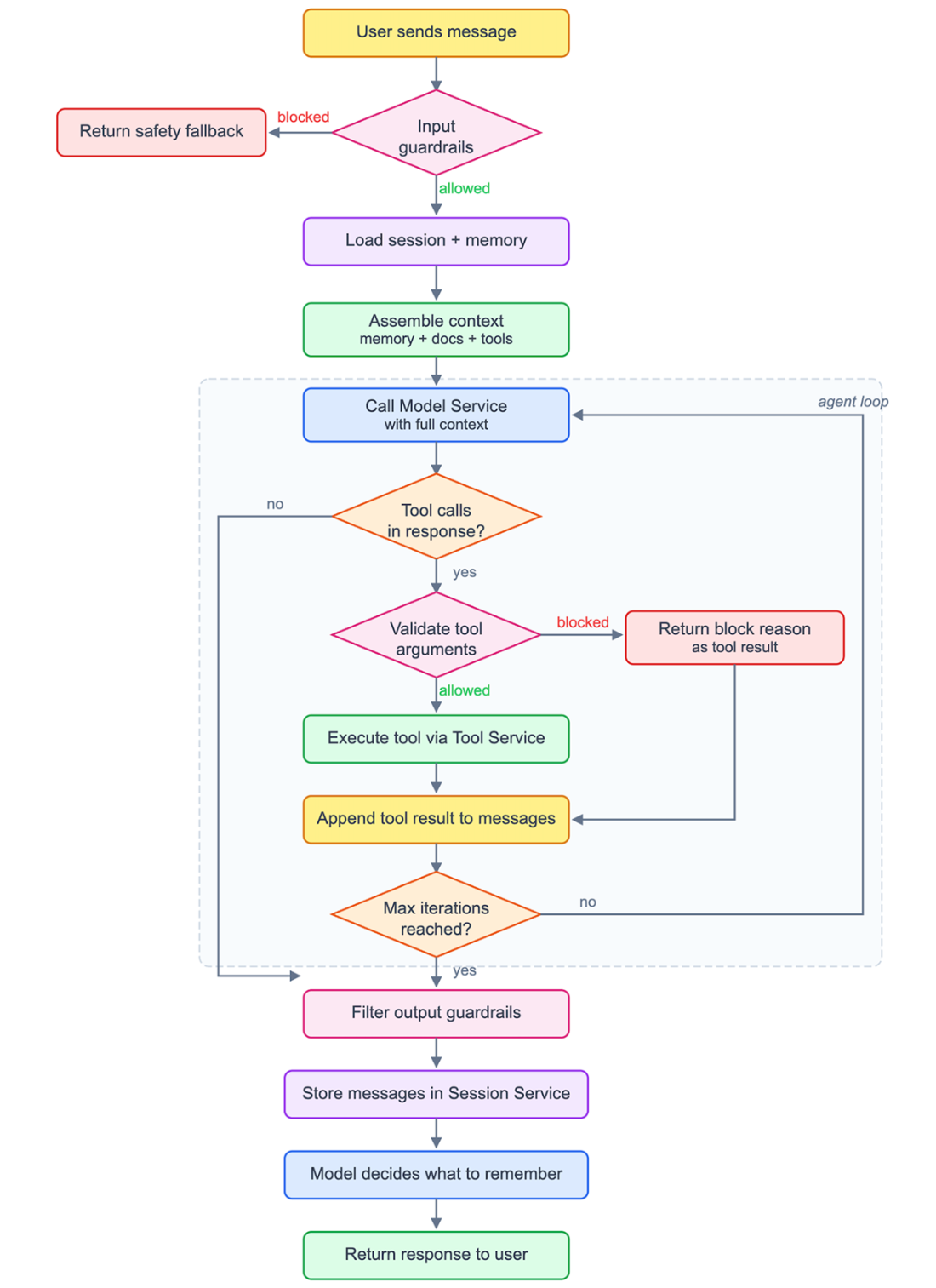
The complete agent loop. Each step corresponds to a platform service call.
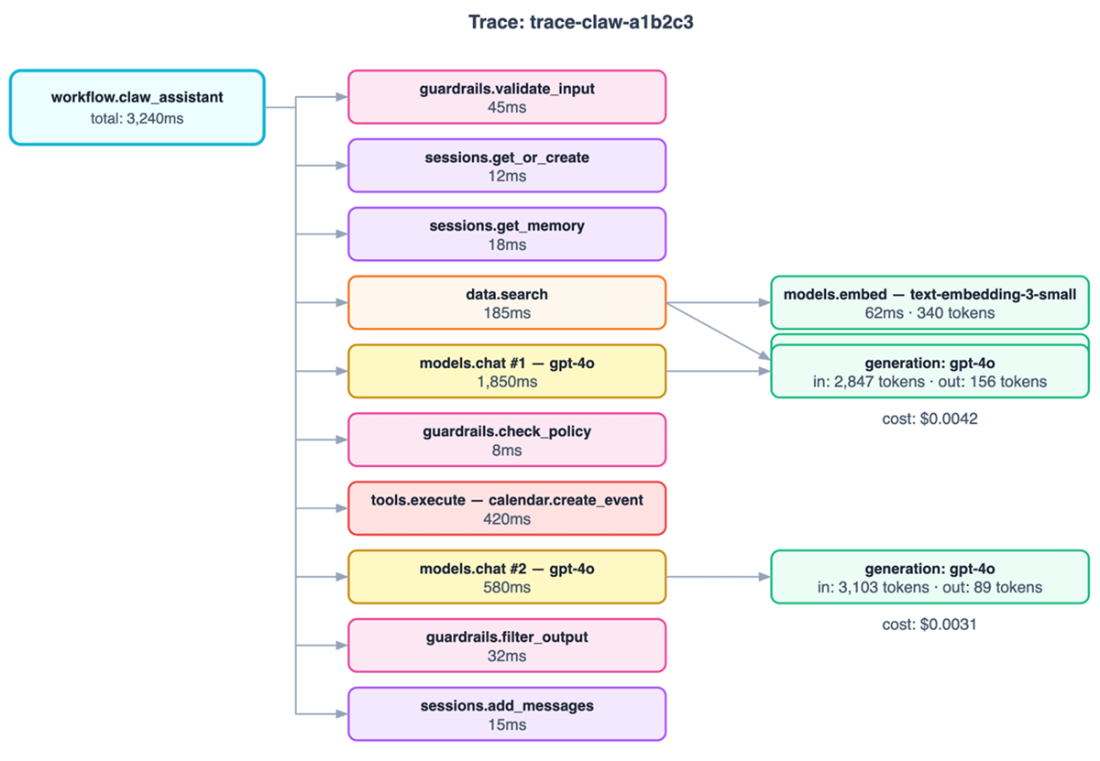
A single Claw request generates a trace tree spanning every platform service. Each span captures timing, token usage, cost, and outcome.
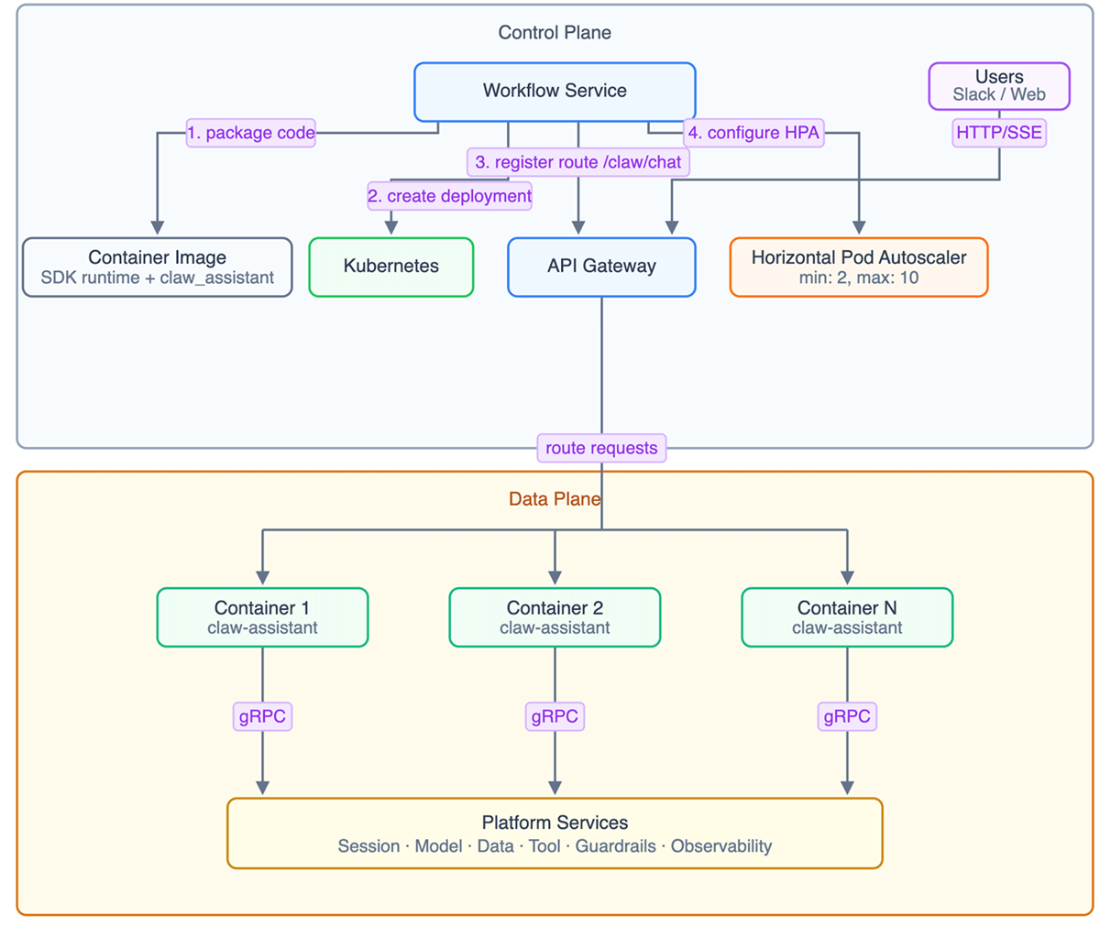
The complete deployment architecture. The Workflow Service (control plane) packages the code, deploys containers, registers routes, and manages scaling. The containers (data plane) handle user requests.
Summary
- A personal AI assistant like Claw requires coordination across every platform service: Model Service for inference, Session Service for memory, Data Service for knowledge, Tool Service for actions, Guardrails Service for safety, Observability Service for visibility, and Experimentation Service for improvement.
- The incremental building approach (start simple, discover limitations, solve with platform services) mirrors how real AI applications evolve from prototypes to production systems.
- Context engineering, the practice of assembling the right information from multiple sources into a coherent context window, is the critical skill that determines response quality. Each source has a priority, a budget allocation, and a degradation strategy.
- The agent loop (reason, act, observe, repeat) is the fundamental pattern for AI assistants that can take actions. Platform services provide managed tool execution, credential isolation, and rate limiting that make this loop production-safe.
- Guardrails integrate into the conversation flow through five inspection points. Blocked actions are communicated back to the model as tool results, allowing graceful degradation rather than abrupt failures.
- Observability is automatic when building on the platform. Every gRPC call generates spans and metrics. Quality scoring and cost attribution enable data-driven decisions about improvements.
- About 200 lines of application code, backed by platform infrastructure, produces an assistant with capabilities that would take months to build from scratch, the same infrastructure that each service chapter built independently now works as a unified system.
FAQ
What is the overall goal of building Claw in this chapter?
The chapter’s goal is to show how to combine the platform services into a complete personal AI assistant. Claw starts as a simple model call and is gradually extended with memory, knowledge retrieval, tools, guardrails, observability, experimentation, and deployment so it can behave like a real production assistant.
Why does the simplest version of Claw fail?
The simplest version only wraps a model call in a workflow, so it can answer a single message but cannot remember past conversations. Every request is stateless, which means the assistant forgets previous turns and cannot support natural follow-up questions.
How does Claw remember conversations within a session?
Claw uses the Session Service to create or load a session, retrieve the message history, include that history in the model context, and store the new user and assistant messages after each turn. This gives the assistant continuity during a conversation.
Why is long-term memory different from conversation history?
Conversation history only helps within one session, while long-term memory stores persistent facts about the user across sessions. This lets Claw remember preferences, projects, and other important details even after the user returns later.
How does Claw decide what to store in long-term memory?
Claw uses a memory tool that the model can call when it encounters information worth preserving. The tool description guides the model to save preferences, project details, and other important facts, while ignoring ordinary or temporary details.
What problem does the Data Service solve for Claw?
The Data Service grounds Claw’s answers in real organizational knowledge. It retrieves relevant documents from the company knowledge base so the assistant can answer questions about policies, decisions, and records instead of hallucinating plausible but incorrect facts.
What is agentic RAG and why is it better than fixed retrieval?
Agentic RAG lets the model decide when to search, how to rewrite the query, which index to use, and whether it should search again. This is better than fixed pipeline retrieval because the model can use conversational context to formulate more accurate searches.
How does the agent loop work when Claw needs to take action?
The agent loop lets Claw reason, call tools, observe results, and continue until it reaches a final answer. The workflow sends tool definitions to the model, executes any requested tool calls through the Tool Service, and feeds the results back into the conversation for further reasoning.
How do guardrails keep Claw safe?
Guardrails are applied at multiple layers: input validation blocks unsafe requests, tool argument checks prevent dangerous actions, and output filtering redacts sensitive information or hedges uncertain claims. This defense-in-depth approach reduces risk even if one layer misses a problem.
What does context engineering do in Claw?
Context engineering decides how to assemble the right information within the model’s token budget. Claw combines the system prompt, user memory, retrieved documents, conversation history, tool definitions, and the current message, while trimming and prioritizing content so the model gets the most useful context possible.

 Designing AI Systems ebook for free
