This chapter bridges the gap between small-scale, single-GPU prototypes and robust, state-of-the-art systems you can deploy in the real world. It lays out a playbook for systematically improving model quality and iteration speed: automate hyperparameter decisions, combine strong yet diverse models, scale training across multiple devices (including TPUs), and leverage lower-precision computation to accelerate both training and inference without sacrificing accuracy.
On the modeling side, the chapter emphasizes automatic hyperparameter optimization as a must for peak performance. Using tools like KerasTuner (with strategies such as Bayesian optimization, Hyperband, or random search), you define a search space, run principled experiments, and select top configurations—while staying mindful of validation overfitting and the need to design efficient, high-level search spaces. It then turns to model ensembling: start from individually strong models and combine their predictions—ideally with learned, validation-tuned weights. The key is diversity: mixing different architectures or even different learning paradigms yields ensembles that cancel out individual biases and reliably outperform any single model.
On the systems side, the chapter covers scaling and efficiency. It explains data parallelism and model parallelism, and shows how Keras (with the JAX backend) streamlines multi-device training—from simple data-parallel setups to custom device meshes and sharded variables for large models—plus practical tips like step fusing on TPUs and avoiding I/O bottlenecks. Finally, it details speedups from reduced precision: float16/bfloat16 for faster inference, mixed-precision training (with loss scaling) to preserve numerical stability, and the niche but growing role of float8 for very large models. For deployment, int8 quantization delivers substantial inference gains by compressing weights and executing core ops in integer arithmetic, typically with minimal accuracy loss. Together, these best practices tighten your loop of progress and elevate results at scale.
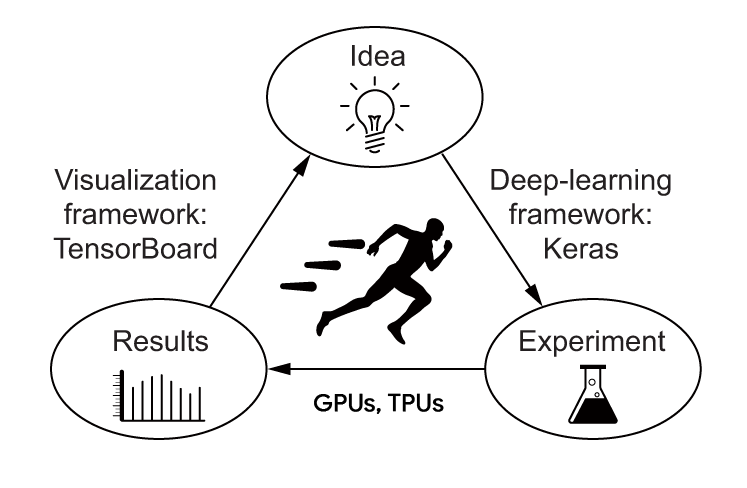
The loop of progress
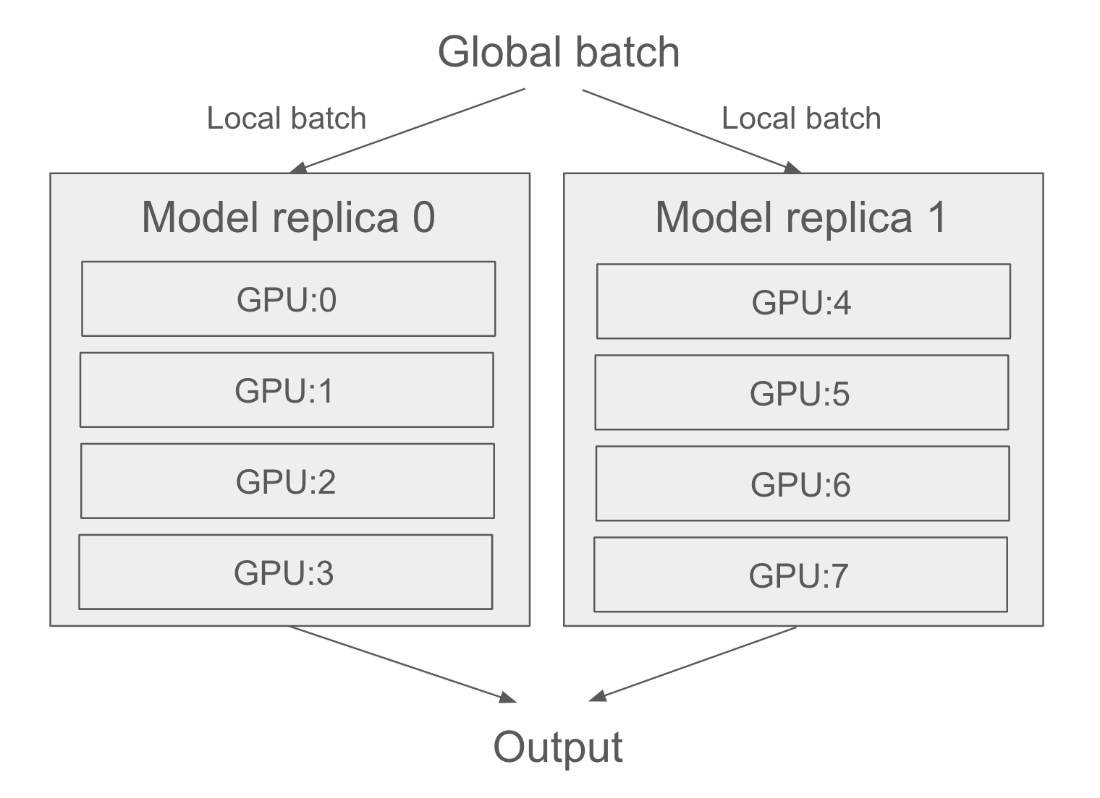
Distributing a model across 8 devices: 2 model replicas, each handled by a group of 4 devices
Chapter summary
You can leverage hyperparameter tuning and KerasTuner to automate the tedium out of finding the best model configuration. But be mindful of validation-set overfitting!
An ensemble of diverse models can often significantly improve the quality of your predictions.
To further scale your workflows, you can use data parallelism to train a model on multiple devices, as long as the model is small enough to fit on a single device.
For larger models, you can also leverage model parallelism to split your model’s variables and computation across several devices.
You can speed up model training on GPU or TPU by turning on mixed precision – you’ll generally get a nice speed boost at virtually no cost.
You can also speed up inference by leveraging float16 precision or even int8 quantization.
FAQ
Why does hyperparameter optimization matter, and what makes it hard?Hyperparameters are architecture and training choices you don’t learn via backpropagation (e.g., layer counts, units, activations, dropout). Manually guessing them is usually suboptimal. Automated search (random search, Bayesian optimization, Hyperband, genetic methods) empirically finds better configurations. It’s challenging because (1) the search space is often discrete and non-differentiable, (2) each trial is expensive (full model training), and (3) results are noisy (minor gains may be due to lucky initialization). Despite this, systematic tuning is essential to reach state-of-the-art results.How do I set up and run a KerasTuner search end-to-end?Steps:
- Write a model-building function that takes an hp object and samples choices (e.g., hp.Int, hp.Choice), then compiles and returns a model.
- Pick a tuner (RandomSearch, BayesianOptimization, or Hyperband), define the objective (e.g., "val_accuracy"), set max_trials and executions_per_trial.
- Call tuner.search(...) with a proper validation set and callbacks like EarlyStopping.
- Retrieve best hyperparameters via tuner.get_best_hyperparameters(n) or best ready-to-use models via tuner.get_best_models(n).
- For final training, pick the best epoch using the validation set, then retrain on the full training data (train+val) and evaluate once on the untouched test set. Never use the test set as validation during tuning.How can I prevent validation-set overfitting during hyperparameter tuning?- Keep a completely held-out test set for your final, single evaluation.
- Don’t reuse the test set as validation data.
- Limit search complexity and trials; prefer executions_per_trial > 1 to reduce noise.
- Use early stopping to avoid excessively fitting to validation idiosyncrasies.
- If feasible, consider cross-validation for more robust validation signals.
- After selecting hyperparameters, retrain on train+val and report metrics only once on the test set.What is model ensembling, and how do I combine model predictions effectively?Ensembling aggregates predictions from multiple independently trained models to improve accuracy and robustness. Simple averaging works if models are similarly strong; weighted averaging (weights learned on validation data) is typically better. The key is diversity—combine models that are “good for different reasons” (different architectures, preprocessing, or even different ML families) so biases cancel out. Ensembling many replicas of the same network with different seeds usually yields small gains.What’s the difference between data parallelism and model parallelism?- Data parallelism: replicate the entire model on each device; split each batch into sub-batches processed in parallel. Gradients are averaged synchronously, scaling throughput with device count. Requires the model to fit on a single device.
- Model parallelism: split a single model across devices (horizontal or vertical partitioning/sharding). Useful when the model is too big for one device. Commonly combined with data parallelism for very large models and clusters.How do I enable multi-GPU data-parallel training with Keras (JAX backend)?- Before building your model, set: keras.distribution.set_distribution(keras.distribution.DataParallel([...])) where [...] is an optional list of device names (e.g., "gpu:0", "gpu:1"). Use keras.distribution.list_devices() to discover device names.
- Then build, compile, and fit as usual.
- Expect near-linear speedups with enough devices and a sufficiently large global batch size. Feed data via tf.data.Dataset and use dataset.prefetch(...) to keep devices busy.How do DeviceMesh and LayoutMap help me do model parallelism (and mixes with data parallelism)?- Create a DeviceMesh that groups devices along named axes (e.g., axis_names=["data","model"]) to express data vs. model parallel roles.
- Define a LayoutMap that maps variable paths (e.g., "sequential/dense_1/kernel") to per-dimension sharding/replication decisions (e.g., (None, "model") to shard the last dimension across the "model" axis).
- Activate via keras.distribution.ModelParallel(layout_map=..., batch_dim_name="data"), then build and fit normally. This scales to very large models; you can inspect sharding with variable.value.sharding and JAX visualization utilities.What are float16/bfloat16 inference and mixed-precision training, and how do I enable them?- Inference: set 16‑bit compute globally before model creation via keras.config.set_dtype_policy("float16") (or try "bfloat16" on TPUs). Expect up to ~2× speedups on GPUs/TPUs.
- Training: use mixed precision via keras.config.set_dtype_policy("mixed_float16"). Most forward-pass ops run in float16 for speed, while variables remain float32 for stable updates. If a layer needs full precision, pass dtype="float32" to that layer. On TPUs, if underutilized, consider model.compile(..., steps_per_execution=N) to fuse steps for additional speed.Why is loss scaling needed in mixed-precision training, and how do I use it?Float16 gradients can underflow to zero. Loss scaling multiplies the loss by a large factor so gradients are representable, then the optimizer safely unscales updates. In Keras, either set a fixed factor (e.g., Adam(..., loss_scale_factor=1024)) or wrap your optimizer with keras.optimizers.LossScaleOptimizer(...). The adaptive wrapper is generally preferred since the ideal scale can change during training.What is int8 quantization for faster inference, and how do I enable it in Keras?Quantization performs certain linear ops (e.g., matmul) in int8 for large speedups and lower memory, by scaling inputs to fit int8 range, computing in int8, then unscaling outputs. Keras provides built-in int8 inference for key layers used in Transformers (Dense, EinsumDense, Embedding). After loading or building your trained model, call model.quantize("int8"), then run predict as usual. Expect faster inference with minimal accuracy impact; this is an inference-time optimization (not for training).
pro $24.99 per month
access to all Manning books, MEAPs, liveVideos, liveProjects, and audiobooks!

 Deep Learning with Python, Third Edition ebook for free
