8 Visualizing Location Data with Datashader
This chapter introduces Datashader as a solution for visualizing massive location datasets without resorting to downsampling techniques that can hide important patterns. Traditional plotting tools like Matplotlib and Seaborn struggle with millions of points, whereas Datashader works directly with Dask collections to rasterize all data onto a pixel grid, preserving signal at full fidelity. Using NYC 311 service requests as a motivating example, the chapter frames the goal of revealing spatial hotspots by plotting every record and avoiding assumptions like fixed cluster counts or averages that blur the true distribution.
The core of the chapter walks through Datashader’s five-stage rendering pipeline. Projection defines a Canvas with plot dimensions and geographic bounds; Aggregation bins all points into pixel buckets (e.g., counts per pixel) based on those ranges and the image size, which together determine resolution; Transformation allows optional array-level operations on the aggregated xarray; Colormapping translates relative aggregated values into a palette that conveys intensity; and Embedding produces the final image via shading. This approach makes it practical to render tens of millions of points quickly, with resolution tuned by canvas size and map extent, and with Dask handling parallel computation under the hood.
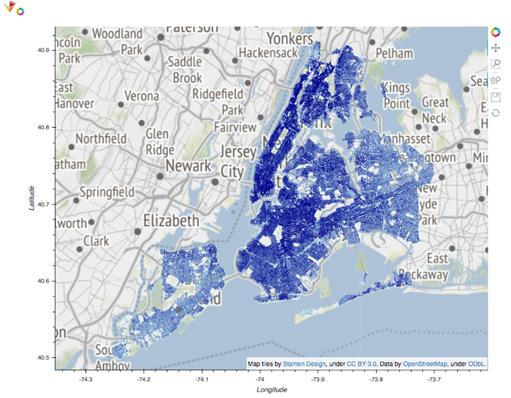
To make the visualization interactive and map-aware, the workflow converts the data to Parquet with Snappy compression for faster redraws, transforms latitude/longitude to Web Mercator coordinates for map tiling, and overlays Datashader output on base tiles. HoloViews and GeoViews manage layering and display, while Bokeh powers smooth pan-and-zoom interactions; Holoviews’ datashade function continuously re-renders the image as the view changes. The result is an interactive heatmap where users can explore citywide patterns and local hotspots, with accurate geographic alignment and sub-second rendering, showcasing a scalable, end-to-end approach to visualizing location data with Dask and Datashader.
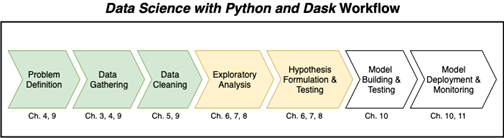
The Data Science with Python and Dask workflow
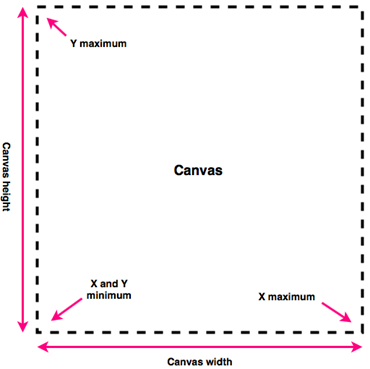
A visual representation of a Canvas object
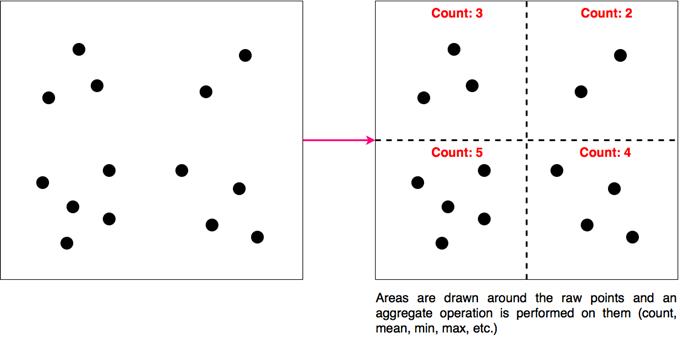
Aggregation draws areas around the raw points and performs an aggregate operation on the areas; each of these areas resemble a single pixel in the final visualization
The contents of the pixel located at 300, 300

Colormapping translates ranked values into colors

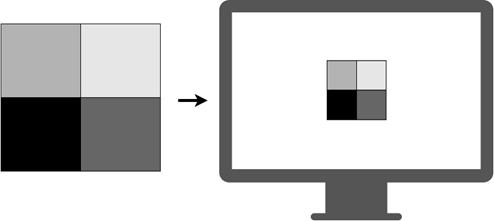
Embedding renders the final image on the screen
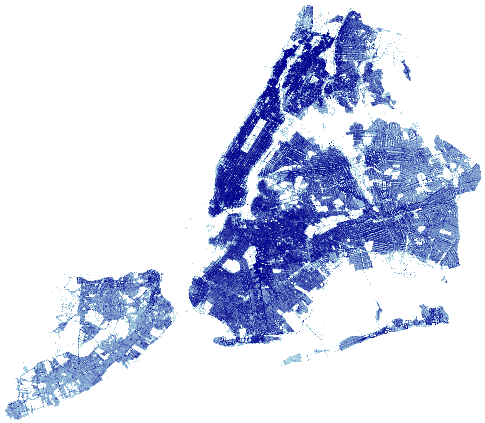
The output of the Datashader image
The interactive heatmap
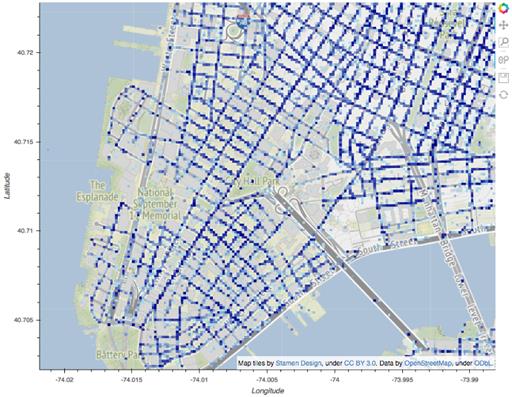
Zoomed into the southern tip of Manhattan
Summary
In this chapter you learned
- Datashader can be used to produce accurate images of large datasets without downsampling.
- Every DataShader object consists of a Canvas, an Aggregation, and a Transfer Function.
- DataShader visualizations aggregate based on the number of pixels in the canvas area, and their resolution is dynamic, allowing you to “zoom in” to a particular area on a graph.
- Holoviews, Geoviews, and Bokeh can be used with Datashader to produce interactive visualizations with map tiles.
- Map tiles are overlaid on a grid using a tile provider. If your data has latitude/longitude coordinates, they should be translated to Web Mercator coordinates first.
FAQ
When should I use Datashader instead of Seaborn or Matplotlib?
Use Datashader when you need to visualize millions or billions of points without throwing data away. Unlike typical plotting libraries that require downsampling, Datashader bins data into pixels and renders the full dataset efficiently, working directly with Dask for scalable computation.What are Datashader’s five rendering stages?
- Projection: define a Canvas (size, x/y fields, and ranges)- Aggregation: bin points into pixel cells using a reduction (count, sum, mean, etc.)
- Transformation: optionally manipulate the aggregated xarray (filter, scale, combine)
- Colormapping: map values to colors using a palette and a mapping strategy
- Embedding: render the final image for display
How do I choose x_range and y_range and create a Canvas for geographic plots?
Longitude typically goes on the x-axis and latitude on the y-axis. Pick ranges that bound your area of interest (or compute min/max of the columns), then create a Canvas with a chosen pixel width/height. Smaller ranges and larger images increase spatial resolution but may cost more compute.What does “aggregation” mean in Datashader?
Aggregation bins all points that fall into each pixel and applies a reduction to them. By default it counts points per pixel. This differs from domain groupby aggregations (like per vehicle year); here, the grouping is by screen-space pixel cells derived from your ranges and image size.How do I render an image and change the color mapping?
Create the aggregation (for example, scene.points(...)), then call shade(aggregation, cmap=..., how=...). The cmap controls the palette; how controls mapping (e.g., "linear", "eq_hist", or "log"). The shaded object is the image Datashader embeds for display.How can I make the plot interactive with panning and zooming?
Use Holoviews with the Bokeh backend and Geoviews for map tiles. Build a Points element from your data and wrap it with holoviews.operation.datashader.datashade(...). Create a WMTS tile source and overlay it with the heatmap (tile_provider * service_calls). Panning/zooming triggers re-renders at the new ranges.Why do I need to convert latitude/longitude to Web Mercator for map tiles?
Most web tile servers index tiles in Web Mercator. Convert lon/lat to that projection (for example, with datashader.utils.lnglat_to_meters) so your data aligns with the tiles fetched by Geoviews. Save the projected x/y for faster reuse.How can I keep interactive rendering fast?
- Store data in Parquet with Snappy compression- Load only needed columns (e.g., x and y)
- Drop rows with missing coordinates
- Choose reasonable plot width/height and sampling parameters
- Keep computations in Dask and consider persisting the dataframe if reused
Do darker colors represent raw counts?
Not necessarily. The shading step maps values to colors; by default, many workflows use equalized or non-linear mappings that emphasize contrast. To reflect absolute counts, inspect the aggregated xarray directly or use shade(..., how="linear") with an appropriate palette.What are common pitfalls when building these maps?
- Swapping latitude/longitude (remember: lon → x, lat → y)- Mixing coordinate systems (use Web Mercator when overlaying tiles)
- Using ranges that are too broad or too narrow for the chosen image size
- Forgetting to enable the Bokeh extension in Holoviews
- Failing to drop NaNs in coordinate columns, which can skew or slow aggregation

 Data Science with Python and Dask ebook for free
