This chapter motivates why visualizing data is essential to exploratory analysis, showing how pictures can reveal structure that simple statistics obscure. Using examples like Anscombe’s quartet and dense scatterplots, it contrasts numerical summaries with visual insight and explains the twin challenges of plotting large datasets: technical limits (memory and rendering on a single client) and cognitive overload (overplotting). To address both, it introduces a reusable workflow for Dask DataFrames—the prepare–reduce–collect–plot pattern—where you choose an appropriate chart and filters (prepare), aggregate or sample to shrink the data (reduce), compute to a single Pandas object (collect), and render with Seaborn/Matplotlib (plot), keeping heavy computation in Dask.
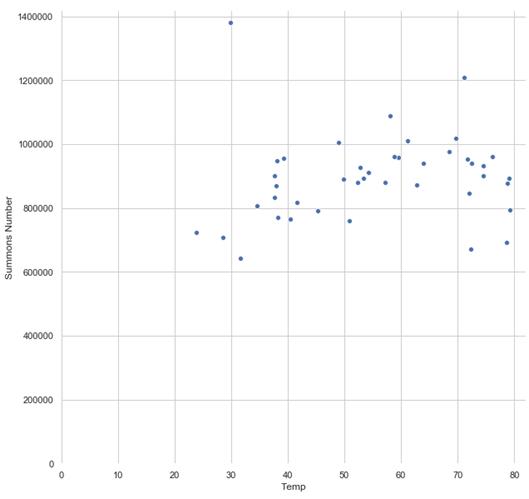
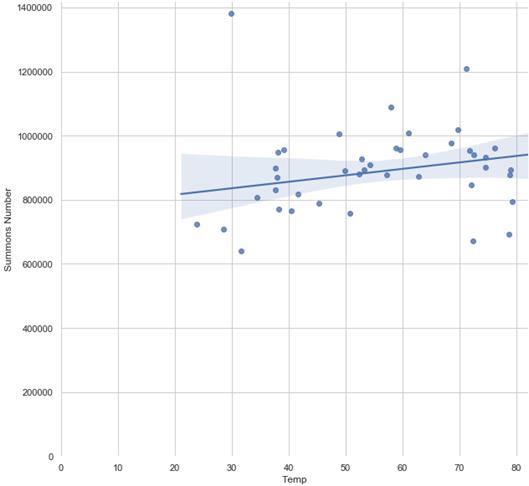
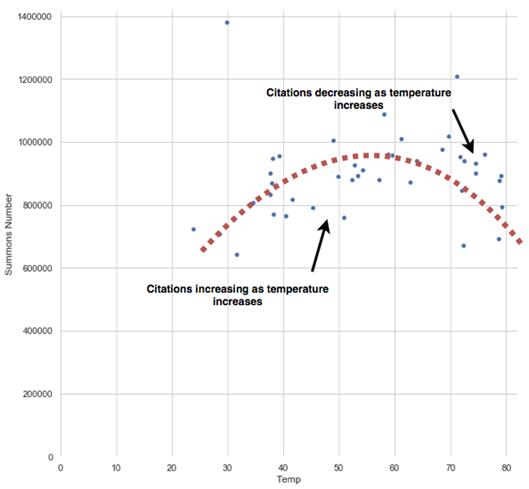
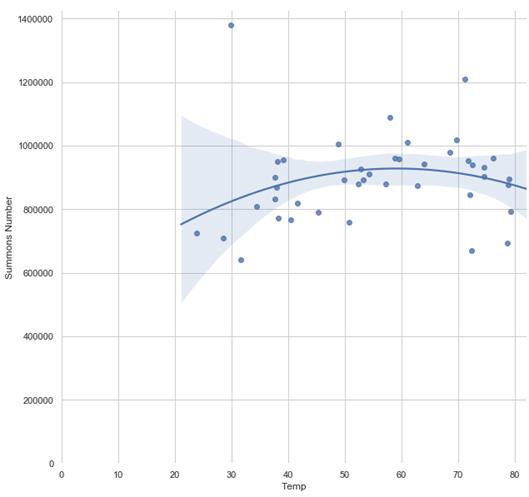
For continuous relationships, the chapter returns to NYC parking tickets to visualize average monthly temperature versus citations. A scatterplot aligns with the weak Pearson correlation, and a Seaborn regplot with robust regression reduces outlier influence, clarifying the trend. Closer inspection suggests the relationship bends—citations rise with temperature until roughly 60°F, then taper—so a non-linear fit (polynomial order=2) captures the curvature better than a line. The key takeaway is that visual modeling exposes patterns missed by a single correlation number and that small parameter changes in Seaborn can quickly test alternative hypotheses.
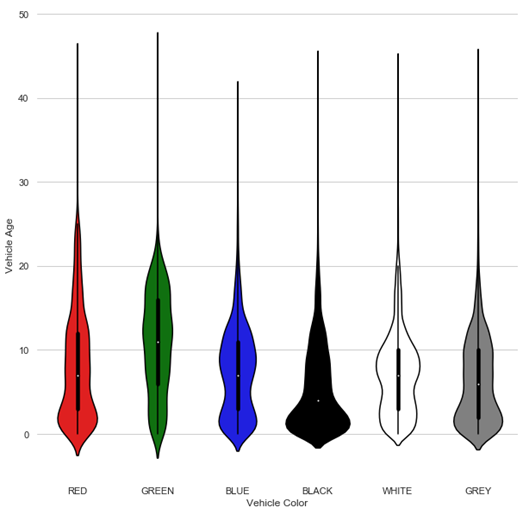
For categorical analysis, violinplots compare the distribution of vehicle ages across the most common colors. The chapter shows how to filter and compute with Dask, plot the full population, then repeat with a 1% random sample without replacement; despite losing fine detail, the sample preserves core patterns (for example, black vehicles skew newer and green older), illustrating when sampling suffices. It then builds a two-way heatmap of citations by month and day of week: extracting calendar fields, grouping in Dask, pivoting to a 12×7 table, and visualizing with annotated cells. The heatmap immediately surfaces fewer weekend citations—especially Sundays—and seasonal peaks, underscoring how the prepare–reduce–collect–plot pattern, combined with Seaborn’s APIs, scales common visuals from large, structured data.
Anscombe’s quartet highlights the importance of using visualization for effective data analysis
The Data Science with Python and Dask workflow
An example of a very dense scatterplot
Applying a reduction technique like clustering can make data easier to interpret
The prepare-reduce-collect-plot pattern for visualizing large datasets with Dask
A scatter plot of average temperature vs. number of citations
The scatterplot of average temperature vs. count of citations with an added regression line
The relationship appears to be non-linear; the relationship changes direction around 60 degrees
The scatterplot of average temperature vs. count of citations fit with a non-linear curve
A violinplot showing the relative distributions of categorical data
A violinplot of vehicle color vs. vehicle age
A violinplot of the random sample
A heatmap of citations issued by day of week and month of year
Summary
In this chapter you learned
There may be “more to the story” than numerical analysis can explain – it’s always worth it to visualize data.
The prepare-reduce-collect-plot pattern can be used to create visualizations from large datasets. You can use any data visualization library that supports Pandas with this method.
If it makes sense for the question you’re trying to answer, your data can be reduced using aggregation (e.g. citations per month).
Random sampling can also be a good method to visually approximate the shape of your data, given a sufficiently large sample size.
The relationship between two continuous variables can be visualized using a pairplot.
Regplots can be used to plot linear regression as well as non-linear regression.
The distribution of a continuous variable across a categorical variable can be visualized using a violinplot.
Two categorical variables can be visualized using a heatmap.
FAQ
What is the prepare-reduce-collect-plot pattern and why is it useful for large datasets?The pattern is a four-step workflow for visualizing big data with Dask:
- Prepare: Choose the right chart for your question; select and optionally filter the necessary columns.
- Reduce: Make the data small enough to plot by aggregating (e.g., groupby-count/mean) or sampling.
- Collect: Execute the Dask computation and bring the reduced result into a single Pandas DataFrame.
- Plot: Use a plotting library (e.g., Seaborn/Matplotlib) on the collected DataFrame.
It addresses two challenges: client memory limits during rendering and the cognitive overload of visual clutter by distilling broad patterns first.Why can’t I just plot a large Dask DataFrame directly?Plot rendering happens on the client in a single process, so all plotted data must fit in local memory. Large datasets can overwhelm both memory and the chart itself (overplotting). Use reduction (aggregation or sampling) before calling .compute() to collect only what’s necessary for the visualization. For truly massive, dense plots, consider Datashader (covered in the next chapter) for server-side rasterization.How do I choose between aggregation and random sampling in the Reduce step?- Aggregate when the question naturally summarizes data (e.g., counts per month, averages per group). This is deterministic and usually yields compact, interpretable results.
- Sample when meaningful aggregation isn’t possible (e.g., distribution plots that need raw observations). Use a sufficiently large fraction to represent the population and prefer sampling without replacement. Beware small samples that can mislead; set a random_state for reproducibility if needed.How do I create a Seaborn scatterplot from a Dask DataFrame?Typical steps:
- Prepare and reduce in Dask (e.g., groupby month to get counts and mean temperature).
- Collect with .compute() (optionally inside a dask.diagnostics.ProgressBar context to see progress).
- Plot with seaborn.scatterplot(x=..., y=..., data=pandas_df).
Tips: set style with seaborn.set(...), create a larger figure with plt.subplots(figsize=(...)), consider seaborn.despine(). Set axis limits (plt.xlim/ylim) after plotting so Matplotlib can auto-infer maxima first.When should I use seaborn.regplot instead of scatterplot?Use regplot to add a fitted regression line and a 95% confidence interval, which can make subtle trends easier to see. robust=True reduces the influence of outliers on the fit, helpful when a few extreme values would otherwise skew the line. Remember the line is an estimate; inspect the CI and outliers before drawing conclusions.How do I fit a non-linear relationship with regplot?Pass order=n to regplot for polynomial regression (e.g., order=2 for a quadratic curve). This is useful when the relationship changes direction (e.g., increases up to ~60°F, then decreases). Keep order low to avoid overfitting, and choose it based on domain knowledge and visual diagnostics. You can still set axis limits and styles as usual.What is a violinplot and when should I use it instead of a boxplot?A violinplot shows summary statistics (like a boxplot) plus a kernel density estimate of the distribution, so you see both central tendency and where observations are concentrated. Use it to compare a continuous variable across categories (e.g., vehicle age by vehicle color). Wider sections indicate more frequent values; the white dot is typically the median. You can control group order (order=...) and colors (palette=...) for clarity and consistency.How do I sample rows from a Dask DataFrame for plotting?Use .sample(frac=..., replace=False) on a Dask DataFrame to take a random fraction without replacement (default). Dask requires a fraction, not an absolute n, so compute or estimate population size first if you need a target sample count. For reproducibility, set random_state=.... Sampling reduces compute and memory while preserving overall patterns for distribution-oriented plots.How do I build a month-by-weekday heatmap from Dask data?Workflow:
- Prepare: Extract labels from a datetime column with .apply(lambda x: x.strftime(...), meta=str) for Day of Week and Month of Year; assign them back with .assign(...). Optionally filter out incomplete periods.
- Reduce: groupby(["Day of Week","Month of Year"]) and count.
- Collect: .compute() to get a Pandas result; reset_index() and pivot(index="Month of Year", columns="Day of Week", values="...").
- Plot: Define ordered lists of months and weekdays, select in that order via .loc[months, weekdays], then seaborn.heatmap(..., annot=True, fmt="d", linewidths=1) to show counts and improve readability.What practical styling and correctness tips should I keep in mind with Seaborn and Dask?- Set figure size and style up front; call axis limits after plotting.
- Use seaborn.despine() for cleaner aesthetics.
- For time-like categories (months, weekdays), explicitly order labels; default sorting is alphabetical.
- In violinplots, align palette colors with category names and fix category order for consistent comparisons.
- Reduce first, then compute; avoid calling .compute() on full raw data by accident.
- Be cautious with incomplete periods (e.g., partial months); filter them out to avoid bias.
pro $24.99 per month
access to all Manning books, MEAPs, liveVideos, liveProjects, and audiobooks!






 Data Science with Python and Dask ebook for free
