4 Loading Data into DataFrames
This chapter shifts from core concepts to hands-on data ingestion, situating loading into the early phases of the data science workflow: problem definition and data gathering. Using NYC parking tickets as a running example, it highlights the practical realities of working with “data at rest” across diverse formats and systems, and frames Dask DataFrames as partitioned collections of Pandas DataFrames executed via a task graph and scheduler. The overarching goal is to show how to reliably and efficiently create DataFrames from common sources while keeping scale, typing, and downstream analysis needs in mind.
The discussion begins with delimited text files, explaining row and column delimiters, headers, and text qualifiers, then demonstrates reading CSVs with Dask’s defaults, inspecting metadata, and reconciling schema drift across multiple years by intersecting column sets. It emphasizes cautious use of head to preview data, and delves into dtype inference pitfalls that surface as runtime errors, motivating explicit schemas. The chapter reviews NumPy-backed dtypes, the memory and performance benefits of choosing the smallest safe type, and the impact of missing values (np.nan) on integer compatibility and inference. It then walks through building and applying a dtype dictionary to disable inference, sampling unique values, checking nulls, refining types column by column, and finally reloading multiple CSVs at once with wildcard paths and selective column import for consistency and efficiency.
Beyond text files, the chapter covers extracting data from relational databases via SQLAlchemy/pyodbc using read_sql_table, noting that Dask still samples for dtypes, requires an index column, and may need explicit partitioning when the index is non-numeric (via npartitions or custom divisions), along with optional column filters and database schema selection. It explains reading from distributed filesystems (HDFS, S3), why colocating data and compute improves throughput and scalability, and how protocol-prefixed paths plus the appropriate filesystem libraries enable the same high-level read patterns at cluster scale. It concludes with Parquet: a columnar, compressed, strictly typed format that accelerates IO and shuffles, typically read as a directory of files; Dask infers schema from the data and supports column and index selection, setting the stage for faster downstream cleaning, transformation, and analysis.
The Data Science with Python and Dask workflow

The structure of a delimited text file

The metadata of the fy17 DataFrame
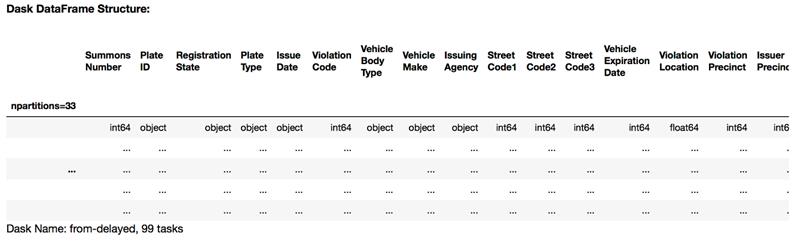
The first five rows of the fy17 DataFrame using the common column set

NumPy datatypes used by Dask

A Dask error showing mismatched datatypes

Running a distributed computation without a distributed filesystem

Running a distributed computation on a distributed filesystem
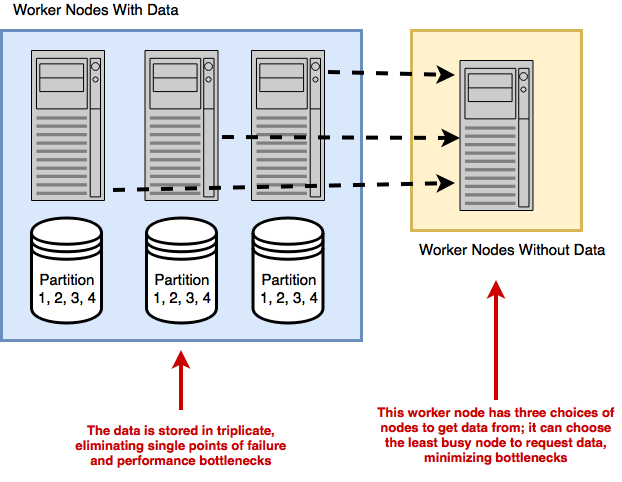
Shipping computations to the data

The structure of Parquet compared with delimited text files

Summary
In this chapter you learned
- Inspecting the columns of a DataFrame can be done with the columns attribute.
- Dask’s data type inference shouldn’t be relied on for large datasets. Instead, you should define your own schemas based on common NumPy datatypes.
- Parquet format offers good performance because it’s a column-oriented format and highly compressible. Whenever possible, try to get your dataset in Parquet format.
FAQ
How do I load one or more CSV files into a Dask DataFrame?
You can use dd.read_csv. To read many files into one DataFrame, use a wildcard in the path (for example, nyc-parking-tickets/*.csv). Dask assumes a header row by default and splits the data into ~64 MB partitions. Example:dd.read_csv('path/*.csv').Why does Dask sometimes infer the wrong dtype (e.g., a text column becomes float)? How do I fix it?
Dask samples data to infer dtypes. If many values are missing, they become NaN (a float), and the sampler may conclude the column is float. Fix this by passing an explicit schema via the dtype argument to read_csv, e.g.,dd.read_csv(..., dtype={'Violation Description': 'object'}).What’s the best way to choose dtypes and deal with missing values?
Pick the smallest NumPy dtype that fits the data’s range to save memory (e.g., uint16 for small positive integers). If a column can contain missing values, integer dtypes can’t represent NaN, so use a float or object type instead.How can I find the common columns across multiple yearly CSVs before combining them?
Use set intersection on each DataFrame’s columns, then select those columns. Example: build a list ofset(df.columns) for each frame and reduce with intersection. Then subset with df[common_columns] before concatenation.How can I quickly preview data without running out of memory?
Use.head(n) on a Dask DataFrame to fetch a small number of rows to the driver (defaults to 5). Avoid calling .compute() on very large, highly unique columns unless necessary, as it materializes more data in RAM.How do I read a SQL table into a Dask DataFrame?
Install and configure SQLAlchemy and a suitable DB driver (e.g., pyodbc) on every worker. Then usedd.read_sql_table(table, connection_string, index_col=...). Dask will infer dtypes (it samples initial rows) and partition the data; you can override assumptions as needed.What if my SQL index column isn’t numeric or datetime—how do I control partitioning?
Provide either the number of partitions withnpartitions=... for even-sized chunks or explicit boundaries via divisions=.... Note that string divisions form half-open, alphabetically ordered intervals.How do I select specific columns or a non-default DB schema with read_sql_table?
Pass a list of column names tocolumns=[...] to reduce data transferred. Use schema='your_schema' if your table isn’t in the default schema (for example, dbo on SQL Server).How do I read from HDFS or S3, and what extra setup is needed?
Prefix paths withhdfs:// or s3:// (for example, dd.read_csv('hdfs://host/path/*.csv') or dd.read_csv('s3://bucket/path/*.csv')). Install hdfs3 for HDFS and s3fs (plus boto configuration) for S3 on every worker. HDFS supports data locality; S3 does not, so data is always transferred to workers.Why use Parquet with Dask, and how do I load it?
Parquet is a columnar format that improves IO efficiency, compression, and enforces a schema. Install pyarrow (recommended) or fastparquet. Load withdd.read_parquet('dataset-dir')—often a directory of files—optionally filtering columns and setting an index with columns=[...] and index='...'. Works with local, HDFS, and S3 paths.
 Data Science with Python and Dask ebook for free
