This chapter introduces Dask through a pragmatic tour of how directed acyclic graphs (DAGs) power scalable, parallel data science workflows. Using the NYC Parking Tickets dataset, it demonstrates Dask’s familiar, Pandas-like DataFrame API while emphasizing lazy computation, task graphs, and partitioned processing. The narrative then steps down to the lower-level Delayed API to make DAG structure and dependencies explicit and closes by explaining how Dask’s task scheduler executes these graphs efficiently, with attention to parallelism and data locality.
The walkthrough begins by reading large CSV data into a Dask DataFrame and inspecting metadata instead of samples, highlighting dtype inference caveats at scale and the importance of explicit schemas or columnar formats like Parquet. It explains how files are split into partitions, how those partitions map to tasks in a DAG, and how lazy operations accumulate until compute is called to materialize results. A short cleaning exercise counts and percentages missing values, drops sparse columns, mixes Pandas and Dask objects seamlessly, and uses persist to keep intermediate, filtered data in memory to avoid recomputation—illustrating both the ergonomics and performance model of Dask on anything from a laptop to a cluster.
To demystify the mechanics, the chapter visualizes DAGs with small Delayed examples, showing how independent tasks enable parallelism, how chaining operations grows graphs, and how persisting intermediate results reduces graph size and repeated work. Finally, it explains Dask’s dynamic, centralized scheduler: computations are planned as DAGs but placed at runtime, balancing load, recovering from failures, and prioritizing data locality. By minimizing data movement—ideally with distributed storage—Dask executes large-scale workflows efficiently, giving practitioners both an intuitive API and insight into the execution principles that make it scale.
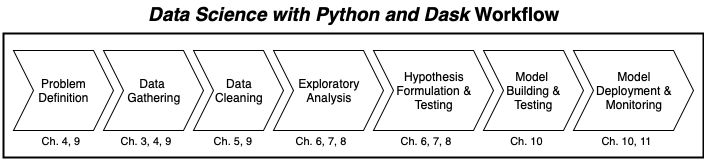
Our workflow, at a glance, in Data Science with Python and Dask
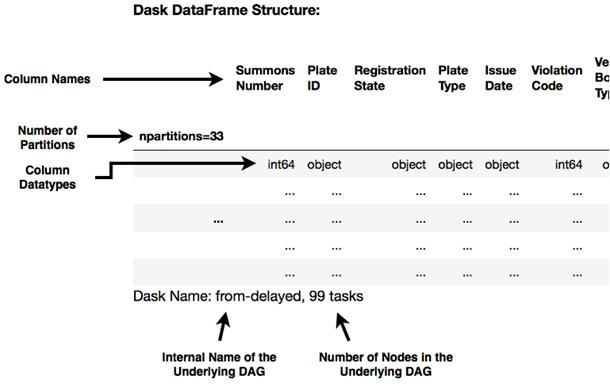
Inspecting the Dask DataFrame
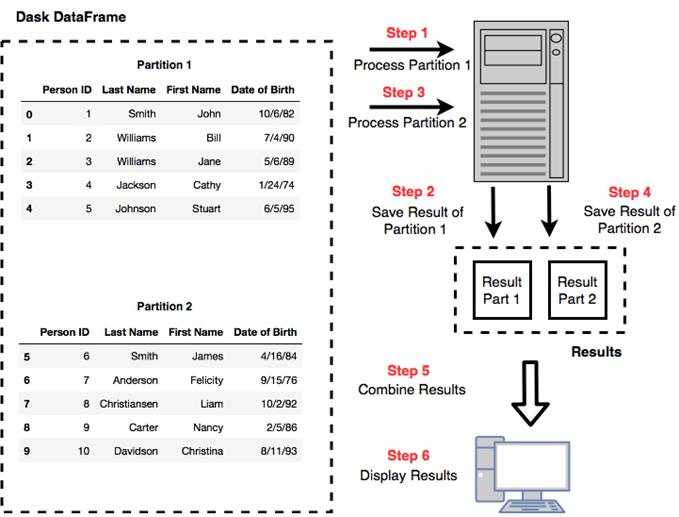
Dask splits large data files into multiple partitions and works on one partition at a time
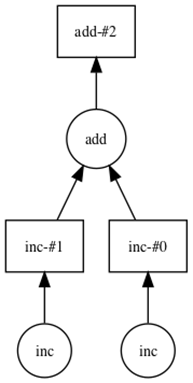
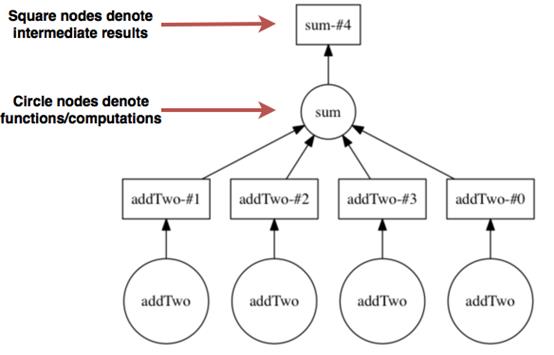
A visual representation of the DAG produced in Listing 2.6.
The directed acyclic graph representing the computation in Listing 2.7
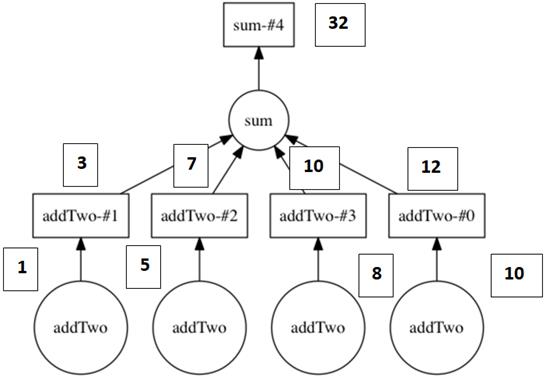
The DAG from Figure 2.5 with the values superimposed over the computation.
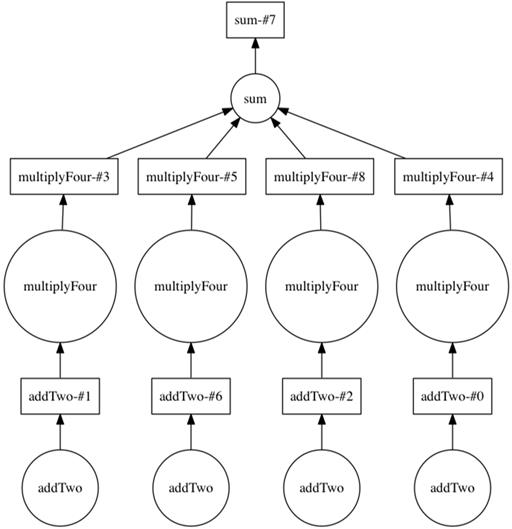
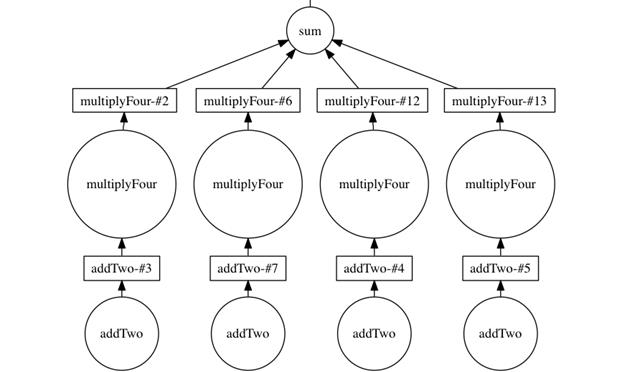
The DAG including the multiply four step
The DAG generated by Listing 2.9
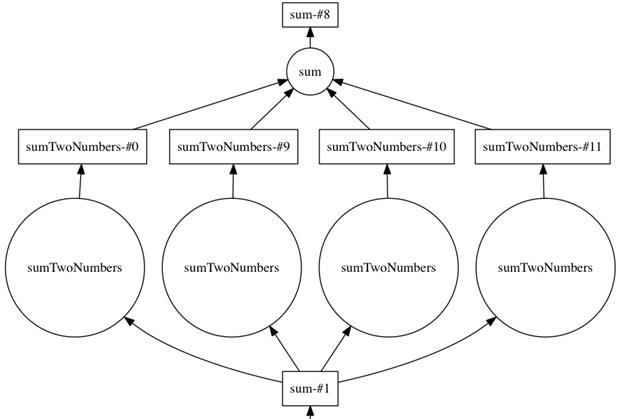
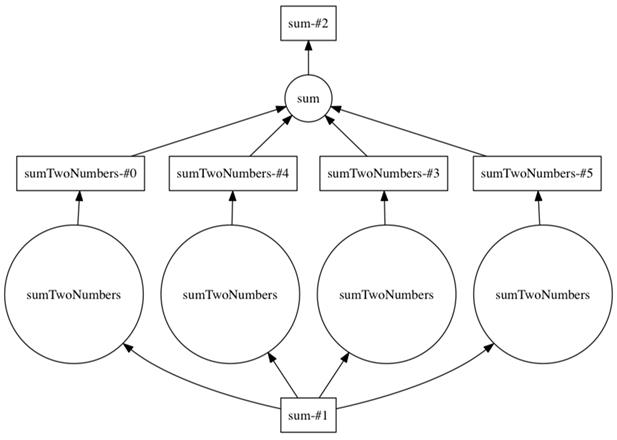
The DAG generated by Listing 2.10
The DAG generated by Listing 2.11
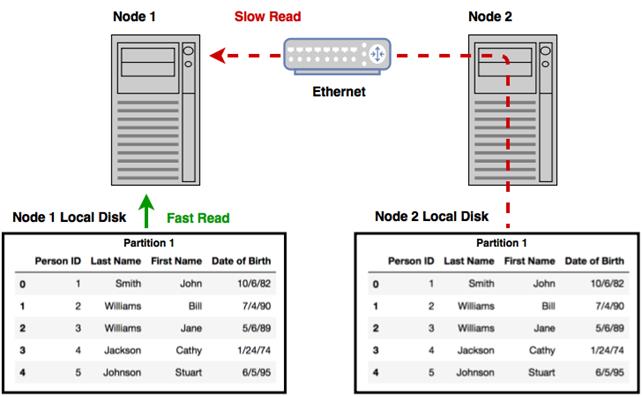
Reading data from local disk is much faster than reading data stored remotely
Summary
In this chapter you learned
Computations on Dask DataFrames are structured by the task scheduler using DAGs.
Computations are constructed lazily, and the compute method is called to execute the computation and retrieve the results.
You can call the visualize method on any Dask object to see a visual representation of the underlying DAG.
Computations can be streamlined by using the persist method to store and reuse intermediate results of complex computations.
Data locality brings the computation to the data in order to minimize network and IO latency.
FAQ
What does Dask show when you “inspect” a DataFrame, and why is it different from pandas?Instead of previewing rows, Dask displays metadata: column names, inferred dtypes, number of partitions, and the task count in the backing DAG. This is because Dask is lazy and built for datasets too large to load into memory, so it avoids materializing data until you explicitly compute.How does Dask infer data types, and what’s the safest way to avoid dtype issues?Dask infers dtypes by sampling the data (not scanning everything), which can miss rare anomalies. To avoid downstream errors, explicitly set dtypes when reading or use a format like Parquet that stores schema, which also improves performance.What are partitions in a Dask DataFrame and how do they help?Partitions are smaller pandas DataFrames that together form a Dask DataFrame. Dask reads and processes partitions one by one or in parallel, allowing work on datasets larger than RAM and enabling distribution across many workers.Why might a simple read produce a DAG with many tasks?Each partition often requires multiple steps (for example: read, block split, and DataFrame creation). If a file is split into many partitions, those steps multiply across partitions, creating a larger task graph.Why don’t I see actual results after operations like isnull().sum(), and how do I get them?Dask uses lazy computation, so operations build a DAG but don’t run immediately. Call .compute() to materialize results. You can wrap the call with a ProgressBar context to see task progress.Why did my result dtype change from integers to floats when I computed percentages?Division typically produces non-integer values, so Dask infers a float dtype for the result (for example, converting missing counts to percentage floats).When should I use persist() instead of compute(), and what does it change?Use persist() to keep intermediate results in memory for reuse across subsequent steps, reducing repeated work and shrinking the effective DAG traversed later. Dask may evict some partitions under memory pressure and recompute them on demand; compute() immediately returns a concrete in-memory result (like a pandas object).How can I visualize the task graph (DAG) behind my computation?Install graphviz, then call .visualize() on Dask collections (DataFrame, Series, Array, Bag) or Delayed objects. Dask draws graphs bottom-up; circles represent function calls and squares represent intermediate results.Can I mix pandas objects with Dask objects?Yes. For example, you can compute a pandas Series of column names to drop and pass it to a Dask DataFrame’s drop method. In distributed settings, small pandas objects are serialized and broadcast to workers.How does the Dask scheduler assign work across machines, and why does data locality matter?The centralized scheduler dynamically assigns tasks based on cluster state, worker load, and where data already lives. Using distributed storage (like S3 or HDFS) helps place computations near data and minimizes costly network transfers, improving performance and resilience.
pro $24.99 per month
access to all Manning books, MEAPs, liveVideos, liveProjects, and audiobooks!

 Data Science with Python and Dask ebook for free
