Overview

8 Communicating with external systems

This chapter explains how Airflow’s real power comes from orchestrating work across external systems through a rich ecosystem of provider packages and operators. By installing the right providers, you gain concise, high-level primitives that wrap cloud SDKs and APIs, letting you trigger storage, compute, and database actions without writing low-level integration code. The chapter emphasizes choosing system-specific operators when available, understanding that they evolve over time, and treating pipelines as reliable, schedulable workflows that can be tested in isolation even when they depend on external services.

The first use case builds an end‑to‑end machine learning flow on AWS: copying sample data to S3, transforming it for training, starting a SageMaker training job, and deploying an endpoint. It demonstrates local task testing with airflow tasks test using developer credentials, and highlights security best practices for handling secrets. Key lessons include templating parameters for idempotency (such as unique training job names), waiting for completion to ensure correct downstream ordering, and keeping Airflow focused on orchestration while the cloud service does the heavy lifting. The chapter also notes emerging Airflow features that simplify object store interactions, further reducing boilerplate around common data movement patterns.

The second use case focuses on moving data between systems in classic ETL scenarios. It surveys A‑to‑B operators and shows how to implement a custom Postgres‑to‑S3 transfer using hooks, discussing practical trade‑offs such as in‑memory buffers versus temporary files, output formats (e.g., writing CSV for broad compatibility), and idempotent overwrites. For heavier transforms, the chapter advocates offloading execution to external engines—running containers with the DockerOperator or invoking Spark via multiple access patterns—while Airflow coordinates, monitors logs, and enforces ordering. Throughout, the guidance centers on clear configuration, safe credential management, and designing tasks that can be rerun predictably without leaving residual state.

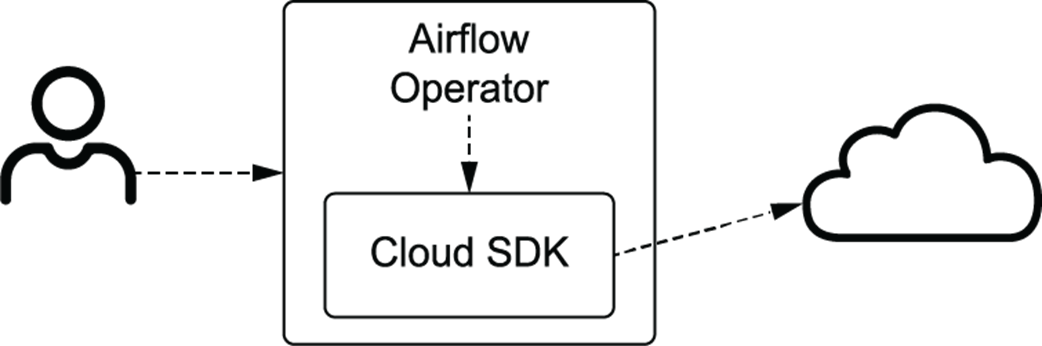
An Airflow operator translates given arguments to operations on the Cloud SDK.
Example handwritten digits in the MNIST data set

Rough outline of how a machine learning model is trained in one stage and classifies previously unseen samples in another
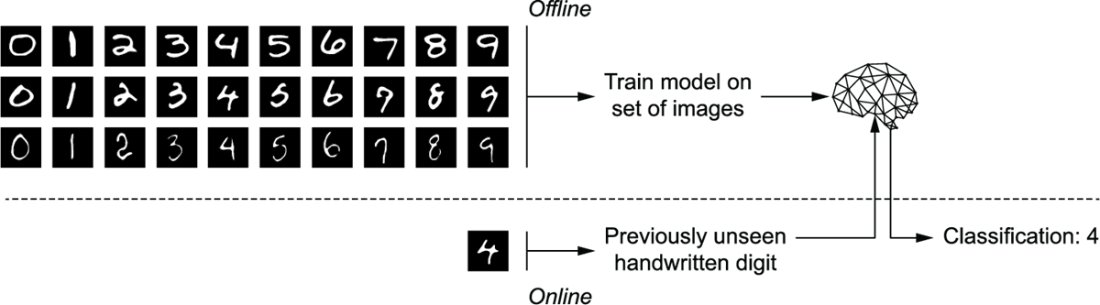
Logical steps to create a handwritten digit classifier
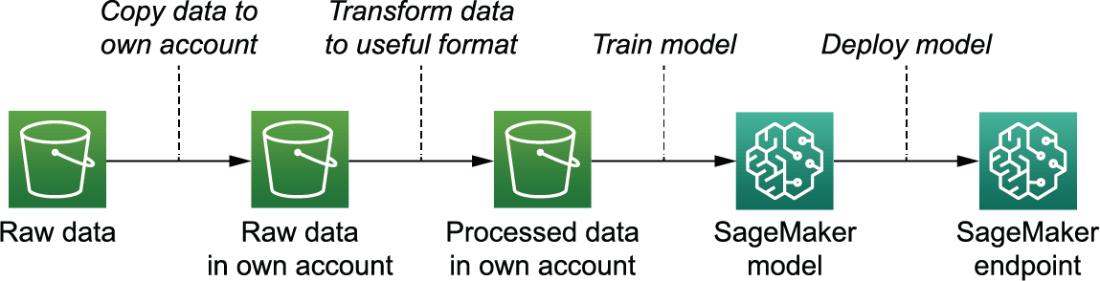
Logical steps implemented in Airflow DAG

After running the task locally with airflow tasks test, the data is copied to our own AWS S3 bucket.

Gzipped and pickled data was read and transformed into a usable format.

The SageMaker operators only succeed once the job is completed successfully in AWS.

In the SageMaker model menu, we can see the model was deployed and the endpoint is operational.

The handwritten digit classifier exists of more components than just the Airflow pipeline.

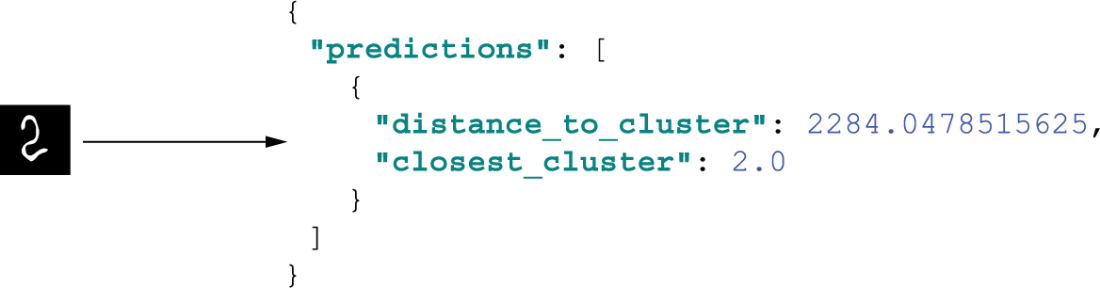
Example API input and output. A real product could display a nice UI for uploading images and displaying the predicted number.
Airflow managing jobs moving data between various systems
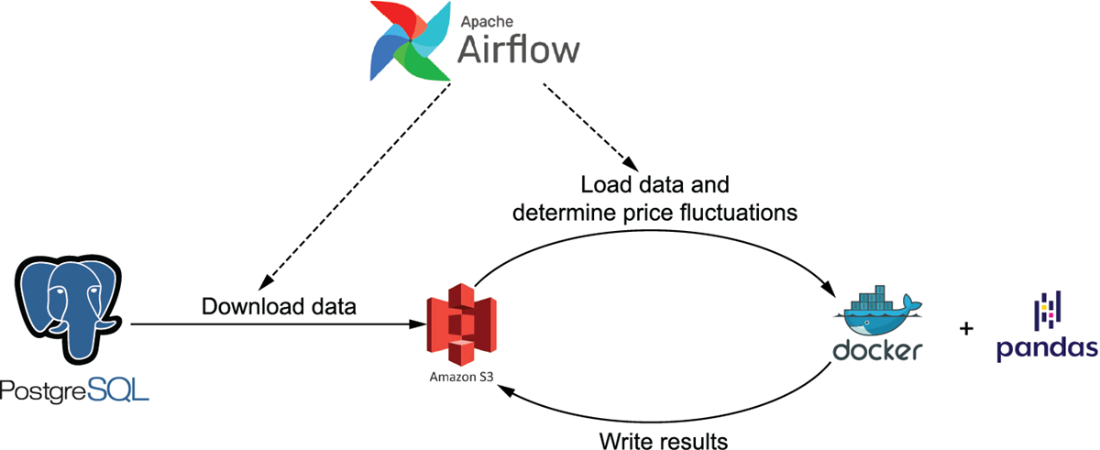
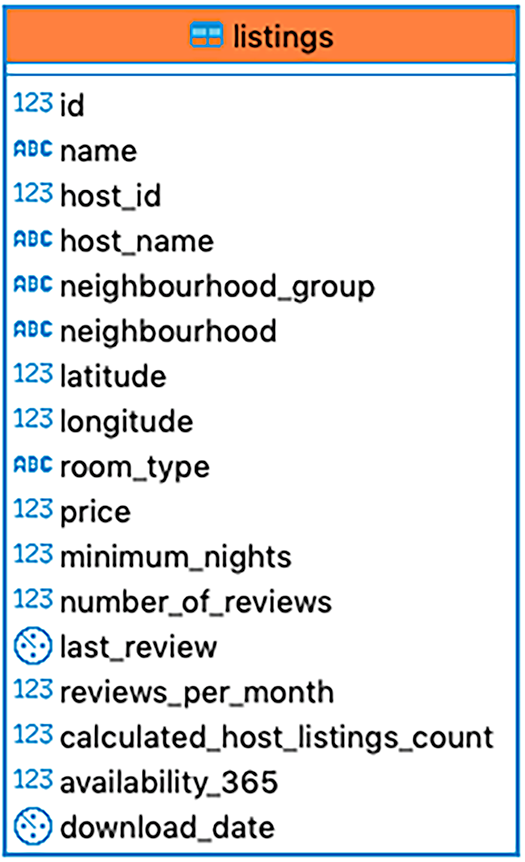
Table structure of example Inside Airbnb database
Exporting data from a Postgres database to stringified tuples

Summary

  • Operators for external systems expose functionality by calling the client for a given system.
  • Sometimes these operators are merely passing through arguments to the Python client.
  • Other times they provide additional functionality, such as the SageMaker-Training-Operator, which continuously polls AWS and blocks until completion.
  • If access to external services from the local machine is possible, we can test tasks using the CLI command airflow tasks test.
  • Think wisely what task to create in your pipeline. One-off infrastructure setup tasks are better deployed as part of your CI/CD pipeline for example.
  • The Airflow ecosystem has a lot of operators to transfer data between two systems (A-to-B operators). If not available you can write one yourself.
  • Separate orchestration from execution, especially for large jobs.

FAQ

What are Airflow provider packages and how do I install cloud-specific operators?Airflow’s core package includes only essential operators. To interact with cloud services, install provider packages via pip, for example: - AWS: pip install apache-airflow-providers-amazon - Google Cloud: pip install apache-airflow-providers-google - Azure: pip install apache-airflow-providers-microsoft-azure These add operators, hooks, and sensors for each platform.
When should I use system-specific operators instead of PythonOperator or BashOperator?Use system-specific operators whenever they exist for your target service. They wrap official SDKs, handle authentication and edge cases, support templating, and reduce custom integration code. This improves reliability and readability compared to hand-rolled Python/Bash.
How do I copy an object between two S3 buckets with Airflow?Use the S3CopyObjectOperator from the Amazon provider. Provide source bucket/key and destination bucket/key. Keys can be templated with execution context (for example, logical_date) so runs remain unique and idempotent.
How can I test tasks that call external systems from my laptop?Use airflow tasks test to run a single task locally. For AWS: - Configure credentials (for example, via ~/.aws/credentials and AWS_PROFILE). - Set AIRFLOW_HOME and run airflow db init once. - Run: airflow tasks test . Ensure the execution date aligns with any templated fields in your task (such as keys using {{ ds }}).
How do SageMaker operators behave, and why use wait_for_completion?SageMaker operators (for training/endpoints) accept a config dict mirroring SageMaker’s API. Set wait_for_completion=True to poll until the job finishes, ensuring correct ordering for downstream tasks. Use check_interval to control polling frequency. Make names like TrainingJobName unique (for example, templated with logical_date) to avoid ResourceInUse errors.
What is the recommended way to handle secrets and credentials?For development, SDKs can read local credentials (for example, AWS_PROFILE). In production, store secrets in a dedicated manager (for example, AWS SSM, GCP Secret Manager, Azure Key Vault, Vault) and reference them via Airflow Connections or the Secrets backend to avoid spreading credentials.
What are the trade-offs between in-memory transfers and using temporary files?Some A-to-B operators keep intermediate data in memory (fast, no filesystem cleanup, but limited by RAM). Others write to a temporary file (handles larger payloads, but depends on disk space). Choose based on dataset size and resource constraints.
There’s no built-in Postgres-to-S3 operator. How can I build one?Compose hooks: query with PostgresHook, then write with S3Hook. Convert results to a usable format (for example, CSV) via in-memory buffers or chunked reads/writes. Set replace=True when uploading to keep runs idempotent, and consider chunking if data won’t fit in memory. Airflow 2.8+ also offers an Object Storage abstraction to simplify cross-store interactions.
Should Airflow execute heavy data processing, or just orchestrate it?Prefer orchestration in Airflow and execution in a data engine. Offload heavy work to systems like Spark or containers. Airflow starts the job (for example, SparkSubmitOperator, SSHOperator, SimpleHttpOperator via Livy, or DockerOperator), streams logs, waits for completion, and manages dependencies.
How do I expose a trained SageMaker model to end users, and should Airflow deploy the API?Airflow is ideal for the offline pipeline (data prep, training, periodic retraining). For online inference, expose the model via an API (for example, Lambda + API Gateway, or a framework like Chalice). These one-off, always-on components are typically deployed via CI/CD rather than scheduled by Airflow.

pro $24.99 per month

  • access to all Manning books, MEAPs, liveVideos, liveProjects, and audiobooks!
  • choose one free eBook per month to keep
  • exclusive 50% discount on all purchases
  • renews monthly, pause or cancel renewal anytime

lite $19.99 per month

  • access to all Manning books, including MEAPs!

team

5, 10 or 20 seats+ for your team - learn more


choose your plan

team

monthly
annual
$49.99
$499.99
only $41.67 per month
  • five seats for your team
  • access to all Manning books, MEAPs, liveVideos, liveProjects, and audiobooks!
  • choose another free product every time you renew
  • choose twelve free products per year
  • exclusive 50% discount on all purchases
  • renews monthly, pause or cancel renewal anytime
  • renews annually, pause or cancel renewal anytime
  • Data Pipelines with Apache Airflow, Second Edition ebook for free

choose your plan

team

monthly
annual
$49.99
$499.99
only $41.67 per month
  • five seats for your team
  • access to all Manning books, MEAPs, liveVideos, liveProjects, and audiobooks!
  • choose another free product every time you renew
  • choose twelve free products per year
  • exclusive 50% discount on all purchases
  • renews monthly, pause or cancel renewal anytime
  • renews annually, pause or cancel renewal anytime
  • Data Pipelines with Apache Airflow, Second Edition ebook for free
choose your plan

team

monthly
annual
$49.99
$499.99
only $41.67 per month
  • five seats for your team
  • access to all Manning books, MEAPs, liveVideos, liveProjects, and audiobooks!
  • choose another free product every time you renew
  • choose twelve free products per year
  • exclusive 50% discount on all purchases
  • renews monthly, pause or cancel renewal anytime
  • renews annually, pause or cancel renewal anytime
  • Data Pipelines with Apache Airflow, Second Edition ebook for free