7 Triggering workflows with external input
This chapter explains how to trigger Airflow workflows from external events so pipelines start as soon as real-world signals arrive. Beyond simple time-based scheduling, it shows how to react to things like new files landing, upstream systems finishing their work, or messages published to a queue. The chapter organizes solutions into three complementary approaches: polling with sensors, push-based triggering through the CLI and REST API (including passing runtime configuration and dataset events), and truly event-driven schedules backed by message queues.
Sensors let a DAG begin early and progress as soon as prerequisites are met, avoiding long idle gaps. Using FileSensor and PythonSensor, you can wait for simple conditions (a path exists) or custom ones (e.g., all data-*.csv files plus a _SUCCESS marker) while tuning poke intervals and timeouts. The chapter cautions that polling adds load to Airflow and external systems and explains failure behavior and concurrency pitfalls such as “sensor deadlock,” where many long-lived sensors exhaust task slots across runs. Mitigations include setting per-DAG concurrency, switching sensors to mode="reschedule" so they release worker slots between pokes, and preferring deferrable operators (and a running triggerer) that offload the waiting phase asynchronously; note that plain Python/Taskflow operators cannot be deferred.
For push-based starts, you can trigger DAGs with the Airflow CLI or REST API and supply a JSON conf payload that tasks read from the run context, enabling parameterized, on-demand executions; you can also POST dataset events to let dataset-aware DAGs react without constant polling. For fully event-driven orchestration, the chapter introduces message-queue triggers: define a MessageQueueTrigger (e.g., for Kafka) with an optional apply_function to filter messages, attach it to an Asset, and use that Asset in the DAG’s schedule so incoming messages launch runs. This pattern reduces idle work, supports cross-instance coordination via a shared queue, and starts runs as messages arrive (with a small, configurable consumer polling delay).
Initial logic for processing supermarket promotions data.
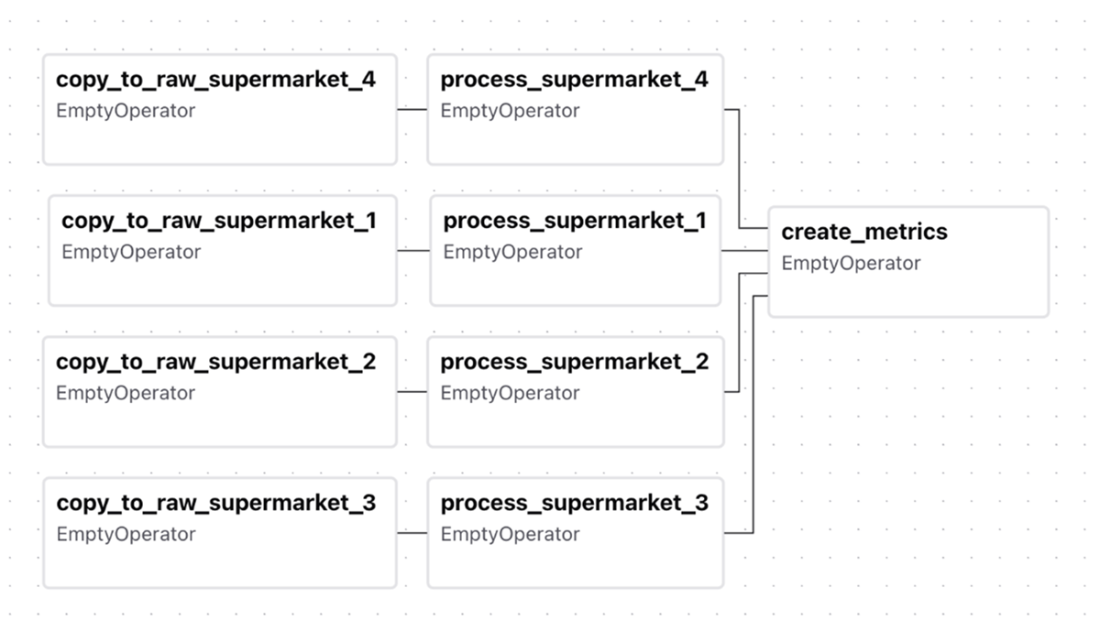
Timeline of processing supermarket promotion data
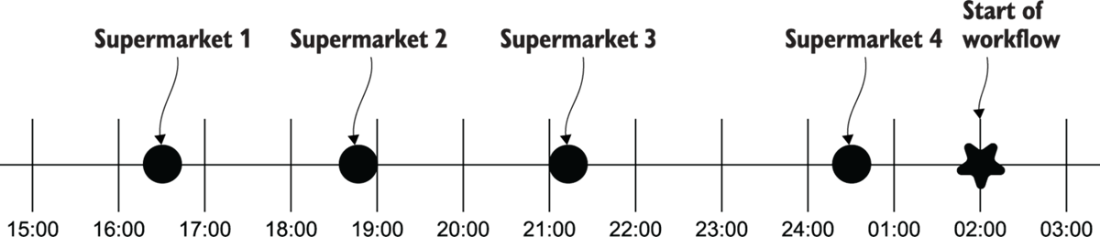
Timeline of supermarket promotion workflow with waiting times
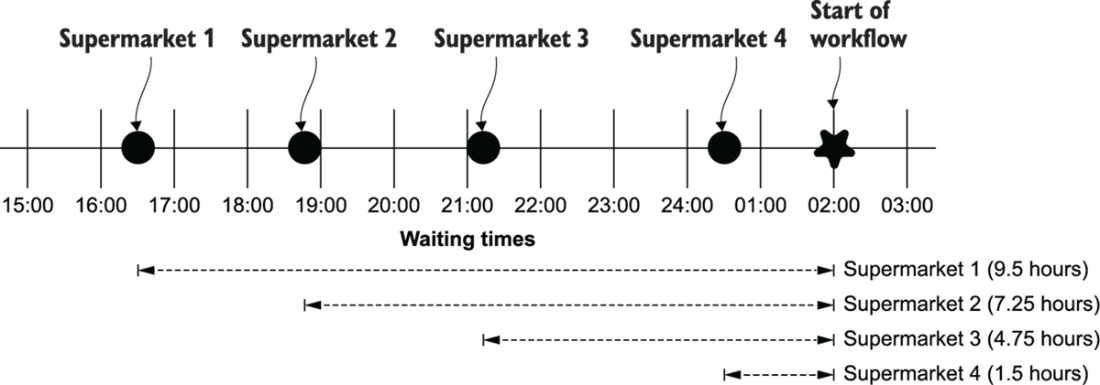
Supermarket promotions timeline with sensors
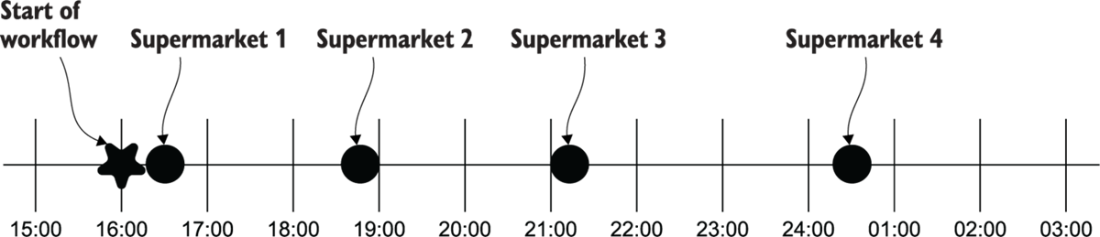
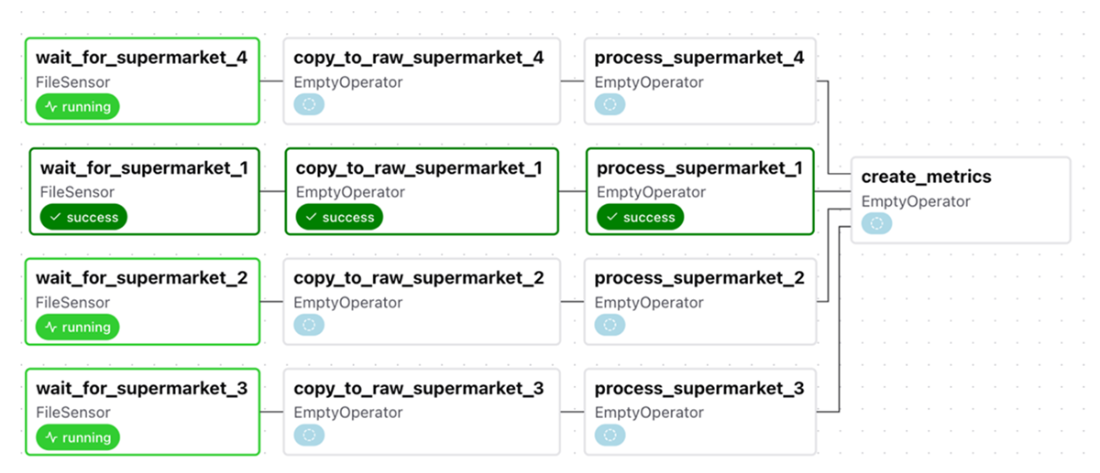
Supermarket promotion DAG with sensors in Airflow
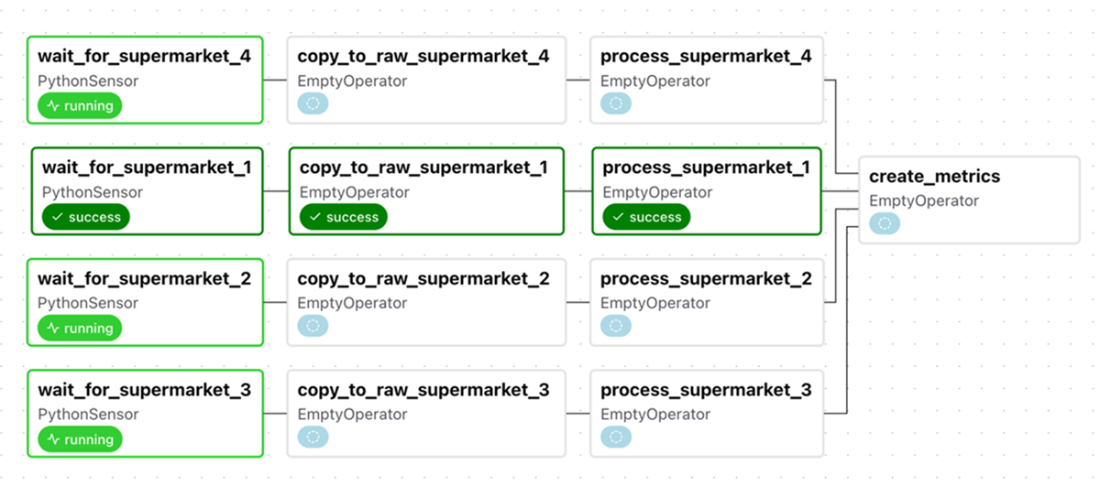
Supermarket promotion DAG using PythonSensors for custom conditions
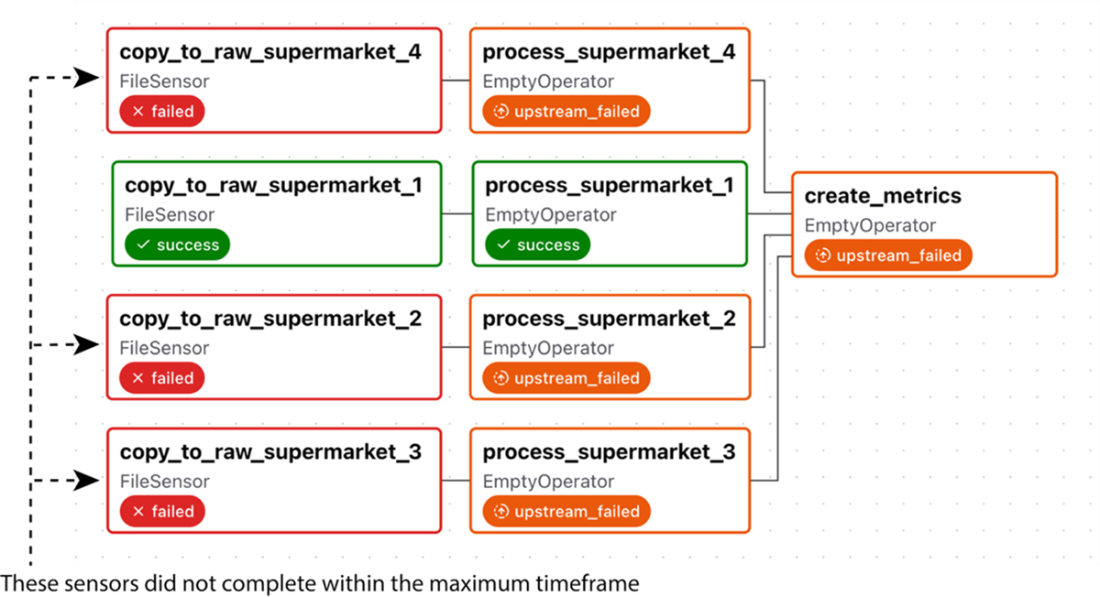
Sensors exceeding the maximum timeframe will fail.
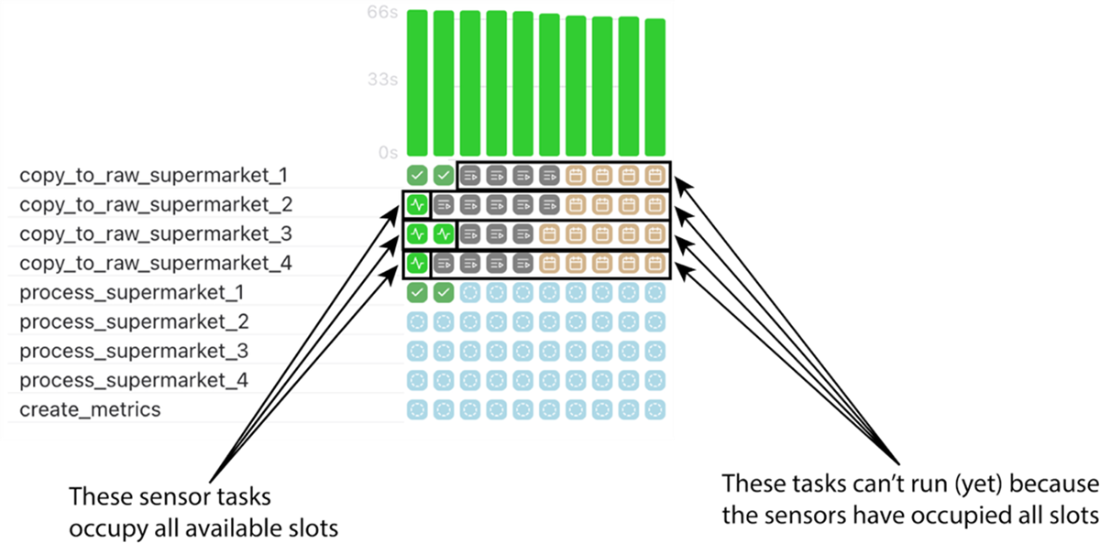
Sensor deadlock: the running tasks are all sensors waiting for a condition to be true, which never happens, and thus occupy all slots.
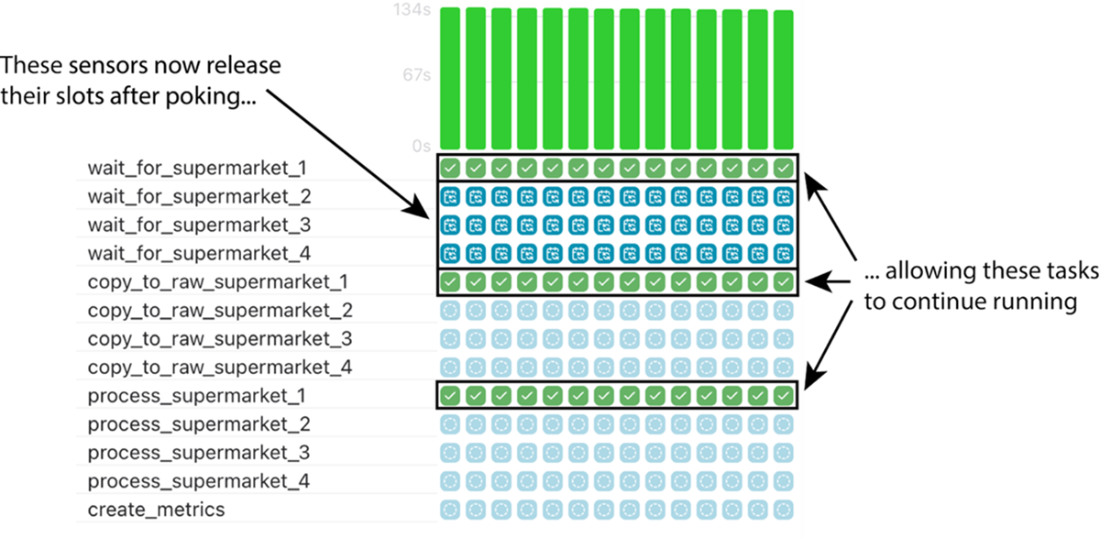
Sensors with mode="reschedule" release their slot after poking, allowing other tasks to run.
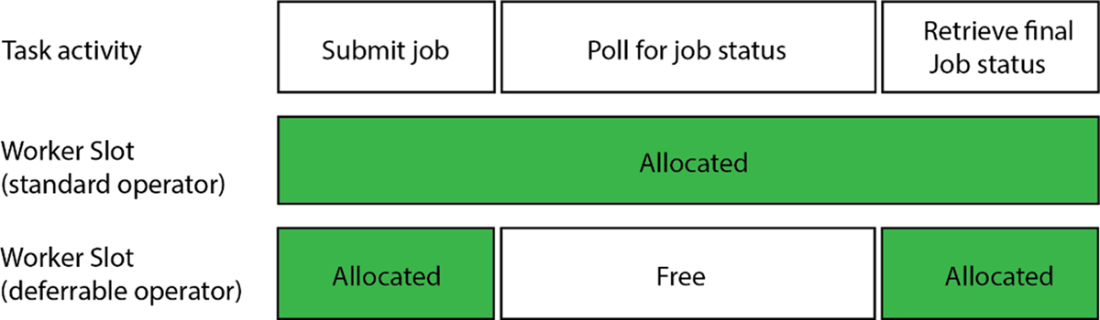
When using a standard operator, during the entire task duration, a worker slot is allocated, blocking other tasks from using this worker slot. A deferrable operator allows the worker slot to be freed up while the job is running and being polled for its status. This enables Airflow to use that worker slot for other tasks while the polling is taking place. Once the polling phase is finished, the worker slot can be re-allocated to the deferrable operator task to complete the work.
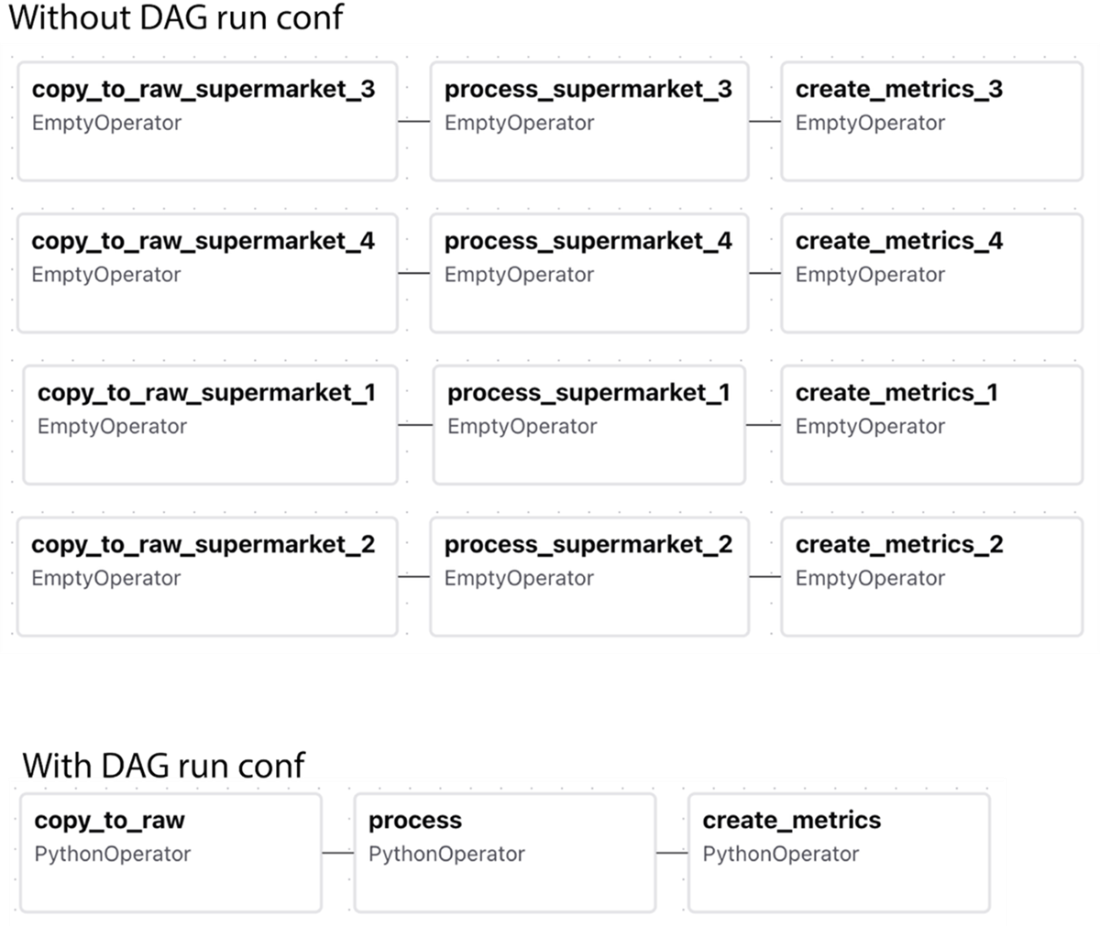
Simplifying DAGs by providing payload at runtime
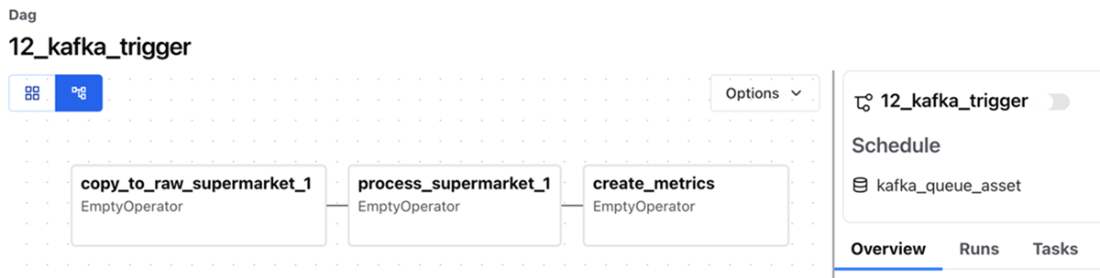
A DAG that is triggerd by messages published on a Kafka a topic. Note the schedule is set to kafka_queue_asset.
Summary
- Sensors are a special type of operator in Airflow that continuously checks for certain conditions to be met. If the condition is true, the sensor successfully completes. If not, it will pause and retry after some time, continuing this cycle until the condition becomes true or it hits a timeout limit.
- Airflow offers a variety of sensors tailored for different systems and use cases. These sensors are designed to monitor specific conditions or events in external systems. The FileSensor, for instance, checks whether a file exists at a specified path. If the file is present, the sensor returns true. If the file isn't there, the sensor returns false and pauses. After a set interval (by default, 60 seconds), it will check again.
- The PythonSensor works similarly to the PythonOperator in that you provide a Python function with custom logic. This function should return a Boolean value based on the outcome of the checks it performs.
- Triggering DAGs is possible from outside Airflow with the REST API and/or CLI. You can also initiate the execution of a DAG by using the REST API to notify Airflow that a dataset update has occurred, which is done through the datasets/events/ endpoint.
- Using a MessageQueueTrigger, it’s possible to run DAGs in Airflow whenever certain messages are published on a Message Queue. This allows Airflow to respond to (near-)real-time events. It also enables inter-Airflow instance communication, without exposing API’s between the Airflow instances involved.
FAQ
What problem do sensors solve in event-driven workflows?
Sensors let a DAG wait for external conditions (like files arriving, records landing, or flags being set) before proceeding. They periodically “poke” an external system and succeed when the condition is true, removing long idle time that comes with fixed schedules while data arrives at random times.How does FileSensor work, and what are poke_interval and timeout?
FileSensor checks for the existence of a path (optionally with wildcards). It rechecks every poke_interval seconds (default 60). If the condition isn’t met before timeout expires, the task fails. Choose intervals and timeouts that balance responsiveness and system load.When should I use PythonSensor instead of FileSensor?
UsePythonSensor when you need custom logic that returns only True/False, such as requiring both “data-*.csv” and a “_SUCCESS” file to exist. It’s clearer than crafting complex glob patterns and supports multi-check validation.How should I schedule a DAG when data can arrive at any time?
Start the DAG at the beginning of the expected arrival window and place sensors at the start of each branch. This lets tasks progress as soon as their inputs are available, instead of waiting for a conservative fixed start time.What is sensor deadlock and how can I avoid it?
Sensor deadlock happens when many long-waiting sensors occupy all available task slots (often compounded by daily runs), blocking other work. Mitigate by: setting reasonabletimeouts, using mode="reschedule", capping concurrency (e.g., max_active_tasks), and preferring deferrable operators where available.What happens when a sensor times out?
It fails with anAirflowSensorTimeout error. This prevents indefinite waiting and helps avoid snowballing runs. Use logs to confirm repeated pokes and timeout conditions.What’s the difference between poke and reschedule sensor modes?
poke keeps a worker slot the whole time between checks; reschedule releases the slot after each poke and requeues the task for the next check. reschedule reduces slot contention and helps prevent deadlocks.What are deferrable operators, and why use them?
Deferrable operators hand off waiting to the triggerer (async) process, freeing worker slots while idle. Many operators have an “Async” variant ordeferrable=True. They require running a triggerer. Note: Python/Taskflow Python operators can’t be deferred.How do I trigger a DAG from outside Airflow and pass parameters?
Use CLI:airflow dags trigger --conf '{"key": "value"}' <dag_id>. Use REST: POST to /api/v1/dags/<dag_id>/dagRuns with {"conf": {...}}. Access parameters in tasks via context["dag_run"].conf. If your DAG logic requires conf, set schedule=None or handle missing values explicitly.How can I trigger a DAG from a message queue like Kafka?
Create aMessageQueueTrigger pointing to the queue/topic, supply an apply_function to filter messages, wrap it in an Asset with an AssetWatcher, and set schedule=[asset] on the DAG. Producing a qualifying message triggers the DAG. Expect a small delay due to the consumer’s fetch interval.
 Data Pipelines with Apache Airflow, Second Edition ebook for free
